
Overview of Primavera P6 Professional Project Management Software
Table of Contents
Oracle Primavera P6 Professional is a comprehensive, multi-project planning and control software solution built on robust relational databases for enterprise-wide project management scalability . This industry-standard project management software serves as a standalone solution for project and resource management, enabling organizations to store and manage their entire project portfolio in a central location .
Designed specifically for project planners, schedulers, and project controls professionals, Primavera P6 Professional integrates traditional project management methodologies with streamlined resource and cost management capabilities . The software addresses the complex needs of large-scale project management across industries including construction, engineering, oil and gas, aerospace, and infrastructure development .
When connected to a Primavera P6 EPPM database, P6 Professional functions as a separate component that provides robust features aimed primarily at addressing the needs of project planners and schedulers . Multiple users can access the same projects concurrently, making it an ideal solution for collaborative project management environments .
The project management software supports critical project management methodologies including work breakdown structures (WBS), organizational breakdown structures (OBS), user-defined fields and codes, critical-path-method (CPM) scheduling, and resource leveling . This comprehensive feature set enables project managers to budget, prioritize, plan, administer, and manage multiple projects while optimizing limited, shared resources and consistently moving projects to on-time, on-budget completion .
Key Features of Primavera P6 Professional
Enterprise Project Structure and Multi-Project Management
Primavera P6 Professional features an Enterprise Project Structure (EPS) that enables project managers to manage multiple projects from the highest levels of the organization down to the individuals performing specific project tasks . This hierarchical structure provides visibility across the entire project portfolio while maintaining control over individual project execution. The software supports concurrent access by multiple users, facilitating collaboration among project teams without compromising data integrity .
Work Breakdown Structure and Organizational Breakdown Structure
The software provides comprehensive support for Work Breakdown Structures (WBS), allowing users to decompose projects into manageable components and establish clear project hierarchies . Organizational Breakdown Structures (OBS) enable organizations to map project responsibilities to specific departments, teams, or individuals, ensuring clear accountability throughout the project lifecycle .
Critical Path Method Scheduling and Resource Leveling
P6 Professional employs Critical Path Method (CPM) scheduling to help project managers identify the most critical activities that determine project duration . The built-in resource leveling capabilities automatically resolve resource conflicts and optimize resource allocation across multiple projects . This ensures that limited, shared resources are utilized efficiently, preventing overallocation and schedule delays.
Advanced Resource and Cost Management
The project management software provides comprehensive resource and role administration capabilities, enabling organizations to manage both human and material resources effectively . Users can track costs at the activity level, manage resource assignments, and monitor budget performance against actual expenditures. The tracking feature enables dynamic cross-project rollups of cost, schedule, and earned value, providing real-time visibility into project performance .
Integrated Risk Management and Issue Tracking
Primavera P6 Professional includes integrated risk management functionality that allows organizations to identify, assess, and mitigate project risks . The built-in issue tracking system helps teams identify, monitor, and resolve problems that could impact project success. Management by threshold capabilities enable automatic alerts when project metrics exceed predetermined limits, facilitating proactive issue resolution .
Reporting and Visualization Tools
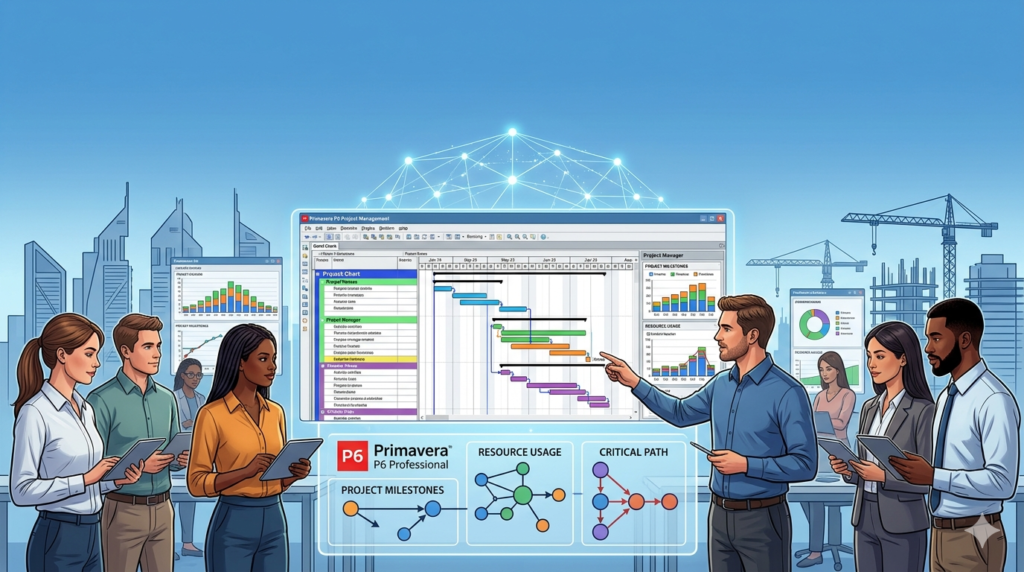
The software includes Visualizer, a powerful tool for creating time-based Gantt and Timescaled Logic Diagram reports . A Report wizard helps users create customized reports to extract any data from the P6 database, providing flexibility in reporting and analysis. Work products and documents can be assigned to activities and managed centrally, ensuring that all project documentation is organized and accessible .
Customizable Interface and Integration Capabilities
Primavera P6 Professional provides customizable interfaces with scalable and flexible tools that adapt to organizational needs . The software offers easy integration with project management solutions outside the P6 suite, including Oracle Contractor, Microsoft Project, and Microsoft Excel . This interoperability enables organizations to incorporate P6 into existing workflows and leverage data from other enterprise systems.
What’s New in the Latest Version
Oracle regularly updates Primavera P6 Professional with enhancements to improve performance, functionality, and user experience. The latest versions of the project management software incorporate feedback from users across industries to deliver improved capabilities .
Users can access the Cumulative Feature Overview (CFO) to see a comprehensive list of changes made between releases. This document provides detailed information about new features, enhancements, and resolved issues, helping organizations understand the value of upgrading to newer versions .
Recent updates have focused on improving integration with other Oracle products, enhancing reporting capabilities, and streamlining user workflows. Cloud deployment options have been expanded, providing organizations with greater flexibility in how they deploy and manage the project management software.
Oracle continues to support both cloud and on-premises deployments of P6 Professional, allowing organizations to choose the deployment model that best meets their requirements .
System Requirements for Primavera P6 Professional
Supported Operating Systems and Hardware
Primavera P6 Professional runs on Windows 11 (64-bit) and Windows 10 (64-bit) operating systems . The software requires a minimum of 4GB of memory and 5GB of disk space for installation . For optimal performance, Oracle recommends using Google Chrome browser when accessing web-based components .
Browser Requirements
The following browsers are supported for Primavera P6 Professional web-based components:
-
Firefox 131+ for Windows, Mac OS X, and iOS devices
-
Chrome 130+ for Windows, Mac OS X, Android tablets, and iOS devices
-
Edge 130+ for Windows
-
Safari 18+ for Mac OS X and iOS devices
Oracle recommends Chrome for optimal performance when accessing web components .
Database and Integration Requirements
P6 Professional supports Oracle and Microsoft SQL Server relational databases for enterprise-wide project management scalability . For Oracle database deployments, version 19.8 or later is certified for use with P6 Professional . The software supports only 64-bit versions of database clients on 64-bit operating systems .
Mobile Compatibility
Primavera P6 Professional offers mobile capabilities through native apps for iOS and Android devices. Supported mobile platforms include:
-
iOS 18.x for iPad and iPhone (native iOS app)
-
Android 14, 13, and 12 for Android phones and tablets (native Android app)
-
iOS 18 and iOS 18.1 for iPad (through P6 Team Member Web)
-
Android Tablets 14+ (through P6 Team Member Web)
Installation Guide for Primavera P6 Professional
Installation Overview
Installing Primavera P6 Professional requires careful planning and preparation to ensure successful deployment. The installation process varies depending on whether you are deploying the software in a standalone configuration or connecting to a P6 EPPM database .
Standalone Installation
For standalone deployments, administrators should follow the Primavera P6 Professional Installation and Configuration Guide, which provides step-by-step instructions for installing and configuring the software . Key considerations for installation include:
-
Verifying that the system meets minimum hardware and software requirements
-
Ensuring database connectivity if using a central database
-
Configuring user permissions and security settings
-
Setting up integration with other Oracle products if required
Cloud Deployment
For cloud deployments, administrators should refer to the cloud-specific installation documentation, which covers P6 Professional Cloud Connect and P6 Professional cloud deployments . Cloud deployments offer advantages including:
-
Reduced infrastructure management overhead
-
Automatic updates and patching
-
Scalability to accommodate changing project demands
-
Accessibility from any location with internet connectivity
Post-Installation Configuration
After installation, organizations should configure Primavera P6 Professional to align with their project management processes. This includes:
-
Defining Enterprise Project Structure (EPS)
-
Setting up Organizational Breakdown Structure (OBS)
-
Creating user accounts and assigning permissions
-
Configuring security settings
-
Establishing integration with other enterprise systems
How to Use Primavera P6 Professional
Getting Started with the Software
Primavera P6 Professional provides a comprehensive interface for managing projects from initiation through completion. The software organizes project management activities around key functional areas accessible through the main menu .
Project Setup and Planning
To begin using Primavera P6 Professional, project managers should:
-
Create a new project or open an existing project from the project menu
-
Define the Work Breakdown Structure (WBS) to decompose the project into manageable components
-
Create activities and assign durations, dependencies, and resources
-
Set project baselines to establish planned costs and schedules
-
Assign resources and roles to activities
The software supports multiple project baselines, allowing organizations to track performance against planned values .
Activity Management
The Activity window allows users to create, display, and edit activities for currently opened projects . Users can:
-
Define activity durations and relationships
-
Assign resources and costs to activities
-
Set activity constraints and milestones
-
Track progress and update actuals
-
View activity information in Gantt chart format
Additional activity display windows can be opened for side-by-side viewing of activity information, with layout configurations saved separately for each display .
Resource and Cost Management
The Resource Assignment window displays all resource assignments for currently opened projects, grouped by resource . Users can:
-
View resource costs and quantity information in summary tables
-
Analyze resource utilization across projects
-
Level resources to resolve conflicts
-
Track resource performance against planned values
-
Manage role-based resource planning
Risk and Issue Management
Primavera P6 Professional includes integrated risk management capabilities accessible through the Project menu . Users can:
-
Add, edit, assign, and delete project risks
-
Calculate risk exposure values
-
Assess risk impact on project schedules and costs
-
Monitor thresholds to identify project issues
-
Track and resolve issues with email notification capabilities
Reporting and Visualization
The Visualizer tool enables creation of time-based Gantt charts and Timescaled Logic Diagram reports . The Report wizard helps users create customized reports to extract specific data from the P6 EPPM database. Users can:
-
Create tailored reports for stakeholders
-
Generate schedule comparisons
-
Publish reports to the web for sharing
-
Export data to Excel for further analysis
Best Use Cases for Primavera P6 Professional
Large-Scale Construction Projects
Primavera P6 Professional excels in managing large-scale construction projects with thousands of activities, complex dependencies, and multiple stakeholders. The software’s multi-project management capabilities enable organizations to manage entire construction programs, from individual building projects to major infrastructure developments .
The software’s resource leveling capabilities help construction firms optimize resource allocation across multiple job sites, while earned value management features provide real-time visibility into project performance. CPM scheduling helps construction managers identify critical activities that could impact project completion dates.
Engineering and Infrastructure Projects
Engineering firms use Primavera P6 Professional to manage complex engineering projects that require coordination across multiple disciplines. The software’s WBS and OBS capabilities enable detailed work breakdown and clear accountability for project deliverables .
The software supports integration with engineering design tools through its customizable interfaces, enabling seamless data flow between project management and design systems. Risk management features help engineering teams identify and mitigate technical and schedule risks before they impact project success.
Oil and Gas Industry Projects
The oil and gas industry relies on Primavera P6 Professional to manage exploration, production, and infrastructure projects that often span multiple years and involve substantial investments . The software’s multi-project management capabilities enable organizations to manage entire portfolios of upstream and downstream projects.
Resource management features help oil and gas companies optimize utilization of specialized personnel and equipment across project sites. The software’s cost management capabilities provide visibility into project budgets and actual expenditures, enabling proactive cost control.
Aerospace and Defense Programs
Aerospace and defense organizations use Primavera P6 Professional to manage complex programs involving multiple contractors, long lead times, and stringent regulatory requirements. The software’s integration capabilities enable seamless data exchange between prime contractors and subcontractors .
Issue tracking and risk management features help organizations maintain schedule integrity despite the complexity inherent in defense programs. The software’s reporting capabilities enable comprehensive reporting to government customers and regulatory bodies.
Project Portfolio Management
Organizations with large project portfolios use Primavera P6 Professional to manage project portfolios effectively. The Enterprise Project Structure enables visibility across the entire portfolio, while resource management capabilities help optimize allocation of limited resources across multiple projects .
The software’s threshold management capabilities enable automatic alerts when projects deviate from planned performance, enabling proactive intervention. Cross-project rollup features provide executive visibility into portfolio performance, supporting strategic decision-making.
Advantages and Limitations of Primavera P6 Professional
Advantages
Enterprise-Grade Scalability: Primavera P6 Professional is designed for enterprise-wide deployment, supporting thousands of activities across multiple projects. The software’s architecture supports complex, large-scale project management across entire organizations .
Comprehensive Feature Set: The software provides extensive capabilities including CPM scheduling, resource leveling, earned value management, risk management, and issue tracking . This comprehensive feature set eliminates the need for multiple disconnected project management tools.
Industry-Standard Status: Primavera P6 Professional is widely recognized as the industry standard for project management in construction, engineering, oil and gas, and other capital-intensive industries . This status enables easier collaboration with contractors, owners, and other stakeholders.
Integration Capabilities: The software integrates with other Oracle products and third-party tools including Microsoft Project and Excel, enabling seamless data exchange across the enterprise . This interoperability reduces manual data entry and improves data accuracy.
Customizable Interface: Primavera P6 Professional provides customizable interfaces that can be tailored to organizational needs and user preferences . This flexibility enables organizations to adapt the software to their specific project management processes.
Strong Reporting Capabilities: The software’s Visualizer tool and Report wizard enable creation of customized reports and charts . These capabilities support stakeholder communication and decision-making.
Limitations
Steep Learning Curve: Primavera P6 Professional requires specialist-level training to operate effectively . The software’s complexity can make it challenging for organizations to onboard new project schedulers and may concentrate schedule ownership in the hands of a few specialists.
Legacy User Interface: The software’s user interface is considered legacy-style by some users, which may impact user adoption and productivity . The interface may feel dated compared to more modern project management tools.
Limited Collaborative Features: Primavera P6 Professional lacks purpose-built, schedule-wide markup and review workflows, making it difficult for teams to provide collaborative input on schedules . This limitation can reduce engagement from project managers, field teams, and subcontractors.
Cost and Resource Requirements: Deploying and maintaining Primavera P6 Professional requires significant investment in licensing, infrastructure, and training. Organizations must allocate resources to support implementation and ongoing administration .
Integration Complexity: While the software integrates with other tools, achieving seamless integration often requires additional configuration and may involve third-party solutions . This integration effort can add complexity and cost to implementation.
Alternatives to Primavera P6 Professional
InEight Schedule
InEight Schedule is a modern scheduling solution designed for teams who have outgrown traditional P6-style models . Unlike Primavera P6 Professional, InEight Schedule was built from the ground up as a cloud-native solution with a modern interface and collaborative features.
Key advantages of InEight Schedule include:
-
Built-in markup tool for collaborative schedule review
-
Dedicated short-interval planning workflow connecting field planning to CPM schedule
-
AI-driven risk analysis and integrated risk-adjusted scheduling
-
Modern interface accessible to users at all skill levels
-
Part of a broader integrated project controls environment
While InEight Schedule offers full CPM capability, it is designed for accessibility and collaboration, whereas Primavera P6 Professional typically requires trained specialists .
Microsoft Project
Microsoft Project is a widely used project management tool suitable for small to medium-sized projects, though it can also handle larger projects with fewer activities compared to Primavera P6 Professional .
Key differences between the two platforms include:
-
P6 is designed for large-scale, complex projects, while Microsoft Project suits smaller to medium-sized projects
-
Microsoft Project offers a more user-friendly interface with an easier learning curve
-
P6 provides more advanced scheduling, resource leveling, and earned value management capabilities
-
Microsoft Project offers seamless integration with other Microsoft Office products
The choice between Primavera P6 Professional and Microsoft Project depends on project complexity, organizational requirements, and available resources for training and support.
Oracle Primavera Cloud
Oracle Primavera Cloud is Oracle’s cloud-based project management solution that offers similar capabilities to Primavera P6 Professional with added benefits of cloud deployment. Organizations transitioning to cloud-based project management often consider Oracle Primavera Cloud alongside P6 Professional .
The cloud solution provides advantages including reduced infrastructure management, automatic updates, and accessibility from any location with internet connectivity.
Frequently Asked Questions
What is Primavera P6 Professional used for?
Primavera P6 Professional is a comprehensive project management software used for planning, scheduling, managing, and controlling complex projects across industries such as construction, engineering, oil and gas, and aerospace. The software enables organizations to manage multiple projects simultaneously, optimize resource allocation, and track project performance against planned values .
What is the difference between Primavera P6 and Primavera P6 Professional?
Primavera P6 Professional is a component of the broader Primavera P6 EPPM solution. When connected to a P6 EPPM database, P6 Professional focuses on project planning and scheduling needs of project planners and schedulers, while administrative and most enterprise-level tasks are handled through other components . P6 Professional can also operate in standalone mode connected to its own database.
What are the system requirements for Primavera P6 Professional?
Primavera P6 Professional requires Windows 11 or Windows 10 (64-bit), a minimum of 4GB of memory, and 5GB of disk space . The software supports Oracle and Microsoft SQL Server databases and integrates with various browsers including Chrome, Firefox, Edge, and Safari .
Is Primavera P6 Professional difficult to learn?
Yes, Primavera P6 Professional has a steep learning curve and typically requires specialist-level training to operate effectively . The software’s complexity concentrates scheduling ownership in the hands of trained specialists, though organizations can mitigate this through comprehensive training programs and ongoing support.
How does Primavera P6 Professional compare to Microsoft Project?
Primavera P6 Professional is designed for large-scale, complex projects with advanced scheduling, resource leveling, and earned value management capabilities, whereas Microsoft Project is more user-friendly and better suited for smaller to medium-sized projects . P6 is widely used in construction, engineering, and oil and gas, while Microsoft Project is commonly used across various industries including IT, healthcare, and construction .
Can Primavera P6 Professional integrate with other software?
Yes, Primavera P6 Professional provides easy integration with project management software outside of the P6 suite, including Oracle Contractor, Microsoft Project, and Microsoft Excel . This interoperability enables organizations to incorporate P6 into existing workflows and leverage data from other enterprise systems.
What is the Primavera P6 Professional Visualizer?
The Visualizer is a tool within Primavera P6 Professional that allows users to create time-based Gantt charts and Timescaled Logic Diagram reports . This visualization capability helps project managers communicate schedule information effectively to stakeholders and analyze project performance visually.
How do I get support for Primavera P6 Professional?
Oracle provides support for Primavera P6 Professional through their official documentation and support channels. Organizations can access Oracle Help Center documentation, including user guides, installation guides, and system requirements documentation . Oracle also offers training courses and professional services to help organizations maximize their investment in the software.
Final Thoughts
Primavera P6 Professional represents the gold standard for enterprise project management software in capital-intensive industries. Its comprehensive feature set, scalability, and integration capabilities make it an essential tool for organizations managing complex projects across multiple industries .
While the software’s steep learning curve and legacy interface present challenges, the benefits of enterprise-grade project management capabilities outweigh these limitations for organizations with complex project management needs . Organizations that invest in training and support can leverage Primavera P6 Professional to optimize resource allocation, control costs, and consistently move projects to on-time, on-budget completion .
For organizations evaluating project management solutions, Primavera P6 Professional offers unmatched capabilities for large-scale, complex projects. However, organizations should consider their specific needs, available resources, and existing technology infrastructure when selecting project management software . Organizations with simpler project management needs may find alternatives such as Microsoft Project or InEight Schedule more suitable, while those with complex, enterprise-wide requirements will benefit from the comprehensive capabilities of Primavera P6 Professional .
Our Paid Service
“We do not sell or provide any software. We only offer professional support services. If any software on your system is not working properly, or you are facing installation errors, crashes, or any other technical issue — just contact us. We will help you fix the problem quickly and remotely via AnyDesk. No software will be provided from our side — only expert troubleshooting and support.”