
Overview of the Software
Table of Contents
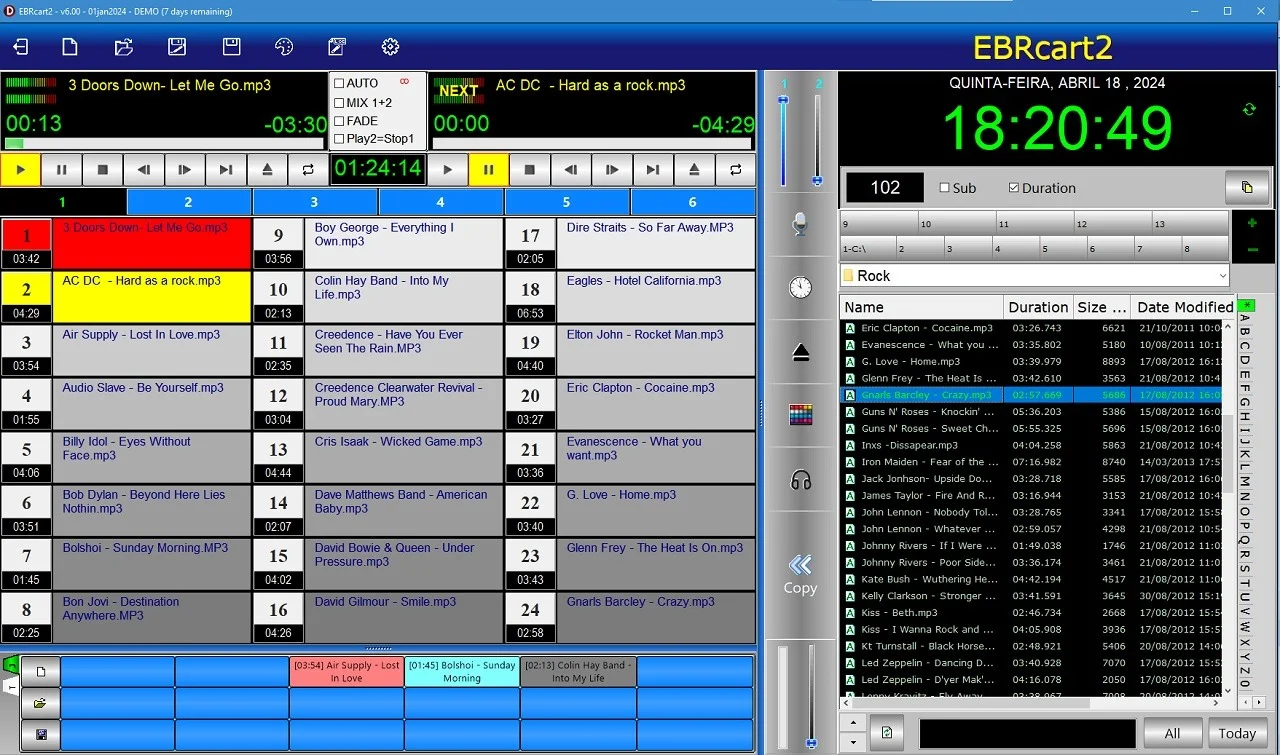
The EBRcart2, also known within the industry as the EBRcart2 player, serves as the modern replacement for legacy hardware such as Mini-Disc players and dedicated instant replay hard drives. The primary purpose of this broadcast automation tool is to provide broadcasters with a “button box” interface—a virtual representation of the physical cart machines once used in radio stations.
By utilizing EBRcart2, radio stations, theaters, and schools can manage their audio libraries efficiently. Its simple drag-and-drop interface supports multiple popular formats, including WAV, MP3, and OGG. The software’s design prioritizes the broadcast journalist and live sound operator, ensuring that critical audio cues can be triggered immediately, making it ideal for dynamic content environments.
Key Features of EBRcart2
EBRcart2 offers a comprehensive suite of features tailored for professional audio management:
-
Instant Play “Cart” System: The interface provides digital “carts” (buttons) that allow for immediate playback of audio. This is crucial for breaking news, radio jingles, and live sound effects.
-
Drag-and-Drop Playlist Management: Users can build and modify playlists on the fly. The software facilitates the creation of “cue sheets” which can be updated even while playing out.
-
Keyboard Hot-Key Support: Dedicated keyboard shortcuts enable rapid triggering of audio files, which is essential for live production environments where timing is critical.
-
Video and Image Support: Although primarily an audio tool, EBRcart2 supports video and image file playback, assisting TV automation and multimedia presentations.
-
Cross-Fading: The software includes professional transition tools like A/B track cross-fading to ensure smooth audio transitions between tracks.
-
Infinite Cue Sheets: Users can access an unlimited number of cue sheets, offering massive flexibility for stations with extensive audio libraries.
What’s New in EBRcart2 v6.10
The latest version of EBRcart2 focuses on improving stability, performance, and compatibility with modern operating systems. Here are the key updates in the EBRcart2 v6.10 release:
-
Improved Stability: Enhanced processing for multitrack playback to ensure reliability during 24/7 broadcast operations.
-
Modern OS Compatibility: Optimized for the latest Windows updates while still maintaining support for legacy systems (Win9x to Win10).
-
Optimized Resource Usage: Designed to minimize CPU and memory usage, allowing it to run smoothly on older hardware often used in broadcast booths.
-
Enhanced Network Drive Support: Improved handling of audio files stored on external and network drives for easier access to large libraries.
System Requirements
To ensure optimal performance of the EBRcart2 player, verify your system meets the following requirements:
-
Operating System: Windows 10/11 or Windows Server, including legacy support for Win9x/Me/NT/2000/XP/2003.
-
System Architecture: 32-bit and 64-bit compatible.
-
Memory: 256 MB or more (depending on file sizes).
-
Disk Space: 1.65 MB for the installation package; additional space is required for audio file storage.
-
Audio Hardware: A Windows-compatible sound card is required. For IP-based systems (e.g., Axia Livewire), network card support is required.
Installation Guide
Installing EBRcart2 requires a straightforward process:
-
Download the Installer: Obtain the EBRcart2 installation package.
-
Run the Setup: Execute the installer file.
-
Select Installation Directory: Choose the destination folder for the software.
-
Complete the Installation: Follow the on-screen prompts to finalize the process.
Once installed, users are advised to organize their audio files (MP3, WAV, OGG) into a logical folder structure to facilitate playlist creation.
How to Use the Software
The EBRcart2 software is designed to be intuitive for broadcasters. A typical workflow includes:
Creating and Managing Playlists
-
Drag-and-Drop: Easily drag audio files from your file explorer into the EBRcart2 interface to build your playlist.
-
Set Cue Points: Configure start and stop points for specific audio clips to ensure they play correctly on-air.
-
Hotkey Assignment: Assign specific audio files or carts to keyboard hotkeys for instant access.
Live Playback and Automation
-
Seamless Transitions: Trigger cues using the mouse or hotkeys, using the cross-fade feature to maintain a professional audio flow.
-
Emergency Playback: Utilize the instant-play buttons to broadcast breaking news or emergency announcements without disrupting the current playlist.
Best Use Cases for EBRcart2
EBRcart2 is versatile and used in various professional audio environments:
-
Radio and TV Newsrooms: Allows broadcasters to play interviews and news clips immediately without needing to import them into a database.
-
Live Events and Concerts: Sound engineers use it to trigger sound effects, walk-on music, and stingers.
-
Theater and Performing Arts: Technicians use it for playing backing tracks and sound cues synchronized with live performances.
-
Schools and Educational Broadcasts: Used for student radio stations and AV departments for educational content creation.
-
Nightclubs and DJs: Enables quick access to a large library of song samples, acapellas, and sound effects for mixing.
Advantages and Limitations of EBRcart2
Advantages
-
Simplicity: The interface is clean and straightforward, reducing training time.
-
Instant Access: No database registration means immediate access to audio files, minimizing delays.
-
Performance: Works effectively on low-spec hardware, ideal for budget-conscious setups.
-
Flexibility: Handles WAV, MP3, and OGG formats, covering the most common broadcast audio standards.
Limitations
-
Platform: Designed primarily for Windows, lacking native support for macOS or Linux.
-
Feature Set: It is a playback client rather than a complete automation scheduler like AutoDJ; it excels at human-machine interaction rather than “set and forget” scheduling.
-
Security: Users are recommended to keep the software updated to maintain security and compatibility.
Alternatives to EBRcart2
If EBRcart2 doesn’t meet your requirements, consider these alternatives:
-
EBRaudio AudioLogger24: For stations requiring multi-channel recording (up to 24 channels) for legal compliance and logging.
-
MegaSeg (macOS): A popular alternative for Mac-based users focusing on radio automation.
-
StationPlaylist Studio: Offers more robust automation scheduling features for stations wanting to operate 24/7.
-
RadioDJ: A free, open-source alternative with a strong community following.
Frequently Asked Questions (FAQs) about EBRcart2
What is the primary function of EBRcart2?
EBRcart2 is a digital cart machine for instant playback of audio, video, and image files, designed to replace outdated hardware. It is widely used in radio and TV automation.
Is EBRcart2 free?
Yes, the software is available as a freeware version, making it accessible for schools and small stations.
What file formats does EBRcart2 support?
The software supports major audio formats like MP3, WAV, and OGG, allowing for versatile library management.
Is EBRcart2 compatible with Mac OS?
EBRcart2 is a Windows-based application. It does not natively support Mac OS or Linux.
Is EBRcart2 suitable for music playback in nightclubs?
Yes, DJs and nightclub sound engineers utilize EBRcart2 to trigger sound effects and acapellas during live sets.
What is the maximum number of cues available?
Users can access an unlimited number of cues by creating multiple cue sheets, making it ideal for extensive libraries.
Can EBRcart2 handle video playback?
Yes, in addition to audio, the software supports the playback of video and image files for multimedia presentations.
Final Thoughts
EBRcart2 v6.10 remains a cornerstone solution for audio professionals needing immediate, reliable, and flexible audio playback. By offering instant access to files via a straightforward cart system, it reduces the stress of on-air production and enhances live event experiences. Whether for radio news, theater productions, or DJ performances, the EBRcart2 software provides a stable, lightweight, and cost-effective answer to modern audio cueing needs. The product’s development, backed by EBRaudio, continues to adapt to the needs of the broadcast market, proving itself as a trustworthy partner in professional audio environments.
Our Paid Service
“We do not sell or provide any software. We only offer professional support services. If any software on your system is not working properly, or you are facing installation errors, crashes, or any other technical issue — just contact us. We will help you fix the problem quickly and remotely via AnyDesk. No software will be provided from our side — only expert troubleshooting and support.”