
Overview of Studio TVPlayer
Table of Contents
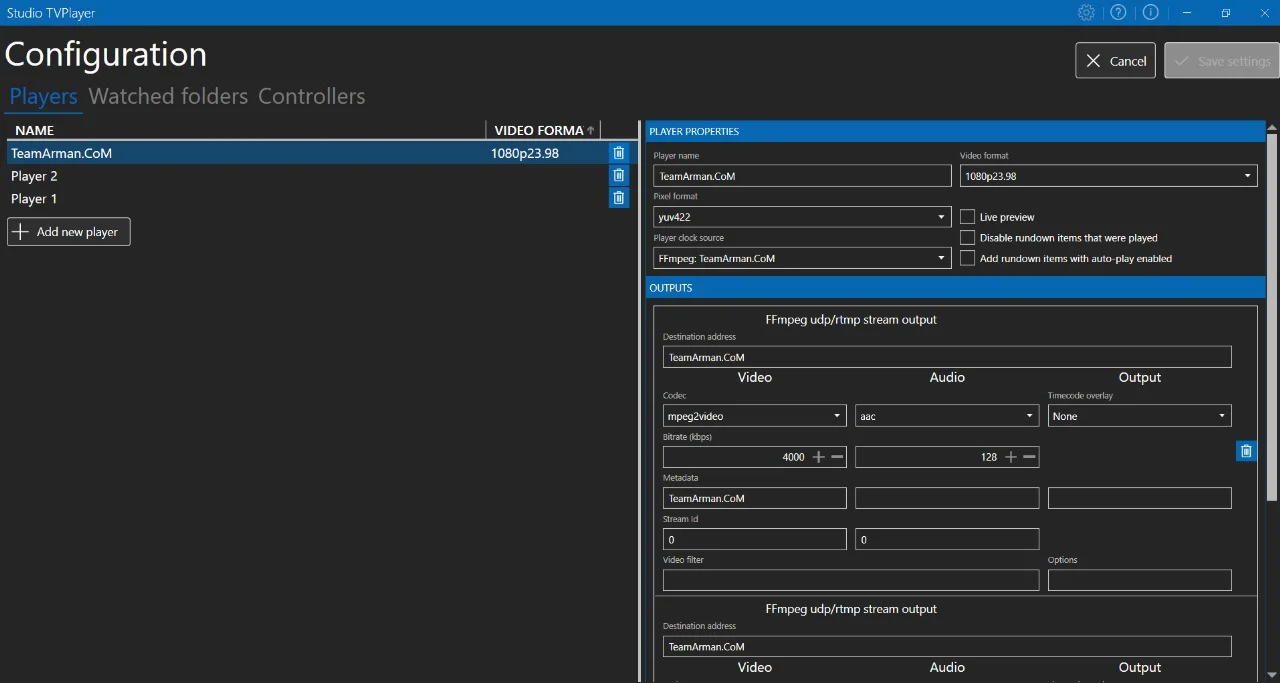
Studio TVPlayer is a professional-grade television studio playout and recording software designed for Windows environments. This powerful broadcast tool enables users to manage video playback, schedule recordings, and control outputs through multiple industry-standard interfaces including SDI, NDI, and MPEG TS . Developed by jaskie and available as an open-source solution on GitHub, Studio TVPlayer serves as a versatile alternative to commercial broadcast systems .
The software functions as a comprehensive TV studio player, offering robust capabilities for both live production and automated playout scenarios. Whether you’re managing a small broadcast operation or need reliable recording scheduling for professional productions, Studio TVPlayer provides the essential tools for modern video workflows.
Key Features of Studio TVPlayer
Studio TVPlayer delivers a comprehensive feature set designed for broadcast professionals. The software’s core capabilities include:
Professional Output Options
-
SDI Output: Direct connection to professional video hardware using Decklink cards
-
NDI Integration: Network Device Interface support for IP-based video workflows
-
MPEG TS Output: Transport stream capabilities for broadcast distribution
Recording and Scheduling
-
Scheduled Recording: Advanced recording scheduler with daily and one-time modes
-
Decklink Input Support: Direct recording from professional capture cards
-
Encoding Presets: Predefined configurations for consistent output quality
Advanced Control Features
-
Blackmagic Design Atem Integration: Direct control of ATEM production switchers
-
Elgato StreamDeck Support: Physical control surface for streamlined operation
-
System Tray Minimization: Background operation capability for scheduled tasks
Playback and Media Management
-
10-bit Pixel Format Support: Enhanced color depth for professional workflows
-
Media Filtering: Organized content management and selection
-
Rundown Save/Load: Project persistence for recurring productions
-
Auto-Play on Startup: Command line parameters for automated workflows
Technical Foundation
-
FFmpeg Integration: Leverages industry-standard media processing
-
Hotkey Support: Keyboard shortcuts for rapid operation
-
Multiple Instance Prevention: Ensures stable single-instance operation
What’s New in Studio TVPlayer V0.8.9177
The latest release of Studio TVPlayer introduces significant enhancements that expand its professional capabilities:
Recording Scheduler
Version V0.8.9177 introduces a dedicated recording scheduler tab, enabling users to schedule recordings using Decklink inputs with predefined encoding presets. The system supports both daily scheduling with specific day selection and one-time recording events. This feature includes automated filename generation based on start time, streamlining post-production workflows .
Enhanced Controller Support
This update adds official support for Blackmagic Design Atem and Elgato StreamDeck controllers, providing professional control surfaces for broadcast operations. These integrations enable physical button control for key functions, reducing reliance on mouse and keyboard during live productions .
Technical Improvements
-
Race Condition Fix: Resolved intermittent issues with clip cueing for more reliable playback
-
NDI Library Detection: Improved initialization when NDI runtime is missing
-
Decklink Compatibility: Enhanced support for Decklink 8K Pro cards and improved audio buffer management
-
10-bit Pixel Format Support: Extended color depth capabilities for NDI outputs (though currently limited to 8-bit in NDI mode)
User Experience
-
System Tray Minimization: Application can now run minimized to system tray, ideal for background recording operations
-
Single Instance Enforcement: Prevents multiple application instances, ensuring stable operation
-
Rundown Playback Reliability: Fixed issues with sequential clip playback
System Requirements for Studio TVPlayer
Before installing Studio TVPlayer, ensure your system meets these requirements:
Operating System
-
Windows 7 or newer with .NET Framework 4.8 installed
Development Dependencies
-
C++ for Visual Studio 2019 Redistributable: Required for core functionality
Optional Components (Based on Usage)
-
NDI Runtime: Required for NDI output functionality
-
Decklink Drivers: Version 11.5 or newer for Blackmagic card integration
-
FFmpeg: Required for recording features and media processing
Recommended Hardware
-
Professional video capture hardware (Decklink cards) for SDI I/O
-
Sufficient storage for recording high-bitrate video
-
Reliable network connection for NDI streaming
Installation Guide for Studio TVPlayer
Installing Studio TVPlayer involves several steps depending on your intended usage. Follow this comprehensive guide for successful setup:
Step 1: Download the Software
-
Visit the official Studio TVPlayer GitHub repository
-
Navigate to the Releases section
-
Download the latest version (V0.8.9177 or newer)
-
Verify the file integrity if checksums are provided
Step 2: Install Required Dependencies
-
.NET Framework 4.8: Download from Microsoft’s official website if not already installed
-
C++ Redistributable 2019: Install the Visual Studio 2019 Redistributable package
-
Decklink Drivers: Install version 11.5 or newer if using Blackmagic hardware
-
NDI Runtime: Download and install from the official NDI website for IP-based outputs
-
FFmpeg: Install for recording functionality
Step 3: Extract and Run
-
Extract the downloaded Studio TVPlayer files to your preferred location
-
Run the executable as administrator for full functionality
-
Verify that all outputs are detected by the software
Step 4: Initial Configuration
-
Configure Decklink inputs and outputs in the settings menu
-
Set up NDI output if using network delivery
-
Configure recording presets for scheduled recordings
-
Test playback with media files to verify installation
How to Use Studio TVPlayer
Getting Started with Basic Playback
-
Launch the Application: Run Studio TVPlayer from the installation directory
-
Load Media: Add video files to the rundown or playlist
-
Configure Outputs: Select your preferred output method (SDI, NDI, or MPEG TS)
-
Begin Playback: Use transport controls or hotkeys to start playback
Setting Up Scheduled Recordings
-
Access the Scheduler: Navigate to the dedicated recording scheduler tab
-
Select Input: Choose Decklink input source for recording
-
Configure Preset: Select predefined encoding preset or customize settings
-
Set Schedule: Choose between daily (with day selection) or one-time recording modes
-
Define Filename: Utilize automatic filename generation based on start time
-
Minimize to System Tray: Use this feature for background recording operation
Working with Rundowns
-
Create Rundown: Add clips to the rundown in the desired sequence
-
Save Rundown: Save projects for future use and consistency across productions
-
Load Rundown: Open previously created rundowns for recurring shows
-
Auto-Play: Use command line parameters to load and play rundowns on startup
Controlling Playback
-
Transport Controls: Standard play, pause, stop, and seek functions
-
Media Filtering: Search and filter through media library for efficient access
-
Clip Cueing: Prepare upcoming clips for smooth transitions
Best Use Cases for Studio TVPlayer
Television Studio Production
Studio TVPlayer excels in traditional broadcast environments where SDI outputs and professional video hardware are standard. The software’s Decklink integration makes it ideal for studios using Blackmagic Design infrastructure .
Automated Broadcasting
The recording scheduler and rundown features enable automated broadcasting for scenarios like:
-
24/7 channel playout requiring minimal operator intervention
-
Scheduled program blocks with pre-defined media
-
Religious or educational broadcasting with recurring content
-
Training and corporate communications
Live Event Production
With NDI output support, Studio TVPlayer is well-suited for:
-
Live event streaming with IP-based delivery
-
Multi-camera productions requiring reliable playback
-
Virtual event production with remote team collaboration
Sports and News Recording
The dual recording and playback capabilities support:
-
Recording live feeds while simultaneously playing out content
-
News production requiring immediate playback of recorded material
-
Sports production with instant replay preparation
Post-Production Review
-
Quality control checking of finished content
-
Review sessions with broadcast output simulation
-
Archive and storage management
Advantages and Limitations of Studio TVPlayer
Advantages
Cost-Effective Professional Solution: Studio TVPlayer offers broadcast-quality features without the high licensing costs associated with commercial alternatives. Being open-source, it provides exceptional value for small to medium broadcast operations.
Comprehensive Output Options: The software supports multiple professional output standards including SDI, NDI, and MPEG TS, making it versatile for various broadcast environments .
Professional Hardware Integration: Native support for Blackmagic Design Decklink cards and ATEM switchers provides seamless integration with existing professional broadcast infrastructure .
Flexible Recording Capabilities: The scheduled recording system with daily and one-time modes supports diverse production workflows, from 24/7 automated channels to single event capture .
Active Development: Regular updates and bug fixes indicate ongoing support and feature development .
Limitations
Windows-Only Platform: Studio TVPlayer is designed exclusively for Windows operating systems, limiting its use in cross-platform environments .
Learning Curve: Professional broadcast software requires technical knowledge of video formats, codecs, and output standards.
Hardware Dependency: Full functionality requires specific professional hardware (Decklink cards, NDI infrastructure), increasing setup complexity and costs.
Limited Audio Control: Advanced audio routing and mixing features are less comprehensive than dedicated audio software solutions.
Alternatives to Studio TVPlayer
CasparCG Server
A professional playout server solution with similar broadcast capabilities. CasparCG supports SDI and NDI outputs and is widely used in the broadcast industry. It offers client applications and integrations with various production tools .
vMix
A comprehensive live production and streaming software with built-in playout features. vMix offers a complete studio-in-a-box solution with switching, graphics, and streaming capabilities. It’s popular for event production and live streaming.
OBS Studio
A free and open-source solution for video recording and live streaming. While less specialized for broadcast playout than Studio TVPlayer, OBS Studio offers excellent streaming capabilities and is widely supported.
Sofie TV Automation
A broadcast automation system that integrates with CasparCG Server. Sofie provides advanced automation features for television production, including rundown management and automated playout .
EngPlayer
A modern IPTV player and media center designed for Linux environments. While different in focus from Studio TVPlayer, EngPlayer offers extensive features including Xtream/M3U support, background PVR recording, and EPG integration .
Frequently Asked Questions About Studio TVPlayer
What is Studio TVPlayer used for?
Studio TVPlayer is professional broadcast playout software used for playing and recording video content in television studios, live events, and automated broadcasting environments. It supports SDI, NDI, and MPEG TS outputs for professional delivery .
Is Studio TVPlayer free?
Yes, Studio TVPlayer is free and open-source software available on GitHub. It provides professional broadcast features without licensing costs, making it an accessible solution for broadcast operations .
What hardware do I need for Studio TVPlayer?
For basic playback, you need a Windows computer with .NET Framework 4.8 and C++ Redistributable 2019. For professional outputs, you’ll need Decklink cards for SDI I/O or NDI runtime for network delivery. A reliable network connection is recommended for NDI streaming .
Does Studio TVPlayer support scheduled recordings?
Yes, Studio TVPlayer V0.8.9177 includes a dedicated recording scheduler that supports both daily and one-time recording modes with predefined encoding presets. You can minimize the application to system tray for background operation .
What output formats does Studio TVPlayer support?
Studio TVPlayer supports professional outputs including SDI via Decklink cards, NDI for network-based video delivery, and MPEG TS for broadcast transport streams. This versatility makes it suitable for various broadcast environments .
Can I control Studio TVPlayer with physical hardware?
Yes, Studio TVPlayer supports Blackmagic Design Atem production switchers and Elgato StreamDeck controllers for physical control surfaces. This enables hands-on operation during live productions .
What are the system requirements for Studio TVPlayer?
Studio TVPlayer requires Windows 7 or newer with .NET Framework 4.8 and C++ for Visual Studio 2019 Redistributable. Optional dependencies include Decklink drivers (version 11.5 or newer) and NDI Runtime for network outputs .
How do I update Studio TVPlayer?
Updates are available through the GitHub repository. Visit the releases section to download the latest version, which includes new features and bug fixes. Always backup your configurations before updating .
Final Thoughts on Studio TVPlayer
Studio TVPlayer stands as a robust, professional-grade playout solution for broadcast operations. Its combination of SDI, NDI, and MPEG TS outputs, coupled with advanced scheduling capabilities and hardware integration, makes it a compelling option for studios seeking reliable, cost-effective broadcast software.
The V0.8.9177 release brings significant improvements to recording scheduling, controller support, and system stability. With features like the dedicated recording scheduler, Decklink hardware integration, and physical controller support, Studio TVPlayer addresses the core needs of professional broadcast environments.
For broadcast professionals, content creators, and organizations looking to establish or upgrade their playout capabilities, Studio TVPlayer offers a powerful, accessible solution. While it requires specific hardware for full functionality and is limited to Windows platforms, its feature set and cost-effectiveness make it an excellent choice for many broadcast applications.
As the software continues to evolve through active development, Studio TVPlayer maintains its position as a valuable tool in the broadcast software ecosystem, providing professional capabilities to users worldwide.
Our Paid Service
“We do not sell or provide any software. We only offer professional support services. If any software on your system is not working properly, or you are facing installation errors, crashes, or any other technical issue — just contact us. We will help you fix the problem quickly and remotely via AnyDesk. No software will be provided from our side — only expert troubleshooting and support.”