
Overview of the Software
Table of Contents
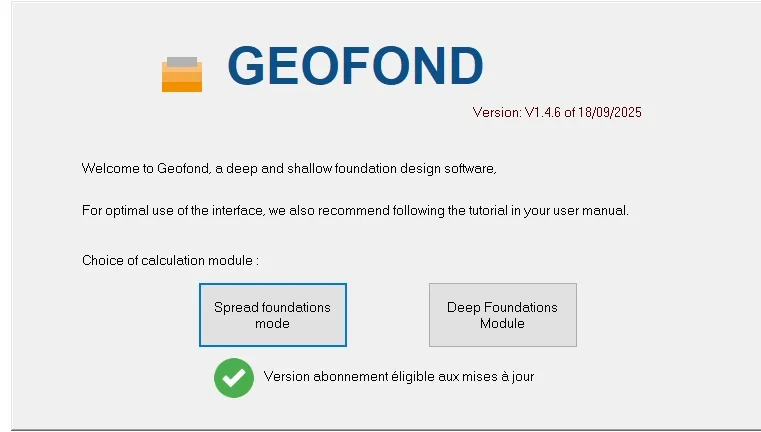
Geofond V2025 is a specialized geotechnical engineering software developed by GEOS. It provides advanced tools for foundation design and soil reinforcement calculations. This professional software is essential for civil engineers and geotechnical specialists working on complex construction projects where soil stability is critical.
The latest version introduces a comprehensive module for rigid inclusion design, complying with ASIRI recommendations . This update significantly enhances the software’s capabilities for ground reinforcement projects.
Key Features
The software offers several powerful features for geotechnical professionals:
-
Rigid Inclusion Design Module: Fully compliant with ASIRI guidelines for soil reinforcement through rigid inclusions
-
Foundation Dimensioning: Tools for calculating and optimizing foundation designs
-
Load-Bearing Capacity Analysis: Assessment of soil bearing capacity for both domain 1 (bearing capacity) and domain 2 (settlement)
-
Settlement Calculations: Precise settlement analysis for various soil conditions
-
3D Visualization: Integration of 3D design capabilities for better project visualization
Target Applications: Building foundations, infrastructure projects, and soil stabilization works.
What’s New in V2025
The V2025 subscription update brings significant enhancements:
-
ASIRI Compliance: Full integration of the ASIRI recommendations for rigid inclusion design
-
Enhanced Calculation Modules: Improved algorithms for soil reinforcement calculations
-
Updated Interface: Streamlined user experience for faster project setup
GEOS continues to develop the software with regular updates available through their official website at www.geos.fr .
System Requirements
Based on typical professional geotechnical software standards, Geofond V2025 likely requires the following:
| Component | Minimum Requirements |
|---|---|
| Operating System | Windows 10 or Windows 11 (64-bit) |
| Processor | Intel or AMD 3.0 GHz or higher |
| RAM | 16 GB minimum, 32 GB recommended |
| Storage | 10 GB free disk space for installation |
| Graphics Card | Dedicated GPU with 1 GB VRAM, 1920 x 1080 resolution |
| Internet | Required for download and license activation |
| Other | .NET Framework 3.5 and 4.8; CodeMeter Runtime |
Note: These specifications are based on industry standards for similar engineering software. Always check with GEOS for the most current system requirements.
Installation Guide
Follow these steps to properly install Geofond V2025:
Before Installation:
-
Verify your system meets all requirements
-
Ensure you have local administrator privileges on your computer
-
Close all running applications
-
Connect to a stable internet connection
Installation Steps:
-
Visit the official GEOS website at www.geos.fr to download the installer
-
Run the downloaded installation file
-
Follow the on-screen setup wizard instructions
-
Enter your subscription license information when prompted
-
Complete the installation and restart your computer
Post-Installation:
-
Activate your subscription using the provided license key
-
Check for any available updates
-
Access the webhelp documentation for guidance
Contact Support: For installation issues, email GEOS at [email protected] .
How to Use the Software
Getting Started:
-
Project Setup: Create a new project with your specific site parameters
-
Input Soil Data: Enter geotechnical investigation data for accurate analysis
-
Select Analysis Type: Choose between standard foundation design or rigid inclusion calculations
Working with Rigid Inclusions:
The new ASIRI-compliant module guides you through:
-
Inputting soil reinforcement parameters
-
Selecting domain type (bearing capacity or settlement analysis)
-
Running calculations and reviewing results
-
Exporting reports for project documentation
Use Tips:
-
Familiarize yourself with ASIRI guidelines for best results
-
Utilize the integrated help system for complex calculations
-
Save your work regularly to prevent data loss
Best Use Cases
Geofond V2025 excels in the following scenarios:
-
Infrastructure Projects: Designing foundations for bridges, tunnels, and large buildings
-
Soil Stabilization: Planning ground reinforcement using rigid inclusions
-
Load-Bearing Analysis: Assessing soil capacity for heavy structures
-
Settlement Calculations: Predicting ground movement under load
-
Construction Planning: Providing geotechnical data for project budgeting
Ideal Users:
-
Geotechnical engineers and consultants
-
Civil engineering firms
-
Construction project managers
-
Government infrastructure agencies
Advantages and Limitations
Advantages:
| Benefit | Description |
|---|---|
| ASIRI Compliance | Meets French geotechnical standards for soil reinforcement |
| Comprehensive Tools | Covers both bearing capacity and settlement calculations |
| Professional Support | Dedicated support team at GEOS |
| Regular Updates | Continuous improvements and feature additions |
Limitations:
-
Niche Application: Primarily designed for French and European geotechnical standards
-
Learning Curve: Advanced features require professional geotechnical knowledge
-
Regional Focus: May not fully support building codes from other countries
-
Internet Dependency: Requires internet for updates and support
Alternatives to Geofond
| Software | Key Features | Best For |
|---|---|---|
| GEO5 | Comprehensive geotechnical analysis suite | International projects |
| Plaxis | 2D and 3D finite element analysis | Complex soil-structure interaction |
| RocScience | Rock and soil mechanics software | Mining and tunneling projects |
| SoilVision | Unsaturated soil analysis | Specialized geotechnical research |
Comparison Insight: Geofond’s strength lies in its ASIRI compliance for rigid inclusion design, making it particularly valuable for projects in France and regions following French standards .
Frequently Asked Questions
What is Geofond V2025 used for?
Geofond V2025 is a geotechnical engineering software used for foundation design and soil reinforcement calculations. It specializes in rigid inclusion design following ASIRI recommendations .
Is Geofond V2025 available as a subscription?
Yes, Geofond V2025 is offered through a subscription model (“Abonnement”), providing users with access to the latest updates and features .
What is the rigid inclusion module in V2025?
The rigid inclusion module is a new feature for soil reinforcement design. It complies with ASIRI guidelines and handles both bearing capacity (domain 1) and settlement (domain 2) analyses .
Where can I download Geofond V2025?
You can download Geofond V2025 from the official GEOS website at www.geos.fr .
What operating system does Geofond support?
While specific system requirements should be confirmed with GEOS, similar engineering software typically supports Windows 10 and Windows 11 (64-bit) with professional-grade hardware.
Does GEOS provide technical support?
Yes, GEOS provides professional support for their software. You can contact their team by email at [email protected] .
Final Thoughts
Geofond V2025 – Abonnement represents a significant advancement in geotechnical software, particularly with its new ASIRI-compliant rigid inclusion module . For engineering professionals working on soil reinforcement projects, this tool offers specialized capabilities that general-purpose software cannot match.
The subscription model ensures users benefit from continuous updates and improvements, making it a reliable choice for ongoing projects. While the software is specialized for French geotechnical standards, its comprehensive features make it valuable for international projects that reference ASIRI guidelines.
For geotechnical engineers seeking precise, standards-compliant foundation design tools, Geofond V2025 deserves serious consideration. Download the latest version from the official GEOS website to explore its capabilities firsthand .