
Overview of GeoStab Software
Table of Contents
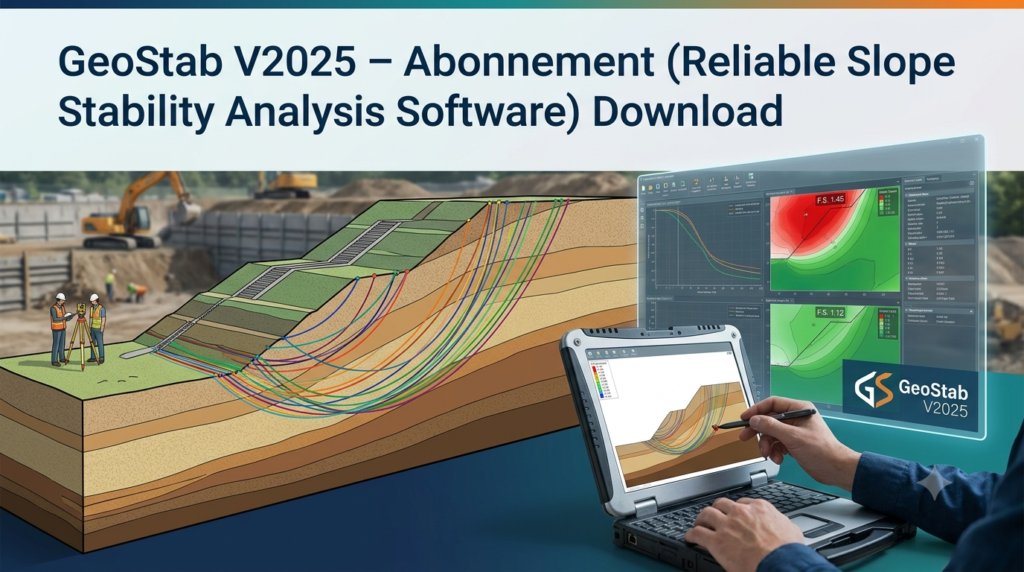
GeoStab is a specialized slope stability analysis software designed for geotechnical engineers and civil engineering professionals. This advanced tool enables comprehensive assessment of slope stability, earth retention systems, and foundation performance through sophisticated numerical modeling. The V2025 subscription version represents the latest evolution in geotechnical analysis capabilities, offering enhanced computational methods for evaluating slope safety factors and failure mechanisms.
Slope stability analysis is critical in infrastructure projects, mining operations, and construction planning. GeoStab addresses this need by providing engineers with reliable tools to assess earth structure integrity under various conditions. The software employs both limit equilibrium methods and finite element analysis (FEM) approaches, allowing users to select the most appropriate methodology for their specific project requirements.
Key Features of GeoStab V2025
Comprehensive Analysis Methods
The software integrates multiple analytical approaches commonly used in geotechnical engineering:
-
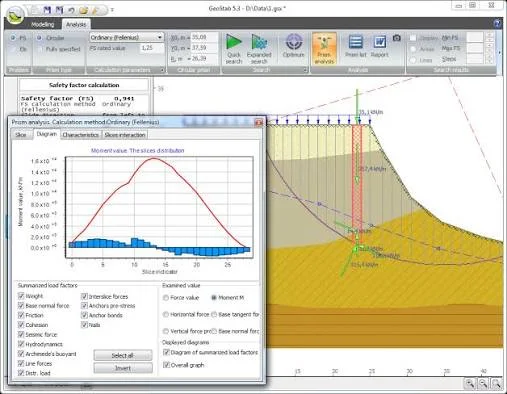
Limit Equilibrium Analysis: Includes Bishop, Fellenius, and Janbu methods for calculating slope stability factors
-
Finite Element Modeling: Supports advanced numerical analysis for complex earth structures
-
Homogeneous and Stratified Soil Analysis: Handles both uniform soil masses and layered geological conditions
-
Shear Strength Parameter Assessment: Evaluates both maximum and residual shear strength values
Technical Capabilities
GeoStab provides robust modeling features for professional geotechnical work:
-
Failure Surface Visualization: Generates detailed graphical representations of potential slip surfaces
-
Stress-Strain Analysis: Models soil plasticity and stress redistribution
-
Multiple Analysis Cases: Supports comparative studies across different slope configurations
-
Soil Property Management: Handles complex material parameters including cohesion, internal friction angle, and unit weight
What’s New in GeoStab V2025
The V2025 subscription release introduces several enhancements over previous versions:
Enhanced Computational Engine: Improved processing speed for complex FEM analyses
Updated Soil Models: Expanded material libraries with advanced constitutive models
Improved Visualization: Enhanced graphical output for failure zone identification
Subscription Model Benefits: Regular updates and technical support included
Cloud Integration: Seamless collaboration and project sharing capabilities
System Requirements for GeoStab V2025
For optimal performance of this geotechnical analysis software, the following system specifications are recommended:
Minimum System Configuration
-
Operating System: Windows 10 or Windows 11 (64-bit)
-
Processor: Modern Intel or AMD processor, 3.0 GHz or higher
-
RAM: 16 GB minimum (32 GB recommended for complex analyses)
-
Graphics Card: Dedicated GPU with 1 GB VRAM, resolution 1920 x 1080
-
Storage: 10 GB available hard disk space
-
Display: Support for multiple monitors recommended
Recommended Configuration
-
Processor: Latest-generation Intel Core i7 or AMD Ryzen 7
-
RAM: 32 GB or higher for large-scale modeling
-
Graphics: Workstation-grade GPU with 4 GB+ VRAM, WQHD resolution (2560 x 1440)
-
Network: Active internet connection for updates and cloud features
-
Database: Microsoft SQL Server 2012-2022 for enterprise deployments
System Components Required
-
Microsoft .NET Framework 3.5 and 4.8
-
Appropriate runtime libraries (VC Runtime 2022)
-
CodeMeter Runtime for license management
Installation Guide for GeoStab V2025
Pre-Installation Checklist
Before installing GeoStab V2025, verify the following:
-
System Compatibility: Confirm your workstation meets minimum requirements
-
License Availability: Ensure your subscription license is active
-
Internet Connection: Required for license verification and updates
-
Administrative Rights: Install with administrator privileges
Installation Steps
Step 1: Download the Installer
-
Access the download link provided with your subscription
-
Verify file integrity through checksum validation
Step 2: Run the Installation
-
Execute the installer file
-
Accept the license agreement terms
-
Select installation directory (recommended: default location)
Step 3: Configure Licensing
-
Enter your subscription credentials
-
Activate license through CodeMeter Runtime
-
For network licenses, configure license server settings
Step 4: Complete Setup
-
Install required system components (if not present)
-
Restart the system to finalize installation
-
Launch GeoStab V2025 to verify successful installation
How to Use GeoStab Software
Getting Started
-
Project Setup: Define project parameters and analysis type
-
Input Data Entry: Enter soil properties, slope geometry, and loading conditions
-
Analysis Selection: Choose appropriate analysis method (LE or FEM)
-
Run Analysis: Execute stability calculations
Basic Workflow
For standard slope stability analysis:
-
Define Soil Layers: Input material properties (cohesion, friction angle, unit weight)
-
Set Slope Geometry: Specify slope dimensions and configuration
-
Apply Loads: Add external forces, water pressure, and seismic loads
-
Select Method: Choose between limit equilibrium or finite element analysis
-
Review Results: Examine safety factors and failure mechanisms
Advanced Features
-
Parametric Studies: Analyze multiple scenarios automatically
-
Probabilistic Analysis: Incorporate soil property variability
-
Visualization Tools: Generate cross-sections and 3D failure surfaces
-
Report Generation: Create professional analysis reports
Best Use Cases for GeoStab
Infrastructure Projects
-
Highway Construction: Embankment and cut slope stability
-
Dam Design: Earth dam and embankment analysis
-
Bridge Approaches: Foundation stability assessment
Mining Applications
-
Open Pit Stability: Slope design for mining operations
-
Waste Dump Analysis: Tailings dam and waste facility evaluation
-
Tunnel Stability: Slope interaction with underground structures
Construction Engineering
-
Excavation Support: Temporary and permanent retaining structures
-
Foundation Design: Bearing capacity and slope interaction
-
Land Development: Site grading and slope optimization
Research and Academic Use
-
Comparative Analysis: Method validation and research studies
-
Educational Purposes: Teaching geotechnical concepts
-
Innovation: Developing new analysis approaches
Advantages and Limitations of GeoStab
Key Advantages
Professional-Grade Analysis: Industry-standard methods for reliable results
Multiple Method Support: Choose between limit equilibrium and FEM approaches
Detailed Visualization: Clear graphical representation of failure mechanisms
Regular Updates: Subscription model ensures ongoing improvements
Limitations to Consider
Learning Curve: Requires geotechnical engineering knowledge
Hardware Requirements: Demands capable workstation hardware
Subscription Cost: Ongoing investment for continued access
Licensing Model: Internet required for license verification
Alternatives to GeoStab
Competing Geotechnical Analysis Software
Plaxis 2D and 3D: Advanced finite element analysis for geotechnical problems
-
Strong in complex soil-structure interaction
-
Comprehensive constitutive models available
Geo5: Comprehensive geotechnical software suite
-
Wide range of analysis modules
-
User-friendly interface for common tasks
Phase2: 2D finite element program for slope stability
-
Specialized in slope and excavation analysis
-
Good visualization capabilities
Midas GTX / Soil Works: Integrated geotechnical analysis tools
-
Strong in 3D modeling capabilities
-
Suitable for complex projects
Selection Considerations
When choosing between alternatives, consider:
-
Project Complexity: Simple vs. advanced analysis needs
-
Team Experience: Familiarity with specific software
-
Budget: One-time purchase vs. subscription models
-
Integration: Compatibility with other engineering software
Frequently Asked Questions
What is the primary purpose of GeoStab?
GeoStab is specialized slope stability analysis software used by geotechnical engineers to assess the safety and stability of earth slopes, embankments, and retaining structures through advanced computational methods including limit equilibrium and finite element analysis.
What are the minimum system requirements for GeoStab V2025?
The software requires Windows 10 or 11 (64-bit), a modern processor at 3.0 GHz or higher, 16 GB RAM, a dedicated graphics card with 1 GB VRAM, and 10 GB of available storage. Additional components include Microsoft .NET Framework 3.5 and 4.8, plus CodeMeter Runtime for license management.
How does the subscription model work for GeoStab?
The V2025 subscription provides ongoing access to the latest version of the software, including regular updates, technical support, and cloud-based collaboration features. Subscriptions ensure users always have access to the most current analysis methods and software improvements.
Can I compare different analysis methods in GeoStab?
Yes, GeoStab supports multiple analytical approaches including Bishop, Fellenius, and Janbu methods for limit equilibrium analysis, as well as finite element modeling. This allows engineers to validate results through method comparison and select the most appropriate approach for specific project conditions.
What types of soil conditions can GeoStab analyze?
The software supports analysis of both homogeneous soil masses and stratified soil conditions. It handles various soil properties including cohesion, internal friction angle, and unit weight, accommodating complex geological conditions encountered in real-world projects.
Is GeoStab suitable for educational purposes?
Yes, the software can be used for teaching geotechnical engineering concepts. Its multiple analysis methods and visualization capabilities make it valuable for both academic instruction and research applications.
Final Thoughts
GeoStab V2025 represents a professional-grade geotechnical analysis software solution for slope stability assessment in civil engineering and construction applications. The comprehensive analysis tools, advanced visualization capabilities, and flexible methodology options make it valuable for both practicing engineers and researchers.
The subscription model offers several benefits over traditional perpetual licenses, including access to regular updates, improved support, and integration with modern engineering workflows. The ability to perform both limit equilibrium and finite element analyses provides engineers with versatile tools suitable for a wide range of project requirements.
However, users should consider their specific needs, project complexity, and available resources when selecting this software. Those requiring advanced 3D modeling or specialized constitutive models may need to evaluate alternatives like Plaxis or Midas GTX for complete project satisfaction.
Overall, GeoStab V2025 offers reliable performance for geotechnical analysis across infrastructure, mining, and construction projects, supporting engineers in making informed decisions about slope stability and earth structure design.