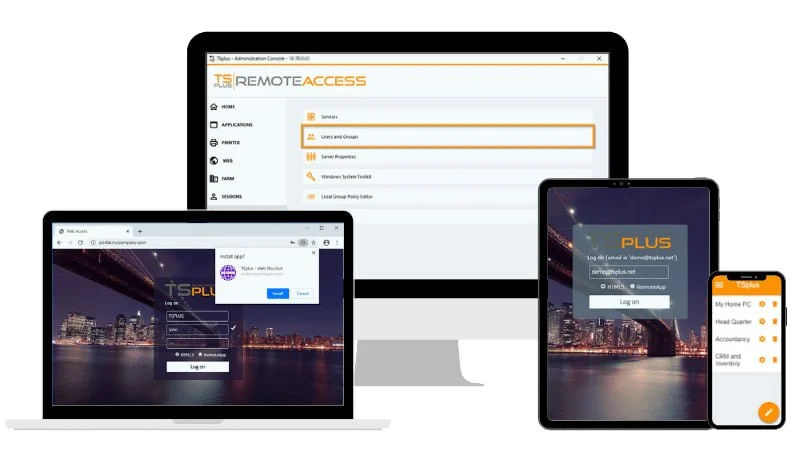
Overview of TSplus Enterprise Edition
Table of Contents
TSplus Enterprise Edition is the premium remote access solution from TSplus, designed for large-scale deployments and complex IT environments . While the company also offers Standard and other editions for smaller needs, Enterprise Edition provides the advanced tools necessary for organizations requiring centralized management of multiple servers and hundreds—or even thousands—of concurrent users.
This software enables IT administrators to publish applications and full desktops from Windows Servers to any device with an HTML5-compatible web browser or the TSplus client. It functions as a powerful alternative to Microsoft Remote Desktop Services (RDS) and Citrix, often at a significantly lower cost and with simpler deployment . The Enterprise Edition is particularly suited for businesses with complex network architectures that need a scalable and secure remote access infrastructure .
Key Features of TSplus Enterprise Edition 18.60.12.4
TSplus Enterprise Edition 18.60.12.4 is packed with features designed to optimize remote access, enhance security, and simplify administration. These features fall into several key areas:
Enterprise-Grade Remote Access
-
Server Farm Management: Centralize the control of multiple servers from a single, intuitive console. This “Farm Manager” allows administrators to view and manage all servers within the farm as a unified resource .
-
Load Balancing: Distribute user connections intelligently across servers in the farm to prevent any single server from becoming overloaded. This ensures consistent performance and a positive user experience, even during peak usage periods .
-
High Availability and Failover: Build scalable and resilient architectures with built-in failover support. If one server in the farm goes offline, the system automatically redirects users to other available servers, minimizing downtime .
-
Unlimited Server Support: The Enterprise Edition allows for an unlimited number of servers within a TSplus Farm, offering virtually limitless scalability for growing organizations .
Centralized Administration and User Management
-
Single Enterprise Portal: Provide users and administrators with a single, unified web portal to access all published applications and desktops across the entire server farm .
-
Advanced Application Publishing: Version 18.60.12.4 streamlines the process of publishing applications. The “Browse on Application Server” function lets administrators browse the file system of remote application servers directly from the Farm Controller’s AdminTool, automatically pulling the correct file path and native icon. This eliminates the error-prone process of manually entering paths .
-
Intuitive Application Assignment: The redesigned application management interface uses a simple two-panel system for assigning applications to users or groups. This allows for quick, bulk assignments, saving hours of administrative time .
Security and Compliance
Security is a cornerstone of the TSplus Enterprise architecture. It provides multiple layers of protection to safeguard sensitive corporate data.
-
SSL/TLS Encryption: Ensures all data transmitted between clients and servers is secure .
-
Multi-Factor Authentication (MFA): Add an extra layer of protection by requiring users to verify their identity through a second method, such as a mobile app or email, in addition to their password .
-
IP Filtering and Access Control: Implement granular rules to restrict remote connections based on IP addresses, providing precise control over who can access the network .
-
Brute Force Protection: Defend against malicious login attempts by automatically detecting and blocking repetitive failed authentication attempts .
What’s New in Version 18.60.12.4
The 18.60.x release series of TSplus Remote Access focuses on improving the application delivery experience and administrative efficiency. Key updates in version 18.60.12.4 include:
-
Simplified Application Discovery: Administrators can now browse the remote file system directly from the Farm Controller to select executable files, ensuring the correct path and icon are automatically applied. This feature is particularly valuable for enterprises managing large, complex application catalogs spread across multiple servers .
-
Enhanced Application Management Interface: The new two-panel design allows for faster, bulk assignment of applications to users and groups, significantly reducing the time required for user onboarding and application deployment .
-
Ongoing Security and Compatibility Enhancements: This version continues TSplus’s commitment to security and performance, incorporating all improvements from the 18.50 series and addressing evolving security standards to ensure compatibility with modern network configurations .
System Requirements
Before installing TSplus Enterprise Edition, ensure your infrastructure meets the following requirements :
| Component | Requirement |
|---|---|
| Operating System | Windows Server 2012 R2 or newer (including 2016, 2019, 2022, 2025); Windows 7 SP1, 8.1, 10, or 11 Pro. Home Editions are not supported. |
| Processor | Minimum: 2 GHz CPU (I5 or equivalent). For deployments with 50+ users, a dual CPU system (e.g., I7 or Xeon) is recommended. |
| RAM | Minimum: 4 GB. Recommendation: 8-32 GB depending on user count and application demands. For 50+ users, 64 GB is recommended. |
| Disk Space | At least 100 MB free disk space for the software. SSDs are recommended for better performance. |
| Network | A static public IP address is recommended. The default RDP port (3389) or a custom port must be open on your firewall . |
| Framework | Microsoft .NET Framework 4.6.2 or newer . |
| Architecture | Only x86 and x64 architectures are supported. ARM32 and ARM64 are not supported . |
Installation Guide for TSplus Enterprise
The installation process is straightforward and can be initiated from the official TSplus trial download . Follow these steps:
-
Download the Setup File: Obtain the official
Setup-TSplus.exeinstaller from the TSplus website . -
Run the Installer: Execute the file and choose your preferred language during the setup wizard.
-
Accept the License Agreement: Read and accept the terms to proceed.
-
Select Destination: Choose the installation directory or accept the default settings.
-
Complete Installation: The setup wizard will guide you through the remaining steps. Once the progress bar is complete, the system will require a reboot to finalize the installation .
Post-Installation Steps:
After the server reboots, you can access the AdminTool to begin configuring your farm, publishing applications, and setting up security features. The free trial is fully functional for 15 days and supports up to 5 concurrent users, allowing you to thoroughly evaluate its capabilities .
How to Use TSplus Enterprise Edition
Managing TSplus Enterprise Edition is primarily done through the powerful AdminTool and the web-based Enterprise Portal. Here’s a general workflow:
-
Configure Your Farm: After installation, open the AdminTool. Use the Farm Manager to add servers to your farm, configure load balancing settings, and establish failover policies .
-
Publish Applications: In the AdminTool, navigate to the “Applications” section. Use the new “Browse on Application Server” function to select executable files from servers in your farm. This automatically adds the application with its correct icon and path .
-
Assign Users and Groups: Use the two-panel interface to manage user access. Select users or groups on one panel and applications on the other, then use the checkboxes to assign permissions quickly.
-
Set Up Security: Implement security protocols via the AdminTool. This includes enabling multi-factor authentication, configuring IP filtering rules, and enabling SSL encryption to protect your connections .
-
Web Portal Access: Users can connect to the TSplus Web Application Portal from any browser. They will log in and see a personalized list of applications they have permission to access .
Best Use Cases for TSplus Enterprise Edition
TSplus Enterprise Edition is versatile and can support various business needs:
-
Large Enterprise Workforces: Organizations with hundreds or thousands of remote, hybrid, or geographically dispersed employees that need secure access to corporate applications and data.
-
Managed Service Providers (MSPs): IT service providers managing multiple client environments can use the Enterprise Edition to consolidate administration and deployment across client networks .
-
Complex IT Environments: Businesses with complex network architectures, multiple application servers, and high-availability requirements benefit from its advanced load balancing and failover support.
-
Secure Application Delivery: Companies in regulated industries that require robust security features like MFA, IP filtering, and encrypted connections to ensure data protection and compliance.
Advantages and Limitations of TSplus Enterprise Edition
Advantages:
-
Scalability: Supports farms with unlimited servers and thousands of concurrent users .
-
Cost-Effective: Offers a powerful alternative to expensive solutions like Citrix, with a favorable pricing structure .
-
Simplified Management: Centralized console and intuitive tools (like the new application browsing) reduce the administrative burden on IT staff .
-
Robust Security: Includes enterprise-grade security features like MFA, SSL, and IP filtering .
-
Flexibility: Supports both web-based (HTML5) and native client access across various devices and operating systems .
Limitations:
-
Windows Environment Only: Designed for Windows Servers and clients; does not natively support publishing applications from Linux or macOS servers.
-
License Costs for Large Farms: While cost-effective compared to Citrix, licensing costs can scale with the number of servers and users in a large farm. Licenses are per server, and you must select the maximum number of concurrent users per server .
Alternatives to TSplus Enterprise Edition
| Software | Key Features | Best For |
|---|---|---|
| Microsoft RDS | Native integration with Windows Server, RemoteApp, and full desktop sessions . | Organizations already heavily invested in the Microsoft ecosystem with a need for a standard solution. |
| Citrix Virtual Apps and Desktops | Advanced features like HDX protocol for multimedia, and highly complex and scalable infrastructure . | Large enterprises requiring the most advanced features, particularly for demanding graphics and media applications, and willing to invest in its complexity and cost. |
| TeamViewer | A user-friendly, cloud-based solution focused on remote support and easy access for ad-hoc connections. | Small to medium businesses and IT support teams needing an accessible solution without significant infrastructure. |
| AnyDesk | Known for speed and low latency, with a light footprint and strong performance on low-bandwidth networks. | Users prioritizing a fast, responsive experience for remote desktop access with simple setup. |
Frequently Asked Questions
What are the system requirements for TSplus Enterprise Edition?
The software typically requires Windows Server 2012 R2 or newer (or Windows 7/8.1/10/11 Pro), a 2 GHz CPU, at least 4 GB RAM, and 100 MB disk space. For large deployments with 50+ users, a Xeon or I7 CPU with 64 GB RAM is recommended .
How does TSplus Enterprise Edition ensure security?
The software includes multiple security layers such as SSL/TLS encryption for data transmission, multi-factor authentication, IP filtering, and brute force protection .
Is there a free trial available for TSplus Enterprise Edition?
Yes, TSplus offers a fully functional 15-day free trial with no credit card required. The trial supports up to 5 concurrent users, allowing for a thorough evaluation of all Enterprise features .
How does TSplus Enterprise compare to Citrix?
TSplus Enterprise Edition provides similar remote access capabilities at a much lower cost and with simpler deployment and management. It is often cited as a cost-effective Citrix alternative .
What licensing options are available for TSplus Enterprise Edition?
TSplus offers both perpetual and subscription-based licenses. Pricing depends on the maximum number of concurrent users per server. Licenses are permanent, but annual support and updates services are an additional cost .
Can I manage multiple servers with TSplus Enterprise Edition?
Yes. The Enterprise Edition is specifically designed for server farm management, supporting an unlimited number of servers within a farm and providing centralized administration .
Final Thoughts on TSplus Enterprise Edition
TSplus Enterprise Edition 18.60.12.4 stands out as a powerful, secure, and cost-effective solution for organizations requiring a robust remote access infrastructure. Its enterprise-grade features, including server farm management, load balancing, and simplified application publishing, make it an ideal choice for large businesses and MSPs. The software’s commitment to security and its intuitive management tools further solidify its position as a strong competitor to more expensive and complex solutions like Citrix and Microsoft RDS.
The latest updates in version 18.60.12.4, particularly the improved application discovery and management interface, demonstrate TSplus’s dedication to enhancing productivity for administrators. Whether you are looking to support a remote workforce, manage complex IT environments, or build a scalable application delivery platform, TSplus Enterprise Edition offers the capabilities and flexibility to meet your organization’s needs.
Our Paid Service