
Overview of IBM SPSS Modeler 18.0
Table of Contents
IBM® SPSS® Modeler 18.0 is an enterprise-strength data mining workbench that empowers organizations to uncover valuable insights from their data . This powerful predictive analytics platform enables businesses to discover patterns, build accurate predictive models, and make data-driven decisions that improve outcomes across all operational areas .
Unlike traditional statistical tools that require extensive programming knowledge, IBM SPSS Modeler 18.0 provides a visual interface that makes sophisticated analytics accessible to users with varying technical backgrounds . Organizations leverage the platform to acquire profitable customers, identify cross-selling opportunities, detect fraud, reduce risk, and enhance service delivery .
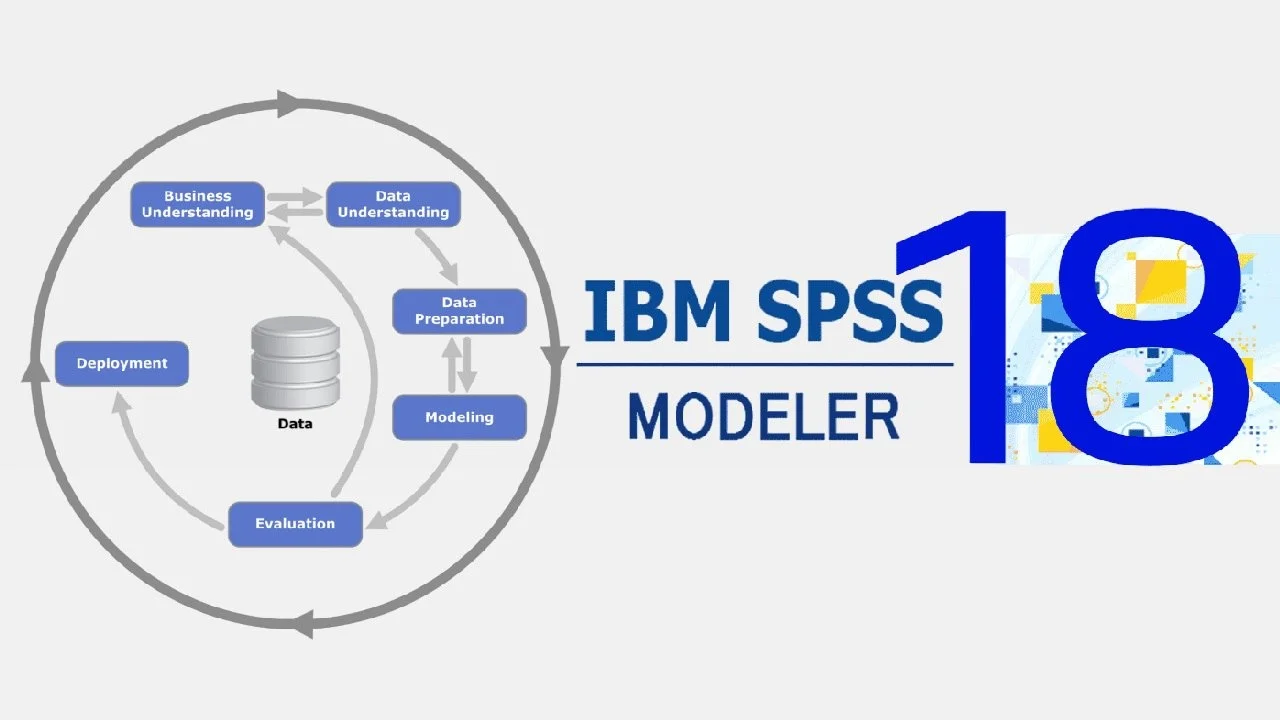
The software follows industry-standard CRISP-DM (Cross-Industry Standard Process for Data Mining) methodology, guiding users through the entire data mining process from data understanding to model deployment . This structured approach ensures that businesses can consistently achieve better outcomes from their analytics initiatives.
Key Features of IBM SPSS Modeler 18.0
Extensive Modeling Techniques
SPSS Modeler 18.0 offers a comprehensive suite of machine learning, artificial intelligence, and statistical modeling methods :
-
Predictive Modeling: Build accurate forecasts using algorithms such as neural networks, decision trees (C&RT, C5.0), and time series analysis
-
Classification Algorithms: Implement logistic regression, discriminant analysis, SVM (Support Vector Machines), and Bayesian networks for categorical outcomes
-
Segmentation Tools: Utilize clustering and association detection algorithms to identify natural groupings within data
-
Automated Modeling Nodes: Features Auto Classifier, Auto Numeric, and Auto Cluster nodes that automatically test and select optimal models
-
Time Series Analysis: Forecast future trends using exponential smoothing, ARIMA, and temporal causal modeling
Visual Workflow Interface
The platform’s intuitive visual interface allows users to apply domain-specific business expertise without requiring programming skills . Analysts can visually construct data mining workflows, examine data patterns, and iteratively refine models to achieve stronger results.
Model Deployment and Publishing
IBM SPSS Modeler Solution Publisher enables organizations to distribute predictive models across the enterprise to decision-makers and database systems . This ensures that insights derived from data mining efforts translate directly into improved business decisions.
Integration Capabilities
SPSS Modeler 18.0 integrates seamlessly with SPSS Modeler Server for enhanced performance on large datasets . This distributed architecture enables faster processing and more efficient handling of big data analytics workloads.
What’s New in IBM SPSS Modeler 18.0
Version 18.0 introduces several enhancements designed to improve the analytics workflow:
-
Enhanced Modeling Nodes: Expanded capabilities in automatic classification, numeric prediction, and clustering nodes with refined expert options for greater control over model building
-
Improved Model Nugget Visualization: Enhanced summary information, predictor importance visualization, and ensemble viewers provide deeper insights into model performance
-
Time Series Enhancements: Advanced temporal causal modeling (TCM) with scenario analysis capabilities for sophisticated forecasting needs
-
PMML Support: Import and export models in Predictive Model Markup Language (PMML) format, facilitating integration with other analytics platforms
-
Updated Algorithms: Improvements to algorithms including Neural Networks, C&RT, C5.0, and SVM for more accurate predictions
System Requirements
Minimum Hardware Requirements
-
Processor: 2.0 GHz or faster multi-core processor
-
Memory: 8 GB RAM (16 GB recommended for large datasets)
-
Storage: 5 GB available disk space (additional space required for data storage)
-
Screen Resolution: 1024 x 768 display or higher
Supported Operating Systems
IBM SPSS Modeler 18.0 is compatible with:
-
Windows: Windows 10, Windows Server 2016 and later
-
macOS: Specific versions supported (check IBM documentation)
-
Linux: Selected distributions for server deployment
Server Requirements
For enterprise deployments, SPSS Modeler Server requires:
-
Operating System: Windows Server, Linux (various distributions)
-
Memory: 16 GB minimum (32+ GB for production environments)
-
Network: High-speed network connection to client systems
Additional Requirements
-
Java Runtime Environment (JRE) for specific features
-
Database drivers for connecting to external data sources
-
Valid license file for enterprise functionality
Installation Guide for IBM SPSS Modeler 18.0
Pre-Installation Preparation
-
Verify System Compatibility: Ensure your system meets the minimum requirements
-
Backup Existing Data: If upgrading from a previous version, backup your data and streams
-
Close Other Applications: Close unnecessary applications to free system resources
-
Obtain License File: Prepare your license authorization code or license file
Step-by-Step Installation
Windows Installation:
-
Run the installer as Administrator
-
Select installation language and accept the license agreement
-
Choose installation directory (default:
C:\Program Files\IBM\SPSS\Modeler\18.0) -
Select components to install (full or custom installation)
-
Configure connection to SPSS Modeler Server if applicable
-
Input license information when prompted
-
Complete installation and restart your computer if required
Server Installation:
-
Install SPSS Modeler Server on dedicated server hardware
-
Configure server communication settings
-
Set up user authentication and access permissions
-
Test connectivity from SPSS Modeler clients
Post-Installation Configuration
-
Configure data source connections to databases, data warehouses, and flat files
-
Set up user roles and permissions for collaborative environments
-
Configure server properties including memory allocation and processing settings
-
Test installation by creating a simple stream and building a model
How to Use IBM SPSS Modeler 18.0
Creating Your First Analytics Stream
-
Launch SPSS Modeler: Open the application from the Start menu or desktop shortcut
-
Add Data Source: Drag a source node from the palettes, such as Excel, Database, or Variable File
-
Explore Data: Add a Data Audit node to examine distributions, outliers, and missing values
-
Prepare Data: Apply Type nodes to define field roles, Data Preparation nodes for cleaning, and Transform nodes for feature engineering
Building Predictive Models
Example: Customer Churn Prediction
Using the CRM example from the product documentation, you can predict customer churn using binomial logistic regression :
-
Import Data: Load customer dataset including demographics, usage patterns, and service history
-
Define Target: Set the churn indicator as the target variable
-
Select Model: Choose an appropriate algorithm such as logistic regression, C5.0 decision tree, or neural network
-
Train Model: Run the model node to learn from training data
-
Evaluate Performance: Use Model Nuggets to examine predictor importance, accuracy, and classification metrics
-
Apply Model: Score new data to predict churn risk and identify at-risk customers
Time Series Forecasting Example
For predicting bandwidth utilization or product sales, the Time Series node supports:
-
Exponential Smoothing: Suitable for data with trend and seasonality
-
ARIMA Models: Advanced forecasting with autocorrelation features
-
Temporal Causal Modeling: Understand causal relationships and run what-if scenarios
Working with Modeling Nodes
SPSS Modeler 18.0 features specialized modeling nodes on the Modeling palette:
-
Auto Classifier: Automatically tests multiple classification algorithms and selects the best performer
-
Auto Numeric: Similar functionality for numeric prediction problems
-
Auto Cluster: Evaluates clustering solutions to find optimal segmentations
-
Model Nuggets: Each model generates a nugget providing summary information, predictor importance rankings, and deployment capabilities
Best Use Cases for IBM SPSS Modeler 18.0
Customer Analytics
-
Churn Prevention: Identify customers at risk of leaving and target retention efforts
-
Cross-Selling: Discover products likely to interest existing customers
-
Customer Segmentation: Group customers based on behaviors and preferences for targeted marketing
-
Lifetime Value Prediction: Forecast customer lifetime value to guide resource allocation
Financial Services
-
Fraud Detection: Identify potentially fraudulent transactions using anomaly detection algorithms
-
Credit Risk Assessment: Build models to predict loan default probabilities
-
Insurance Pricing: Develop predictive models for risk-based pricing
-
Portfolio Optimization: Analyze investment patterns and optimize asset allocation
Healthcare
-
Patient Outcome Prediction: Forecast patient discharge patterns and healthcare utilization
-
Resource Planning: Predict bed occupancy and staff requirements
-
Treatment Effectiveness: Evaluate the impact of interventions and treatment protocols
-
Readmission Risk: Identify patients at high risk of hospital readmission
Telecommunications
-
Network Utilization Forecasting: Predict bandwidth needs for capacity planning
-
Customer Churn Prediction: Identify customers likely to switch providers
-
Service Quality Monitoring: Detect service degradation patterns
-
Customer Segmentation for Service Plans: Group customers based on usage patterns
Government and Public Sector
-
Service Delivery Optimization: Improve government service outcomes
-
Fraud Detection: Identify fraudulent claims and applications
-
Resource Allocation: Predict demand for public services
-
Program Effectiveness: Evaluate the impact of social programs
Advantages and Limitations of IBM SPSS Modeler
Advantages
-
User-Friendly Visual Interface: Enables non-programmers to build sophisticated predictive models
-
Comprehensive Algorithm Library: Supports a wide range of ML, AI, and statistical techniques
-
Scalable Architecture: Works as both standalone and client-server deployment for large datasets
-
Enterprise Integration: Connects to major databases and integrates with IBM’s analytics ecosystem
-
Model Deployment Options: Distribute models through Solution Publisher and PMML export
-
Automated Modeling: Auto Classifier and Auto Numeric nodes reduce manual algorithm selection
-
CRISP-DM Alignment: Supports industry-standard methodology for consistent results
-
Rich Documentation: Comprehensive guides covering modeling nodes, application examples, and batch processing
Limitations
-
Cost: Enterprise licensing can be expensive, particularly for full feature set
-
Learning Curve: While visual, the platform requires understanding of statistical concepts
-
Data Volume: Performance on extremely large datasets may require SPSS Modeler Server deployment
-
Advanced Customization: May require additional products or extensions for specialized needs
-
Cloud Integration: Native cloud capabilities are less developed compared to modern cloud-native alternatives
Alternatives to IBM SPSS Modeler
Qlik Predict
Qlik Predict (formerly AutoML) provides a code-free machine learning platform fully integrated with Qlik’s analytics ecosystem. It offers automated model building and explainable AI capabilities . While well-suited for business intelligence teams, it may not offer the depth of statistical features found in SPSS Modeler .
Pecan AI
Pecan AI allows users to ask business questions in plain English and receive validated predictions without data preparation or model building . Its focus on ease of use and fast deployment makes it attractive for small to medium teams. However, organizations with complex modeling needs may prefer SPSS Modeler’s comprehensive algorithm library .
ThoughtSpot SpotIQ
ThoughtSpot’s augmented analytics engine uses machine learning and AI to automatically deliver personalized insights and identify anomalies . While excellent for data discovery and BI, it may not provide the depth of statistical modeling offered by SPSS Modeler for predictive analytics .
Comparison Summary
| Feature | SPSS Modeler | Qlik Predict | Pecan AI | ThoughtSpot |
|---|---|---|---|---|
| Visual Workflow | Yes | Integrated | Limited | Limited |
| Algorithm Variety | Extensive | Moderate | Moderate | Limited |
| Model Deployment | Strong | Integrated | Standard | Standard |
| Statistical Modeling | Strong | Moderate | Limited | Limited |
| Ease of Use | Moderate | Easy | Very Easy | Very Easy |
| Enterprise Scale | Strong | Moderate | Growing | Moderate |
Frequently Asked Questions
What is IBM SPSS Modeler 18.0 used for?
IBM SPSS Modeler 18.0 is a predictive analytics platform used for data mining, machine learning, and statistical modeling. It helps organizations build predictive models to solve business problems including customer churn prediction, fraud detection, time series forecasting, and market segmentation .
What modeling techniques are available in SPSS Modeler?
SPSS Modeler provides an extensive range of techniques derived from machine learning, artificial intelligence, and statistics. These include neural networks, decision trees (C&RT and C5.0), logistic regression, discriminant analysis, SVM, Bayesian networks, time series analysis (ARIMA and exponential smoothing), clustering algorithms, and association detection .
Is programming required to use SPSS Modeler?
No. SPSS Modeler provides a visual, code-free interface that allows users to build predictive models through drag-and-drop workflow construction. This intuitive approach applies business expertise without requiring programming skills, making sophisticated analytics accessible to a broader audience .
What are the system requirements for IBM SPSS Modeler 18.0?
The software requires a 2.0 GHz or faster multi-core processor, 8 GB RAM (16 GB recommended), 5 GB available disk space, and a compatible operating system such as Windows 10 or Windows Server 2016. Server deployments have additional requirements including more memory and specific Linux distributions .
Can SPSS Modeler handle large datasets?
Yes. While SPSS Modeler works as a standalone product, it can be combined with SPSS Modeler Server for improved performance on large datasets. The server architecture enables distributed processing and handles bigger data volumes more efficiently than standalone installations .
What is CRISP-DM and how does SPSS Modeler support it?
CRISP-DM (Cross-Industry Standard Process for Data Mining) is an industry-standard methodology for data mining projects. SPSS Modeler is designed around this model, supporting the entire process from data understanding through model deployment to achieve better business outcomes .
How do I deploy models built in SPSS Modeler?
IBM SPSS Modeler Solution Publisher allows you to distribute predictive models to decision-makers and databases across your enterprise. Models can also be exported in PMML (Predictive Model Markup Language) format for integration with other platforms .
What’s new in SPSS Modeler 18.0 compared to earlier versions?
Version 18.0 introduces enhanced automated modeling nodes, improved model nugget visualization including predictor importance and ensemble viewers, advanced time series capabilities with temporal causal modeling, PMML support, and updated algorithms for Neural Networks, C&RT, C5.0, and SVM .
Final Thoughts
IBM SPSS Modeler 18.0 represents a mature and powerful predictive analytics solution for organizations serious about leveraging their data assets. The platform stands out for its comprehensive algorithm library, visual workflow interface, and enterprise deployment capabilities.
For businesses requiring sophisticated statistical modeling without extensive programming resources, SPSS Modeler provides a balanced approach between analytical power and accessibility. The software excels in scenarios where domain experts need to actively participate in the modeling process while maintaining statistical rigor.
While competitors offer increasingly user-friendly alternatives, SPSS Modeler retains advantages in algorithm variety, deployment flexibility, and integration with IBM’s analytics ecosystem. Organizations with complex analytical needs or those already invested in IBM’s technology stack will find particular value in this solution.
The investment in SPSS Modeler delivers significant returns when organizations fully leverage its capabilities across multiple business functions. Whether predicting customer behavior, detecting fraud, or optimizing operations, the platform provides the tools needed to transform data into actionable insights and competitive advantage.
Our Paid Service
“We do not sell or provide any software. We only offer professional support services. If any software on your system is not working properly, or you are facing installation errors, crashes, or any other technical issue — just contact us. We will help you fix the problem quickly and remotely via AnyDesk. No software will be provided from our side — only expert troubleshooting and support.”