

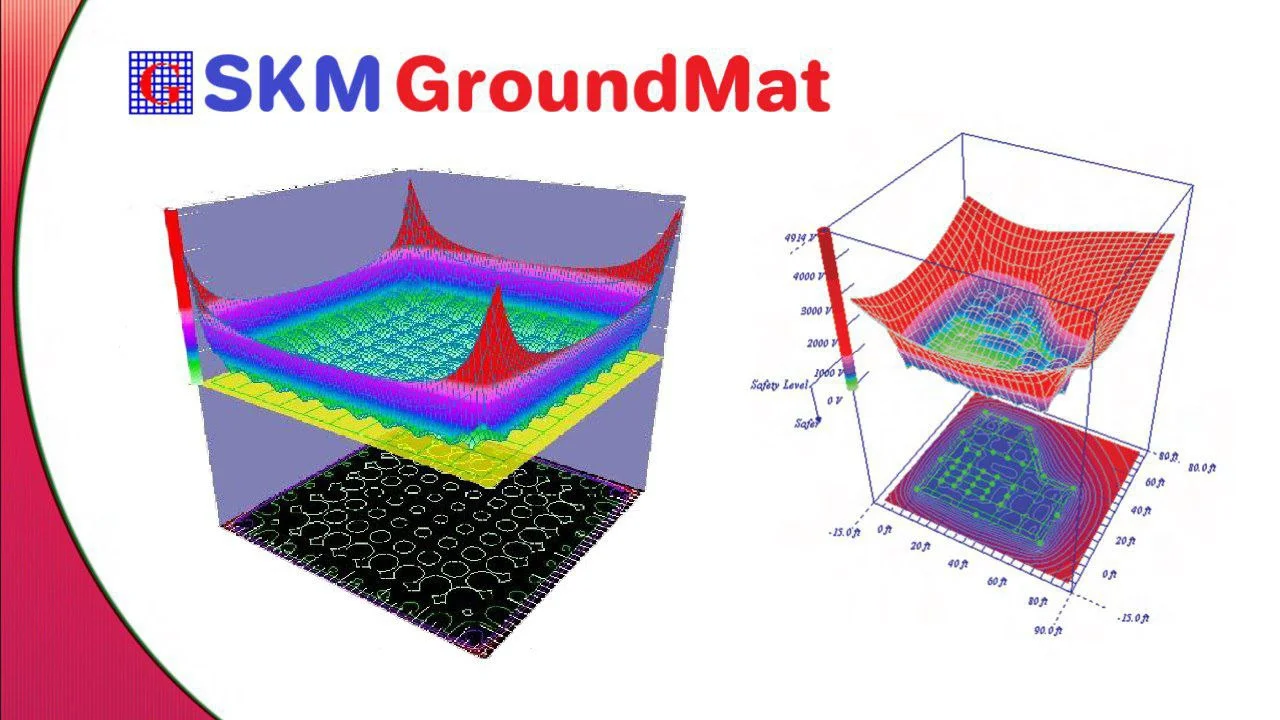
Overview of SKM GroundMat 2.0.2.5
Table of Contents
SKM GroundMat 2.0.2.5 is a specialized software application designed for the precise modeling, simulation, and analysis of electrical grounding systems. Developed as part of the widely respected SKM Power*Tools suite, this professional-grade tool is engineered for electrical engineers working in power system design, substation engineering, and industrial facility management .
The software enables users to create accurate models of grounding grids and earthing systems to ensure personnel safety and equipment protection. By analyzing critical parameters such as step voltage, touch voltage, and ground potential rise (GPR), GroundMat helps engineers comply with international safety standards and optimize grounding system designs before physical installation .
Key Features
Comprehensive Grounding System Modeling
SKM GroundMat 2.0.2.5 provides robust capabilities for modeling complex grounding configurations:
-
Multi-layer Soil Analysis: The software supports uniform and two-layer soil models, allowing engineers to accurately represent varying soil resistivity conditions
-
Grid Design Flexibility: Users can design square, rectangular, and custom-shaped grounding grids with variable conductor spacing
-
Vertical Rod Integration: The tool accommodates ground rods of various lengths and diameters at grid nodes and periphery positions
-
Multiple Conductor Types: Support for different conductor materials, sizes, and cross-sections
Safety Performance Analysis
The software calculates essential safety parameters required by IEEE Standard 80:
-
Touch Voltage Analysis: Evaluation of potential differences between grounded metallic structures and the earth’s surface
-
Step Voltage Assessment: Analysis of voltage gradients across the earth’s surface during fault conditions
-
Ground Potential Rise (GPR): Computation of the maximum potential rise of the grounding system relative to remote earth
-
Earth Surface Potential Distribution: Visualization of voltage gradients across the entire grounding area
Simulation and Visualization Tools
-
Graphical Interface: Intuitive project view with study tools and graphic display options
-
Report Generation: Comprehensive output reports detailing system performance metrics
-
Parametric Studies: Capability to evaluate the impact of varying design parameters on system safety
What’s New in Version 2.0.2.5
The 2.0.2.5 release of SKM GroundMat includes several refinements and enhancements:
-
Improved Calculation Engine: Enhanced algorithms for more accurate ground resistance and surface potential computations
-
Extended Standards Compliance: Updated to align with current IEEE and IEC grounding standards
-
Enhanced Visualization: Improved graphical display of touch and step voltage contours
-
Streamlined User Interface: Refined project management and study workflow tools
-
Expanded Reporting: More detailed and customizable output reports for documentation purposes
System Requirements
Before installing SKM GroundMat 2.0.2.5, ensure your system meets these minimum requirements:
-
Operating System: Windows 10 or Windows 11 (64-bit recommended)
-
Processor: Intel Core i5 or equivalent, 2.5 GHz or higher
-
Memory (RAM): 8 GB minimum, 16 GB recommended for complex projects
-
Storage: 2 GB available disk space for installation and project files
-
Display: 1920 x 1080 resolution recommended for optimal UI experience
-
Additional Software: Microsoft Excel for data export and reporting functionality
Installation Guide
Step 1: Pre-Installation Preparation
-
Verify that your system meets the minimum requirements
-
Ensure you have administrative privileges on your computer
-
Close all running applications, especially other engineering software
-
Locate your license key or prepare your hardware key for activation
Step 2: Download and Setup
-
Download the SKM GroundMat 2.0.2.5 installation package from the official SKM website or authorized distributor
-
Extract the installation files if compressed
-
Run the setup executable as administrator
-
Follow the on-screen installation wizard prompts
Step 3: Software Activation
-
Launch SKM GroundMat after installation
-
Enter your serial number or connect your hardware key
-
Complete the license activation process online or via email
-
Verify successful activation before beginning projects
Step 4: Post-Installation Configuration
-
Set your default project directory
-
Configure user preferences for your workflow
-
Verify the software can access all required toolbars and menus
-
Test the installation by opening a sample project or starting a new study
How to Use the Software
Creating a New Project
-
Launch SKM GroundMat from the Windows Start menu
-
Select “New Project” from the File menu or Quick Access toolbar
-
Name your project and select a storage location
-
Define the project parameters: soil characteristics, grid dimensions, and safety criteria
Defining Soil Parameters
-
Navigate to the Soil Properties section of the project setup
-
Select uniform or two-layer soil model
-
Enter measured soil resistivity values for each layer
-
Specify the upper layer thickness if using a two-layer model
Building the Grounding Grid
-
Use the grid editor to define grid dimensions and shape
-
Specify conductor spacing and size
-
Add vertical rods at nodes or along periphery as needed
-
Define the burial depth for the grounding system
Running the Analysis
-
Select the study type from the View or Study menu
-
Enter fault current magnitude and duration parameters
-
Initiate the computation
-
Review results for step voltage, touch voltage, and GPR values
Interpreting Results
-
Analyze the touch and step voltage contour maps
-
Compare computed values against IEEE Standard 80 permissible limits
-
Evaluate the ground resistance of the designed system
-
Generate comprehensive reports for documentation and approval
Best Use Cases
Substation Grounding Design
The software excels in analyzing grounding systems for electrical substations. Engineers can evaluate grid performance under various fault conditions, verify safety criteria, and optimize conductor layout to minimize material costs while maintaining safety standards .
Power Plant Earthing Systems
Power generation facilities require robust grounding systems to protect personnel and equipment. SKM GroundMat enables detailed analysis of earthing networks within generator, transformer, and switchyard areas.
Industrial Facility Grounding
Manufacturing plants, data centers, and other industrial facilities benefit from accurate grounding system design. The software helps evaluate grid performance in complex layouts with extensive metallic structures and equipment.
Transmission Line Tower Grounding
Grounding analysis for transmission line structures is supported, including evaluation of tower footing resistance and step voltage hazards near towers .
Retrofit and Upgrade Projects
When upgrading or expanding existing grounding systems, SKM GroundMat allows engineers to analyze current performance and design improvements to meet updated safety standards or accommodate increased fault current capacities.
Advantages and Limitations
Advantages
-
Professional-Grade Accuracy: Validated calculation methods that align with industry standards
-
Comprehensive Safety Analysis: Full evaluation of touch voltage, step voltage, and ground potential rise
-
Flexible Modeling: Support for multiple soil layers and custom grid configurations
-
Part of Integrated Suite: Compatibility with other SKM Power*Tools modules for complete power system analysis
-
Industry Trust: Used by top electrical engineering firms worldwide
Limitations
-
Learning Curve: Requires knowledge of grounding theory and IEEE Standard 80
-
Windows-Only Platform: No native support for macOS or Linux operating systems
-
Cost: Professional-grade software with corresponding investment requirements
-
No Cloud Version: Desktop application without web-based collaboration features
-
Advanced Features: Some complex features may require additional training or experience
Alternatives to SKM GroundMat
CDEGS (Current Distribution, Electromagnetic Fields, Grounding and Soil Structure Analysis)
A comprehensive electromagnetic analysis software suite that includes advanced grounding system analysis tools. It offers extensive functionality for soil structure analysis, electromagnetic field computation, and interference studies .
XGSLab Grounding Solution
A powerful alternative known for its accuracy and affordability. Features include:
-
Multi-layer soil modeling
-
International standard compliance (IEC, EN, IEEE)
-
AutoCAD integration for streamlined workflow
-
Validated calculation accuracy against field measurements and published research
ETAP Ground Grid Systems
Part of the broader ETAP power system analysis platform, providing integrated grounding analysis with other power system studies such as short circuit, load flow, and protection coordination .
CYMGRD
A specialized grounding analysis software focusing on safety evaluation, touch and step voltage calculations, and grid optimization for substation and industrial applications .
SafeGrid
Provides accurate grounding system performance analysis with emphasis on IEEE Standard 80 compliance and practical engineering applications .
Frequently Asked Questions
What is the primary purpose of SKM GroundMat 2.0.2.5?
SKM GroundMat is designed for the analysis and design of electrical grounding systems. It evaluates step voltage, touch voltage, and ground resistance to ensure personnel and equipment safety during fault conditions .
What standards does SKM GroundMat support for grounding analysis?
The software aligns with IEEE Standard 80, Guide for Safety in AC Substation Grounding, along with relevant IEC standards for grounding system safety assessment .
What types of soil models are available in SKM GroundMat?
The software supports both uniform and two-layer soil models, allowing engineers to represent varying soil resistivity conditions accurately .
How does SKM GroundMat improve safety in electrical substations?
By computing touch and step voltages, the software helps engineers design grounding systems that keep these parameters within permissible limits, reducing the risk of electrical shock to personnel during ground faults .
Can SKM GroundMat integrate with other SKM Power*Tools software?
Yes, GroundMat is part of the SKM Power*Tools suite, providing seamless integration with other modules for comprehensive power system analysis.
What file formats does SKM GroundMat support for exporting results?
The software supports exporting analysis data to various formats, including Microsoft Excel for detailed reporting and documentation .
How often is SKM GroundMat updated?
SKM Systems Analysis periodically releases updates to ensure compatibility with current operating systems and alignment with evolving industry standards.
What training resources are available for SKM GroundMat?
SKM offers technical support documentation, user manuals, and professional training services for engineers using their software products .
Final Thoughts
SKM GroundMat 2.0.2.5 represents a professional-grade solution for grounding system analysis and design. As part of the established SKM Power*Tools suite, it delivers the accuracy and reliability that electrical engineers require for substation, power plant, and industrial grounding applications.
The software’s ability to model complex soil conditions and compute critical safety parameters such as touch voltage, step voltage, and ground potential rise provides essential insights for designing grounding systems that protect personnel and equipment during fault conditions . With support for IEEE Standard 80 compliance and flexible modeling capabilities, GroundMat remains a valuable tool for power system professionals.
For engineers seeking a specialized grounding analysis tool with proven industry validation, SKM GroundMat 2.0.2.5 offers comprehensive functionality backed by years of development and practical application. The software continues to serve the needs of electrical engineering firms worldwide, contributing to safer and more reliable power systems.
Our Paid Service