
Overview of OKM Visualizer 3D Studio Pro
Table of Contents
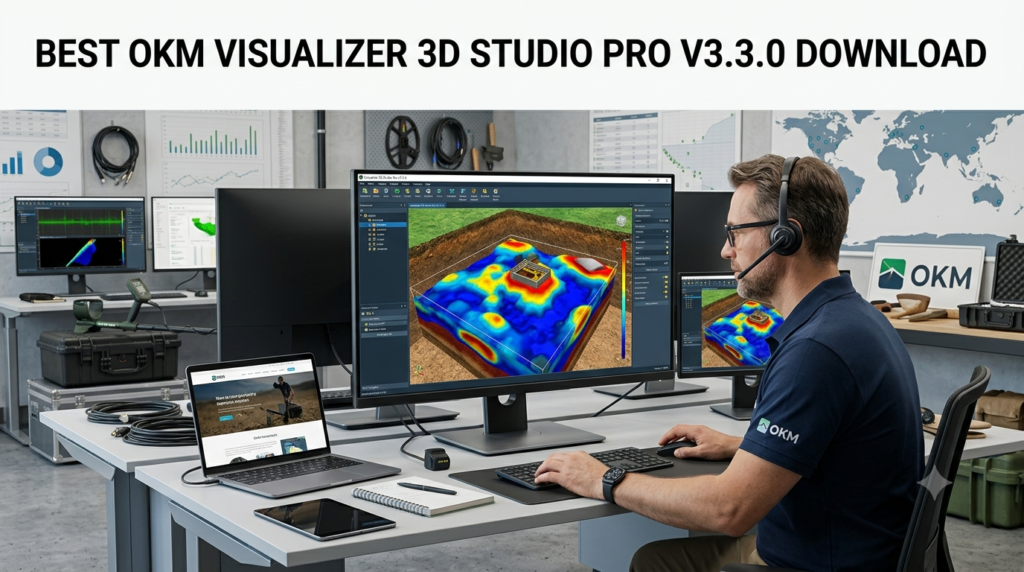
OKM Visualizer 3D Studio is a powerful analysis suite that serves as the central hub for processing and interpreting data gathered during field scans. Its primary function is to take raw measurement data from a compatible OKM detector and automatically generate a three-dimensional model of the subsurface . This allows users to determine the position, size, and depth of hidden objects like metallic artifacts, underground voids, tunnels, or pipelines before any excavation begins . The software is designed with an intuitive graphical user interface and offers context-sensitive help, making it accessible to both beginners and experienced professionals . It is available in two primary editions, Standard and Professional, with the Professional version offering advanced features like volumetric 3D rendering, PDF report generation, and comprehensive soil type management .
Key Features of Visualizer 3D Studio Pro
Advanced Data Import and Editing
The software supports seamless data transfer from a wide range of OKM detectors via USB cable or Bluetooth . Certain newer models, such as the Rover UC and eXp 6000, can create scan files directly in the native .v3d format, which can be opened immediately in the software . Once imported, users can edit the scan’s properties, add detailed notes about the measurement field, and associate GPS coordinates with the data for precise location tracking .
3D Visualization and Analysis Tools
Visualizer 3D Studio provides a robust suite of tools for analyzing subsurface data. Key capabilities include:
-
3D Ground Scan Visualization: Users can view their scans in a fully interactive 3D environment. The software allows for rotation, scaling, and movement of the 3D model to inspect findings from every angle .
-
Predefined Viewports: The scan image can be divided across multiple windows, allowing users to view a single object from several perspectives simultaneously .
-
Modifiers for Data Optimization: To enhance scan quality, the software utilizes four predefined modifiers: Interpolation, Subdivision, Signal Correction, and Rotational Correction. These tools automatically correct and refine measured values, improving the clarity of the final 3D visualization and making it easier to identify potential targets .
-
Soil Type Assignment: One of the most critical features for accurate depth calculation is the assignment of soil types. The software includes an extensive library of over 45 soil types (including 12 OKM standard, 12 USDA, and 33 GPR-specific types in the Pro version), each with properties like dielectric constant and mineralization that directly influence the depth calculation algorithm . Selecting the correct soil type is essential for obtaining accurate depth measurements.
-
Bookmarks (PRO only): This feature allows users to highlight specific areas of interest within the scan. A pin can be placed on a selected measurement, and a circle or rectangle can be drawn around it to denote the target area. This is invaluable for reporting and for sharing findings with colleagues .
-
PDF Report Generation (PRO only): The Professional Edition enables users to automatically compile their scan data into a well-structured PDF report. These reports can be customized to include the scan image, detailed scan information, selected soil types, and any placed bookmarks, providing a professional way to document and share results .
What’s New in OKM Visualizer 3D Studio Pro V3.3.0
The V3.3.0 update introduces several key enhancements and fixes that improve the software’s functionality and user experience. According to the official changelog from OKM, this version includes significant updates :
-
Added 3D VLF Scan Support: The software now supports 3D VLF (Very Low Frequency) scans, specifically for the OKM eXp 7000 detector .
-
Enhanced Interface: A new Status Bar has been added, displaying crucial real-time information such as scan dimensions, depth, and the assigned soil type .
-
Improved File Format Handling: The OKM Exchange Format (
*.okm) has been updated to ensure compatibility with the OKM eXp 7000, building upon previous support for the eXp 5500 . -
Visualization and Filtering Updates: The visualization of Mineral and Tunnel Scans has been improved, and graphical filtering for geoelectric scans has been optimized .
-
Bug Fixes: This version resolves several issues, including a problem where older files would throw an exception upon opening and issues with the menu item for “Interpolation” .
System Requirements
To run OKM Visualizer 3D Studio Pro effectively, your system must meet the following minimum requirements :
| Component | Minimum Requirement |
|---|---|
| Operating System | Windows 10, Windows 8.1, Windows 7 |
| Processor | 1.2 GHz |
| RAM | 2 GB |
| Graphics Card | 1 GB RAM, OpenGL 3.3 compatible |
| Free Disk Space | 250 MB |
| Display | 1920 x 1080 resolution |
| Interface | USB 2.0 for data import |
Important Note: It is critical to ensure your graphics card supports OpenGL 3.3, as this is required for the software’s advanced 3D rendering capabilities .
Installation and Activation Guide
Installing OKM Visualizer 3D Studio Pro involves a straightforward process using the provided Software Key and Activation Codes.
-
Download Software: Download the installer from the official OKM website or the link provided with your purchase.
-
Run Installer: Execute the downloaded file and follow the on-screen instructions to install the software on your Windows PC.
-
Launch Software: After installation, launch the program. It will prompt you to activate your license.
-
Software Activation: To activate, you will need your Software Key and an Activation Code. The software comes with four licenses (Activation Codes), allowing you to install and use it on multiple PCs . After running major updates, such as the V3.3.0 update, the software may require re-activation, and an additional free activation code is often provided .
-
USB Driver Installation (If Needed): For data transfer via USB, your system may require specific drivers to communicate with your OKM detector. These drivers can be found in the “Updates and Drivers” section of the OKM download center .
How to Use the Software
Importing Scan Data
Scan data can be imported from your OKM detector to the Visualizer 3D Studio in several ways :
-
USB Cable: Connect your detector to the PC using a USB cable. The software will guide you through importing the data.
-
Bluetooth: For supported devices, data can be transferred wirelessly via Bluetooth .
-
Direct File Opening: Detectors like the Rover UC and eXp 6000 create
.v3dfiles during the scan, which can be opened directly in the software .
Analyzing and Interpreting Data
Once the data is loaded, the core analysis begins. A typical workflow involves:
-
View Adjustment: Use the mouse and on-screen controls to rotate, zoom, and pan around the 3D model to get the best view of the data.
-
Apply Soil Type: Select the correct soil type from the library in the right sidebar. This recalibrates the depth calculations for higher accuracy .
-
Apply Modifiers: Use the modifiers in the right sidebar to refine the data. For example, applying “Interpolation” can smooth out data points, making a clearer image.
-
Set Bookmarks (PRO): Identify potential targets and use the bookmarking tool to mark them for future reference.
-
Export Results: Once satisfied with the analysis, export the current view as an image, or, for Pro users, generate a comprehensive PDF report .
Best Use Cases for OKM Visualizer 3D Studio Pro
The software is a versatile tool for a wide range of subsurface investigation tasks .
-
Archaeology: Locate and visualize the 3D structure of buried artifacts, foundations, and burial chambers before excavation.
-
Treasure Hunting: Identify potential targets like caches, metallic artifacts, and deeply buried objects.
-
Utility Detection: Map underground pipelines, cables, and other infrastructure for construction and safety purposes.
-
Geological Surveys: Analyze underground structures and soil composition, including the detection of voids and water deposits (with GeoSeeker) .
-
Security and Forensics: Detect buried contraband or conduct ground surveys for security applications.
Advantages and Limitations of Visualizer 3D Studio Pro
Advantages
-
Professional-Grade Analysis: The software is a professional tool trusted by archaeologists, geophysicists, and serious detectorists.
-
Advanced 3D Visualization: It provides clear, detailed 3D models that make it easy to understand complex subsurface data.
-
Wide Hardware Compatibility: It supports a vast array of OKM detectors, both current and legacy models .
-
Comprehensive Feature Set (PRO): The Professional edition includes powerful features like Volumetric 3D rendering, CSV/PDF export, and advanced bookmarking for thorough analysis and reporting .
Limitations
-
Hardware Dependency: The software is exclusive to OKM detectors and scanners; it is not compatible with devices from other manufacturers .
-
Windows-Only Platform: It is designed only for the Windows operating system and is not natively available for macOS or Linux .
-
Cost and Licensing: The software is a premium product with a significant cost, and licenses are tied to the Software Key, requiring activation .
-
Complexity: While designed for all users, fully leveraging all features, especially the advanced modifiers and soil type settings, requires practice and a good understanding of the technology . OKM offers paid software training to help users maximize the software’s potential .
Alternatives to OKM Visualizer 3D Studio Pro
When considering alternatives to OKM Visualizer 3D Studio Pro, options are relatively limited, as most ground-penetrating radar (GPR) and metal detection software is proprietary to the hardware manufacturer. Key alternatives include:
-
GSSI RADAN 7: The industry-standard software for GSSI GPR systems, offering robust 2D and 3D visualization for advanced subsurface analysis.
-
MALÅ Easy 3D: A 3D visualization module for MALÅ GPR systems, used for processing and presenting 3D data volumes.
-
Sensors & Software EKKO_Project: A comprehensive GPR data processing and interpretation software suite for Sensors & Software systems.
-
General GPR Data Processing Software: Programs like Reflexw or GPR-SLICE offer third-party processing for various GPR data formats but may have a steep learning curve.
-
OKM Companion Apps: For users who need a simpler, on-the-go solution, OKM offers mobile apps for certain scanners. While these provide real-time feedback and basic object detection, they lack the in-depth analysis, depth calculations, and reporting features of the full Visualizer 3D Studio Pro .
Frequently Asked Questions
What detectors are compatible with OKM Visualizer 3D Studio Pro?
The software is compatible with a wide range of OKM detectors including the Delta Ranger, Evolution NTX, eXp 4500, eXp 6000, Fusion Light, Fusion Professional, GeoSeeker, Gepard GPR 3D, Rover C4, and Rover UC, among many older models .
What is the difference between the Standard and Professional editions of Visualizer 3D Studio?
The Professional Edition offers advanced features over the Standard Edition. These include volumetric 3D visualization, cross-section views, the ability to view and edit bookmarks, export to PDF and CSV, and a much larger library of soil types (including USDA and GPR-specific types) .
How do I activate my OKM Visualizer 3D Studio Pro software?
You activate the software using the Software Key and Activation Codes provided at purchase. Each license provides one free activation. After a major update, such as moving to V3.3.0, you may need to re-activate using an additional free code provided by OKM .
What is the role of soil types in Visualizer 3D Studio?
Soil types are critical for accurate depth calculation. By selecting the correct soil type (which affects properties like dielectric constant and mineralization), the software’s algorithm can more accurately determine the depth of a detected object. The software includes an extensive library of over 45 different soil types in the Professional Edition .
Can I generate reports directly from the software?
Yes, the Professional Edition allows you to automatically generate detailed PDF reports. These reports can include the scan image, all scan data, soil type information, and your bookmarks, providing a professional summary of your findings .
Does the software run on Windows 11?
While system requirements specify Windows 7, 8.1, and 10, the software is generally compatible with Windows 11. It is always recommended to check the official OKM documentation for the latest compatibility information .
Final Thoughts on OKM Visualizer 3D Studio Pro V3.3.0
OKM Visualizer 3D Studio Pro V3.3.0 stands as a powerful and essential tool for anyone serious about subsurface detection and analysis. Its ability to convert raw data into detailed, interactive 3D models empowers users across archaeology, industry, and treasure hunting to make informed decisions about their excavations. The latest V3.3.0 update continues to refine the user experience with new features like 3D VLF scan support and various bug fixes, ensuring the software remains at the forefront of the industry .
While the software and its required hardware represent a significant investment, the depth of analysis, reporting capabilities, and advanced features like soil type management and volumetric rendering justify the cost for professionals. Whether you are an experienced user or a beginner taking your first steps into the world of professional ground scanning, Visualizer 3D Studio Pro provides the analysis and visualization capabilities needed to uncover what lies beneath.
Our Paid Service
“We do not sell or provide any software. We only offer professional support services. If any software on your system is not working properly, or you are facing installation errors, crashes, or any other technical issue — just contact us. We will help you fix the problem quickly and remotely via AnyDesk. No software will be provided from our side — only expert troubleshooting and support.”