Overview of HelixPile
Table of Contents
HelixPile is a powerful, modern software program specifically engineered for the design and analysis of helical piles—also known as screw piles. Developed by Deep Excavation, a trusted name in geotechnical engineering software, HelixPile serves as a dedicated solution within the broader DeepFND foundation design ecosystem . The software is designed to handle a wide range of project complexities, from single pile analysis to advanced pile group and pile raft configurations.
Unlike general-purpose foundation tools, HelixPile focuses on the unique behavior of helical piles, incorporating the latest industry recommendations and allowing engineers to investigate multiple failure modes . Its user-friendly interface streamlines the modeling process, enabling rapid creation of models using wizards and interactive tools. This makes it an invaluable asset for consulting firms, contractors, and infrastructure professionals who require fast, accurate, and defensible designs.
As a specialized module, HelixPile can be used as a standalone application or as part of the more comprehensive DeepFND suite, which integrates geotechnical and structural design into a single cohesive workflow . It supports the import and interpretation of Cone Penetration Test (CPT) data, enhancing its utility in site-specific soil characterization .
Key Features
HelixPile V2026 is equipped with a robust set of features designed to address the full spectrum of helical pile design requirements.
-
Comprehensive Analysis Options: The software supports both axial and lateral pile analysis. It incorporates trapezoidal load options and enables the modeling of an unlimited number of stage conditions and soil profiles .
-
Dual Capacity Calculation Methods: HelixPile implements two established approaches for estimating axial bearing capacity: the Individual Plate Method and the Cylindrical Shear (Cylinder) Method. The software automatically performs both calculations and identifies the governing condition, removing uncertainty from the design process .
-
Advanced Modeling Capabilities: Users can analyze single piles, complex pile groups, and pile rafts within the same environment. This is critical for large-scale infrastructure projects where pile-soil-pile interaction significantly impacts performance .
-
CPT Data Integration: A key feature is the ability to import and interpret full CPT logs directly into the software. This allows for a more accurate and detailed assessment of soil stratigraphy and strength parameters, leading to more reliable designs .
-
Detailed Reporting and Documentation: HelixPile includes effective documentation and reporting capabilities. It can generate reports that include equations and calculations, ensuring transparency and aiding in peer review or client communication .
-
Optimization Workflow: The software is built to facilitate design optimization. Engineers can quickly evaluate multiple pile configurations—varying the number of helices, helix diameter, and spacing—to determine the most efficient and cost-effective solution .
What’s New in HelixPile V2026
HelixPile V2026 continues to evolve as a leading solution for helical pile design, with the latest features focused on enhancing accuracy, efficiency, and user experience.
-
Enhanced Lateral Analysis: The V2026 version introduces refined capabilities for lateral pile analysis, including support for trapezoidal loading patterns, which are common in retaining wall and slope stability applications .
-
Seamless Integration with DeepFND: The updated version benefits from tighter integration with the DeepFND ecosystem. This allows engineers to easily scale their projects from simple helical pile designs to comprehensive foundation systems that include structural pile cap design and 3D FEM analysis .
-
Expanded Reporting Features: Reporting functionality has been improved to provide even more detailed output, making it easier to create professional, calculation-backed design documentation.
-
Support for Current Standards: HelixPile V2026 aligns with the latest geotechnical design standards and recommendations, ensuring compliance with regulatory requirements for projects across different regions .
These updates reinforce HelixPile’s position as a state-of-the-art tool for engineers who demand precision and efficiency in foundation design.
System Requirements
To run HelixPile V2026 efficiently, ensure your system meets the following recommended specifications:
-
Operating System: Windows 10 or Windows 11 (64-bit) is recommended.
-
Processor: Intel Core i5 or AMD Ryzen 5 processor (or equivalent). A multi-core processor is recommended for complex analyses.
-
Memory (RAM): 8 GB minimum; 16 GB or more is recommended for large models or pile group analyses.
-
Storage: 1 GB of available hard disk space for installation. Additional space is required for project files.
-
Graphics: A dedicated graphics card (e.g., NVIDIA Quadro or GeForce series) with at least 2 GB of video memory is recommended for optimal 3D visualization.
-
Display: A monitor with a resolution of 1920 x 1080 or higher.
Installation Guide
Installing HelixPile V2026 is a straightforward process. Please note that the software requires a valid license from Deep Excavation.
-
Download the Installer: After purchasing or signing up for a trial, log in to your Deep Excavation account and download the HelixPile V2026 installer.
-
Run the Installer: Locate the downloaded
.exefile and double-click to run it. You may need to provide administrator permissions. -
Follow the Setup Wizard: The installer will guide you through the process. Accept the license agreement and choose the installation directory.
-
Complete the Installation: The setup will copy the necessary files to your system. Once completed, you can launch HelixPile from the desktop shortcut or Windows Start menu.
-
Activate Your License: Upon first launch, the software will prompt you to enter your license key. Enter the key provided by Deep Excavation to unlock the full version.
How to Use the Software
The workflow in HelixPile V2026 is designed to be logical and efficient for practicing engineers. The following is a general guide to the process.
Creating a New Project and Defining Soil Profiles
After launching the software, create a new project. The first step involves defining the site’s subsurface conditions. HelixPile allows you to create multiple soil layers and assign appropriate parameters such as unit weight, friction angle, and undrained shear strength. You can import this data from a CPT log, which significantly speeds up the process .
Defining Pile Geometry and Helix Configuration
Next, define the helical pile geometry. This includes specifying:
-
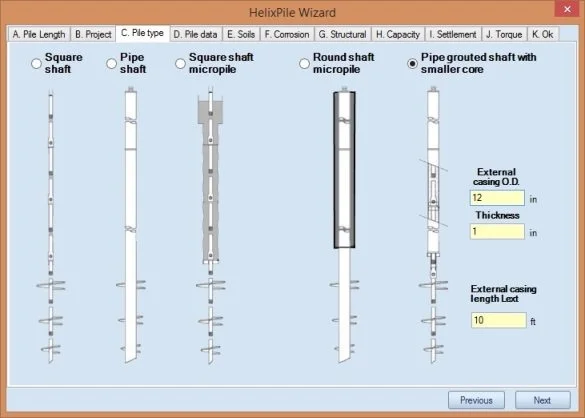
Shaft properties: Diameter, section modulus, and material (e.g., steel).
-
Helix properties: Number of helices, diameter of each helix (typically increasing from top to bottom), pitch, and spacing between helices .
-
Embedment depth: The total length of the pile shaft below the ground surface.
Conducting Axial and Lateral Capacity Analysis
Once the model is defined, proceed to the analysis. For axial capacity, HelixPile automatically calculates the ultimate capacity using both the Individual Plate Method and the Cylindrical Shear Method, and reports the governing lower value . For lateral analysis, the software uses advanced soil-structure interaction models (e.g., p-y curves) to evaluate the pile’s response to horizontal loads and moments, including trapezoidal loads .
Reviewing Results and Optimizing Design
After the analysis, review the results, which are presented in both graphical and tabular formats. You can view capacity curves, stress distribution, and failure envelopes. The software enables quick iteration, allowing you to alter the helix configuration and see how the optimized pile embedment depth changes . This optimization capability helps engineers balance structural integrity with cost-effectiveness.
Best Use Cases
HelixPile V2026 is applicable to a diverse range of geotechnical projects. Its primary use cases include:
-
Infrastructure Projects: Designing foundations for bridges, retaining walls, and transmission towers where speed of installation and minimal soil disturbance are critical.
-
Buildings with Limited Access: Helical piles are ideal for underpinning existing structures, interior retrofits, or sites with restricted headroom where traditional driven piles cannot be used .
-
Renewable Energy: Foundations for solar panel arrays and wind turbines, which often require rapid installation and can be in environmentally sensitive areas.
-
Temporary Structures: Foundation solutions for scaffolding, shoring, and temporary access platforms.
-
New Construction: Designing efficient and cost-effective foundations for commercial and residential buildings, particularly on sites with weak or variable soil conditions.
Advantages and Limitations
Advantages
-
Speed and Efficiency: Helical piles are fast to install, and HelixPile is fast to design. The software’s user-friendly interface and optimization tools significantly cut down on design time .
-
Accuracy and Reliability: By implementing multiple failure modes (Individual Plate and Cylindrical Shear) and integrating with CPT data, HelixPile delivers accurate, defensible designs .
-
Comprehensive Reporting: The ability to generate detailed, equation-backed reports supports transparency and approval processes.
-
Versatility: Capable of analyzing single piles, groups, and rafts with advanced lateral loading conditions .
Limitations
-
Licensing Cost: As a professional-grade software suite, HelixPile represents a significant investment compared to simpler spreadsheet-based tools. Pricing for the comprehensive DeepFND package starts at $9,650.00 .
-
Learning Curve: While the interface is user-friendly, effective use requires a solid understanding of geotechnical engineering principles and foundation design.
-
No Free Version: Unlike some limited-functionality freeware, HelixPile does not offer a permanent free version. However, a free trial is available to evaluate its capabilities.
Alternatives to HelixPile
For engineers who require helical pile design capabilities, several alternatives exist, each with its own strengths.
-
RSPile (Rocscience): This is a general-purpose pile analysis software that added helical pile modeling capabilities in late 2024. It allows engineers to model helical piles alongside driven and bored piles, calculating capacities using similar methods .
-
DeepFND (Full Suite): While HelixPile is the dedicated helical pile module, the full DeepFND suite offers an even broader scope, including structural pile cap design, 3D FEM analysis, and design for non-helical piles (drilled, driven, CFA) . Choosing HelixPile as a standalone is ideal if your focus is exclusively on helical piles.
-
PLAXIS 2D (Seequent): A powerful finite element software used for advanced geotechnical analysis. While it can model helical piles, it is a more complex, general-purpose tool that requires a higher level of expertise and is not dedicated to helical pile design workflows .
Frequently Asked Questions
1. What is HelixPile V2026 used for?
HelixPile V2026 is specialized software for the structural and geotechnical design of helical piles. It is used by engineers to model, analyze, and optimize screw pile foundations for various projects .
2. What is the difference between HelixPile and DeepFND?
HelixPile is a dedicated module for helical pile design, available standalone. DeepFND is the comprehensive suite that includes HelixPile along with tools for designing other pile types, pile caps, rafts, and performing 3D FEM analysis .
3. What analysis methods does HelixPile use for helical piles?
HelixPile calculates axial capacity using two primary methods: the Individual Plate Method and the Cylindrical Shear Method. It uses the lower, governing result to ensure a conservative and safe design .
4. Can HelixPile import CPT data?
Yes, HelixPile allows users to import and interpret full Cone Penetration Test (CPT) logs, which helps in developing more accurate soil profiles for analysis .
5. Does HelixPile support lateral load analysis?
Yes, the software includes advanced lateral pile analysis options, allowing engineers to assess helical pile performance under horizontal loads and moments, including trapezoidal loads .
6. Is HelixPile compatible with Australian Standards?
Yes, the broader DeepFND suite is compliant with Australian Standards such as AS/NZS 1170:2002. It is suitable for use by engineers in regions with similar regulatory frameworks .
7. Where can I purchase HelixPile or get a free trial?
HelixPile V2026 is available for purchase directly from Deep Excavation. The company also offers free trials so engineers can evaluate the software before committing to a license .
Final Thoughts
HelixPile V2026 stands out as a premier solution for engineers dedicated to helical pile foundation design. Its blend of specialized features, user-friendly design, and commitment to the latest analytical methods makes it a powerful tool for improving design accuracy and efficiency. By enabling rapid optimization of pile geometry and helix configurations, HelixPile empowers engineers to deliver safe, cost-effective, and high-performance foundations.
While the software represents a notable investment, the time savings, reduction in design errors, and confidence in the final design justify the cost for many professional design offices. Whether you are a seasoned geotechnical consultant or an engineer looking to expand your foundation design capabilities, HelixPile V2026 is a robust and reliable choice that is well-supported by the developers at Deep Excavation.
Our Paid Service
“We do not sell or provide any software. We only offer professional support services. If any software on your system is not working properly, or you are facing installation errors, crashes, or any other technical issue — just contact us. We will help you fix the problem quickly and remotely via AnyDesk. No software will be provided from our side — only expert troubleshooting and support.”