
Overview of SnailPlus Soil Nail Analysis Software
Table of Contents
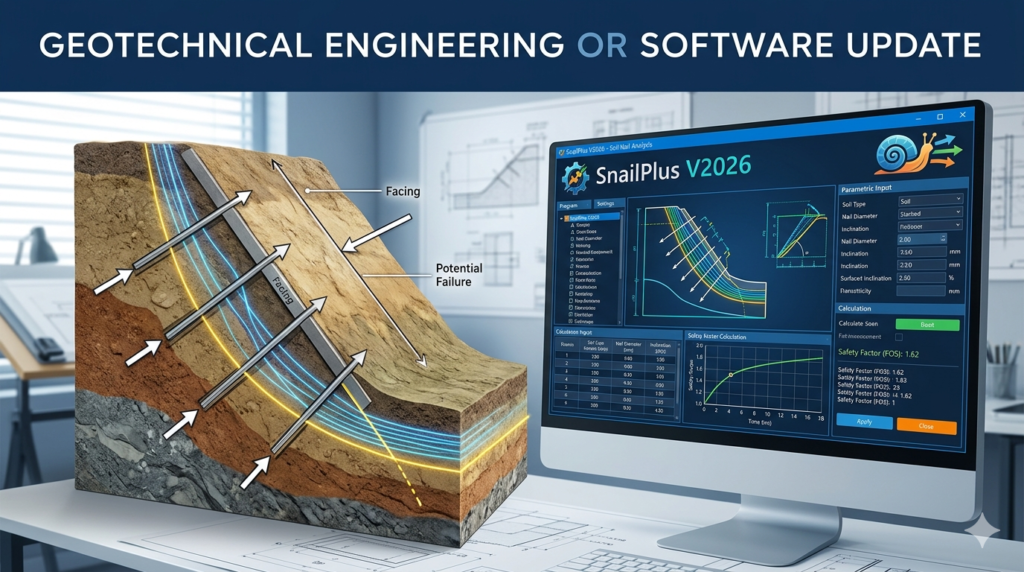
SnailPlus V2026 is a comprehensive slope stability analysis and soil nail wall design software developed by Deep Excavation LLC. This powerful geotechnical engineering tool follows the FHWA (Federal Highway Administration) methodology for soil nail wall design, providing engineers with an interactive environment built on the DeepEX framework .
The software streamlines the design of soil nail walls, shotcrete facing, and head plates in a unified workflow. It enables engineers to identify critical slip surfaces, compute safety factors, and design stabilization systems with confidence . SnailPlus stands out as the only software solution that produces a complete printable report of all design calculations, making it invaluable for project documentation and regulatory compliance .
Developed by practicing engineers, this geotechnical software combines structural and geotechnical design capabilities into one cohesive ecosystem. This eliminates the need to switch between multiple programs or reconcile inconsistent assumptions across different analysis tools .
Key Features of SnailPlus V2026
Slope Stability Analysis Methods
SnailPlus incorporates multiple scientific methods for slope stability analysis, allowing engineers to select the most appropriate approach for their specific project requirements:
-
Bishop Method – A widely accepted limit equilibrium method for circular failure surfaces
-
Morgenstern-Price Method – A general limit equilibrium method that satisfies both force and moment equilibrium
-
Spencer Method – Another rigorous limit equilibrium approach suitable for various slope geometries
-
French Clouterre Standards – Specialized design standards for soil nail systems
Slope Surface Search Capabilities
The software offers extensive flexibility in locating the most critical failure surface:
-
Circular Slope Surfaces – Traditional rotational failure analysis
-
Circular Surfaces with Active and Passive Wedges – Complex failure mechanisms
-
Automatic Surface Search Method – Efficient identification of critical surfaces
-
Trilinear Surface Search Methods – Multi-linear failure surface analysis
-
Block-type Failure Surfaces – Analysis of wedge-style failures
-
User-Defined Slope Surfaces – Custom failure surface specification
Comprehensive Design Code Support
SnailPlus V2026 supports multiple design standards and specifications:
-
ACI Direct Method – American Concrete Institute structural design standards
-
FHWA and FHWA LRFD Methods – Federal Highway Administration methodologies
-
ASD Safety Factors – Allowable Stress Design approach
-
LRFD FHWA GEC-7 – Load and Resistance Factor Design per the Geotechnical Engineering Circular No. 7
Interactive Modeling Environment
The software features a superior interactive interface that enables rapid model creation and editing:
-
Graphical addition and editing of all model elements (shotcrete facing, soil nails, borings, loads)
-
Visual representation of all construction stages
-
Quick modification of facing status with a single click
-
Support for external surcharges on soil surface or facing
-
Inclusion of seismic loads and extreme event analysis
-
Custom soil surfaces with non-horizontal stratigraphy
Full Structural Design Capabilities
SnailPlus provides complete structural design for all soil nail wall components:
-
Soil Nails – Design of steel tendon reinforcement
-
Shotcrete Facing – Analysis of concrete facing thickness and reinforcement
-
Head Plates – Design of bearing plates at nail heads
-
Permanent and Temporary Facing Options – Two-stage facing design capability
What’s New in SnailPlus V2026
The V2026 version represents the latest iteration of Deep Excavation LLC’s commitment to geotechnical software innovation. Building on the improvements introduced in previous versions, this update delivers enhanced capabilities for modern engineering challenges.
Enhanced Analysis Precision
Improved Slice Generation – The V2026 update features refined slice generation for more precise layer intersections. This enhancement ensures greater accuracy in modeling complex soil stratigraphy and delivers more reliable stability calculations .
Updated Code Compliance
The software now incorporates the most current design standards:
-
Updated Concrete Codes – Incorporation of latest structural concrete design provisions
-
Updated AASHTO Load Combinations – Alignment with current American Association of State Highway and Transportation Officials requirements
-
Updated Canadian Code Load Combinations – Compliance with Canadian design standards
These updates ensure that SnailPlus V2026 remains compliant with the latest industry regulations and best practices .
Expanded Design Options
-
Variable Facing Thickness Options – Greater flexibility in modeling shotcrete facing with different thicknesses
-
Prestressed Soil Nails – New capability to model and analyze prestressed soil nail systems
-
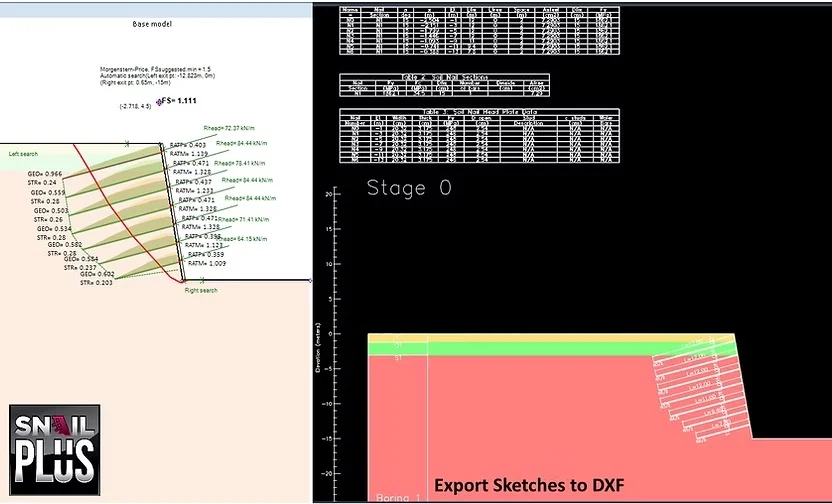
Output Drawings to DXF – Improved export functionality for CAD integration
Enhanced Usability
-
Improved Wizard Generation – Streamlined model creation process with enhanced project parameter definition
-
Enhanced Report Outputs – More comprehensive and professionally formatted calculation reports
System Requirements
The performance and reliability of SnailPlus V2026 depend on adequate hardware specifications. Based on system requirements for similar professional geotechnical software from 2026, the following specifications are recommended for optimal performance :
Minimum Requirements
-
Operating System – Microsoft Windows 10 (Version 22H2 or higher) or Windows 11 (Version 24H2 or higher)
-
Processor – 2.5 GHz or higher
-
Working Memory (RAM) – 16 GB minimum
-
Graphics Card – 2 GB GPU with bandwidth of 29 Gbit/s, compatible with DirectX 11
-
Screen Resolution – 1920 x 1080 with True Color
Recommended Specifications
-
Processor – 4+ performance cores with 4+ GHz Turbo capability
-
Working Memory (RAM) – 32 GB for complex models
-
Graphics Card – Higher-performance GPU for 4K display support (up to 3840 x 2160 resolution)
Note: ARM Processors are not supported. These specifications are based on CAD+T Classic 2026 system requirements .
Installation Guide
Step-by-Step Installation Process
-
System Preparation
-
Verify your system meets the minimum requirements
-
Ensure Windows is fully updated with the latest patches
-
Close all unnecessary applications
-
-
Download the Installer
-
Access the official Deep Excavation LLC customer portal
-
Download the SnailPlus V2026 installation package
-
Verify the integrity of the downloaded file
-
-
Run the Installation
-
Execute the installer with administrator privileges
-
Accept the license agreement
-
Select the installation directory (default recommended)
-
-
License Activation
-
Enter your valid license key when prompted
-
For floating licenses, configure network server settings if applicable
-
Complete the activation process
-
-
Verify Installation
-
Launch SnailPlus and confirm successful startup
-
Check that all features are accessible
-
Run a sample analysis to verify functionality
-
Important Considerations
-
Licensing: Ensure you have a valid license purchased directly from Deep Excavation LLC or an authorized reseller
-
Updates: Enable automatic update checking to stay current with patches
-
Backup: Create a system restore point before installation
How to Use SnailPlus V2026
Getting Started with Model Creation
SnailPlus V2026 features an intuitive Model Wizard that enables rapid project setup. This tool allows engineers to define project parameters, soil properties, construction stages, and design standards in minutes .
Creating a Soil Nail Wall Model
-
Launch the Model Wizard
-
Select “New Project” from the File menu
-
Choose the Model Wizard option for guided setup
-
-
Define Project Parameters
-
Specify the sloped surface geometry
-
Define soil layers and properties (unit weight, friction angle, cohesion)
-
Set nominal bond strength values for each layer
-
Input groundwater conditions
-
-
Configure Construction Stages
-
Define excavation sequence and depths
-
Set soil nail installation stages
-
Specify shotcrete facing application timing
-
Include temporary and permanent facing designations
-
-
Design Soil Nail System
-
Specify nail diameter, length, spacing (vertical and horizontal)
-
Define inclination angle
-
Set tendon yield strength
-
Establish factors of safety for tendon yielding and pullout capacity
-
-
Apply Loads
-
Include external surcharges
-
Define seismic loads with horizontal seismic coefficient
-
Apply appropriate load factors
-
Select load application method (soil nail tensile force or loads/soil weight)
-
-
Run Analysis
-
Select the desired stability analysis method
-
Define slope surface search parameters
-
Execute the analysis
-
Review the most critical failure surface and minimum factor of safety
-
-
Review Results
-
Access the comprehensive printable report
-
Examine graphical representations of nail forces (T-Force)
-
Verify design meets required safety factors
-
Iterate design if necessary
-
Understanding Analysis Output
SnailPlus provides detailed output including:
-
Overall stability factor of safety (FoS)
-
Individual nail forces and failure modes
-
Facing resistance calculations (flexural, punching shear, steel stud)
-
Complete calculation trace for verification
Best Use Cases for SnailPlus
Transportation Infrastructure Projects
SnailPlus is extensively used in highway and roadway projects for stabilizing cut slopes and retaining walls. The software follows FHWA GEC-7 methodologies, making it particularly suitable for federally-funded transportation projects .
Excavation Support Systems
For deep excavation projects, SnailPlus enables engineers to design temporary and permanent soil nail walls that provide effective support during construction. The multi-stage analysis capability allows for modeling of progressive excavation sequences .
Slope Stabilization in Challenging Ground Conditions
The software excels in analyzing slopes with:
-
Multiple soil layers with varying properties
-
Non-horizontal stratigraphy
-
Complex groundwater conditions
-
Seismic loading requirements
Permanent Retaining Structures
For permanent soil nail wall installations, SnailPlus provides comprehensive design verification including:
-
Long-term stability analysis
-
Facing durability assessment
-
Corrosion protection considerations
-
Head plate and connection design
Tunneling and Underground Construction
Engineers working on tunneling projects utilize SnailPlus for portal stability analysis and temporary support design for cut-and-cover sections.
Advantages and Limitations
Advantages
Comprehensive Design Integration
SnailPlus combines slope stability analysis and soil nail wall design in a single unified platform, eliminating the need for multiple software tools and reducing workflow complexity .
Industry Standard Compliance
The software strictly follows FHWA GEC-7 methodology, ensuring designs meet federal standards and regulatory requirements .
Superior User Experience
The interactive graphical interface and Model Wizard enable rapid model creation and intuitive design iteration, significantly reducing project setup time .
Complete Documentation
SnailPlus is the only soil nail analysis software that produces a full printable report of all design calculations, streamlining project documentation and review processes .
Multi-Stage Construction Modeling
The ability to model all intermediate construction stages provides engineers with a complete understanding of wall behavior during and after construction.
Versatile Analysis Methods
Support for multiple limit equilibrium methods and surface search options ensures engineers can apply the most appropriate approach for each project.
Limitations
Platform Dependency
SnailPlus is Windows-only software and does not support ARM processors or other operating systems .
Learning Curve
While the interface is intuitive, engineers new to soil nail design may require training to fully leverage all capabilities.
Licensing Costs
As professional geotechnical software, SnailPlus requires a paid license, which may be a consideration for smaller firms or occasional users.
Specialized Focus
The software is specifically designed for soil nail walls and may not be suitable for other retaining wall types without additional Deep Excavation products.
Alternatives to SnailPlus
DeepEX (Deep Excavation LLC)
DeepEX provides comprehensive shoring design capabilities that include soil nail analysis. Engineers may prefer DeepEX when they need to design multiple types of retaining systems within a single platform, including excavations, retaining walls, sea walls, and tunnels . While SnailPlus focuses specifically on soil nail walls, DeepEX offers broader functionality but with a different workflow.
SNAP (SNAP_2)
SNAP is a software program that also follows FHWA methodologies for soil nail wall design. It supports complicated slopes, multiple soil nail walls, and multiple soil layers. Key differences include SNAP’s approach to data entry and its use of a 2D graphical representation . SnailPlus offers a more interactive 3D modeling environment and superior report generation capabilities.
Comparison Summary
| Feature | SnailPlus V2026 | DeepEX | SNAP |
|---|---|---|---|
| Soil Nail Design | ✓ (Dedicated) | ✓ (Integrated) | ✓ |
| FHWA GEC-7 Compliance | ✓ | ✓ | ✓ |
| Full Printable Report | ✓ | Limited | Limited |
| Interactive 3D Modeling | ✓ | ✓ | 2D Only |
| Multi-Stage Analysis | ✓ | ✓ | ✓ |
| Multiple Analysis Methods | ✓ | ✓ | Limited |
| Specialized Focus | High | Broad | Medium |
Other Related Software
-
RetainEX – Specialized for gravity retaining wall design
-
DeepFND – Foundation and pile design software
-
RocPlane – Planar rock slope stability analysis
-
SWedge – Surface wedge stability analysis for rock slopes
-
Dips – Stereographic projection for orientation-based data analysis
Frequently Asked Questions
What is SnailPlus used for in geotechnical engineering?
SnailPlus is specialized software used for slope stability analysis and soil nail wall design. It enables engineers to identify critical slip surfaces, compute safety factors, and design soil nail reinforcement systems, shotcrete facing, and head plates. The software follows FHWA GEC-7 methodology and is widely used in transportation, excavation, and slope stabilization projects .
How does SnailPlus compare to other soil nail design software?
SnailPlus distinguishes itself through its interactive graphical interface, comprehensive reporting capabilities, and specialized focus on soil nail walls. Unlike broader geotechnical software, SnailPlus is dedicated specifically to soil nail analysis and design. It supports multiple limit equilibrium methods (Bishop, Morgenstern-Price, Spencer) and produces full printable design reports, making it unique in the market .
What analysis methods does SnailPlus support?
SnailPlus supports Bishop Method, Morgenstern-Price General Limit Equilibrium Method, Spencer Method, and French Clouterre standards. These methods enable engineers to apply the most appropriate approach for their specific project conditions .
What design codes does SnailPlus comply with?
SnailPlus complies with ACI Direct Method, FHWA methodology, and FHWA LRFD GEC-7 standards. The software supports both Allowable Stress Design (ASD) and Load and Resistance Factor Design (LRFD) approaches, along with AASHTO and Canadian code load combinations .
What are the system requirements for SnailPlus V2026?
SnailPlus V2026 requires Windows 10 (Version 22H2 or higher) or Windows 11 (Version 24H2 or higher), a 2.5 GHz processor, 16 GB RAM minimum, and a DirectX 11 compatible graphics card with 2 GB GPU. For optimal performance, 32 GB RAM and a 4+ GHz processor with performance cores are recommended. ARM processors are not supported .
Can SnailPlus model temporary and permanent facing designs?
Yes, SnailPlus supports both temporary and permanent facing designs, including two-stage facing where temporary facing is used during construction and permanent facing in the final stage. The facing status can be changed in any construction stage with a single click, providing flexibility in modeling phased construction .
How do I obtain a license for SnailPlus?
Licenses for SnailPlus are obtained directly from Deep Excavation LLC or through authorized resellers. The company offers various licensing options including individual and floating licenses. Visit the official Deep Excavation website for current pricing and licensing details .
Final Thoughts
SnailPlus V2026 represents a significant advancement in soil nail analysis software, combining engineering rigor with user-friendly design. Developed by Deep Excavation LLC, this geotechnical engineering tool follows established FHWA GEC-7 methodologies while offering the flexibility to incorporate multiple analysis methods and design codes .
The software’s greatest strengths lie in its specialized focus on soil nail walls, comprehensive reporting capabilities, and interactive modeling environment. Engineers can design complex soil nail systems with confidence, knowing that the software produces complete documentation suitable for project review and regulatory compliance.
The V2026 version brings meaningful improvements including enhanced slice generation for precise analysis, updated code compliance with current AASHTO and Canadian standards, and expanded design options such as prestressed soil nails and variable facing thicknesses . These refinements demonstrate Deep Excavation LLC’s commitment to continuous improvement and responsiveness to evolving industry needs.
For geotechnical engineers engaged in transportation infrastructure, deep excavation projects, and slope stabilization, SnailPlus V2026 provides the specialized tools needed to deliver safe, constructible, and code-compliant soil nail wall designs. While alternatives like DeepEX offer broader retaining wall capabilities, SnailPlus remains the preferred choice for dedicated soil nail analysis and design, particularly where comprehensive design documentation is essential.
Our Paid Service
“We do not sell or provide any software. We only offer professional support services. If any software on your system is not working properly, or you are facing installation errors, crashes, or any other technical issue — just contact us. We will help you fix the problem quickly and remotely via AnyDesk. No software will be provided from our side — only expert troubleshooting and support.”