
Overview of Hedge Mimiq Pro
Table of Contents
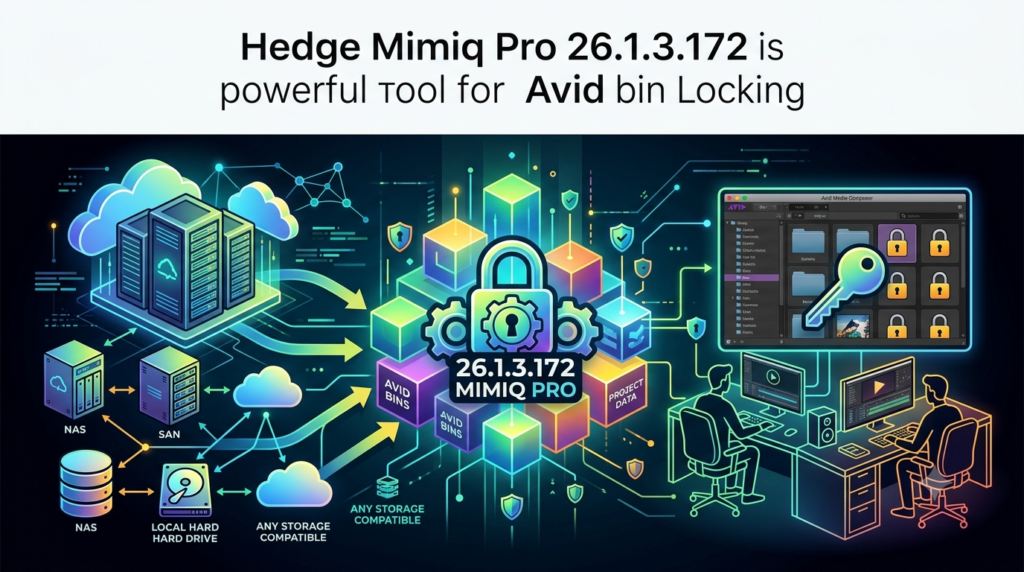
Hedge Mimiq Pro is a specialized software solution designed to liberate Avid Media Composer editors from the constraints of proprietary, expensive storage systems. It enables robust Avid bin locking on virtually any type of storage, from standard network-attached storage (NAS) to high-performance SANs and even cloud-based drives . By allowing Media Composer to recognize these diverse storage volumes as compatible shared workspaces, Mimiq Pro facilitates seamless, collaborative editing workflows for both on-premise and remote teams .
Why Bin Locking Matters for Collaborative Editing
In a multi-editor environment, bin locking is essential to prevent data conflicts. When an editor opens a project bin, a lock file (.lck) is created, signaling to other users that the bin is in use and should only be opened in a read-only state to avoid overwriting changes . Avid’s native bin locking typically requires a dedicated Avid NEXIS or ISIS storage system. Mimiq Pro bridges this gap, providing the same Avid-style bin locking functionality for third-party storage options, empowering teams with flexibility and cost savings .
Key Features of Mimiq Pro
Mimiq Pro transforms how post-production teams interact with their storage and collaborate on projects. Its feature set is tailored to enhance productivity, flexibility, and workflow efficiency.
Workspaces: Turn Any Storage into an Avid Volume
The Workspaces feature is a cornerstone of Mimiq Pro. It allows you to turn any block-based storage—such as a RAID array, a SAN (like Quantum StorNext), or even an internal SSD—into a volume that Media Composer recognizes as an Avid workspace . This eliminates the need for specialized hardware and provides an easy way to manage, share, and distribute these workspaces across an entire team .
NEXIS and Facilis Coexistence
A major advantage of Mimiq Pro is its ability to work alongside existing shared storage systems. NEXIS Coexistence allows you to use a traditional Avid NEXIS simultaneously with third-party storage like a NAS or cloud drive . For instance, you can store bins on one share and media on another, optimizing performance and storage costs. This flexibility is also available for facilities using Facilis storage .
Cloud Drive Support for Remote Workflows
Mimiq Pro extends collaborative capabilities to the cloud, making it a powerful tool for remote and hybrid teams. It officially supports and is regularly updated for popular cloud storage providers like LucidLink Filespaces and Suite Studios . This allows editors to work on the same projects from anywhere in the world with full bin locking, as if they were in the same edit suite.
Broad Compatibility and Up-to-Date Support
Hedge ensures Mimiq Pro is future-proof and widely compatible. It supports all Avid-supported versions of Media Composer, with a special build available for Media Composer 2018 on macOS Mojave . With a dedicated technology stack for both macOS and Windows, including native support for Apple silicon, Mimiq Pro offers an optimized experience regardless of your platform .
What’s New in Version 26.1.3.172
The latest version of Hedge Mimiq Pro, 26.1.3.172, continues the trend of solidifying its support for cloud workflows and maintaining compatibility with the latest industry tools. The version released on March 30, 2026, focuses primarily on expanding support for new updates from its key cloud storage partners .
Summary of Updates in the 26.1 Series
The 26.1 release cycle has introduced a series of updates to ensure seamless integration with the latest versions of cloud services :
-
Cloud Drive Support: Version 26.1.3.172 adds “Pro Support” for the newest versions of Suite Studios (Build 65.36.0) and LucidLink (3.7 Build 8012).
-
Media Composer Compatibility: The 26.1 series introduced formal support for Media Composer 2025.12, ensuring users can upgrade their NLE without losing Mimiq Pro’s bin-locking functionality.
-
Enhanced Workspace Management: Building on the introduction of “Managed Workspaces,” this update lays the groundwork for future features like “Workspace Groups,” which will allow administrators to create and distribute entire sets of Workspaces to all users, simplifying large-scale deployment .
System Requirements
To run Hedge Mimiq Pro effectively, your system must meet the following requirements:
Avid Media Composer:
-
A Media Composer | Ultimate subscription or a perpetual license is required .
-
Version 2025.12 is supported as of the 26.1 release .
-
A special build (
Mimiq 18.1) is available for Media Composer 2018 running on macOS Mojave .
Operating System:
-
macOS: Modern versions of macOS are supported, including those running on Apple Silicon (with native support) .
-
Windows: Windows 10 and 11 are supported .
Storage:
-
Network Volumes: SMB, NFS, and AFP shares are fully supported for bin locking out of the box .
-
Workspaces (Pro): Requires a compatible block-based storage volume (e.g., SAN, RAID) .
-
Cloud Drives (Pro): A LucidLink or Suite Studios account and its respective client application are needed .
Installation Guide
Installing and activating Mimiq Pro is a straightforward process designed to get your team up and running quickly.
-
Download and Install: Download the latest installer for macOS or Windows from the official Hedge website. Run the installer and follow the on-screen prompts. The installer now also includes an uninstaller for easier management .
-
Activate Your License: Launch Mimiq and use the License Manager to activate your license. This modern system allows for unlimited portability and easy remote deactivations, avoiding the hassles of traditional MAC address-based licensing .
-
Mount Your Storage: Connect the storage you intend to use. This could be a network share (SMB, NFS, AFP) via your operating system’s file explorer, a cloud volume via its dedicated app, or a physical drive that you plan to turn into a Workspace .
-
(For Workspaces on macOS) Install macFUSE: The first time you create a Workspace, Mimiq Pro will perform a preflight check. On macOS, this requires
macFUSE, a kernel extension for creating virtual filesystems. Mimiq Pro will guide you through the installation process. On Apple Silicon Macs, this process requires setting your startup security policy to “Reduced Security” to allow signed kernel extensions to load . -
Create Workspaces (Optional): To turn a block-based storage volume into an Avid-compatible workspace, use the Mimiq app to create and name a new Workspace, pointing it to the desired folder.
How to Use the Software: A Step-by-Step Guide
Once installed, using Mimiq Pro to enable bin locking on your chosen storage is simple.
-
Launch Mimiq: Launch the application. It will run as a helper app in the menu bar (macOS) or system tray (Windows) .
-
Verify Volumes: Ensure your desired volumes (network shares, cloud drives, or Workspaces) are mounted on your system. Mimiq will detect them and display them in its interface with a green status if they are accessible .
-
Launch Media Composer: Open Avid Media Composer. When you create or open a shared project on one of the eligible volumes, Media Composer will recognize it as a compatible storage location.
-
Confirm Bin Locking is Active:
-
When you open a bin, Media Composer will display the team member’s computer name and a lock indicator, confirming that bin locking is active .
-
You can also verify this by navigating to
About Avid Media Composer > Hardware(macOS) orHelp > About Avid Media Composer > Hardware(Windows). The volumes managed by Mimiq Pro will be listed as “Avid NEXIS Drives” .
-
Best Use Cases
Hedge Mimiq Pro is an incredibly versatile tool that empowers creative teams in numerous scenarios .
-
Post-Production Facilities Migrating from Legacy Systems: Facilities can use Mimiq Pro to migrate off expensive, aging Avid storage to more modern and cost-effective solutions like high-performance SANs (e.g., Quantum StorNext) or RAIDs without losing collaborative bin-locking capabilities .
-
Remote and Hybrid Editing Teams: By supporting cloud drives like LucidLink and Suite Studios, Mimiq Pro enables geographically dispersed editors to collaborate on Avid projects as if they were in the same room, with full bin locking to prevent conflicts .
-
Portable Editorial Workflows: The combination of Mimiq Pro with a portable, high-speed Thunderbolt storage solution like iodyne Pro Data creates an “Open Workflow Bundle” . This allows small teams to have a complete, collaborative Avid editing environment that is quiet, portable, and can be set up without complex IT infrastructure .
-
Mixed NLE Environments: Studios that need to run Avid Media Composer alongside other NLEs like Premiere Pro or Final Cut Pro can use Mimiq Pro to integrate Avid into their existing shared storage infrastructure, eliminating the need for a separate, dedicated system .
Advantages and Limitations
Advantages
-
Storage Freedom: Liberates Avid editors from being locked into proprietary and expensive hardware .
-
Cost-Effective Collaboration: Enables powerful, multi-user Avid workflows on more affordable NAS and SAN solutions .
-
Seamless Remote Workflow: Bridges the gap between on-premise and cloud-based editing, supporting major remote workflow platforms .
-
NEXIS Coexistence: Adds flexibility by allowing third-party storage to be used alongside existing Avid NEXIS systems .
-
Flexible Licensing: Offers perpetual licenses with a year of free updates and support, with flexible pricing options .
Limitations
-
Requires a Pro License for Advanced Features: Features like Workspaces, NEXIS Coexistence, and cloud drive support require the higher-tier Mimiq Pro license .
-
Setup for Workspaces: Creating Workspaces on macOS requires a slightly more technical setup, including adjusting macOS security settings and installing
macFUSE. -
Dependence on Cloud Clients: Compatibility with cloud drives depends on timely updates from both Hedge and the cloud service provider .
Alternatives to Hedge Mimiq Pro
While Hedge Mimiq Pro is an industry-leading tool for Avid bin locking on third-party storage, alternatives exist.
-
Avid NEXIS | PRO & NEXIS | E2: Avid’s own shared storage solutions are the most direct alternative. They offer native, guaranteed performance and integration with Media Composer. However, they are often significantly more expensive and less flexible in terms of storage choices.
-
Osiris (by Projective Technology GmbH): This is a lightweight client software that also enables Avid editors to collaborate on Media Composer projects simultaneously. Osiris provides Avid-style bin locking for Windows and macOS clients on a wide variety of storage systems .
-
Avid’s Native Network Support (SMB/NFS): Avid Media Composer does have built-in support for working with bins on network volumes like SMB or NFS. However, this workflow is often less reliable and can be problematic without a dedicated solution like Mimiq Pro, especially for larger teams .
Frequently Asked Questions
Q1: What is Hedge Mimiq Pro used for?
Hedge Mimiq Pro is a software application that enables Avid bin locking on non-Avid storage. It allows Avid Media Composer editors to collaborate on shared projects using NAS, SAN, cloud drives, or even local SSDs, freeing them from the need for expensive, proprietary storage .
Q2: What is the difference between Mimiq and Mimiq Pro?
The standard version of Mimiq supports bin locking on standard network mounts (SMB, NFS, AFP). Mimiq Pro adds premium features like Workspaces (for SAN, RAID, and SSD), NEXIS Coexistence, and full support for remote cloud workflows with LucidLink and Suite Studios .
Q3: What storage systems does Mimiq Pro support?
Mimiq Pro supports a vast array of storage. It works out-of-the-box with SMB, NFS, and AFP shares. With the Pro license, it also supports Workspaces on block-based storage (like RAIDs and SANs), facilitates NEXIS Coexistence, and supports cloud drives like LucidLink and Suite Studios .
Q4: Does Mimiq Pro work with LucidLink?
Yes. Mimiq Pro has official support for LucidLink Filespaces. The Hedge team releases regular updates to ensure compatibility with the latest LucidLink client versions, enabling robust, remote collaborative workflows on LucidLink’s cloud storage platform .
Q5: Is Mimiq Pro a subscription?
No, Mimiq Pro is not a subscription. Hedge offers a perpetual license. Each activation includes one year of free updates and support. There are no monthly fees or long-term contracts, and the 10-day trial allows you to test the software fully before purchasing .
Q6: How do I create a Workspace in Mimiq Pro?
To create a Workspace, you must have a Mimiq Pro license. In the Mimiq app, use the “Add Workspace” feature. On macOS, this will first require you to install macFUSE and adjust your security settings. You then simply select the folder on your block-based storage that you want to turn into an Avid workspace .
Final Thoughts
Hedge Mimiq Pro 26.1.3.172 stands as an indispensable tool for any post-production team that values flexibility, cost-efficiency, and seamless collaboration in their Avid Media Composer workflows. By eliminating the storage lock-in of traditional Avid solutions, it empowers editors to choose the best tools for their specific needs, whether on-premise or in the cloud. Its commitment to supporting the latest industry standards and cloud storage platforms ensures that it remains a future-proof solution for years to come.
Our Paid Service
“We do not sell or provide any software. We only offer professional support services. If any software on your system is not working properly, or you are facing installation errors, crashes, or any other technical issue — just contact us. We will help you fix the problem quickly and remotely via AnyDesk. No software will be provided from our side — only expert troubleshooting and support.”