
Overview of the Software
Table of Contents
The CSTSOFT ActiveX GDIPlus V5.5 is a powerful development toolkit designed for software engineers working within the Windows ecosystem. This component library leverages the Microsoft GDI+ graphics engine to provide a robust set of ActiveX controls. Developers use this pack to create modern, visually rich user interfaces and process high-quality 2D vector graphics without writing complex low-level drawing code.
Unlike standard image processing libraries, this pack focuses on anti-aliasing, gradient shading, and alpha blending. It serves as a critical bridge between legacy Visual Basic 6.0 applications and contemporary graphic design standards, allowing older software to render modern PNG and JPEG assets natively.
Key Features
This library distinguishes itself through a comprehensive suite of drawing capabilities.
-
Advanced 2D Vector Rendering: Draw lines, curves, bezier shapes, and polygons with precise control over thickness and style.
-
Image Format Compatibility: Supports loading and saving raster images, including BMP, JPEG, GIF, TIFF, and PNG.
-
Alpha Blending & Transparency: Render semi-transparent objects and layered graphics for modern UI effects.
-
Anti-Aliased Graphics: Smooth jagged edges in text and shapes, improving visual fidelity.
-
Matrix Transformations: Rotate, scale, shear, and translate the drawing coordinate system easily.
-
Gradient Brushes: Implement linear and path gradients to create depth in buttons and panels.
What’s New in the Latest Version (V5.5)
The V5.5 update focuses on stability and modern resolution handling.
-
High-DPI Awareness: Improved scaling logic for displays with high pixel densities.
-
Memory Optimization: Reduced memory leaks when rapidly redrawing large canvases.
-
Extended PNG Support: Better handling of 32-bit PNGs with full alpha channels.
-
Performance Boost: Faster rendering times for complex vector paths.
System Requirements
Minimum Requirements
-
Operating System: Windows 7, 8, 10, or 11 (32-bit or 64-bit)
-
Development Environment: Visual Studio 6.0, Visual Studio .NET, or any ActiveX container (VB6, VC++, Delphi)
-
Runtime: Microsoft GDI+ (typically pre-installed on Windows)
-
Disk Space: 25 MB
Recommended Configuration
-
OS: Windows 10/11
-
IDE: Visual Studio 2019 or 2022 (for legacy ActiveX support)
-
RAM: 8 GB or higher for complex rendering tasks
Installation Guide
Installing the CSTSOFT ActiveX GDIPlus V5.5 follows standard Windows component registration.
-
Download the Package: Obtain the official installer from the developer’s website.
-
Run the Installer: Execute the setup file with administrator privileges.
-
Register the Controls: The setup automatically registers the
.ocxfiles with your Windows registry. (Do not manually copy.ocxfiles without the installer). -
Add to IDE: Open your development environment. Right-click the toolbox, select “Components,” and browse for “CSTSOFT GDIPlus Control.”
-
Verification: Drag the control onto a test form. If no errors appear, the installation is successful.
Note: If you encounter registration errors, ensure you have administrative rights and that the Microsoft Visual C++ Redistributable is installed.
How to Use the Software
Basic Implementation
To draw a gradient rectangle, you need to initialize the GdiplusStartupInput structure. Here is the general logic flow:
-
Initialize the GDI+ token.
-
Create a
Graphicsobject linked to your window handle. -
Define a
LinearGradientBrush. -
Call
FillRectangleto render the shape.
Code Snippet Example (VB6 Style)
' Initialize GDI+
Call GdipCreateFromHDC(hDC, Graphics)

' Define a gradient from red to blue
Call GdipCreateLineBrush(StartPoint, EndPoint, Red, Blue, WrapModeTile, Brush)

' Draw a rectangle
Call GdipFillRectangle(Graphics, Brush, 10, 10, 200, 100)

' Clean up objects
Call GdipDeleteBrush(Brush)
Call GdipDeleteGraphics(Graphics)
Best Use Cases
The CSTSOFT ActiveX GDIPlus V5.5 excels in specific legacy and niche scenarios.
-
Legacy VB6 Modernization: Updating the UI of old enterprise applications without rewriting the entire codebase.
-
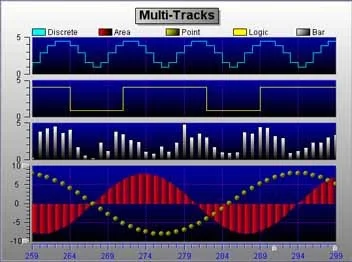
Charting and Dashboards: Creating dynamic, real-time graphs for industrial monitoring software.
-
Map Rendering: Displaying vector-based maps or floor plans where scaling is required.
-
Photo Viewers: Building lightweight image manipulation tools that support basic effects and rotation.
Advantages and Limitations
Advantages
-
Legacy Support: The only viable option for ActiveX containers to access GDI+ features.
-
Ease of Use: Abstracted API calls make complex drawing simple for junior developers.
-
Stability: Mature codebase with few breaking changes.
Limitations
-
Platform Lock-in: Windows-only. No support for web or mobile deployment.
-
Deprecated Technology: ActiveX is declining in support for modern browsers and security models.
-
Performance: Slower than Direct2D or OpenGL for high-frame-rate games or 3D rendering.
-
No GPU Acceleration: Relies solely on the CPU for rendering.
Alternatives to the Software
If CSTSOFT ActiveX GDIPlus Pack V5.5 does not fit your project, consider these alternatives based on your development environment.
| Alternative | Platform | Best For |
|---|---|---|
| Microsoft GDI+ Flat API | Windows (C++) | Developers needing raw access without an ActiveX wrapper. |
| ImageMagick | Cross-platform | Batch processing and image conversion (CLI based). |
| SkiaSharp | Cross-platform (.NET) | Modern 2D graphics for C# applications (replaces ActiveX). |
| Direct2D | Windows | High-performance rendering for games or intensive UI. |
Frequently Asked Questions
Is CSTSOFT ActiveX GDIPlus Pack V5.5 compatible with Windows 11?
Yes. The software runs reliably on Windows 11 using the built-in compatibility layer for legacy ActiveX controls.
Can I use this library with C# .NET 6.0?
While possible via COM interop, it is not recommended. Native .NET libraries like System.Drawing.Common or SkiaSharp offer better performance and support.
Does this pack support vector file formats like SVG or EPS?
No. V5.5 focuses on raster output and vector drawing primitives, but it does not parse external SVG files.
How do I resolve “Runtime error 429: ActiveX component can’t create object”?
This indicates a failed registration. Uninstall the pack, restart your machine, and reinstall “As Administrator” to ensure the OCX files are correctly registered.
Is there a 64-bit version of the control?
Most legacy versions are 32-bit, but they run seamlessly under WOW64 on 64-bit Windows systems. Check the official documentation for native x64 builds.
Is a license required for commercial distribution?
Yes. CSTSOFT typically requires a commercial developer license for distributing applications that bundle the GDIPlus Pack. Verify your license type (Standard vs. Enterprise) before deployment.
Final Thoughts
The CSTSOFT ActiveX GDIPlus Pack V5.5 serves a specific but crucial role in the software ecosystem. While modern developers should look toward .NET MAUI or Qt for new projects, this toolkit is invaluable for maintaining and upgrading legacy Visual Basic and C++ applications.
If your goal is to extend the life of an ActiveX-based application with modern gradient interfaces, anti-aliased text, or PNG transparency, this pack remains a reliable, feature-complete solution. Always ensure you obtain the software through official channels to maintain compliance and security.
Our Paid Service
“We do not sell or provide any software. We only offer professional support services. If any software on your system is not working properly, or you are facing installation errors, crashes, or any other technical issue — just contact us. We will help you fix the problem quickly and remotely via AnyDesk. No software will be provided from our side — only expert troubleshooting and support.”