
Overview of WeBuilder 2025
Table of Contents
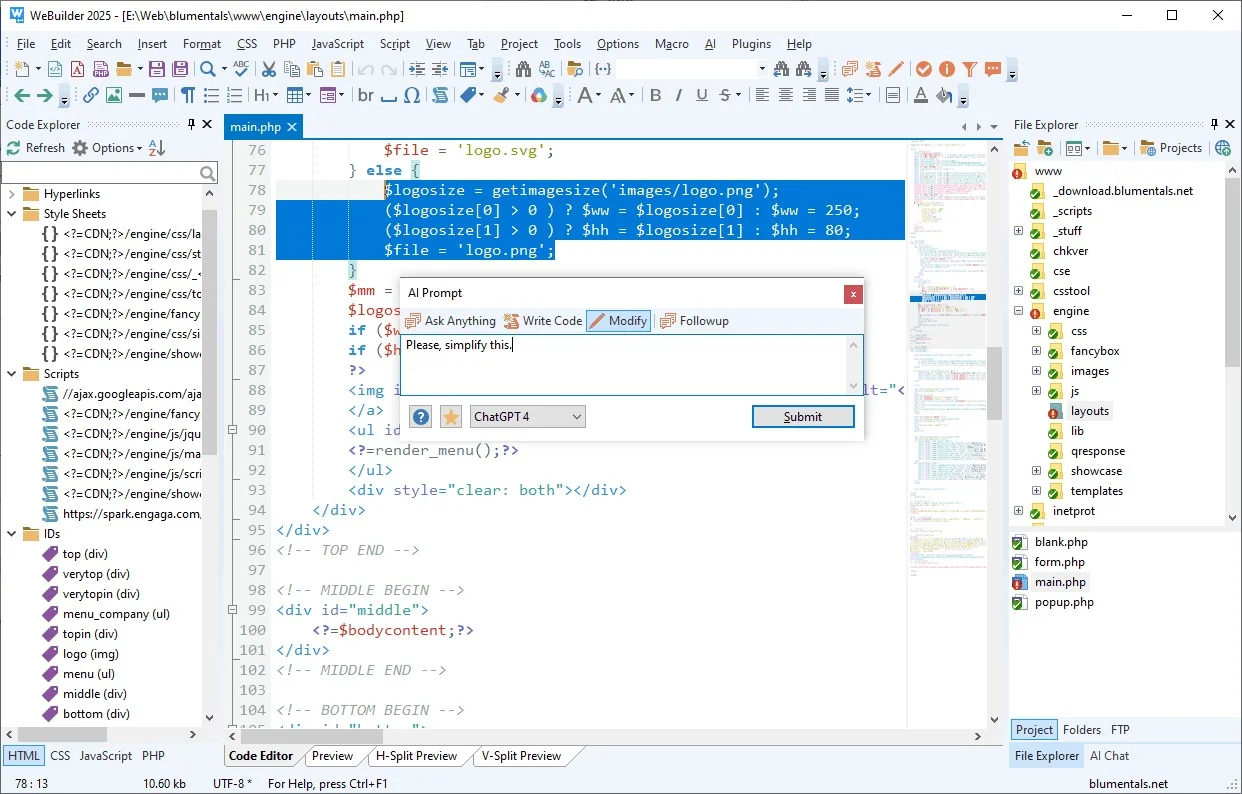
WeBuilder 2025 version 18.4 is a comprehensive, all-in-one code editor designed for web developers who need a powerful and fast environment for writing code. It combines a rich set of features including a robust code editor with syntax highlighting, an integrated FTP client, a built-in browser preview, and a host of validation and code-formatting tools. Unlike many modern, minimalistic code editors that rely on a plugin ecosystem for core functionality, WeBuilder provides a complete, out-of-the-box solution for HTML, CSS, JavaScript, PHP, ASP, and more. This makes it an exceptional choice for developers who value efficiency and a streamlined, integrated development environment (IDE). The software is developed by Blumentals Solutions, a company known for its long-standing expertise in creating powerful yet accessible developer tools for Windows.
Key Features of WeBuilder 2025
The strength of WeBuilder lies in its extensive and well-integrated feature set, all available without the need for additional plugins. Here are the key features that make it a top-tier web development editor:
-
Syntax Highlighting and Code Folding: Supports a wide range of programming and markup languages including HTML, CSS, JavaScript, PHP, Python, Ruby, and more. Code folding allows you to collapse and expand sections of code for better navigation.
-
Intelligent Autocompletion and Syntax Checker: Speed up your workflow with smart code completion for HTML, CSS, and JavaScript. The built-in syntax checker helps identify and correct errors in real-time, preventing bugs from reaching the browser.
-
FTP, SFTP, FTPS, and WebDAV Client: Seamlessly manage your server files with a built-in client that supports secure file transfer protocols. Publish your local changes directly from the editor with a single click.
-
Built-in Web Browser Preview: A unique and time-saving feature. Preview your work instantly without switching between applications. The preview is synchronized with the editor, allowing you to see changes as you type.
-
Code Library and Snippets: Store frequently used code blocks, HTML structures, and CSS styles for easy reuse. This feature significantly accelerates development time and ensures consistency.
-
Advanced Find and Replace: Search across multiple files and folders. Use powerful regular expressions to find and replace complex code patterns.
-
HTML and CSS Code Beautifier: Automatically format your code for improved readability, making it easier to debug and maintain.
-
Project Management: Organize your work efficiently by managing multiple projects. Each project can have its own set of files, settings, and FTP configurations.
-
Support for Modern Frameworks: Works seamlessly with popular frameworks like Bootstrap, Foundation, and jQuery.
What’s New in WeBuilder 2025 v18.4
This latest version focuses on enhancing performance, improving the user interface, and refining core features.
-
Enhanced Dark Theme: The popular dark theme has been updated for better contrast and clarity, reducing eye strain during long coding sessions.
-
Optimized Code Completion: The autocomplete engine is now faster and more accurate, leading to a more fluid coding experience.
-
Improved High-DPI (4K) Monitor Support: The user interface scales perfectly on high-resolution monitors, ensuring crisp and sharp text and icons.
-
Updated PHP and JavaScript Syntax Support: The editor now recognizes the latest language constructs, providing more accurate syntax highlighting and error checking.
System Requirements
Before you download and install WeBuilder 2025, ensure your system meets the following requirements:
-
Operating System: Windows 7, Windows 8, Windows 10, or Windows 11 (both 32-bit and 64-bit versions are supported). WeBuilder is a native Windows application and is not natively supported on macOS or Linux.
-
Processor: 1 GHz or faster processor.
-
Memory (RAM): 1 GB of RAM (2 GB recommended for larger projects).
-
Hard Disk Space: 200 MB of free space for installation.
-
Other: Microsoft .NET Framework 4.0 or higher (will be installed automatically if not present).
Installation Guide
Installing WeBuilder 2025 is a straightforward process:
-
Download the Installer: Obtain the WeBuilder 2025 v18.4 installer from the official Blumentals Solutions website.
-
Run the Installer: Locate the downloaded
.exefile (e.g.,webuilder2025.exe) and double-click it to launch the installation wizard. -
Choose the Installation Language: Select your preferred language and click “OK.”
-
Accept the License Agreement: Read the license agreement and select “I accept the agreement” to proceed.
-
Select Destination Location: Choose the directory where you want to install WeBuilder. The default location is
C:\Program Files (x86)\WeBuilderorC:\Program Files\WeBuilder. Click “Next.” -
Select Start Menu Folder: Choose the folder name for the program shortcuts in the Windows Start Menu.
-
Select Additional Tasks: Here, you can choose to create a desktop icon and associate file types with WeBuilder.
-
Ready to Install: Review your settings and click “Install.”
-
Complete the Installation: Once the process is complete, click “Finish.” You can now launch WeBuilder from the Start Menu or the desktop shortcut.
How to Use WeBuilder 2025
Getting started with WeBuilder is intuitive. Here’s a quick guide to its core workflow:
-
Starting a New Project:
-
Go to
Project>New Project. -
Enter a name for your project and specify the folder where you want to store its files.
-
(Optional) Set up an FTP connection for automatic publishing.
-
-
Creating a New File:
-
Click
File>Newor use the keyboard shortcutCtrl+N. -
Choose the file type (e.g., HTML, PHP, CSS, JavaScript).
-
The editor will automatically apply the correct syntax highlighting and provide relevant code completion.
-
-
Writing Code:
-
Begin typing your code. The editor will suggest auto-completions.
-
Use the built-in preview to see real-time results. Click the “Preview” button or use the shortcut
F12. The preview will be synchronized with the active file. This is one of the most popular features for web design.
-
-
Publishing with Built-in FTP:
-
Configure your server connection in the
Projectsettings. -
Once configured, you can upload individual files (right-click >
Upload) or the entire project.
-
Best Use Cases for WeBuilder 2025
WeBuilder is a versatile tool that caters to a wide range of web development and design tasks.
-
For Front-End Web Developers:
-
The instant preview is invaluable for rapid prototyping and design adjustments.
-
The HTML and CSS code beautifiers ensure clean, readable code.
-
Use the integrated color picker and CSS editor tools for efficient styling.
-
-
For Web Designers:
-
Use the advanced HTML editing to create clean, semantic code quickly.
-
Validate your pages with the built-in HTML and CSS validators to ensure they meet web standards.
-
Test layout and styling instantly with the synchronized preview.
-
-
For Webmasters and Site Managers:
-
Manage your websites directly with the built-in FTP, making updates quick and easy.
-
Search and replace across multiple files to update site-wide content or code.
-
-
For Education and Learning:
-
The validation and syntax checking helps students learn to write correct code.
-
Code snippets and libraries provide a useful reference for new developers.
-
Advantages and Limitations
| Advantages (Pros) | Limitations (Cons) |
|---|---|
| All-in-One Solution: No need for external plugins. | Windows Only: No native support for macOS or Linux. |
| Fully Integrated Preview: Significant time-saver. | User Interface: Can feel slightly outdated to some. |
| Lightweight and Fast: Runs efficiently on modest systems. | Plugin Ecosystem: Smaller compared to VS Code. |
| Excellent Value: One-time purchase (not subscription). | Less Modern: Missing some cutting-edge features. |
| Powerful Built-in FTP: Makes publishing seamless. | |
| Great for Web Design: Strong HTML/CSS tooling. |
Alternatives to WeBuilder 2025
While WeBuilder is an excellent choice, you may also consider these alternatives depending on your specific needs.
-
Microsoft Visual Studio Code: A free, open-source, and highly popular code editor. It is highly customizable and has an enormous library of extensions but requires more initial configuration.
-
Sublime Text: A fast, sophisticated, and highly customizable text editor. It offers excellent performance but requires a license for continued use.
-
Adobe Dreamweaver: A professional web design tool with WYSIWYG capabilities. It is more expensive and resource-heavy but offers a visual design interface.
-
Atom: A free, open-source text editor developed by GitHub. It is highly customizable but can be resource-intensive.
Frequently Asked Questions (FAQ)
1. What is the primary difference between WeBuilder and Visual Studio Code?
WeBuilder is an all-in-one integrated development environment (IDE) with key features like a built-in FTP client and preview built-in, requiring no setup. Visual Studio Code is a lightweight, open-source code editor that becomes an IDE through a vast ecosystem of plugins and extensions.
2. Is WeBuilder 2025 available for Mac or Linux?
No, WeBuilder is developed exclusively for the Windows operating system. It is not available for macOS or Linux.
3. Does WeBuilder 2025 support the latest version of PHP?
Yes, WeBuilder 2025 includes updated syntax support for the latest PHP versions, ensuring accurate highlighting and error checking.
4. Can I use WeBuilder for Node.js development?
Yes, WeBuilder supports JavaScript syntax highlighting and can be used to edit and manage Node.js files.
5. Is there a trial version available for download?
Yes, Blumentals Solutions offers a fully functional 30-day trial version of WeBuilder. You can download it from their official website to evaluate the software before purchasing a license.
6. What file formats does WeBuilder support?
WeBuilder supports a wide array of web development file formats, including HTML, XHTML, CSS, PHP, JavaScript, ASP, Ruby, Python, Perl, and many others. It also handles plain text and configuration files.
Final Thoughts
WeBuilder 2025 v18.4 stands as a powerful and efficient all-in-one web development code editor. It is particularly well-suited for Windows developers and web designers who value a complete, integrated toolset without the complexity of managing a plugin ecosystem. Its standout features, like the real-time preview and built-in FTP client, make web development workflows smoother and more productive. If you are a front-end developer, web designer, or webmaster seeking a reliable, fast, and comprehensive solution for Windows, WeBuilder is an outstanding choice that offers excellent value for its price.
Our Paid Service