
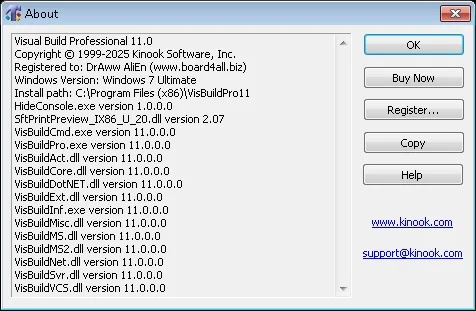
Overview of Visual Build 11.0
Table of Contents
Visual Build 11.0 is a powerful software build automation tool developed by Kinook Software, designed to help developers, software process engineers, and build specialists create automated, repeatable build processes . This build management solution streamlines the entire software compilation, testing, and deployment workflow through an intuitive graphical interface. Unlike traditional command-line build tools, Visual Build Professional provides a visual approach to constructing complex build scripts, making it accessible for both beginners and experienced developers.
In modern software development, build automation is essential for maintaining code quality, accelerating release cycles, and ensuring consistent deployment processes. Visual Build 11.0 excels at automating repetitive tasks, compiling code across multiple languages, running tests, and deploying applications . The software is particularly valuable for teams working with mixed technology stacks, as it provides built-in support for Microsoft Visual Studio .NET, Visual Basic, Visual C++, SourceSafe, Borland/CodeGear/Embarcadero Developer Studio, Delphi, JBuilder, C++Builder, and IBM/Rational ClearCase .
Key Features of Visual Build Professional
Visual Build 11.0 offers a comprehensive feature set designed to meet the needs of modern software development teams:
Visual Build Automation Interface
The core strength of Visual Build lies in its GUI-driven approach to automation. Users can visually construct build processes by dragging and dropping actions, eliminating the need to write complex XML configuration files or scripts from scratch. This visual build automation approach significantly reduces the learning curve and allows teams to implement robust build pipelines quickly.
Extensive Action Library
The software includes a rich library of pre-built actions covering common build tasks. These actions handle source control operations, compilation, testing, deployment, and reporting. The extensive library of actions ensures that most build requirements can be met without custom scripting, though VBScript support is available for advanced customization when needed .
Multi-Platform and Multi-Language Support
Visual Build Professional supports a broad range of programming languages and platforms. Teams working with C++, C#, Java, Visual Basic, Delphi, and other languages can use a single tool for their build automation needs . This cross-platform build tool capability helps standardize build processes across diverse development environments.
Version Control Integration
The software integrates with popular version control systems including Subversion, Git, and TFS . This integration enables automated source code retrieval, change tracking, and build triggering based on repository updates, creating a seamless continuous integration workflow.
Detailed Build Logging and Reporting
Visual Build provides comprehensive logging and reporting capabilities for build processes. The system captures timestamps, success/failure indicators, and detailed error messages, helping teams diagnose issues quickly and maintain build quality .
Remote Build Execution
For teams with distributed development environments, Visual Build supports remote build execution, allowing build processes to run on designated build servers or across multiple machines .
What’s New in Visual Build 11.0
Version 11.0 represents a significant update to the Visual Build product line. This latest build automation software release includes several enhancements:
-
Free update for all direct purchases since August 1, 2025
-
Upgrade pricing available for licenses purchased before this date
-
Feature improvements over previous versions, detailed in the official release notes
The update demonstrates Kinook Software’s commitment to keeping Visual Build current with evolving development practices and tools.
System Requirements for Visual Build
To run Visual Build 11.0 effectively, ensure your system meets the following requirements:
| Component | Minimum Requirement |
|---|---|
| Operating System | Windows-based platforms |
| Architecture | x86 (32-bit) |
| Memory | Standard Windows requirements |
| Disk Space | Minimal footprint |
| Additional Software | Visual Studio (for integrated features) |
The Visual Build download package is compact, making installation quick and straightforward.
Installation Guide for Visual Build
Installing Visual Build 11.0 is a straightforward process:
-
Download the installer from the official Kinook Software website
-
Run the installation executable and follow the on-screen prompts
-
Accept the license agreement to proceed
-
Select the installation directory (default is recommended)
-
Complete the installation and launch the application
Pro tip: After installation, check for updates or documentation at kinook.com/VisBuildPro/Manual/version11.htm .
How to Use Visual Build 11.0
Getting started with Visual Build Professional involves these core steps:
Create a New Build Project
Launch Visual Build and create a new project file. The project acts as a container for all build steps, actions, and configurations.
Add Build Actions
Use the visual interface to add actions to your build process. Common actions include:
-
Source control checkout – Retrieve code from version control
-
Compilation – Build code using Visual Studio or other compilers
-
Unit testing – Run automated tests to validate code quality
-
Deployment – Package and deploy the built application
Configure Action Properties
For each action, specify parameters such as file paths, command-line arguments, or script content. The GUI makes this process intuitive.
Set Build Dependencies
Establish dependencies between actions to ensure they execute in the correct order. For example, compilation must occur before testing.
Run the Build
Execute the build process and monitor progress through the visual interface. You can step through the build process or start from anywhere in the middle—a feature that makes debugging build issues significantly easier .
Review Build Logs
After the build completes, review detailed logs to verify success and identify any issues.
Best Use Cases for Visual Build
Software Development Teams
Visual Build is ideal for development teams seeking to standardize build processes across multiple projects. Its build automation tool capabilities ensure that every build is consistent, documented, and repeatable .
Build Specialists and Release Engineers
For professionals responsible for managing build infrastructure, Visual Build provides the tools needed to create and maintain reliable build pipelines without extensive scripting knowledge.
Mixed-Technology Environments
When teams work with multiple programming languages and tools, Visual Build serves as a unifying platform that integrates disparate technologies into a single build workflow.
Continuous Integration Setup
Visual Build can be integrated with CI servers like CruiseControl.NET, providing comprehensive build automation as part of a larger CI/CD pipeline .
Advantages and Limitations of Visual Build
Advantages
| Advantage | Benefit |
|---|---|
| Visual GUI Interface | Faster learning curve compared to script-based tools |
| Rich Action Library | Pre-built actions cover most common build tasks |
| Cost-Effective | Rapid payback through time savings |
| Documented Build Process | XML project files create a permanent build record |
| Reduces Key-Person Dependency | Documents build knowledge that might otherwise exist only in people’s heads |
Limitations
| Limitation | Consideration |
|---|---|
| Commercial Product | Not free, unlike open-source alternatives |
| Windows-Centric | Best suited for Windows development environments |
| Less Common Than Open-Source | Smaller ecosystem compared to tools like Apache Ant or Maven |
Alternatives to Visual Build
Several alternatives offer similar build automation capabilities:
Open-Source Alternatives
-
Apache Ant – A Java-based build tool that uses XML configuration. Free and widely adopted, but requires scripting
-
Apache Maven – A project management tool with built-in build capabilities. Uses conventions over configuration
-
Gradle – A modern build tool with a Groovy-based DSL. Offers excellent performance and flexibility
Commercial Alternatives
-
FinalBuilder – A similar GUI-based build automation tool popular among Windows developers
-
MSBuild – Microsoft’s build platform for .NET and Visual Studio projects
-
Jenkins – An open-source automation server with extensive plugin ecosystem for CI/CD pipelines
Key Differentiators
Visual Build stands out for its visual development automation approach, making it particularly accessible for teams who prefer GUI tools over scripting-based solutions. While open-source alternatives offer cost advantages and larger communities, Visual Build’s ease of use and quick setup time can make it a more efficient choice for teams prioritizing rapid implementation.
Frequently Asked Questions
What is Visual Build Professional used for?
Visual Build Professional is a software automation tool used to automate the build process for software development projects. It compiles code, runs tests, packages applications, and deploys software releases .
What programming languages does Visual Build support?
Visual Build supports a wide range of programming languages, including C++, C#, Java, Visual Basic, Delphi, and more .
Can Visual Build integrate with version control systems?
Yes, Visual Build integrates with popular version control systems like Subversion, Git, and TFS .
Is Visual Build available as a free tool?
No, Visual Build is a commercial product. However, it offers upgrade pricing and free updates for recent purchases .
What are the best alternatives to Visual Build?
The best alternatives include open-source tools like Apache Ant, Apache Maven, and Gradle, as well as commercial options like FinalBuilder and MSBuild .
How does Visual Build compare to Ant?
Visual Build features a GUI and built-in scripting support, while Ant requires XML scripting. Visual Build is also designed for Windows-centric environments, whereas Ant is more cross-platform .
Final Thoughts
Visual Build 11.0 Professional stands as a robust software build automation tool that excels in making build automation accessible to developers and build specialists. Its visual build management approach removes barriers to entry, allowing teams to implement professional-grade build processes without extensive scripting expertise.
The software’s key strengths—intuitive GUI, rich action library, and comprehensive integration capabilities—make it particularly valuable for Windows-based development teams and organizations working with mixed technology stacks. While commercial alternatives and open-source options exist, Visual Build’s focus on visual productivity and rapid implementation provides a compelling value proposition for teams seeking to eliminate manual build processes and improve software quality.
Whether you’re a solo developer looking to automate repetitive tasks or a build master managing complex multi-project pipelines, Visual Build 11.0 offers the features and flexibility to streamline your software delivery workflow.