
Overview of Veeam Data Platform v13
Table of Contents
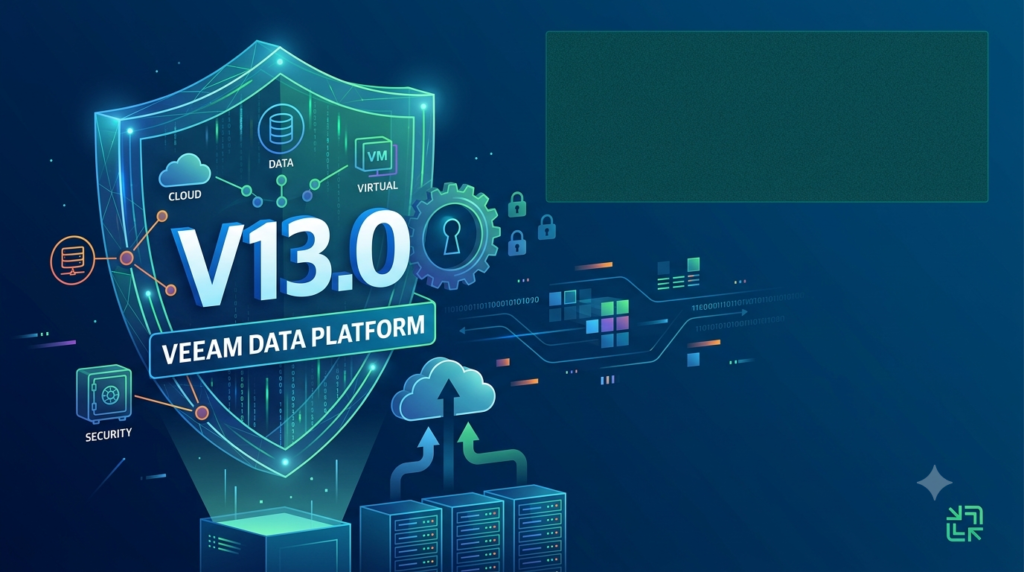
Veeam Data Platform v13 is the latest iteration of Veeam’s industry-leading enterprise data resilience solution, trusted by more than 550,000 customers worldwide . Built for hybrid and multi-cloud environments, the platform delivers automated protection, AI-driven insights, and built-in resiliency designed to help organizations recover quickly when disaster strikes .
The v13 release represents a fundamental architectural shift that prioritizes security as a built-in feature rather than an afterthought. It introduces the Veeam Software Appliance—a pre-hardened, Linux-based deployment option that eliminates operating system management overhead while maintaining enterprise-grade security compliance .
Core Capabilities
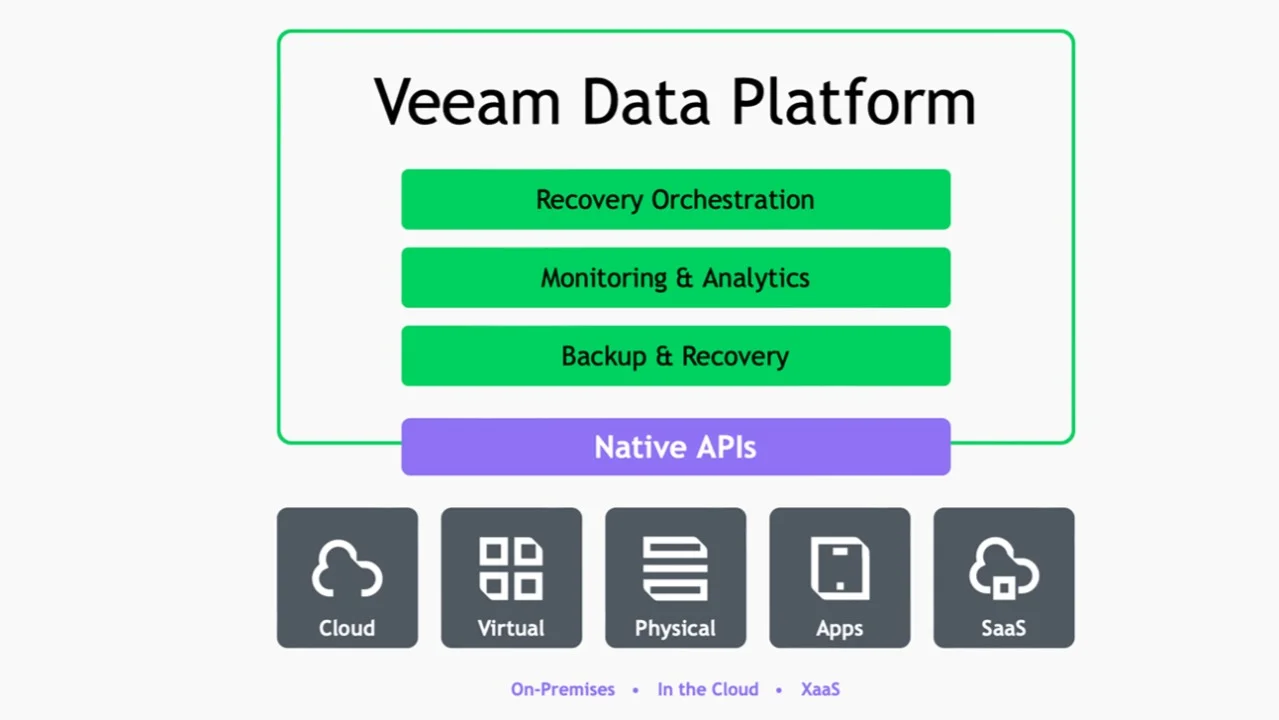
The platform provides unified data protection across virtual, cloud, physical, and endpoint environments. It combines reliable backup and recovery with proactive threat detection, immutable backups, and automated recovery validation to ensure data integrity and business continuity .
Key Features of Veeam Data Platform v13
Security and Identity Controls
Veeam Software Appliance: A pre-configured Linux appliance with “just enough” hardened OS that follows DISA STIG hardening standards. It includes automated security updates and eliminates manual OS management tasks .
Enhanced Role-Based Access Control (RBAC): Fine-tuned access controls implement zero-trust principles, limiting privileges and reducing attack surfaces. This ensures sensitive data remains accessible only to authorized personnel .
SAML-Based Single Sign-On: Centralized authentication with multi-factor authentication passthrough streamlines compliance while protecting access at the identity layer .
Immutable Backups by Default: Backups are automatically configured with immutability, aligning with ransomware protection best practices and preventing unauthorized modifications to recovery points .
AI-Powered Intelligence
Malware Analysis Agent: AI-driven analysis automatically detects, classifies, and reports malware and suspicious activity. It provides actionable intelligence and guided remediation to ensure recoveries are clean and trustworthy .
Recon Scanner 3.0: Powered by Coveware by Veeam, this capability flags suspicious behaviors including brute force attacks, suspicious file activity, and unexpected network connections. It integrates with Veeam ONE Threat Center and maps findings to the MITRE ATT&CK framework for comprehensive threat context .
Deep Data Analysis Agent: Users can generate observability reports simply by asking questions through Veeam Intelligence, eliminating the need to navigate complex menus .
Data Resilience Daily Summary: An AI-powered email summarizes policy and job results, correlates issues with relevant Veeam KB articles, and lists recommended actions .
High Availability and Recovery
High Availability for Backup Services: Ensures backup infrastructure remains online through disruptions, maintaining business continuity in hybrid and multi-cloud environments .
Instant Recovery to Microsoft Azure: Enables verified clean restores to Azure within minutes, creating a secure cleanroom environment to validate recoverability before full restoration .
Modern Web UI: A streamlined browser-based interface simplifies setup and daily management, reducing the learning curve for IT teams .
Expanded Workload Coverage
Universal Hypervisor Integration API: A first-of-its-kind integration framework that enables any hypervisor vendor to natively integrate with Veeam’s backup and recovery capabilities .
New Hypervisor Support: Native support for Scale Computing HyperCore, with upcoming support for HPE Morpheus VM Essentials, Citrix XenServer, and XCP-ng .
OpenShift Virtualization Support: Native host-based VM backup and recovery for Red Hat OpenShift Virtualization, building on existing Veeam Kasten capabilities .
What’s New in Veeam Data Platform v13
The v13 release introduces transformative capabilities across security, resilience, and intelligence:
| Capability | Description | Benefit |
|---|---|---|
| Veeam Software Appliance | Pre-hardened Linux appliance with automated updates | Simplified deployment, reduced OS management |
| High Availability | Backup services remain online through disruptions | Uninterrupted business continuity |
| Instant Recovery to Azure | Rapid restoration directly to Microsoft Azure | Minimized downtime, cleanroom validation |
| Recon Scanner 3.0 | Real-time threat detection with MITRE ATT&CK mapping | Proactive security monitoring |
| Malware Analysis AI Agent | AI-driven malware detection and guided remediation | Cleaner recoveries |
| SAML SSO with MFA | Centralized identity protection | Improved security posture |
| Universal Hypervisor API | Standardized integration for any hypervisor | Future-proofed infrastructure |
| Modern Web UI | Intuitive browser-based management | Reduced training requirements |
| Immutable Backups by Default | Automatic protection against unauthorized changes | Ransomware readiness |
System Requirements for Veeam Data Platform v13
Veeam Software Appliance Requirements
The new Linux-based appliance streamlines deployment with the following minimum specifications :
| Component | Requirement |
|---|---|
| OS | Linux (Rocky Linux 9.2 based) |
| CPU | 8 Cores |
| RAM | 16 GB |
| Disk | 2x 240 GB (OS + software + logs) |
Additional requirements:
-
UEFI mode must be enabled
-
Two disk drives of at least 256 GB capacity
-
Static IP configuration recommended
Recovery Orchestrator Requirements
For larger deployments using Veeam Recovery Orchestrator, requirements scale with infrastructure size :
| Protected Systems | Orchestrator CPU | Orchestrator RAM | SQL Server RAM | Disk IOPS |
|---|---|---|---|---|
| 1–1500 | 4–8 vCPUs | 12 GB | 8 GB | N/A |
| 1500–5000 | 10 vCPUs | 40 GB | 40 GB | 1000 |
| 5000–10000 | 12 vCPUs | 70 GB | 70 GB | 2000 |
| 10000–20000+ | >20 vCPUs | >70 GB | >70 GB | 2000+ |
Supported Operating Systems
Veeam Recovery Orchestrator: Windows Server 2025, 2022, 2019, 2016 (64-bit only)
Veeam ONE: Supports Windows Server 2025, 2022, 2019, 2016 and Windows 11/10 Professional/Enterprise editions
Supported Hypervisors
-
vSphere 9.0, 8.0, 7.0
-
ESXi 9.0, 8.0, 7.0
-
Windows Server Hyper-V 2025, 2022, 2019, 2016
-
Azure Stack HCI
-
Scale Computing HyperCore
-
(Upcoming) HPE Morpheus VM Essentials, Citrix XenServer, XCP-ng
Installation Guide for Veeam Data Platform v13
Hardware Preparation
-
Server Configuration: Prepare a server meeting the minimum specifications for your deployment size
-
Disk Configuration: Ensure two disk drives of at least 256 GB capacity are available
-
UEFI Mode: Enable UEFI boot mode in the system BIOS
Installation Process
-
Download the ISO: Obtain the VeeamDataPlatformPremium_v13.0_*.iso file from the Veeam downloads page
-
Create Bootable Media: Use the ISO to create bootable installation media
-
Boot from Installation Media: Launch the system and boot from the installation media
-
Select Installation Type: Choose “New Installation” for fresh deployments
-
Network Configuration: Configure static IP with IPv4 and IPv6 addressing as needed
-
Time and NTP Settings: Set timezone and configure NTP servers (e.g., ntp.aliyun.com)
Post-Installation Configuration
-
Define Hostname: Configure the system hostname through the Configuration Wizard
-
Create Administrator Account: Set up the veeamadmin user with a strong password
-
Enable Two-Factor Authentication: 2FA is mandatory for VBR administration
-
Configure Security Officer: Create the veeamso account or skip if not required
-
Access Web Interface: Navigate to
https://[server-ip]/for management access -
Import License: Apply your Veeam Data Platform license key
How to Use Veeam Data Platform v13
Web Management Console
Access the modern browser-based UI at https://[server-ip]/ for day-to-day management. For host management, use port 10443: https://[server-ip]:10443 .
AI-Powered Monitoring
-
Access Veeam Intelligence: Use the chat interface to query backup status and performance
-
Review Daily Summary: Check AI-generated email summaries for policy results and recommendations
-
Monitor Threat Center: Use Veeam ONE Threat Center dashboards for real-time threat visualization
Recovery Operations
Instant Recovery to Azure:
-
Select the workload to recover
-
Configure the Azure destination environment
-
Initiate recovery to a secure cleanroom environment
-
Validate recovery before full migration
Role-Based Administration
-
Define Roles: Configure granular permissions through RBAC settings
-
Set Up SSO: Implement SAML-based single sign-on for centralized authentication
-
Enable MFA: Protect access with multi-factor authentication
Best Use Cases for Veeam Data Platform v13
Cyber Resilience and Ransomware Protection
Organizations facing increasing ransomware threats can leverage Veeam Data Platform v13’s AI-powered threat detection and immutable backups. The Malware Analysis Agent and Recon Scanner 3.0 provide early warning of attacks, while confirmed clean restore points enable rapid recovery .
Cloud Migration and Disaster Recovery
The platform excels in hybrid cloud scenarios. Instant Recovery to Azure enables organizations to move workloads to the cloud during outages or as part of migration strategies. The secure cleanroom environment allows testing before full commitment .
Virtualized Environment Protection
With VMware transformation creating uncertainty, Veeam Data Platform v13 supports alternative hypervisors including Scale Computing HyperCore, Citrix XenServer, and OpenShift Virtualization. The Universal Hypervisor Integration API future-proofs backup infrastructure .
Simplified Infrastructure Management
IT teams seeking to reduce operational overhead benefit from the Veeam Software Appliance. The pre-hardened, self-updating Linux appliance eliminates OS management while maintaining enterprise-grade security compliance .
Security Operations Integration
Security teams can integrate Veeam with existing security infrastructure through deep integrations with CrowdStrike, Palo Alto Networks, Splunk, and ServiceNow. This unifies detection, investigation, and response across security tools .
Advantages and Limitations of Veeam Data Platform v13
Advantages
Enhanced Security Posture: The pre-hardened appliance with DISA STIG standards and automated patching significantly reduces the attack surface and simplifies compliance .
Reduced Operational Overhead: The software appliance model eliminates OS management tasks, freeing IT teams to focus on strategic initiatives .
AI-Powered Intelligence: AI-driven threat detection, guided remediation, and automated reporting reduce investigation time and improve recovery confidence .
Flexibility Without Lock-in: No proprietary hardware requirements mean organizations can deploy on their preferred infrastructure while scaling as needed .
Broad Workload Coverage: Support for diverse environments including virtual, physical, cloud, and endpoints ensures comprehensive protection .
Integrated Threat Detection: Recon Scanner 3.0 with MITRE ATT&CK mapping provides unmatched forensic visibility .
Future-Proof Integration: Universal Hypervisor Integration API ensures compatibility with emerging virtualization technologies .
Limitations
Scale Considerations: While Veeam Data Platform v13 supports up to 20,000 VMs per backup server, organizations exceeding these recommendations may experience decreased efficiency .
Learning Curve for Advanced Features: While the web UI simplifies basic management, advanced features like AI-driven analytics and complex recovery orchestration require training .
Infrastructure Requirements: Large deployments require significant hardware resources. For 10,000+ protected systems, memory requirements exceed 70 GB for both Orchestrator and SQL servers .
Feature Availability: Some capabilities like Recon Scanner 3.0 are included in Veeam Data Platform Premium, with availability for VCSP partners coming later .
Alternatives to Veeam Data Platform
Acronis Cyber Protect Cloud
Acronis offers a unified platform combining backup, disaster recovery, and cybersecurity. G2 reviews indicate users appreciate the centralized management and faster onboarding, particularly for managed service providers managing multiple clients. Acronis supports Microsoft 365 backups alongside server and cloud workloads in a single solution .
Key Differentiators:
-
Integrated cybersecurity with backup
-
Single agent for all workloads
-
Simplified multi-tenant management
-
Built-in Microsoft 365 protection
Veeam Data Cloud (SaaS Alternative)
For organizations seeking a fully managed approach, Veeam Data Cloud provides backup as a service. Available for Microsoft 365 and Entra ID protection, this option eliminates infrastructure management entirely .
Comparison Factors:
| Consideration | Veeam Data Platform v13 | Acronis Cyber Protect Cloud |
|---|---|---|
| Deployment | Self-managed or SaaS | Self-managed |
| Security Features | Built-in with AI | Integrated cybersecurity |
| Hypervisor Support | Broad with Universal API | Broad |
| Management | Modern web UI | Centralized console |
| Best For | Enterprise data resilience | MSPs, integrated security |
Frequently Asked Questions About Veeam Data Platform v13
What is Veeam Data Platform v13?
Veeam Data Platform v13 is the latest release of Veeam’s enterprise data resilience solution. It introduces a security-first architecture with a pre-hardened Linux appliance, AI-powered threat detection, immutable backups by default, and instant recovery to Microsoft Azure .
What are the system requirements for Veeam Data Platform v13?
The Veeam Software Appliance requires 8 CPU cores, 16 GB RAM, and two 240 GB disks. For larger deployments, Recovery Orchestrator scales with infrastructure size, requiring up to 20+ vCPUs and 70+ GB RAM for 10,000+ protected systems .
How does Veeam Data Platform v13 improve ransomware protection?
V13 introduces multiple ransomware defenses including immutable backups by default, the Recon Scanner 3.0 for real-time threat detection, and the Malware Analysis AI Agent that automatically detects malware and guides clean recoveries .
What is the Veeam Software Appliance?
The Veeam Software Appliance is a pre-hardened Linux-based deployment option that installs automatically, self-updates, and eliminates OS management overhead. It follows DISA STIG hardening standards and supports high availability for uninterrupted operations .
How does Instant Recovery to Azure work?
Instant Recovery to Azure enables organizations to restore critical workloads directly to Microsoft Azure within minutes. The feature creates a secure cleanroom environment to validate recoverability before full migration, significantly reducing downtime .
What hypervisors does Veeam Data Platform v13 support?
V13 supports vSphere 9.0, 8.0, 7.0; ESXi 9.0, 8.0, 7.0; Windows Server Hyper-V 2025, 2022, 2019, 2016; Azure Stack HCI; and Scale Computing HyperCore. Upcoming support includes HPE Morpheus VM Essentials, Citrix XenServer, and XCP-ng .
Is Veeam Data Platform v13 available now?
Yes, Veeam Data Platform v13 is available now through Veeam’s global network of authorized partners, resellers, and distributors. Current customers can download V13 through MyAccount, while new customers can start a trial .
Final Thoughts
Veeam Data Platform v13 represents a defining moment for enterprise data resilience. By embedding security directly into the platform architecture, introducing AI-powered intelligence, and eliminating deployment complexity through the Veeam Software Appliance, this release addresses the most pressing challenges facing IT and security leaders today.
The platform’s balance of advanced security, resilient performance, and AI-driven intelligence positions it as a comprehensive solution for organizations navigating an increasingly threat-filled landscape. For businesses seeking to transform their approach to data protection from reactive recovery to proactive resilience, Veeam Data Platform v13 provides the tools needed to maintain business continuity, demonstrate compliance, and recover faster when it matters most .
With over 550,000 customers already trusting Veeam, this latest release extends the platform’s capabilities while maintaining the flexibility and openness that organizations require for hybrid and multi-cloud environments. Whether deploying on-premises, in the cloud, or across mixed infrastructure, Veeam Data Platform v13 delivers the resilience needed to protect data on your own terms .
Our Paid Service