
Overview of Sante PACS Server PG
Table of Contents
Sante PACS Server PG functions as a comprehensive medical image storage and communication system designed primarily for hospitals, clinics, and imaging centers. The software handles the complete lifecycle of DICOM medical images—receiving, storing, querying, transmitting, and managing diagnostic imaging data.
The server is particularly well-suited for small to medium-sized healthcare facilities or organizations needing rapid DICOM imaging system deployment. Its architecture supports connectivity with a wide range of medical imaging modalities, including CT, MRI, CR, DR, ultrasound (US), mammography (MG), and nuclear medicine (NM) equipment.
The “PG” designation indicates this version uses enterprise-grade PostgreSQL or MySQL database systems rather than the file-based SQLite database found in the free version. This provides enhanced performance, scalability, and data integrity for demanding clinical environments.
Key Features
Complete DICOM PACS Server
The server provides full DICOM 3.0 standard compliance, ensuring seamless interoperability with virtually all medical imaging equipment and systems. It supports all common transfer syntaxes and connects with modalities from all major manufacturers.
DICOM Network Services
Sante PACS Server PG includes comprehensive DICOM network services with support for all essential Service Classes:
-
C-STORE for image storage
-
C-FIND for querying studies
-
C-MOVE and C-GET for retrieving images
-
C-ECHO for verification (DICOM ping)
The server can operate both as SCU (Service Class User) and SCP (Service Class Provider), enabling flexible integration with existing PACS infrastructure.
Modality Worklist (MWL)
The built-in Worklist Server receives patient demographics and scheduling information via HL7 communication from HIS/RIS systems and transfers them to modalities through DICOM C-FIND protocols. This automates patient data entry, significantly reducing manual input errors and improving workflow efficiency.
Web Server Module
The embedded web server enables remote access to DICOM studies through standard web browsers. This functions as a free cloud server for DICOM files, allowing physicians and patients to access medical images from anywhere. Remote users can securely connect using HTTP or HTTPS protocols from browsers like Edge, Chrome, or Mozilla.
Integrated DICOM Viewer
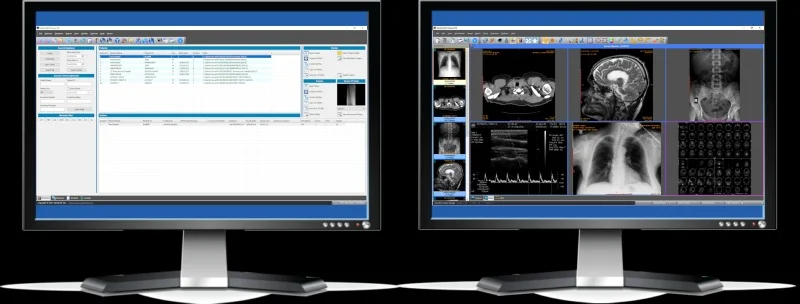
The server includes a built-in full-featured DICOM viewer, eliminating the need for additional software installation. It supports viewing of all major imaging modalities including CT, MRI, ultrasound, X-ray, and mammography. Remote users can access two built-in world-class free DICOM viewers: Sante DICOM Web Viewer and the OHIF Viewer.
CD/DVD Burning and Printing
The server functions as a CD/DVD burning and printing server. It supports automatic disk burning on Epson and Primera robotic producers when studies are received, and can print directly to DICOM printers.
What’s New in Version 4.5.1
Version 4.5.1 represents the latest release of Sante PACS Server PG, building on the significant updates introduced in version 4.5.0.
Enhanced Security Features
Version 4.5.0 introduced support for creating encrypted (SHA-256) CD/DVD media to protect patients’ personal, medical, and other sensitive data. This security enhancement ensures that patient information remains protected when sharing imaging studies via physical media.
Stability Improvements
The 4.5.0 update resolved a rare crash issue of the built-in DICOM Viewer on some systems. Version 4.5.1 continues this stability focus with additional refinements.
Token-Based Patient Access
Patients and physicians can receive and view studies online using secure tokens instead of logging in with accounts. This eliminates the need to create and distribute CD/DVD discs and their associated costs. The 64-character wide tokens provide secure, account-free access to imaging studies.
Enhanced Web Portal
The built-in web portal interface supports 23 languages, including English, French, German, Spanish, Chinese, Japanese, Arabic, and others. This makes the system accessible to healthcare professionals and patients worldwide.
System Requirements
Minimum Hardware Requirements
The server requires the following minimum specifications:
| Component | Minimum Requirement |
|---|---|
| Operating System | Windows Server 2025/2022/2019/2016/2012/2008 or Windows 11/10/8.1/8/7/Vista (64-bit) |
| Processor | Intel Core i3 / AMD Ryzen 3 or greater |
| Memory | 8 GB or more (16 GB recommended for large ultrasound files) |
| Graphics Card | 512 MB memory |
| Display | Monitor supporting 1366×768 resolution or above, true color (16M Colors) |
| Storage | 500 MB free hard disk space (application only; actual data storage depends on archive size) |
Database Requirements
Sante PACS Server PG uses either PostgreSQL or MySQL as its database engine. The database server should be installed and configured according to manufacturer specifications. Storage capacity for patient data is limited only by available hard disk space, with support for unlimited patients, studies, series, and images.
Installation Guide
Download and Preparation
-
Obtain the Sante PACS Server PG 4.5.1 installer (approximately 534 MB)
-
Ensure your system meets the minimum requirements
-
Verify that PostgreSQL or MySQL is installed and configured
-
Have administrative credentials available
Installation Steps
Follow these steps for successful installation:
-
Run the Installer: Launch the installation executable
-
Accept License Agreement: Review and accept the license terms
-
Select Installation Directory: Choose the destination folder (default:
C:\Program Files\Santesoft\Sante PACS Server) -
Configure Start Menu Folder: Specify the start menu folder for shortcuts
-
Create Desktop Shortcut: Optionally create a desktop shortcut for easy access
-
Confirm Installation: Review settings and click Install to begin
-
Complete Setup: Wait for installation to finish and click Finish
Post-Installation Configuration
-
Configure the database connection settings for PostgreSQL or MySQL
-
Set up DICOM AE titles for the server and connected modalities
-
Configure network ports for DICOM and web services
-
Set up user accounts and access permissions
-
Test connectivity with modalities using C-ECHO
Winget Installation
For users comfortable with command-line tools, Sante PACS Server can also be installed using the Windows Package Manager:
winget install -e --id Santesoft.SantePacsServer
How to Use the Software
DICOM Image Reception
The server automatically receives DICOM images from connected modalities. Studies are stored in the database with full patient and study information. The system supports:
-
Unlimited number of connected medical scanners
-
Unlimited number of connected users, locally or remotely
-
Automatic routing rules for sending studies between AE titles
Study Management
Users can query and retrieve studies using:
-
Patient demographics (name, ID, date of birth)
-
Study date ranges
-
Modality types
-
Referring physician information
Web-Based Remote Access
Remote users can access the system through the built-in web server:
-
Open a web browser (Edge, Chrome, or Mozilla)
-
Navigate to the server’s web interface (HTTP or HTTPS)
-
Log in with credentials or use token-based access
-
Query and retrieve studies
-
View images using Sante DICOM Web Viewer or OHIF Viewer
Worklist Management
The Modality Worklist server communicates with HIS/RIS systems via HL7 to receive:
-
Patient demographics
-
Exam scheduling information
-
Referring physician details
This information is automatically transferred to modalities through DICOM communication protocols, reducing manual data entry.
Best Use Cases
Small to Medium Healthcare Facilities
Sante PACS Server PG is ideal for clinics, imaging centers, and small hospitals that need an affordable, full-featured PACS solution without the overhead of enterprise systems. The perpetual license model eliminates ongoing subscription costs.
Cloud Hybrid Deployments
The server serves as a perfect companion for cloud-based DICOM archiving solutions. It can function as a local backup server while keeping older studies locally, reducing cloud storage costs. Built-in web server functionality provides cloud-like access without monthly fees.
Teleradiology and Remote Reading
With its built-in web server and free remote DICOM viewers, the system enables radiologists and physicians to review studies from anywhere. Patients can also access their own imaging studies securely using tokens.
Research and Education
The comprehensive DICOM viewer tools, including measurement capabilities, ROI analysis, and study comparison features, make the server suitable for research and educational environments.
Advantages and Limitations
Advantages
Cost-Effective Licensing: The perpetual license model involves a one-time purchase with no annual renewal or contract fees. Updates, maintenance, and support are included free of charge.
Comprehensive Feature Set: Full DICOM PACS server functionality, worklist server, web server, and CD/DVD burning/printing server are all included in one package.
Unlimited Scalability: Supports unlimited patients, studies, series, connected modalities, and users—limited only by storage capacity.
Built-in Web Access: The embedded web server provides remote access without additional software purchases.
Flexible Viewer Options: Two built-in free DICOM viewers for remote use, plus the integrated built-in viewer for local access.
Enterprise Database: Uses PostgreSQL or MySQL for robust data management and integrity.
Limitations
Windows-Only Operation: The server runs only on Windows operating systems (64-bit), which may not suit organizations with Linux-based infrastructure.
Resource Requirements: The recommended 8-16 GB RAM and i3/Ryzen 3 processor may be modest for larger implementations but could be limiting for very high-volume facilities.
No Built-In AI/Advanced Analytics: The system focuses on PACS server functionality rather than AI-assisted diagnostics or advanced image processing.
Initial Setup Complexity: As with any enterprise medical imaging system, proper configuration requires DICOM and networking expertise.
Alternatives to Sante PACS Server PG
Sante Free PACS Server
Santesoft offers a completely free version for organizations with basic PACS needs. Key differences include:
-
Uses SQLite database instead of PostgreSQL/MySQL
-
No built-in Worklist Server
-
Limited customization options
-
No scheduled routing features
-
No DICOM CD/DVD burning capabilities
-
No DICOM printing support
Sante DICOM Viewer Pro
For users who primarily need viewing capabilities rather than full server functionality, Sante DICOM Viewer Pro serves as a viewer, converter, anonymizer, and PACS client/mini server.
Orthanc PACS Server
Orthanc is a popular open-source DICOM server with RESTful API support, offering cross-platform compatibility (Windows, Linux, macOS). It may appeal to organizations with technical resources for customization but lacks the built-in worklist server and integrated CD/DVD burning features.
Conquest DICOM Server
An open-source alternative with community support, Conquest offers basic PACS functionality but may have limited vendor support compared to commercial solutions.
Sectra PACS
An enterprise-grade solution for large healthcare organizations with advanced features and AI integration, though at significantly higher cost and complexity.
Frequently Asked Questions
What is Sante PACS Server PG and what does it do?
Sante PACS Server PG is a DICOM 3.0 compliant picture archiving and communication system designed for storing, archiving, managing, viewing, and burning medical images. It functions as a comprehensive PACS server with built-in web access and worklist capabilities for healthcare facilities.
What is the difference between Sante PACS Server PG and the free version?
The PG version uses enterprise-grade PostgreSQL or MySQL databases, includes a built-in Worklist Server, provides customization options for the web portal, supports DICOM CD/DVD burning and printing, and offers professional support. The free version uses SQLite and has limited features.
What are the system requirements for Sante PACS Server PG 4.5.1?
The server requires a 64-bit Windows operating system (Server 2008 to 2025, or Windows 7 to 11), Intel Core i3/AMD Ryzen 3 processor or better, 8 GB RAM (16 GB recommended for ultrasound files), 512 MB graphics memory, and 500 MB storage for the application.
Can I access Sante PACS Server PG remotely?
Yes, the built-in web server module enables remote access to DICOM studies using standard web browsers with HTTP or HTTPS protocols. Remote users can query, retrieve, and view studies from anywhere using the included free DICOM viewers.
Is Sante PACS Server PG compatible with all medical imaging modalities?
Yes, the server supports all DICOM modalities including CT, MR, US, CR, NM, XA, MG, and DX from all manufacturers. It supports all DICOM 3.0 and NEMA 2 file types and all transfer syntaxes.
What is the licensing model for Sante PACS Server PG?
The software uses a perpetual license model, meaning it is a one-time purchase without annual renewal or contract fees. Updates, maintenance, and support are included at no additional cost.
Final Thoughts
Sante PACS Server PG 4.5.1 represents a mature, feature-rich solution for healthcare facilities seeking a reliable DICOM image management system. With over two decades of development behind it, Santesoft’s product combines professional-grade capabilities with an accessible pricing model.
The server’s support for unlimited connected modalities and users, combined with its built-in web access and worklist functionality, makes it particularly suitable for small to medium healthcare facilities. The perpetual licensing model offers significant long-term value compared to subscription-based alternatives.
Version 4.5.1’s security enhancements, including SHA-256 encrypted CD/DVD burning, demonstrate Santesoft’s commitment to patient data protection. Token-based patient access modernizes how patients and physicians interact with medical images, potentially reducing costs associated with physical media distribution.
For organizations considering a PACS solution that balances functionality with affordability, Sante PACS Server PG 4.5.1 deserves careful evaluation. Its compatibility with DICOM and HL7 standards ensures integration with existing healthcare IT infrastructure, while the embedded web server provides flexibility for modern, distributed clinical workflows.