
Overview of RV Live Coordinates 2027
Table of Contents
RV Live Coordinates is a powerful Revit plugin designed to automate the tracking, reporting, and updating of element coordinates within your Autodesk Revit projects . This tool eliminates the tedious and error-prone process of manually updating XYZ parameters, ensuring that your model’s coordinate data remains accurate and current as you move elements around . By automating these tasks, RV Live Coordinates 2027 streamlines your Revit workflow, allowing you to focus on design and complex problem-solving rather than data entry .
Key Features of RV Live Coordinates for Revit
RV Live Coordinates offers a comprehensive suite of features designed to enhance coordinate management directly within the Revit environment. It automates the process of maintaining coordinate values as parameters in your Revit elements, updating them in real-time as you move elements within your model . This ensures that you always have an up-to-date record of element locations without manual intervention. The plugin is compatible with all coordinate systems, including shared coordinates and project base points, and supports various element location types, including insertion points and endpoints . You can also configure the plugin to report coordinates from a “coordinate marker” family nested inside each object .
Coordinate Reporting Automation
The app automates coordinate reporting by eliminating manual updates of XYZ parameters . Once configured, these parameters automatically update when you move elements in your model, ensuring precise element location tracking and saving valuable time . This automatic maintenance is perfect for workflows that require accurate coordinate data, such as structural analysis or fabrication.
Flexible Configuration and Compatibility
RV Live Coordinates is incredibly versatile, allowing you to choose which point on each Revit object to use for coordinate calculations . For instance, you can record the insertion point of pile foundations while recording the endpoints of structural beams . It supports both point-based and curve/line-based Revit elements, including nested components regardless of their depth . You can also set different coordinate-mapping configurations for individual Revit categories or for a predefined set of selected elements .
Coordinate Markers Placement
The plugin allows you to generate new coordinate markers using a family of your choice at any desired location . Marker locations can be input manually or imported from a CSV file . This feature is ideal for verifying reported coordinates and can significantly reduce manual data entry . If your model lacks a default coordinate marker family, RV Live Coordinates can add one for you .
Move Elements to Custom Coordinates
RV Live Coordinates enables you to specify custom XYZ coordinate values in element parameters, providing easy commands for batch-moving elements to your specified locations . This is essential for workflows that require importing correct element coordinates from external software like Excel, eliminating manual coordinate alignment and potential user errors .
What’s New in RV Live Coordinates 2027 v1.3.0
Version 1.3.0 of RV Live Coordinates for Revit 2027 brings enhanced automation and performance improvements. While the core functionality remains focused on automating coordinate tracking, this update ensures full compatibility with the latest Autodesk Revit 2027 release . The Autodesk Revit 2027 platform itself has moved to .NET 10, which provides a technical upgrade that improves long-term performance and opens the door for more advanced tools and plugins . This version of RV Live Coordinates is built to leverage these underlying improvements, offering a smoother and more responsive user experience.
System Requirements for RV Live Coordinates 2027
To run RV Live Coordinates 2027 v1.3.0 effectively, your system must meet the following requirements:
-
Operating System: Microsoft Windows 10 64-bit or later.
-
Host Application: Autodesk Revit 2027 .
-
Processor: Multi-core Intel Xeon or i-series processor or AMD equivalent. Higher clock speeds and more cores are recommended for better performance.
-
Memory (RAM): At least 8 GB of RAM, with 16 GB or more recommended for larger projects.
-
Disk Space: Sufficient free space for the Revit model files and the plugin installation.
-
Graphics: DirectX 11 or DirectX 12 compatible graphics card with adequate VRAM for smooth navigation.
It is also worth noting that while the move to .NET 10 in Revit 2027 offers long-term benefits, it may cause compatibility issues with some existing add-ins . Ensure all your critical plugins are updated before installing RV Live Coordinates 2027 .
How to Install RV Live Coordinates 2027
Installing RV Live Coordinates for Revit 2027 is a straightforward process:
-
Download the Plugin: Visit the official RV Boost website to download the latest version of RV Live Coordinates for Revit 2027.
-
Run the Installer: Locate the downloaded installer file and double-click to run it.
-
Follow the Prompts: Follow the on-screen instructions in the installation wizard. You may need to accept the license agreement and choose an installation directory.
-
Install for Revit: The installer will typically detect your installed versions of Revit. Ensure that the box for Autodesk Revit 2027 is checked.
-
Launch Revit: After installation is complete, launch Autodesk Revit 2027.
-
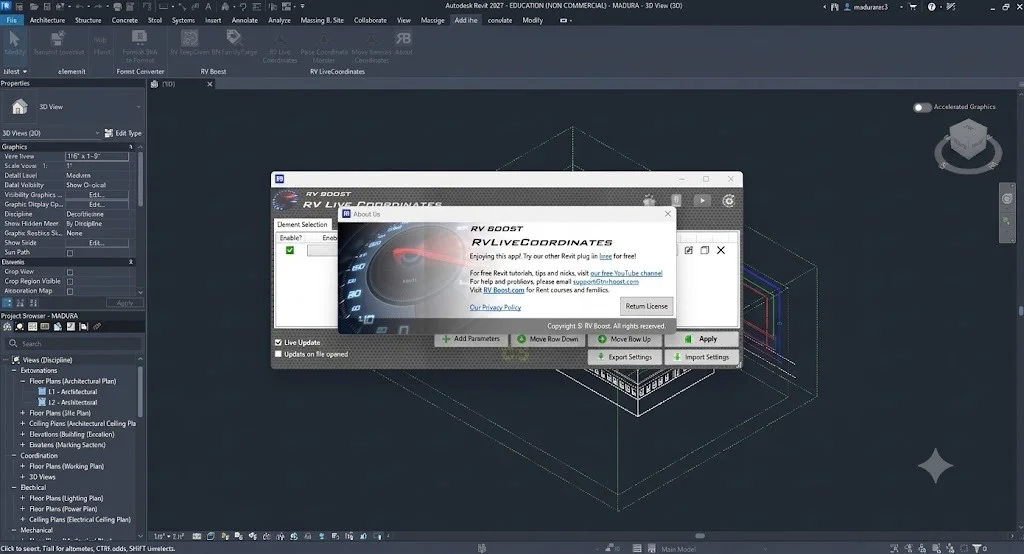
Locate the Plugin: You should find the RV Live Coordinates tab or toolbar within the Revit interface, ready to use.
How to Use RV Live Coordinates in Revit
Once RV Live Coordinates is installed, using it to manage coordinates is intuitive. The initial configuration is essential, as it defines how the plugin will report and maintain coordinate data.
Setting Up Coordinate Automation
To set up automated coordinates, navigate to the RV Live Coordinates tab in Revit and select the settings for the element categories you wish to track. You can specify the coordinate system (project or shared), define the reference point on the element (insertion point, endpoint, etc.), and the plugin will begin maintaining those coordinates automatically as you work .
Moving Elements to Custom Coordinates
When you need to move elements to precise locations, you can input custom values into the X, Y, and Z coordinate parameters within the element properties. Then, use RV Live Coordinates’ batch-move command to relocate the selected elements to those specified coordinates . This functionality is invaluable for aligning elements based on data from spreadsheets or external design tools.
Creating Coordinate Markers
To visualize and verify the coordinate reporting, you can use the “Create Markers” feature. This allows you to place a marker family at the reported coordinate of any element, providing a clear visual confirmation of its location. You can even export and import coordinates to and from CSV files, perfect for checking accuracy and sharing data .
Best Use Cases for RV Live Coordinates
RV Live Coordinates proves invaluable in several professional BIM workflows:
-
Structural Engineering: Accurately tracking the coordinates of piles, columns, beams, and foundations, ensuring they match structural analysis models .
-
Site and Civil Work: Managing large site models where precise location data for topographical features, utilities, and site elements is critical.
-
Modular Construction: Ensuring modules are designed to specific coordinates for seamless assembly on site.
-
Quality Control and Verification: Placing coordinate markers to check the accuracy of the model against survey data or design intent .
-
Data Exchange: Streamlining workflows where coordinate data needs to be exported to or imported from spreadsheets or other software like Excel .
Advantages and Limitations of RV Live Coordinates
Advantages
-
Time Savings: Automates manual coordinate updates, significantly increasing efficiency .
-
Accuracy: Reduces human error associated with manual data entry .
-
Flexibility: Works with all coordinate systems and element types, including nested families .
-
Automated Verification: The coordinate marker feature allows for quick visual checks and validation .
-
Batch Processing: The ability to move multiple elements to specified coordinates at once streamlines complex adjustments .
Limitations
-
Dependency on Revit: Requires an active Autodesk Revit 2027 license.
-
Potential for Compatibility Issues: As with any plugin, there is a risk of conflicts with other Revit add-ins, especially with the transition to .NET 10 in Revit 2027 .
-
Initial Setup: Requires initial configuration to define mapping for different Revit categories .
Alternatives to RV Live Coordinates
For professionals seeking alternatives, the Revit ecosystem offers other tools for coordinate management:
-
Dynamo: A powerful visual programming language that can be used to create custom scripts for coordinate tracking and manipulation. While highly flexible, it requires programming knowledge and more setup time compared to a dedicated plugin like RV Live Coordinates.
-
BIM 360 / Autodesk Docs: While not a direct alternative, these cloud collaboration platforms help manage project coordinates through shared models and location data.
-
Other Third-Party Plugins: The market has various other Revit plugins that offer similar functionality, though they may lack the specific automation and real-time updating features of RV Live Coordinates.
Frequently Asked Questions
What is RV Live Coordinates for Revit?
RV Live Coordinates is a plugin for Autodesk Revit that automates the tracking, reporting, and updating of element coordinates within a project . It ensures that XYZ parameters are always up-to-date without manual input.
What are the system requirements for RV Live Coordinates 2027?
The primary requirement is Autodesk Revit 2027 running on a 64-bit version of Windows 10 or later . It also requires a compatible hardware setup that can run Revit 2027 effectively, particularly with the new .NET 10 framework .
How do I update coordinates for multiple elements at once?
You can update multiple elements by selecting them and then using the batch-move feature in RV Live Coordinates. First, specify the new XYZ coordinates in the element parameters, then execute the batch move command to relocate them all to those coordinates .
Does RV Live Coordinates support nested Revit families?
Yes, the plugin supports nested families, allowing you to report coordinates from components regardless of how deep they are nested within the parent element .
Is RV Live Coordinates compatible with all coordinate systems?
Yes, it works with all coordinate systems available in Revit, including Project Base Point, Survey Point, and Shared Coordinates .
How can I verify the coordinates that RV Live Coordinates reports?
You can use the coordinate markers feature to place marker families at the reported coordinates of any element, providing a visual way to verify accuracy . You can also export coordinate data to a CSV file for external verification .
Final Thoughts on RV Live Coordinates 2027
RV Live Coordinates 2027 v1.3.0 is an indispensable tool for any BIM professional who relies on accurate, up-to-date coordinate data in their Revit models. By automating the tedious and error-prone process of manual coordinate tracking and updating, it significantly enhances productivity and reduces the risk of costly mistakes . Its flexibility in supporting all element types and coordinate systems, combined with features like coordinate markers and batch editing, makes it a versatile solution for a wide range of project types . For design firms and engineers looking to streamline their workflows, ensure data accuracy, and spend more time on high-value design work, RV Live Coordinates for Autodesk Revit 2027 is a valuable investment.