

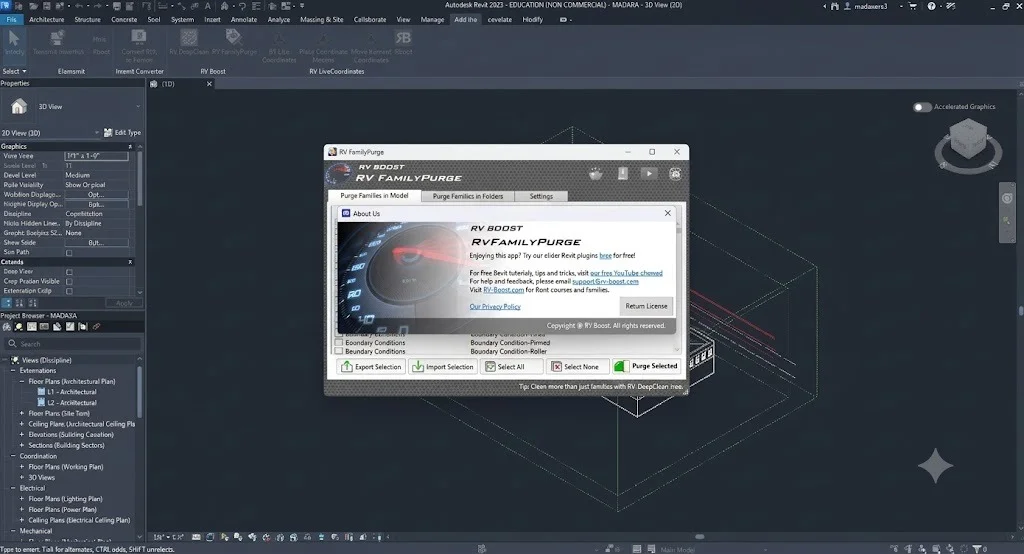
Overview of the Software
Table of Contents
RV FamilyPurge is a specialized Autodesk Revit plugin developed by RV Boost, designed to address one of the most common yet time-consuming issues in Revit project management: the accumulation of unused and nested family components. Over time, as a project evolves, a Revit file (.rvt) is loaded with countless families and nested elements that are no longer used. This bloat slows down the software, increases load and save times, and can lead to frustrating crashes.
While Autodesk Revit includes a native “Purge Unused” tool, it does not efficiently handle nested components. Manually opening each family, purging unused elements, checking for nested families, and reloading them back into the project is a tedious and error-prone process . RV FamilyPurge automates this entire workflow, providing a Revit file size optimization method that is both thorough and time-efficient .
The One-Click Solution for Model Cleanup
The primary purpose of RV FamilyPurge is to serve as a batch Revit family cleaner. It operates by opening every loaded family in your model, performing a comprehensive purge on each one, and extending this purge to all nested components regardless of how many levels deep they are . This level of thorough cleaning is nearly impossible to achieve manually in a large project.
File Size Reduction Capabilities
The effectiveness of RV FamilyPurge is best demonstrated by its impact on file size. In tests, users have reported significant file size reductions, often between 40% and 60% . A cleaner model translates directly to improved performance, making everyday tasks like synchronizing with the central model, opening views, and rendering much faster.
Key Features of RV FamilyPurge
RV FamilyPurge comes packed with features tailored to streamline the Revit model maintenance process. These features focus on deep cleaning, user control, and integration with the Revit environment.
| Feature | Description |
|---|---|
| Batch Cleaning | Purge unused elements from multiple Revit families simultaneously, eliminating the need for manual cleaning of each family. |
| Nested Family Handling | Automatically detects and purges unused elements within nested families, no matter how deep the nesting hierarchy extends . |
| Detailed Reporting | Generates a report after the cleaning process, listing purged items and providing element IDs for any families that could not be cleaned, aiding in troubleshooting . |
| Seamless Integration | Installs as a ribbon button under the Add-Ins tab in Autodesk Revit, making it easily accessible and simple to use within the familiar Revit interface . |
What’s New in Version 1.4.0 for Revit 2027
Version 1.4.0 of RV FamilyPurge is specifically developed for compatibility with Autodesk Revit 2027. This version ensures that users working on the latest Revit software can still benefit from the plugin’s core functionality without interruption .
It’s important to note that RV Boost maintains separate versioning for different Revit years. For example, version 1.3.0 is available for Revit 2026 , while version 1.2.0 is designated for Revit 2025 . Therefore, version 1.4.0 represents a direct update to support the 2027 release cycle, ensuring all new features and underlying API changes of Revit 2027 are fully supported.
System Requirements
Before installing RV FamilyPurge, ensure your system meets the following requirements:
-
Compatible Software: Autodesk Revit 2027 .
-
Operating System: Windows 10 or later (64-bit), as required by Autodesk Revit 2027.
-
Hardware: Meets the minimum system requirements for Autodesk Revit 2027.
-
Disk Space: Approximately 4.2 MB to 4.3 MB of free disk space for the installer .
Installation Guide for RV FamilyPurge
Installing RV FamilyPurge is a straightforward process, similar to installing other Revit add-ins. Users can obtain the plugin from the official Autodesk App Store or the RV Boost website.
-
Download the Installer: Obtain the installer file for RV FamilyPurge 2027 v1.4.0 from a trusted source, such as the Autodesk App Store.
-
Run the Installer: Double-click the downloaded installer (.exe) file. The installer will guide you through the setup process.
-
Follow On-Screen Instructions: Accept the license agreement and choose the installation directory (the default path is usually recommended).
-
Restart Revit: Once the installation is complete, close and reopen Autodesk Revit 2027 to activate the plugin.
-
Locate the Plugin: After restarting, you will find the RV FamilyPurge button on the Add-Ins tab in the Revit ribbon .
How to Use RV FamilyPurge
Using RV FamilyPurge is designed to be simple, allowing you to clean your model with minimal effort. The process involves a few straightforward steps within the Revit interface.
-
Open Your Revit Project: Launch Autodesk Revit 2027 and open the project file (.rvt) you wish to clean.
-
Launch the Plugin: Navigate to the Add-Ins tab on the ribbon and click the RV FamilyPurge button .
-
Select Families to Clean: A dialog box will appear, listing the families loaded in your project. You can select specific families or choose all of them for a full cleanup.
-
Run the Process: Click the Purge Unused button within the plugin interface.
-
Review the Report: The plugin will process each selected family. Upon completion, it will provide a report showing the number of items purged and noting any families that failed .
-
Final Native Purge: After using RV FamilyPurge, it is recommended to run the standard Purge Unused command from the Revit “Manage” tab to catch any remaining top-level unused elements .
Best Use Cases for RV FamilyPurge
Understanding when to use RV FamilyPurge can help you maximize its benefits and maintain optimal project health throughout the design lifecycle.
Model Auditing and Archiving
Before sharing a model with external consultants, submitting it for review, or creating an archive, it’s crucial to ensure the file is as lean as possible. Running RV FamilyPurge before these milestones removes unnecessary data, making the file easier to share and ensuring a faster opening experience for collaborators.
Improving Project Performance
A large file size is a primary cause of slow performance in Revit. As a project grows, so does the number of loaded families. Optimizing Revit project performance is a key goal for BIM managers. RV FamilyPurge directly addresses this issue by stripping away the hidden weight of unused nested components, leading to faster sync times, smoother navigation, and a more responsive software experience overall.
Regular Project Maintenance
Incorporating RV FamilyPurge into your regular project maintenance routine can prevent the build-up of bloat over time. Using the tool at key project phases—such as after a design development milestone or before a construction document phase—ensures that the model remains efficient throughout its lifecycle.
Advantages and Limitations
While RV FamilyPurge is a powerful tool, it is important to understand its strengths and constraints to use it effectively.
Advantages
-
Significant Time Savings: Automates a process that would take hours or days if done manually, especially in large projects with complex family hierarchies .
-
Massive File Size Reduction: Can reduce file size by 40% to 60%, dramatically improving software performance .
-
Deep Cleaning: Reaches nested components that the native Revit “Purge Unused” tool misses .
-
Ease of Use: Features a simple, one-click interface that is accessible to all levels of Revit users.
-
Detailed Logging: Provides a report to help track the cleaning process and identify any problematic families .
Limitations and Considerations
-
Limited to Families: The tool focuses exclusively on purging unused items within families. It does not clean other model elements like line styles, fill patterns, or materials, which may require additional tools or manual cleanup .
-
Manual Final Purge Recommended: For optimal results, a final manual “Purge Unused” command is still recommended to catch any remaining unused items at the project level.
-
Processing Time: Depending on the size of the model and the number of families, the process can take a significant amount of time to complete—potentially an hour or more for very large files . It is best run during off-peak hours.
-
Backup Required: As with any tool that modifies a project file extensively, it is always a best practice to create a backup before running the purge to prevent unintended data loss.
Alternatives to RV FamilyPurge
RV FamilyPurge is a specialized tool designed for a specific task. For a more comprehensive model cleaning strategy, it can be used alongside other tools, or users may consider alternative solutions for different needs.
-
Native Revit “Purge Unused”: This is the standard, free tool built into Revit. While it is essential for basic cleanup, it is limited in its ability to handle nested families and lacks the automation that RV FamilyPurge provides .
-
RV DeepClean: Another product from RV Boost, RV DeepClean offers a broader range of general cleaning functions beyond family purging. It can automate tasks like deleting unused scope boxes, removing unplaced rooms, exploding groups, and deleting duplicate elements . For users seeking a more holistic model cleanup, RV DeepClean might be the next step.
-
Ideate StyleManager: This Revit plugin from the Graitec Group focuses on managing and purging styles, such as fill patterns, line patterns, line styles, and subcategories that the native Revit Purge often cannot remove . It is an excellent complement to RV FamilyPurge, as FamilyPurge handles family content while Ideate StyleManager manages project styles.
-
FamillesManager: For users who need a better way to browse and load family files (.rfa) into their project, FamillesManager offers a visual and efficient interface as an alternative to Revit’s built-in browser. While it doesn’t clean families, it significantly improves the process of family loading and management .
Frequently Asked Questions
Is RV FamilyPurge compatible with my version of Revit?
Version 1.4.0 is specifically compatible with Autodesk Revit 2027 . RV Boost offers separate versions for different Revit years, including 2026, 2025, 2024, and 2023 . Always download the version that matches your Revit software.
Does RV FamilyPurge remove imported CAD files from families?
Yes, RV FamilyPurge will remove unused imported CAD files during its purge process . If you need to manage or explore imported CAD files in families, the developer offers a separate tool called “CAD Files Explorer” .
Can I try the software before purchasing?
Yes, RV Boost provides a free trial that offers full app functionality for 14 days . This allows you to test the tool’s effectiveness on your specific Revit models before making a purchase decision.
How long does the purge process take?
The processing time depends on the size of your Revit model and the number of families that need to be cleaned. For very large models, it can take about an hour to complete . It is recommended to run the tool when you do not need immediate access to the model.
Does using RV FamilyPurge risk deleting important data?
The tool is designed to purge only unused elements. However, as with any automated cleaning process, it’s a best practice to create a backup of your Revit project before running the tool to safeguard against accidental loss of needed data.
What happens to families that fail to purge?
If the plugin fails to clean a specific family, it will note this in the detailed report it generates at the end of the process. The report provides element IDs for these failed items, allowing you to locate them and investigate the issue manually .
Final Thoughts
Managing the size and performance of a Revit model is a constant challenge in the BIM workflow. RV Boost RV FamilyPurge 2027 v1.4.0 is an indispensable tool for professionals looking to combat model bloat effectively. By automating the tedious process of purging unused and nested family components, it delivers a leaner, faster, and more stable Revit environment.
This Revit model optimization tool excels in its primary purpose: achieving significant file size reduction with a single click. While it works best alongside other cleanup practices and tools, its ability to save time and enhance project performance makes it a valuable addition to any BIM professional’s toolkit. If you are struggling with a sluggish model, RV FamilyPurge provides a powerful, legally compliant solution to restore your Revit project’s efficiency.
Our Paid Service
“We do not sell or provide any software. We only offer professional support services. If any software on your system is not working properly, or you are facing installation errors, crashes, or any other technical issue — just contact us. We will help you fix the problem quickly and remotely via AnyDesk. No software will be provided from our side — only expert troubleshooting and support.”