
Overview of PyroSim 2026.1.211
Table of Contents
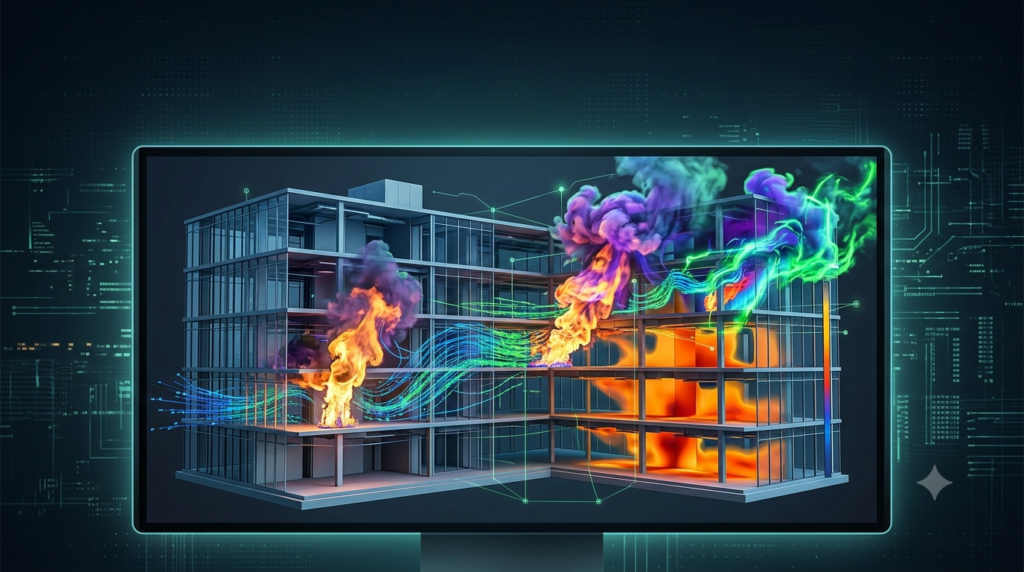
Thunderhead Engineering PyroSim is a professional-grade graphical user interface (GUI) for the Fire Dynamics Simulator (FDS), a computational fluid dynamics (CFD) model developed by the National Institute of Standards and Technology (NIST) Fire Research Division . This powerful fire modeling software enables fire protection engineers, safety consultants, and researchers to simulate dynamic fire behavior, smoke movement, and temperature distribution in complex building environments.
PyroSim streamlines the entire fire simulation workflow by replacing complex text-based FDS input with an intuitive 3D modeling environment. You can import architectural CAD files, design simulations graphically, manage computational resources, and deliver professional visual results—all within a single integrated platform . The software supports both metric (SI) and US customary units, making it accessible for international engineering projects .
The 2026.1.211 version builds on decades of development, introducing significant user experience improvements, enhanced documentation systems, and refined results processing capabilities. Whether you are conducting fire safety assessments for high-rise buildings, optimizing smoke control systems, or investigating fire incidents, PyroSim provides the accuracy and flexibility required for professional fire protection engineering .
Key Features of PyroSim 2026.1.211
CAD Import and Geometry Management
PyroSim supports importing various CAD and BIM file formats, including IFC, DXF, DWG, FBX, STL, and FDS files . This capability allows engineers to import architects’ models in seconds, automatically detect BIM data, and generate fire-model-specific geometry. The software’s intelligent import system helps users easily understand and navigate complex building structures while avoiding the time-consuming process of recreating geometry from scratch .
Graphical Simulation Design
The software provides comprehensive 2D and 3D geometry drawing tools tailored specifically for fire modeling applications . Users can build models in an environment designed to prevent errors and mistakes, with real-time visual feedback that allows immediate investigation of model details . The intuitive user interface includes dimension labeling during drawing, PDF background image import, and object tagging for efficient model management .
Mesh Refinement and Grid Management
PyroSim offers sophisticated mesh management tools that are essential for accurate and efficient fire simulations. The 2025.1 release introduced mesh refinement zones, allowing users to specify areas requiring higher cell resolution—such as regions around rapidly growing fires—while maintaining coarser grids elsewhere . This approach significantly improves simulation fidelity where it matters most while reducing overall computation time. The software automatically handles grid alignment and refinement level application (2x or 4x), eliminating the tedious manual process of creating and aligning multiple meshes .
Parallel Processing and Performance Optimization
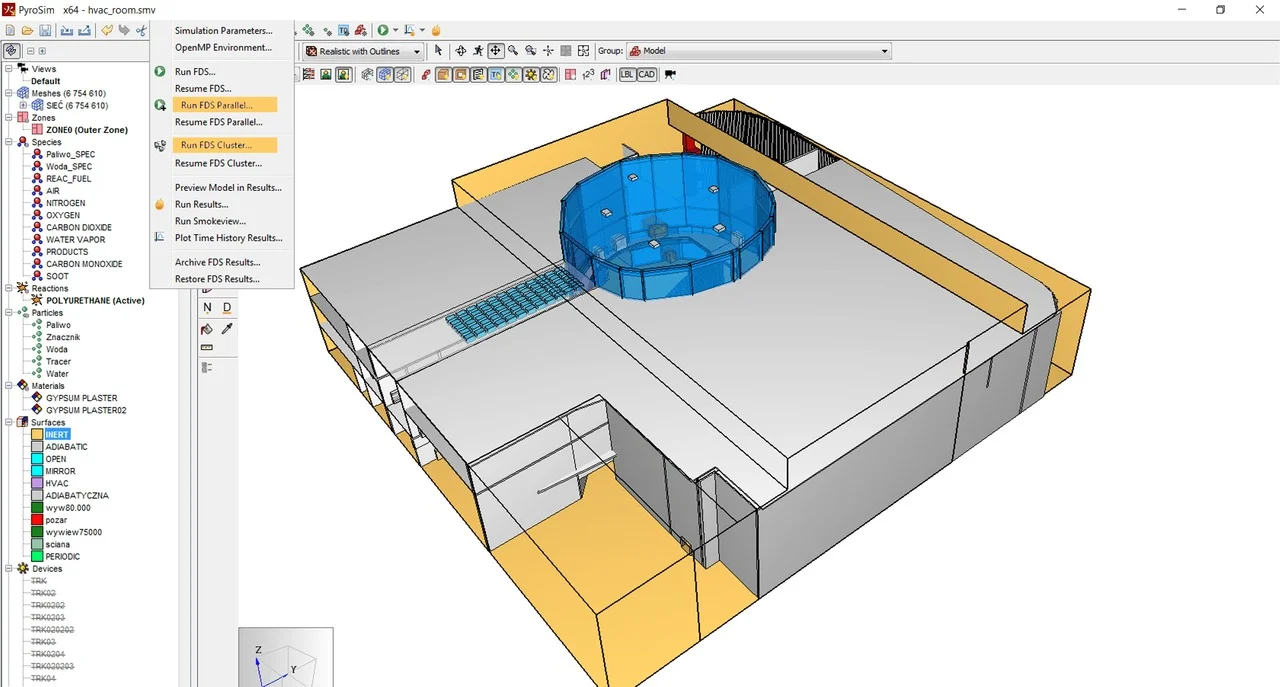
PyroSim supports integrated parallel processing using MPI, enabling simulations to leverage multiple CPU cores or networked computers . For single machines with multiple cores, the software manages parallel execution details automatically. Advanced users can extend this capability to network clusters, distributing computational loads across multiple machines for complex, large-scale fire simulations . This performance optimization is crucial for reducing simulation runtimes without compromising model complexity.
HVAC System Integration
The software includes comprehensive HVAC (Heating, Ventilation, and Air Conditioning) system modeling, a significant enhancement introduced in FDS 6 . Users can define duct networks, nodes, fans, heat exchangers, and dampers directly within PyroSim, visualizing the entire system in 3D. HVAC systems can model standalone airflow scenarios or function as integrated building fire safety systems for smoke extraction and stairwell pressurization . This capability is essential for modern building design where smoke control systems must be coordinated with overall building ventilation.
Results Visualization and Post-Processing
PyroSim provides robust post-processing capabilities through its integrated Results Viewer, allowing users to analyze smoke dynamics, temperature distribution, velocity fields, toxicity levels, and other FDS outputs . The 2025.1 release introduced two powerful post-processing options: Fractional Effective Dose (FED) calculations for personnel exposure assessment and visibility analysis through smoke . These features enable comprehensive fire safety evaluations, integrating occupant movement data from Pathfinder simulations to assess evacuation scenarios realistically .
Automated Results Processing
Version 2026.1 introduces significant improvements to results handling. The 3D Smoke results now load automatically when available, eliminating manual configuration steps . CSV result data also loads automatically, providing immediate access to numerical outputs for plotting and post-processing analysis. This automation streamlines the analysis workflow, allowing engineers to focus on interpreting results rather than managing data files .
Property Libraries and Material Definitions
PyroSim includes customizable property libraries that accelerate model creation and reduce errors . Users can define and manage libraries for reactions, heat detectors, materials, particles, surfaces, and other model parameters. The software supports detailed material property definitions—including density, specific heat, thermal conductivity, emissivity, and absorption coefficients—essential for accurate heat transfer modeling through solid obstructions . These libraries can be imported across projects, ensuring consistency and efficiency in engineering workflows.
What’s New in PyroSim 2026.1.211
Enhanced User Experience and Keyboard Shortcuts
PyroSim 2026.1 introduces expanded keyboard shortcuts, enabling more intuitive and efficient model navigation . Updated warning messages provide clearer feedback during model setup, helping users identify and resolve issues promptly. Scene creation stability has been improved to reduce interruptions in complex projects, while OpenGL rendering updates deliver more consistent visual performance .
Redesigned Documentation System
The 2026.1 release includes a comprehensive documentation overhaul focused on improving information accessibility . The new documentation system features:
-
Page navigation enabling seamless chapter transitions
-
Full-text search tools for quick topic identification
-
Clear version change indicators highlighting updated content
-
Consolidated manuals reducing content fragmentation
-
Reorganized structure improving workflow-based information discovery
Users can now access Examples (formerly Tutorials) for step-by-step guidance, Troubleshooting (formerly FAQs) for common issue resolution, and Advanced Topics with Appendices for complex applications .
Improved Results Handling
Version 2026.1 streamlines post-processing workflows with automatic 3D Smoke result activation and CSV data loading . These changes reduce manual setup operations and accelerate the transition from simulation completion to results analysis. The updates specifically address common analysis workflows, making the software more accessible to both new and experienced users .
Documentation-Specific Updates
The documentation improvements extend beyond navigation to include:
-
Unified documentation portal replacing multiple separate manuals
-
Enhanced search capabilities allowing rapid access to specific topics and problems
-
Clearer identification of new or updated pages
-
Simplified learning path for new users
-
Advanced reference material for experienced practitioners
This documentation overhaul reflects PyroSim’s commitment to reducing the learning curve while providing depth for advanced applications .
System Requirements for PyroSim 2026.1.211
PyroSim 2026.1.211 requires a 64-bit version of Windows 10 or later . The software demands significant computational resources, particularly for complex fire simulations involving multiple meshes and extensive geometry.
Recommended Hardware Specifications
-
Processor: Intel i7 or equivalent high-speed processor . Simulation runtime directly correlates with CPU speed, making processor selection critical for efficient workflows.
-
Memory (RAM): 8 GB or more, with 2–4 GB recommended per CPU core . RAM capacity determines the number of mesh cells that can be maintained in memory, directly impacting model complexity.
-
Hard Disk: 100 GB or more free space, SSD recommended for optimal performance . Single simulations can consume 10 GB or more of storage.
-
Graphics: OpenGL 3.2 support or later, with OpenGL 1.2 minimum . Graphics performance affects visualization responsiveness during model creation and results review.
Operating System and Platform Support
PyroSim runs exclusively on Windows 10 64-bit and later versions . Network cluster simulations require additional node installations on participating computers .
Licensing Considerations
PyroSim operates on a licensed basis with options including floating licenses for shared access across teams . Automatic update notifications help users stay current with the latest version .
Installation Guide for PyroSim 2026.1.211
Standard Installation Process
-
Download the installer: Obtain the PyroSim 2026.1.211 installer file (*.msi) from the official Thunderhead Engineering website or authorized distributor .
-
Run the installer: Open the .msi file and proceed through the installation wizard .
-
Launch the software: Access PyroSim from the Windows Start menu after installation completes .
-
Activate license: Enter your license information when prompted (trial or purchased license).
-
Check for updates: Navigate to Help > Check for Updates to ensure you have the latest patches .
Updating from Previous Versions
Recent PyroSim versions automatically present notification when updates are available . If automatic updates are disabled, users can manually check for updates via the Help menu. The 2026.1 release represents a significant update from earlier versions, with substantial improvements in user experience, results handling, and documentation.
Floating License Configuration
Organizations using floating licenses should reference the Floating License FAQs for complete installation and management instructions .
How to Use PyroSim 2026.1.211
Getting Started with Your First Model
Step 1: Import or Create Geometry
Begin by either importing architectural CAD files (IFC, FBX, DWG, DXF, or STL formats) or using PyroSim’s drawing tools to create building geometry from scratch . PDF files can be imported as background images to guide manual model construction . The software’s dimension labeling feature displays real-time measurements during drawing, helping maintain accurate dimensions .
Step 2: Define Simulation Parameters
Configure your simulation by:
-
Setting up meshes: Create multiple grids with appropriate resolutions. Use mesh refinement zones to focus computational effort on critical areas like fire sources .
-
Defining materials: Use the property libraries or create custom material definitions specifying density, thermal conductivity, specific heat, emissivity, and absorption coefficients .
-
Assigning surfaces: Apply surface properties to obstructions, specifying thermal boundary conditions (INSULATED, VOID, or EXPOSED) that determine heat transfer behavior .
-
Specifying reactions: Define combustion reactions for fire sources.
-
Configuring HVAC systems: Model duct networks, fans, dampers, and heat exchangers for smoke control and ventilation analysis .
Step 3: Run the Simulation
Launch the FDS simulation through PyroSim’s integrated interface. For complex models, utilize parallel processing to distribute computational load across multiple cores or a network cluster . Monitor simulation progress and adjust parameters as needed.
Step 4: Analyze Results
After simulation completion, access results through the PyroSim Results Viewer. The software automatically loads 3D Smoke results and CSV data for immediate analysis . Key analysis capabilities include:
-
Visualizing fire and smoke behavior: View temperature, velocity, toxicity, and smoke concentration distributions .
-
Creating video outputs: Record visualizations with adjustable camera controls and data overlays .
-
Calculating FED and visibility: Assess occupant exposure to smoke irritants and visibility conditions using post-processing tools .
-
Exporting numerical data: Access CSV outputs for detailed plotting and analysis.
Step 5: Refine and Iterate
Based on results analysis, adjust simulation parameters, refine mesh configurations, or modify building geometry. PyroSim’s project management features allow maintaining multiple simulation configurations for sensitivity analyses .
Using Views and Viewpoints
PyroSim includes sophisticated view management capabilities that allow users to save and recall specific camera positions, orientations, and clipping regions .
-
Creating views: Save current camera viewpoints and section boxes to document critical perspectives .
-
Managing section boxes: Define convex clipping regions to focus on specific areas of the model .
-
Switching between views: Double-click views in the Navigation panel to restore saved camera configurations .
-
Importing Smokeview viewpoints: Transfer viewpoints from Smokeview INI files for consistent analysis perspectives .
Managing Model Objects
PyroSim’s object management capabilities support efficient modeling:
-
Object tagging: Identify and organize objects with shared characteristics .
-
Multi-device editing: Edit shared properties across multiple devices simultaneously .
-
Find by label: Locate objects based on associated tags .
-
Interactive editing: Modify object properties with visual feedback .
Best Use Cases for PyroSim 2026.1.211
Building Fire Safety Design
PyroSim is widely used in the design of fire protection systems for commercial, residential, and industrial buildings . Engineers simulate fire scenarios to:
-
Evaluate active protection systems: Test sprinkler effectiveness, smoke extraction performance, and alarm system responses .
-
Design smoke control systems: Optimize HVAC configurations for smoke management in atriums, stairwells, and corridors .
-
Assess egress routes: Coordinate with Pathfinder occupant evacuation simulations to validate life safety strategies .
-
Comply with regulations: Demonstrate code compliance with NFPA 101 – Life Safety Code, SFPE Handbook recommendations, and local building regulations .
Fire Incident Investigation
Fire investigators and forensic engineers use PyroSim to reconstruct fire incidents and determine causes . The software allows:
-
Scenario reconstruction: Model actual fire conditions based on evidence and physical parameters .
-
Hypothesis testing: Evaluate different ignition scenarios and fire development patterns.
-
Documentation: Create visual evidence for legal and insurance purposes .
Infrastructure and Transportation Fire Safety
PyroSim’s versatility extends to specialized infrastructure applications:
-
Tunnel fire safety: Model fire spread in transportation tunnels, evaluating ventilation and suppression systems .
-
Aircraft cabin safety: Simulate cabin fire scenarios to improve evacuation procedures and fire detection systems. Recent studies using PyroSim examined Boeing 737-800 cabin fires to assess available safe egress time (ASET) under different ventilation conditions .
-
High-rise facade fire protection: Evaluate sprinkler effectiveness for protecting transparent facade structures in tall buildings .
Research and Academic Applications
PyroSim serves as a research tool for academic institutions and laboratories:
-
Thermal behavior studies: Investigate heat transfer through solid obstructions and thermal radiation effects .
-
Fire dynamics research: Study fire behavior in controlled scenarios to validate theoretical models .
-
Educational training: Provide hands-on experience with fire modeling for engineering students.
Large-Scale and Complex Spaces
PyroSim is particularly valuable for modeling large, unconventional spaces where traditional fire safety approaches are insufficient :
-
Atriums and exhibition halls: Simulate smoke movement and heat behavior in expansive spaces.
-
Stadiums and assembly areas: Design smoke control strategies for large gatherings.
-
Shopping malls and transportation hubs: Model complex building geometries with multiple interconnected spaces.
Advantages and Limitations of PyroSim
Advantages
1. Professional-Grade FDS Interface
PyroSim eliminates the complexity of text-based FDS input through an intuitive 3D modeling environment. Users can build, visualize, and modify fire models with real-time feedback, significantly reducing errors and accelerating the simulation workflow .
2. Comprehensive CAD Import Capabilities
Support for multiple file formats (IFC, FBX, DWG, DXF, STL) allows seamless integration with architectural and engineering workflows . This feature reduces geometry creation time from days to minutes.
3. Advanced Mesh Management
Mesh refinement zones provide precise control over simulation accuracy and computational efficiency . Users can focus computational resources where needed while maintaining reasonable total runtime.
4. Integrated HVAC Modeling
The ability to model HVAC systems within the CFD simulation is a significant advantage for building design professionals, enabling coordinated analysis of fire safety and building ventilation .
5. Powerful Post-Processing
The integrated Results Viewer, combined with FED and visibility analysis tools, delivers comprehensive fire safety assessments . Automatic results loading in version 2026.1 further streamlines the analysis process .
6. Parallel Processing Support
Integrated parallel processing capabilities allow simulations to leverage multi-core processors and network clusters, significantly reducing computation time for complex models .
Limitations
1. Computational Resource Requirements
PyroSim simulations are computationally intensive, requiring powerful hardware for complex models. Large simulations may require substantial RAM (8+ GB) and storage (10+ GB per simulation) .
2. Windows-Only Platform
PyroSim runs exclusively on Windows 10 64-bit and later versions, limiting options for users on other operating systems .
3. Steep Learning Curve
Despite the graphical interface, fire modeling with PyroSim requires understanding of fire dynamics, CFD principles, and FDS model parameters. New users should expect significant learning investment.
4. 1D Heat Transfer Limitations
PyroSim (through FDS) uses one-dimensional transient heat transfer calculations for solid obstructions. This approximation, while computationally efficient, has limitations for complex thermal behavior, as local heating does not radially diffuse through surfaces .
5. Cost Considerations
PyroSim is a professional licensed software with significant cost, which may be prohibitive for individual researchers or small firms.
6. Mesh Resolution Constraints
Geometry in FDS snaps to mesh coordinates, meaning objects with dimensions smaller than cell sizes may not be accurately represented. This can introduce errors in simulations with coarse meshes .
Alternatives to PyroSim
1. Smokeview
Smokeview is the native visualization tool for FDS, developed by NIST. It provides essential 3D visualization capabilities for fire simulations at no cost. However, Smokeview lacks PyroSim’s geometry creation and simulation management features, making it better suited for results visualization than model creation .
2. Pathfinder (Thunderhead Engineering)
Pathfinder focuses specifically on pedestrian egress and evacuation simulation. While it integrates with PyroSim for coupled fire and evacuation analysis, it does not provide fire modeling capabilities. Together, PyroSim and Pathfinder form a comprehensive fire safety analysis suite .
3. Ventus (Thunderhead Engineering)
Ventus provides faster pressure zone modeling for buildings, including stairwells, shafts, atriums, and underground facilities. It uses simpler macroscopic airflow models rather than full CFD, offering quicker analysis for specific applications where detailed CFD may be unnecessary .
4. OpenFOAM
OpenFOAM is an open-source CFD toolbox with fire modeling capabilities. It offers maximum flexibility and customization but requires significant programming knowledge and does not provide PyroSim’s specialized fire modeling workflows. Users must manage meshing, physics models, and visualization manually.
5. FDS with Text Editor
For users who prefer not to invest in commercial software, FDS can be used directly by creating text-based input files. This approach is completely free but lacks PyroSim’s visual modeling, error checking, and workflow efficiency .
Frequently Asked Questions
What is PyroSim and what is it used for?
PyroSim is a graphical user interface for the Fire Dynamics Simulator (FDS), a computational fluid dynamics model developed by NIST . Fire protection engineers, safety consultants, and researchers use PyroSim to model dynamic fire behavior, smoke movement, temperature distribution, and toxicity in buildings and other structures. The software supports fire safety system design, fire incident investigation, and compliance demonstration with fire safety codes .
How much does PyroSim cost and where can I purchase it?
PyroSim is commercial software distributed through Thunderhead Engineering and authorized partners. Pricing varies based on licensing model (perpetual license, subscription, or floating license). For current pricing and purchasing options, contact Thunderhead Engineering directly or an authorized distributor in your region .
What are the system requirements for PyroSim 2026.1?
PyroSim 2026.1 requires Windows 10 64-bit or later, a fast processor (Intel i7 recommended), 8 GB RAM minimum (2–4 GB per core recommended), 100 GB storage (SSD recommended), and OpenGL 3.2 support . Simulation complexity significantly impacts resource requirements; large models may require substantially more memory and storage.
Can PyroSim import CAD models from other software?
Yes, PyroSim supports importing multiple CAD and BIM formats, including IFC, FBX, DWG, DXF, and STL . This capability allows seamless geometry transfer from architectural software such as Revit, AutoCAD, and SketchUp. The software automatically detects BIM data and generates fire-model-specific geometry .
What is the difference between PyroSim and Pathfinder?
PyroSim focuses on fire and smoke modeling using computational fluid dynamics . Pathfinder specializes in pedestrian egress and evacuation simulation . The two products are complementary—PyroSim simulates fire conditions (temperature, smoke, toxicity), while Pathfinder simulates occupant movement. They can be integrated to assess evacuation performance under realistic fire conditions .
How does PyroSim handle HVAC systems in fire simulations?
PyroSim integrates HVAC modeling directly into CFD simulations, allowing users to define duct networks, nodes, fans, heat exchangers, and dampers . HVAC systems can model standalone airflow or function as integrated building fire safety systems for smoke extraction and stairwell pressurization. This capability was significantly enhanced with FDS 6 .
Does PyroSim support parallel processing?
Yes, PyroSim supports parallel processing using MPI . Single machines with multiple cores can run simulations in parallel with minimal configuration. Advanced users can extend this capability to network clusters, distributing computational loads across multiple computers for complex simulations .
How do I install PyroSim 2026.1?
Install PyroSim by opening the installer file (*.msi) and proceeding through the installation wizard . Launch the software from the Windows Start menu after installation. For floating license configurations, refer to the Floating License FAQs for complete installation instructions .
Final Thoughts
Thunderhead Engineering PyroSim 2026.1.211 represents a significant advancement in fire modeling software, combining the computational power of NIST’s Fire Dynamics Simulator with an intuitive graphical interface and professional-grade features. The 2026.1 release’s emphasis on user experience improvements, streamlined results processing, and enhanced documentation reflects the software’s commitment to accessibility without compromising technical depth.
For fire protection engineers and safety professionals, PyroSim delivers the tools needed to design safer buildings, evaluate fire protection systems, and comply with regulatory requirements. The software’s integration of advanced features—including mesh refinement, HVAC modeling, and coupled evacuation analysis—positions it as a comprehensive solution for modern fire safety engineering challenges.
However, PyroSim is not a black-box solution. Effective use requires understanding of fire dynamics, CFD principles, and the specific parameters of FDS modeling. The software’s computational demands also necessitate investment in appropriate hardware infrastructure. For users committed to developing this expertise, PyroSim offers an unmatched combination of accuracy, flexibility, and workflow efficiency.
Whether you are conducting research, investigating fire incidents, or designing fire safety systems for complex buildings, PyroSim 2026.1.211 provides a reliable foundation for informed fire safety decisions. As the software continues to evolve, its integration with related tools like Pathfinder and its responsiveness to user needs suggest a future of even more powerful and accessible fire modeling capabilities.
Our Paid Service
“We do not sell or provide any software. We only offer professional support services. If any software on your system is not working properly, or you are facing installation errors, crashes, or any other technical issue — just contact us. We will help you fix the problem quickly and remotely via AnyDesk. No software will be provided from our side — only expert troubleshooting and support.”