

Overview of the Software
Table of Contents
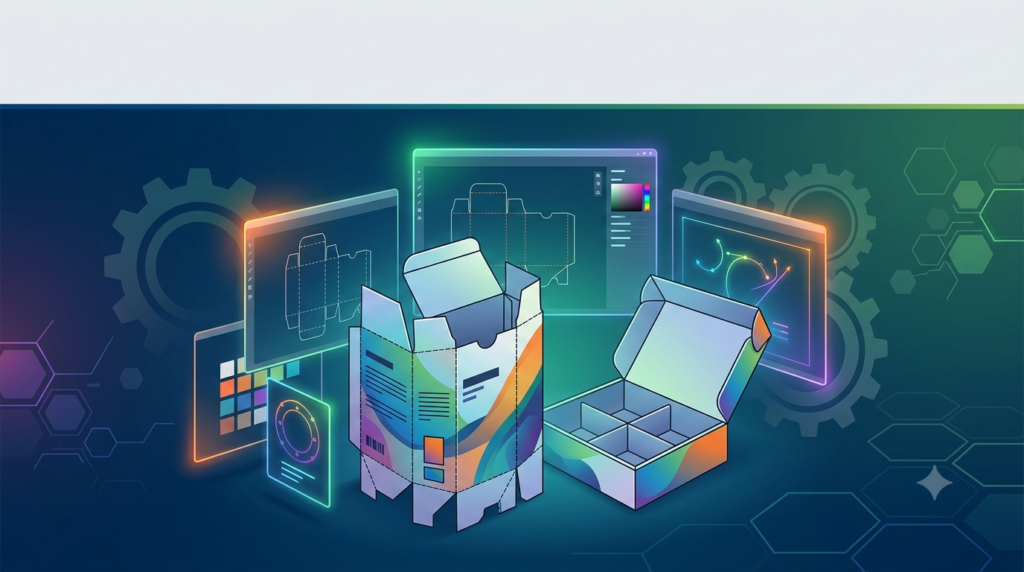
Prinect Package Designer is a specialized software solution developed to simplify and accelerate the design of packaging and die-cutting tools. Its core strength lies in its parametric design capabilities, which allow users to create complex folding cartons quickly and with high accuracy .
The software is built on a modular structure that covers the entire packaging development lifecycle. This includes structural design, sheet layout optimization, cutting die parameterization, and the creation of presetting data for folding carton gluers . A significant advantage is its integration within the Heidelberg Prinect workflow, enabling automatic creation of designs and layouts from standard libraries . For graphic design integration, the “Illustrator Connect” plugin allows seamless data exchange with Adobe Illustrator, complete with 3D visualizations for accurate graphic placement .
The package comes with an extensive library of reusable components. Users have access to thousands of designs, including the complete ECMA and FEFCO catalogs, providing a strong foundation for developing custom packaging solutions . While originally developed by EngView Systems, the software has been refined by Heidelberg to integrate deeply with its print and packaging workflow ecosystem .
Key Features of Prinect Package Designer
Prinect Package Designer offers a comprehensive set of features designed for professionals. Its capabilities can be understood through its core modules and tools.
Parametric Design and Extensive Library
The software facilitates efficient design through parametric components. Users can create scalable, reusable designs that automatically adapt based on specified parameters such as dimensions and material thickness . This is complemented by a comprehensive library containing over 1,800 standard designs and components, including entire ECMA and FEFCO catalogs .
Realistic 3D Visualization and Folding Simulation
Prinect Package Designer provides powerful 3D visualization tools. Users can view designs in solid, semi-transparent, or wireframe modes . Animated folding sequences allow for easy verification of the design and help identify potential errors before physical samples are created . This feature is invaluable for client approvals and internal quality control.
Synergy Option for Custom Library Creation
The “Synergy” option provides advanced tools for creating scalable, parametric packaging designs . This module allows users to build their own custom libraries of components and designs, which can be reused and adapted for future projects, significantly increasing efficiency and consistency .
Diemaker Option for Cutting Tool Design
The “Diemaker” option extends the software’s capabilities to include the design of cutting dies . This feature allows for the creation of die layouts with bridges, cut-off knives, and compensating knives. The resulting data can be sent to tool manufacturers or used directly to control CNC machines, streamlining the production of physical tools .
Illustrator Connect Plugin
The “Illustrator Connect” plugin ensures a smooth workflow between CAD design and graphic design . It enables designers to use CAD data, including 3D representations, directly within Adobe Illustrator. This allows graphic artists to visualize their designs on a 3D packaging model in real-time, ensuring correct placement and alignment of graphics on every panel .
Integrated Workflow and Automation
As part of the Prinect ecosystem, Package Designer integrates seamlessly with the broader Heidelberg workflow. It can automatically generate designs and sheet layouts from standard libraries, and the CAD data can be used to create presettings for postpress equipment, saving setup time and material .
What’s New in Prinect Package Designer 21.10
Version 21.10 introduces several significant improvements focused on user experience, customization, and data exchange.
Centralized Preferences Menu
One of the most notable changes in the 21.10 version is the consolidation of all preference settings into a single, centralized menu . Previously scattered across the user interface, these settings are now organized in one location. This change significantly reduces complexity, especially for new users . The new menu also includes a powerful search functionality, allowing users to quickly find and change specific settings by simply typing keywords .
Customizable Drafting Colors
To improve visual clarity and user comfort, the 21.10 update allows for custom display colors for different line types (e.g., cutting, creasing) . Users can now define colors that are mapped for display purposes only; this means the actual line type data is unchanged, preventing compatibility issues when files are opened in other systems . The update also includes a setting to switch the canvas from white to a darker theme .
Alternative Unit Display
Recognizing the global nature of the packaging industry, version 21.10 introduces the ability to set an alternative unit of measurement . For example, a designer working in millimeters can also display dimensions in inches. This is a significant feature for international collaboration, as it allows both metric and imperial system users to view dimensions in their preferred units directly on the canvas and in the 3D view, reducing the risk of miscommunication .
System Requirements
To ensure optimal performance, your system must meet the following requirements for Prinect Package Designer 21.10.
Operating System
-
Supported Windows Operating Systems: Windows 11 Professional (64-bit) or Windows 10 Professional (64-bit) . The software is a Windows-only application and is not compatible with macOS .
-
Server Operating Systems: Windows Server 2016, 2019, or 2022 Standard Edition .
Hardware Specifications
-
Processor (CPU):
-
Recommended: Workstation CPU i5 class or higher with a clock speed of at least 3 GHz .
-
Minimum: Workstation CPU i5 class or higher with a clock speed of at least 2 GHz .
-
-
Memory (RAM):
-
Recommended: 16 GB .
-
Minimum: 8 GB .
-
-
Storage (Hard Disk):
-
Recommended: 256 GB or larger .
-
Minimum: 256 GB .
-
-
Display:
-
Recommended: 4K resolution (3840 x 2160) .
-
Minimum: Full HD resolution (1920 x 1080) with 32-bit color depth .
-
-
Graphics: A powerful graphics card with the appropriate driver is required for full use of 3D functions and visualization effects .
-
Network: 1x network connection (1 Gbit/s) .
Additional Software
-
Adobe Illustrator: Adobe Illustrator CS6 or CC is required to use the Illustrator Connect plugin .
-
Browser: A standard web browser for internet/intranet features .
Installation Guide
The installation process for Prinect Package Designer requires administrative rights on the target computer . The software is typically distributed through the Prinect Maintenance Center (PMC) and the Prinect Software Center (PSC) .
-
Obtain the Installer: Download the installation files from the HEIDELBERG Prinect Software Center (PSC) via the Prinect Maintenance Center . The installer is often a compressed ZIP file containing the necessary components .
-
Start the Installation: Locate the downloaded files and run the
PackagingSuiteSetup.exefile . -
License Agreement: Read and confirm the license agreement to proceed .
-
Select Installation Type: Choose the appropriate installation type:
-
Local Installation: For a standard single-computer setup .
-
Server Installation: For integration with a Prinect Production Manager server in an automated workflow .
-
-
Select Configuration: Choose the licensed configuration you have purchased. The base package is “Prinect Package Designer + Synergy.” If you have the Diemaker license, select the corresponding option .
-
Install Adobe Illustrator Plugin: If Adobe Illustrator is detected on the system, the Illustrator Connect plugin will be installed automatically. You can also install it later .
-
Configure Settings: Set your preferred language, default unit of measurement, and installation directory .
-
Select Work Directory: Choose a folder where your work files (e.g.,
.evdfiles) will be saved. You can also set up shared resource folders for network environments . -
CAM/CNC Machine Selection: From the list, select the CAM or CNC machine that will be used in your production process. This can be configured later as well .
-
Graphics Card Verification: The installer will check if your graphics card can support advanced 3D features. If necessary, it will guide you through a quality check to ensure proper rendering .
-
Finalize: Select whether to create desktop icons and click “Finish” to complete the installation .
After installation, you must connect to the license server. Start the program and enter the server’s name or IP address to activate your purchased license .
How to Use the Software
The workflow in Prinect Package Designer is intuitive, moving from design creation to production.
-
Creating a New Design: The process typically begins by selecting a base design from the extensive library (ECMA/FEFCO catalogues) or creating a new one from scratch .
-
Parametric Editing: With a design open, you can change its dimensions and other parameters, which will automatically update the entire structure. For example, in a video tutorial, users altered the dimensions A, B, and H of a box and the position of a hole, and the software recalculated the design instantly .
-
Structural Modification: The software provides tools like “Trim” to edit structural components. In one example, users trimmed parts of a webbed flap and then changed the line style from “Creasing” to “Cutting” to prepare the design for production .
-
3D Visualization: A crucial step is checking the design in 3D. Users can view the design, run animated folding sequences to see how the box will be assembled, and ensure the design is correct .
-
Integration with Illustrator: For adding graphics, the design data can be opened in Adobe Illustrator via the plugin. Changes made in the CAD software are automatically reflected in Illustrator, ensuring a smooth transition between structural and graphic design .
-
Output for Production: Once the design is finalized, the software can generate sheet layouts (ganging multiple boxes on a sheet) and create presetting data for cutting and creasing machines .
Best Use Cases
Prinect Package Designer is versatile and supports various roles in the packaging supply chain.
-
CAD/CAM Designers: As the primary users, they utilize the software for creating and editing structural designs for folding cartons and displays. They manage the parametric library and ensure designs are ready for production.
-
Packaging Structural Engineers: They leverage the Diemaker option to design and optimize cutting tools. They use the software’s simulation and analysis tools to ensure the structural integrity of the packaging.
-
Graphic Designers: Using the Illustrator Connect plugin, they can work with the structural design directly in Adobe Illustrator. The 3D preview helps them place graphics accurately on the 3D model, checking for alignment and continuity across panels .
-
MIS Administrators: In automated workflows, the software can be integrated with a Management Information System (MIS). The MIS triggers the automatic creation of shapes and layouts, feeding data such as box catalog numbers and dimensions directly into the CAD system .
-
Print and Postpress Operators: They benefit from the presetting data generated by the software. This data is used to set up the folding carton gluer, saving significant make-ready time and reducing waste .
Advantages and Limitations
Key Advantages
-
Seamless Prinect Integration: Offers a smooth workflow from design to production for shops using the Heidelberg Prinect ecosystem .
-
Extensive Parametric Library: The included library of over 1,800 designs (including ECMA/FEFCO) provides a massive head start on any project .
-
Efficient Automation: The automated sheet layout and presetting generation features reduce manual work and errors, saving time and materials .
-
Powerful 3D Visualization: Animated folding sequences and 3D models facilitate error checking and enhance client communication .
-
Global Collaboration: The alternative unit display feature (new in 21.10) is a significant advantage for international teams .
Limitations
-
Windows-Only: The software is not natively supported on macOS .
-
Cost: As a professional, enterprise-level solution, the licensing (now on a subscription model) and hardware costs can be substantial .
-
Complexity: Despite UI improvements in v21.10, the software’s breadth of features still has a learning curve for new users .
-
Requires Integration for Max Benefit: While it can be used with third-party workflows, its deepest advantages are realized when fully integrated into a Heidelberg Prinect workflow .
Alternatives to the Software
While Prinect Package Designer is a leader in its field, several other professional CAD/CAM systems cater to the packaging industry.
-
Esko ArtiosCAD: A primary competitor known for its powerful 3D capabilities and wide industry adoption, often considered a leader in packaging design .
-
Arden ImpactCAD: Another strong alternative, valued for its robust parametric design and user-friendly interface .
-
CimPACK: A CAD software suite tailored specifically for the corrugated and folding carton industry.
Prinect Package Designer distinguishes itself through its close integration with the Heidelberg Prinect workflow, making it a natural choice for businesses already invested in that ecosystem.
Frequently Asked Questions
What is the latest version of Prinect Package Designer?
The latest major version is 21.10. The documentation and features described correspond to this release, which is available from Prinect Mediaset 26 onwards .
Can Prinect Package Designer run on a Mac computer?
No, Prinect Package Designer is a Windows-based application and is not designed to run natively on macOS .
Is the Adobe Illustrator plugin included?
Yes, the Illustrator Connect plugin is part of the standard Package Designer package. It is automatically installed if Adobe Illustrator is detected on the computer during setup .
What is the “Synergy” option?
The Synergy option provides the fundamental tools for creating and managing parametric, scalable designs . It allows you to build custom libraries of packaging components, making it possible to create new designs efficiently by reusing and adapting existing parts .
Can I design cutting tools with Prinect Package Designer?
Yes, with the optional Diemaker module. This option allows you to design die cutting tools, including bridges, cut-off knives, and stripping tools, within the software environment .
Is it possible to use the software with a third-party workflow?
Yes, Prinect Package Designer can be used with standardized output formats (like DXF, CF2) for integration with third-party workflows. However, for full automation and the best experience, integration with the Heidelberg Prinect workflow is recommended .
Final Thoughts
Prinect Package Designer 21.10 is a powerful and sophisticated CAD/CAM system that represents a significant step forward in packaging design software. Its strengths lie in its seamless integration with the Heidelberg workflow, its extensive and customizable parametric library, and its powerful 3D visualization tools. The latest updates to the user interface—the centralized preferences menu and alternative unit display—show a clear commitment to enhancing user experience and global collaboration.
For companies already operating within the Prinect ecosystem, this software is an essential and highly optimized tool for streamlining their packaging production. While there are viable alternatives in the market, such as Esko ArtiosCAD, the unique synergy between Package Designer and the Heidelberg print and postpress workflow makes it a compelling and often superior choice for those invested in that environment. It remains a critical solution for professionals seeking to master packaging innovation with speed, precision, and full production-line integration.
Our Paid Service
“We do not sell or provide any software. We only offer professional support services. If any software on your system is not working properly, or you are facing installation errors, crashes, or any other technical issue — just contact us. We will help you fix the problem quickly and remotely via AnyDesk. No software will be provided from our side — only expert troubleshooting and support.”