

Overview of the Software
Table of Contents
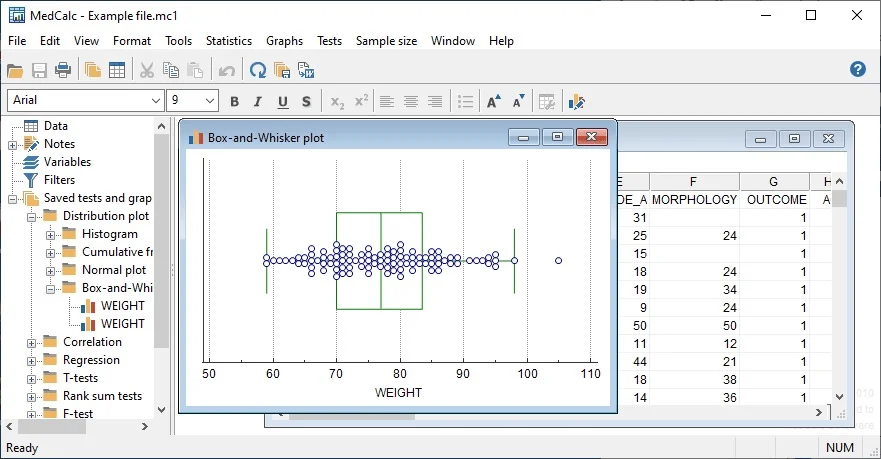
MedCalc is a long-standing statistical software developed by MedCalc Software Ltd. Unlike general analytics platforms such as SPSS or R, MedCalc prioritizes tests commonly used in clinical medicine, laboratory medicine, and epidemiology. Version 23.5.2 x64 is a 64-bit native application, allowing it to handle larger datasets, faster matrix computations, and complex regression models than its 32-bit predecessors.
The software provides a spreadsheet interface for data entry, integrated ROC curve analysis with threshold calculation, and publication-ready charts. Researchers frequently select MedCalc for diagnostic test accuracy studies, method comparison studies (Bland-Altman), and meta-analyses of diagnostic tests.
Key Features
MedCalc v23.5.2 x64 bundles specialized tools not always found in standard statistical suites. Below are its primary capabilities.
-
ROC curve analysis – Includes area under the curve (AUC) comparison, Youden index, predictive values, and likelihood ratios.
-
Bland-Altman plot – Essential for method comparison studies, now including 95% limits of agreement and regression-based analysis of differences.
-
Deming and Passing-Bablok regression – For laboratory method validation.
-
Survival analysis – Kaplan-Meier curves with log-rank and Wilcoxon tests.
-
Meta-analysis – Diagnostic test accuracy meta-analyses, forest plots, and bivariate models.
-
Sample size calculation – Built-in calculators for diagnostic studies, clinical trials, and confidence intervals.
-
Data visualization – Histograms, box-and-whisker plots, Q-Q plots, and interactive chart customization.
-
Spreadsheet interface – Direct data entry or import from Excel, CSV, and LIMS formats.
What’s New in MedCalc v23.5.2 x64
This 64-bit version introduces several improvements over prior releases. Existing users will notice the following enhancements.
Enhanced ROC analysis – Users can now compute partial area under the curve (pAUC) with custom specificity ranges, a critical feature for screening test evaluation.
Extended Passing-Bablok options – The regression algorithm now handles replicates automatically and provides improved confidence interval calculations for small samples.
Faster 64-bit performance – Large datasets (over 2 million rows) are now manageable without memory errors.
Updated chart engine – Exported figures maintain higher resolution for publication in scientific journals (300+ DPI).
Direct LIMS connectivity – Laboratory information systems using HL7/FHIR protocols can stream data directly into MedCalc without intermediate files.
System Requirements
Before installing MedCalc v23.5.2 x64, verify that your system meets these specifications.
| Component | Minimum Requirement |
|---|---|
| Operating System | Windows 10 or Windows 11 (64-bit only) |
| Processor | Intel Core i3 / AMD Ryzen 3 or higher |
| RAM | 8 GB (16 GB recommended for large datasets) |
| Storage | 1 GB free space |
| Display | 1366 x 768 (1920 x 1080 recommended) |
| Additional | Excel or CSV files for import; optional LIMS connector |
MedCalc does not currently offer native Linux or macOS versions, but it runs reliably on Parallels Desktop or VMware Fusion for macOS users.
Installation Guide
This installation guide applies to the x64 version on Windows 10 and 11 systems.
-
Download the installer – Visit the official MedCalc Software Ltd. website and select MedCalc v23.5.2 x64 (64-bit). Verify the digital signature before running.
-
Run as administrator – Right-click the downloaded
.exefile and choose “Run as administrator”. -
Accept the license agreement – Read the end-user license agreement (EULA). This is legally required software; do not use any unauthorized activation tools.
-
Select installation path – The default path is
C:\Program Files\MedCalc. For SSD systems, retain this path for faster loading. -
Choose components – Select “Full installation” to include all statistical modules, help files, and example datasets.
-
Complete installation – Click Install and wait for the process to finish. Launch MedCalc from the Start menu or desktop shortcut.
How to Use the Software
MedCalc’s interface follows a spreadsheet-plus-menu model. Learning the workflow takes less time than R or SPSS syntax.
Step 1 – Import or enter data
Open MedCalc and use File > Import to load an Excel or CSV file. For small datasets, type directly into the spreadsheet grid.
Step 2 – Select a statistical test
Navigate to the Statistics menu. Choose from:
-
Descriptive statistics – For summary tables.
-
ROC curve – For diagnostic accuracy studies.
-
Method comparison – For Bland-Altman or Passing-Bablok.
Step 3 – Define variables
A dialog box asks for dependent and independent variables, grouping variables, and confidence intervals.
Step 4 – Generate results
MedCalc produces a results window with statistical tables, confidence intervals, p-values, and a chart. Right-click any chart to copy or export it.
Step 5 – Save your project
Use File > Save as to store your data and analysis together in .mcw format.
Best Use Cases for Biomedical Researchers
MedCalc v23.5.2 x64 excels in specific research scenarios. Below are the most common applications.
Diagnostic test accuracy studies
Calculate sensitivity, specificity, positive predictive value (PPV), and negative predictive value (NPV) with exact confidence intervals. ROC curves help identify optimal cut-off values.
Method comparison studies
When a new laboratory method replaces an existing one, use Bland-Altman plots to visualize agreement between the two methods.
Clinical trial data analysis
Analyze continuous outcomes (e.g., blood pressure reduction) and categorical outcomes (e.g., response rates) using t-tests, ANOVA, chi-square, or logistic regression.
Meta-analysis of diagnostic tests
Combine multiple diagnostic accuracy studies into a single forest plot with hierarchical summary ROC (HSROC) models.
Advantages and Limitations
Understanding both strengths and weaknesses ensures appropriate tool selection.
Advantages
-
Specialized for medicine – No other software makes ROC and Bland-Altman as accessible.
-
Publication-ready outputs – Charts meet major journal requirements with minimal editing.
-
Fast 64-bit performance – Handles datasets that crash older 32-bit statistical software.
-
Compliance-friendly – Suitable for regulated environments (GCP, FDA inspection readiness).
-
No programming needed – Menu-driven interface reduces syntax errors.
Limitations
-
Windows only – No native macOS or Linux version.
-
Limited machine learning – No random forests, deep learning, or clustering algorithms.
-
Smaller user community – Fewer online tutorials compared to R or SPSS.
-
Cost – Paid license required (free trial available).
Alternatives to MedCalc for Statistical Analysis
Depending on your budget, platform, and analytical depth, consider these alternatives.
| Software | Best for | Platform | Price Model |
|---|---|---|---|
| IBM SPSS Statistics | General social science & medical research | Windows, macOS | Subscription/Perpetual |
| GraphPad Prism | Biostatistics and pharmacology | Windows, macOS | Subscription/Perpetual |
| R (with RStudio) | Unlimited flexibility, no cost | Windows, macOS, Linux | Free, open-source |
| Stata | Epidemiology and longitudinal data | Windows, macOS, Linux | Perpetual license |
| Jamovi | SPSS-like interface, free | Windows, macOS, Linux | Free, open-source |
For clinical laboratory professionals, MedCalc remains the most direct alternative to expensive suites or complex code.
Frequently Asked Questions
Is MedCalc v23.5.2 x64 free for academic researchers?
No, MedCalc requires a paid license. However, free 30-day trials are available on the official website. Some institutions provide site licenses.
Can MedCalc replace SPSS for biomedical analysis?
For ROC analysis, method comparison, and diagnostic test studies, MedCalc is often superior. For complex multivariate modeling or large-scale survey analysis, SPSS or R offers more flexibility.
Does MedCalc produce graphs in vector format for journals?
Yes. Export charts as EMF, SVG, or PDF for vector-based publications. Bitmap formats (PNG, TIFF) are also available at 300+ DPI.
How do I update from MedCalc v22 to v23.5.2 x64?
Licensed users download the new installer from the official website and install over the existing version. The update preserves your preferences and projects.
Does MedCalc v23.5.2 support non-parametric tests?
Yes. The software includes Mann-Whitney, Wilcoxon signed-rank, Kruskal-Wallis, and Friedman tests.
Is the x64 version necessary for small datasets (under 100 rows)?
No. The 32-bit version works for small data. The x64 version becomes beneficial when analyzing over 100,000 rows or performing bootstrap resampling.
Can I automate MedCalc analyses with a script?
MedCalc includes limited batch processing but lacks a full scripting API like R or Python. For large-scale automation, consider R or SPSS syntax.
Final Thoughts
MedCalc v23.5.2 x64 delivers specialized statistical tools that general-purpose software packages obscure behind complex menus or code. For biomedical researchers, clinical epidemiologists, and laboratory scientists, the software’s ROC analysis, Bland-Altman plots, and Passing-Bablok regression provide immediate value. The 64-bit version ensures smooth operation with modern laboratory datasets, while the chart export engine meets rigorous journal standards.
If your work focuses on diagnostic accuracy, method validation, or clinical trial analysis, MedCalc is worth the investment. For researchers requiring deep machine learning or free open-source tools, R with appropriate packages (pROC, BlandAltmanLeh, mada) remains a viable alternative. Always download MedCalc from the official website and support legal software use.
Our Paid Service
“We do not sell or provide any software. We only offer professional support services. If any software on your system is not working properly, or you are facing installation errors, crashes, or any other technical issue — just contact us. We will help you fix the problem quickly and remotely via AnyDesk. No software will be provided from our side — only expert troubleshooting and support.”