

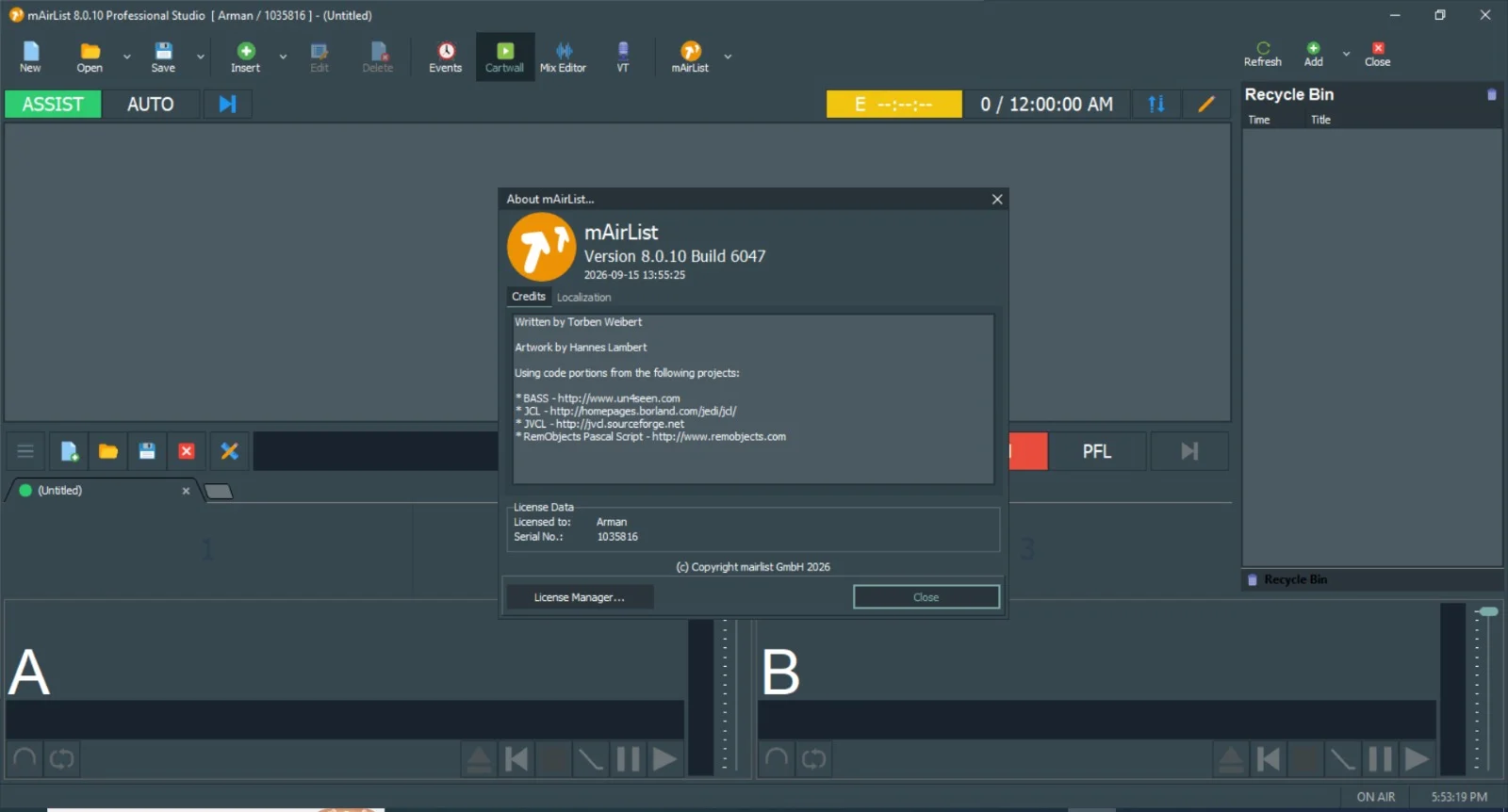
Overview of mAirList V8.0.10 Build 6047
Table of Contents
mAirList V8.0.10 Build 6047 is a professional radio automation and playout system developed by mAirList GmbH. It is designed for terrestrial broadcasters, online radio stations, and audio content producers who require reliable 24/7 operation, precise timing, and regulatory compliance.
The software is available in three specialized editions: Professional, Advanced Plus, and Advanced Server. Each edition targets different operational scales, from single-studio setups to multi-studio networked environments with hardware failover capabilities.
Unlike consumer audio players, mAirList is built around a customizable playout engine that supports both live-assist and fully automated modes. Presenters can start audio manually or let the system run programming smoothly, with the ability to switch modes at any time.
The software works with Windows-based studio environments and supports remote operation. Its modular architecture allows broadcasters to scale from a single computer setup to a multi-studio networked system.
Key Features of mAirList V8.0.10
Core Capabilities Across All Editions
-
Multi-Player Architecture: Supports primary, secondary, and cue players for seamless transitions
-
Broad Audio Format Support: Handles MP3, AAC, WAV, FLAC, OGG, and broadcast-specific formats
-
Automated Playlists: Rule-based scheduling with rotation, category, and time-based logic
-
Live-Assist Mode: Allows presenters to override automation for live shows
-
Remote Voice Tracking: Record and insert links between songs without being in the studio
-
Cart Wall & Hot Keys: Instant playback of jingles, promos, and sound effects
-
Logging & Compliance: Automatic playout logging for regulatory reporting
-
Stream Encoding: Built-in encoders for Icecast and SHOUTcast
-
GPIO Support: Hardware control for studio equipment including faders and cough buttons
-
Database Backend: Uses SQLite or external MySQL/MariaDB for media management
Edition-Specific Feature Differences
The three editions of mAirList V8.0.10 offer progressively advanced capabilities:
| Feature | Professional | Advanced Plus | Advanced Server |
|---|---|---|---|
| Maximum audio channels | 4 | 8 | Unlimited |
| Networked studio sync | No | Limited | Full |
| Remote access via web | No | No | Yes |
| Advanced scheduling rules | Basic | Full | Full |
| Redundancy & failover | No | No | Yes |
Professional is suitable for single-studio operations with basic scheduling needs. Advanced Plus adds remote voice tracking, more audio channels, and full scheduling rules. Advanced Server targets 24/7 server operations with web-based remote control, full network studio synchronization, and hardware failover capabilities.
What’s New in mAirList V8.0.10 Build 6047
The V8.0.10 update focuses on stability, performance, and workflow improvements. Key enhancements include:
-
Improved Database Performance: Faster media loading for large libraries, including those exceeding 500,000 tracks
-
Updated Audio Engine: Lower latency for live input monitoring with ASIO improvements
-
Enhanced Remote Voice Tracking: Better waveform visualization for precise cue point setting
-
Security Patches: Updated network authentication for the Advanced Server edition
-
Dark Mode: A new interface option that simplifies operation, though some screen elements may require adjustment
-
Bug Fixes: Resolved issues with crossfade logic and metadata writing to MP3 files
-
Action Commands: New ability to define custom remote control commands that trigger arbitrary action lists
Users upgrading from version 6.x can import their old configuration almost automatically. Encoder settings are transferred 1:1, and skins are largely preserved.
System Requirements
Minimum Requirements (Professional & Advanced Plus)
-
Operating System: Windows 10 or Windows 11 (64-bit)
-
Processor: Intel Core i3 or AMD equivalent
-
Memory: 4 GB RAM (8 GB recommended)
-
Storage: 500 GB HDD for audio storage
-
Audio: DirectX compatible sound card
Recommended Requirements (Advanced Server)
-
Operating System: Windows Server 2019/2022 or Windows 11 Pro for Workstations
-
Processor: Intel Xeon or AMD Ryzen 7
-
Memory: 16 GB RAM
-
Storage: SSD for OS plus separate HDD/SSD for audio library
-
Audio: Professional audio interface with ASIO drivers
-
Network: Redundant network interfaces
Supported Operating Systems
mAirList runs on Windows 7 and later, including Windows Server 2008 and above. On Windows Server, the “Desktop Experience” feature may be required for playback codecs. The software is also confirmed to work on Windows 11 without issues. A running mAirList process typically consumes only 2-3% CPU and less than 50 MB RAM on a modern i5 processor, excluding encoders and sound processing.
Installation Guide
Follow these steps to install mAirList V8.0.10 legally and safely:
-
Purchase a Valid License: Obtain a legitimate license key from the official mAirList website or an authorized reseller. The software requires a valid license file to operate fully.
-
Download the Installer: Download the setup file (.exe) from the official mAirList website.
-
Run the Installer: Double-click the downloaded file and follow the on-screen prompts. Accept the license agreement and choose the installation directory. The default location is typically under
C:\Program Files (x86). -
Activate Your License: After installation, use the License Manager to download and activate your license. The new version installs with a blank configuration initially.
-
Configure the Database: When you install mAirList from scratch, no database is configured. Open the configuration app (or mAirList Control Panel) and navigate to the Databases page. Click Add and select either mAirListDB (local mode) or mAirListDB (networked SQL).
-
Set Up Audio Routing: Configure your audio inputs and outputs through the configuration app. mAirList supports DirectSound, WASAPI, and ASIO drivers.
-
Test Playback: Load a few audio files into the playlist and verify that playback works correctly through your chosen audio device.
How to Use mAirList V8.0.10
Getting Started with the Interface
The main window of mAirList provides a clear overview of the playout system. The primary elements include:
-
Playlist: Where you load or insert audio files to be played in your rundown
-
Players: Primary and secondary players for seamless audio transitions
-
Cartwall: A multi-tabbed section for instant playback of jingles, promos, and sound effects. It has three operation modes: ON (on air), PFL (prelistening), and OFF
Basic Operations
To load audio into the cartwall, simply drag items from Windows Explorer, the Browser, or the playlist into an empty slot. Click a player to start playback and click again to stop. For a fade-out instead of a hard stop, right-click the player, select Cart Settings, and enable the Fade out when stopped option.
Automation vs. Live Assist
mAirList offers two primary modes of operation:
-
Automation Mode: The system starts and stops players automatically, playing items in the playlist one by one.
-
Live Assist Mode: Presenters control playback manually, with the option to switch to automation at any time.
Database Setup
For single-PC installations, a local mAirListDB database stores all information in a single .mldb file using SQLite. For multi-computer setups, an SQL backend (PostgreSQL, MySQL/MariaDB, or Microsoft SQL Server) should be used. Local database files must not be shared over a network, as this can lead to data corruption.
Best Use Cases for mAirList V8.0.10
Terrestrial Radio Stations
mAirList is widely used by FM and DAB+ radio stations for managing playlists, scheduling, and logging. Its regulatory compliance features make it suitable for stations that need to maintain accurate playout records.
Internet Radio & Streaming
The built-in Icecast and SHOUTcast encoders allow internet radio stations to broadcast directly without additional software. Streams can be configured in MP3 and OggVorbis formats.
Multi-Studio Networks
The Advanced Server edition supports full network studio synchronization, making it ideal for broadcasters operating multiple studios that need to share a central database and coordinate playout.
Remote Voice Tracking
Presenters can record voice links from home or a remote location and insert them into the playlist without being physically present in the studio. This feature is particularly valuable for community radio and syndicated programming.
24/7 Automated Broadcasting
With hardware failover capabilities in the Advanced Server edition, mAirList can run unattended for extended periods, making it suitable for automated channels and overnight programming.
Advantages and Limitations
Advantages
-
Scalable Architecture: Choose from three editions based on operational needs
-
Reliable Playback Engine: Built for 24/7 operation with precise timing
-
Extensive Hardware Integration: Supports DHD, Lawo, Wheatstone, and other professional audio equipment
-
Comprehensive Logging: Meets regulatory compliance requirements for broadcasters
-
Active Development: Regular updates with new features and performance improvements
Limitations
-
Windows-Only: The software runs exclusively on Windows operating systems
-
Learning Curve: New users may need time to configure the system fully
-
Edition Restrictions: Some advanced features like web remote access and full network sync are limited to the Advanced Server edition
-
Licensing Cost: Professional editions require a paid license, though private user discounts may be available
Alternatives to mAirList V8.0.10
Several radio automation software options exist for broadcasters considering alternatives:
| Software | Key Characteristics |
|---|---|
| ProppFrexx ONAIR | All-in-one playout and broadcast automation for web radio to large terrestrial broadcasters |
| RadioDJ | Free Windows-based radio automation software |
| SAM Broadcaster | Popular for internet radio with cloud integration |
| PlayIt Live | Free live-assist and automated playout system supporting WAV, MP3, WMA, and MP4 |
| AzuraCast | Free and open-source web radio management suite |
| OpenBroadcaster | Free and open-source alternative |
mAirList distinguishes itself through its extensive hardware integration, regulatory compliance features, and the Advanced Server edition’s network synchronization and failover capabilities.
Frequently Asked Questions
What is mAirList V8.0.10 used for?
mAirList V8.0.10 is a radio automation and playout system used by terrestrial broadcasters, internet radio stations, and audio content producers for scheduling, playing, and managing audio content in real time.
What is the difference between the Professional, Advanced Plus, and Advanced Server editions?
The Professional edition is for single-studio operations with basic scheduling. Advanced Plus adds remote voice tracking, more audio channels, and full scheduling rules. Advanced Server targets 24/7 server operations with web-based remote control, full network studio synchronization, and hardware failover.
Does mAirList work on Windows 11?
Yes, mAirList is confirmed to work on Windows 11 without issues. Users upgrading from version 6.x can import their old configuration almost automatically.
How much CPU and RAM does mAirList use?
On a current i5 CPU, a running mAirList process typically consumes only 2-3% CPU and less than 50 MB RAM, excluding encoders and sound processing.
Can I run mAirList on Windows Server?
Yes, mAirList runs on Windows Server 2008 and above. You may need to install the “Desktop Experience” feature to have the required playback codecs available.
What audio formats does mAirList support?
mAirList supports MP3, AAC, WAV, FLAC, OGG, and various broadcast-specific formats. Streams can be configured in MP3 and OggVorbis formats.
Does mAirList support remote voice tracking?
Yes, remote voice tracking is available in the Advanced Plus and Advanced Server editions. It allows presenters to record and insert links between songs without being in the studio.
How do I upgrade from an older version of mAirList?
Install version 8, then import the old configuration from your previous version using the menu option in the configuration app. Encoder settings are transferred 1:1, and skins are largely preserved.
Final Thoughts
mAirList V8.0.10 Build 6047 represents a mature, professional-grade solution for radio automation. Its three-tiered edition structure allows broadcasters to invest in exactly the capability level they need, from single-studio operations to complex networked environments with failover protection.
The software’s strengths lie in its reliable playout engine, extensive hardware integration, and regulatory compliance features. The V8.0.10 update brings meaningful performance improvements, including faster database loading for large libraries and a new dark mode interface.
For broadcasters seeking a Windows-based automation system that can scale with their operations, mAirList V8.0.10 is a compelling option worth evaluating alongside alternatives like ProppFrexx ONAIR and RadioDJ.
Our Paid Service