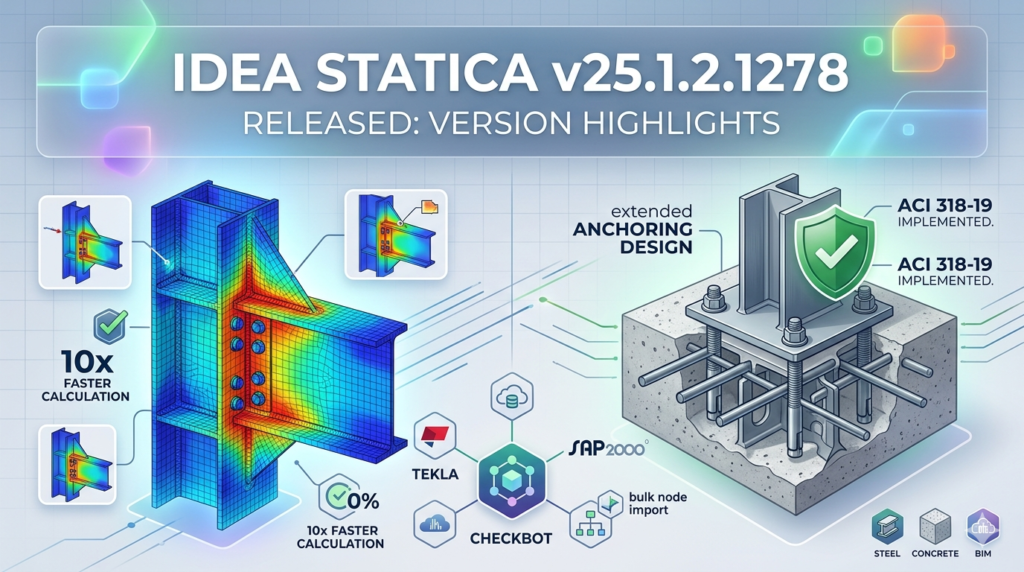

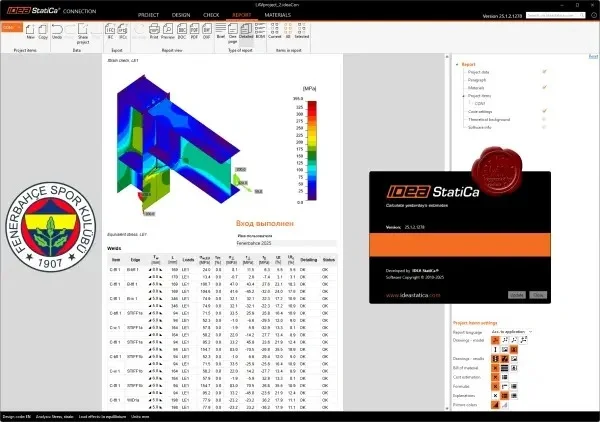
Overview of IDEA StatiCa
Table of Contents
IDEA StatiCa v25.1.2.1278 is a specialized structural engineering software application designed for the code-checking, design, and optimization of steel connections and details. Unlike general-purpose FEA tools, this version focuses on the Component-Based Finite Element Method (CBFEM) , which bridges the gap between traditional rigid analysis and complex 3D modeling.
This release (build 1278) serves as a critical update for civil and structural engineers working on welded joints, bolted connections, anchor bolts, and even cold-formed steel members. The software integrates seamlessly with major BIM ecosystems (Tekla Structures, Autodesk Revit, SAP2000, SCIA Engineer) to ensure that connection design is both geometrically accurate and compliant with international standards.
Key Features
IDEA StatiCa v25.1.2.1278 includes several high-performance modules that enhance the engineering workflow:
-
CBFE (Code-Checking): Validates resistance and stiffness of joints against AISC (360-16/22), Eurocode (EN 1993-1-8), CISC, and Australian Standards.
-
Stiffness Analysis: Classifies joints as rigid, semi-rigid, or pinned directly within the model, improving global frame analysis accuracy.
-
Operation Module: Designs welds and bolts based on internal forces, producing fabrication-ready shop drawings.
-
Cyclic / Seismic Module: Evaluates connections under cyclic loading for seismic design categories.
-
Fatigue Module: Performs high-cycle fatigue checks using the nominal stress method and structural hot-spot stress approach.
What’s New in Version 25.1.2.1278
The v25.1.2.1278 update introduces specific refinements that improve calculation stability and user control:
-
Enhanced AISC 360-22 Compliance: Updated limit state checks for block shear and bolt bearing in end-plate connections per the latest AISC specification.
-
Improved Workflow for Cold-Formed Steel: New templates for C and Z purlin connections, including lapped splices and moment-resisting joints.
-
Faster Meshing Algorithm: Reduced RAM usage during automatic mesh generation for complex tubular joints (up to 30% faster in internal tests).
-
Expanded BIM Export: Direct export of connection stiffness matrices to SAP2000 v26 and RFEM 6.
-
Bug Fix for Welded Gussets: Resolved an overestimation of weld throat resistance for non-planar plates.
System Requirements
To ensure stable performance of IDEA StatiCa v25.1.2.1278, your workstation should meet the following specifications:
| Component | Minimum Requirement | Recommended |
|---|---|---|
| OS | Windows 10 Pro (64-bit, 22H2) | Windows 11 Pro (64-bit) |
| CPU | Intel Core i5 (8th gen) or AMD Ryzen 5 | Intel Core i7 (12th+ gen) / Ryzen 7 |
| RAM | 16 GB | 32 GB or more |
| GPU | DX11 compatible, 2GB VRAM | DX12, 4GB VRAM (for large 3D scenes) |
| Storage | 5 GB SSD | 10 GB NVMe SSD |
| Display | 1920×1080 | 2560×1440 or higher |
Installation Guide
Follow these steps for a clean installation of IDEA StatiCa v25.1.2.1278 on a new Windows machine:
-
Download the installer from the official IDEA StatiCa customer portal (requires valid maintenance credentials).
-
Temporarily disable real-time antivirus scanning to avoid false positives on mesh calculation binaries.
-
Run
IDEAStatiCa_v25.1.2.1278.exeas Administrator. -
Select language (English, German, Spanish, or Chinese) and accept the EULA.
-
Choose installation type:
-
Complete: Installs all modules (Code-Check, Fatigue, BIM, Operation).
-
Custom: Deselect modules not needed (e.g., Cold-Formed steel library).
-
-
Wait for the installer to deploy C++ redistributables and the License Manager service.
-
Activate license: Enter your 25-character product key or start the 14-day trial (no payment required).
-
Restart your workstation to finalize environment variables.
How to Use the Software (Workflow Example)
For a typical moment-resisting steel frame, follow this CBFEM workflow:
Step 1: Import Geometry
Use the BIM link to import member end forces (M, N, V) directly from your frame analysis. Supported formats: .cxl (Tekla), .ifc, or manual DXF template.
Step 2: Model the Connection
Drag and drop components from the library:
-
Bolts (grade 8.8 / 10.9, preloaded or bearing type)
-
End plates (flush or extended)
-
Stiffeners and doubler plates
-
Welds (fillet, partial or full penetration)
Step 3: Apply Loads
The software automatically transfers internal forces from the connected members. You can also define envelope combinations from Eurocode or ASCE 7.
Step 4: Run Analysis
Click Calculate > Code Check. The solver computes:
-
Plate yielding and buckling
-
Bolt shear/tension interaction
-
Weld throat stress (using IIW recommendations)
Step 5: Interpret Results
-
UTI (Unity Check): Values < 1.0 indicate a safe design.
-
Deformation view: Check serviceability limits (L/250 or L/360).
-
Report generator: Export a professionally formatted PDF for permit submissions.
Best Use Cases
This software version excels in specific structural scenarios:
| Use Case | Why IDEA StatiCa v25 is Suitable |
|---|---|
| Industrial sheds | Fast parametric modeling of haunched connections |
| Braced frame connections | Accurate shear lag and block shear checks per AISC |
| Seismic retrofit | Cyclic module calculates ductility factors (µ) |
| Connection optimization | Reduce plate thickness and bolt count by up to 20% |
| Cold-formed steel purlins | New templates for lapped Z-sections |
Advantages and Limitations
Advantages (+)
-
Bidirectional BIM integration: Changes in Tekla update the IDEA model and vice versa.
-
Visual failure mode identification: Color-coded stress hotspots help diagnose local failures.
-
Comprehensive code library: Includes AISC, Eurocode, GB 50017 (China), and Russian SP.
-
No over-conservatism: CBFEM eliminates traditional presumed plastic distribution limits.
Limitations (–)
-
Steep learning curve: New users require 2–3 weeks to master parametric modeling.
-
No concrete connection design: Limited to steel and composite (steel-concrete) only.
-
High licensing cost: Perpetual licenses start at $4,500 USD (excluding annual maintenance).
-
Large assembly models: Projects with >500 unique connections may slow down the solver.
Alternatives to the Software
Depending on your budget and analysis requirements, consider these substitutes:
| Software | Best For | Price Model | Code Coverage |
|---|---|---|---|
| IDEA StatiCa v25 | Complex welded/bolted joints | Subscription / Perpetual | AISC, EC, GB, CISC |
| RISA-3D | Integrated frame + connection design | Annual subscription | AISC 360 only |
| Dlubal RFEM 6 + RF-STEEL | General FEA with joint library | Module-based | Eurocode, AISC |
| Limcon | Simple connection templates | One-time purchase | AISC, EC, AS4100 |
| SkyCiv Connection Design | Cloud-based, low budget | Monthly SaaS | AISC 360, EC3 |
Frequently Asked Questions
1. What is the difference between IDEA StatiCa and standard FEA?
Standard FEA models connections as rigid or pinned nodes. IDEA StatiCa uses CBFEM, which models actual plate flexibility, bolt slip, and weld deformation, leading to more economical and safer designs.
2. Can I open older project files (.idms) in v25.1.2.1278?
Yes. The installer automatically migrates projects from v21, v22, and v24. However, models created in v15 or older require manual re-entry of components.
3. Does this version support API automation?
Yes. It includes a .NET API (C# and Python) for batch analysis. You can automate the checking of 100+ standard connections using a CSV input file.
4. How do I obtain a legal trial license for v25.1.2.1278?
Visit the official IDEA StatiCa website, register a business email (no generic Gmail/Hotmail), and download the trial installer. No credit card is required for the 14-day evaluation.
5. Which BIM software integrates best with this release?
The Tekla Structures 2024 link plugin is the most stable. Revit integration is available but limited to geometry export – analysis results do not sync back to Revit.
6. Why does the software show “License checkout failed”?
This usually occurs when the IDEA License Manager service is blocked by a firewall. Ensure ports 1947 and 1949 are open for outgoing traffic.
7. Can I use IDEA StatiCa for stainless steel or aluminum connections?
The material library includes stainless steel (austenitic and duplex) per EN 1993-1-4, but not pure aluminum. For aluminum structures, use the Eurocode 9 add-on (separate purchase).
8. Is there a free student version?
Yes. IDEA StatiCa offers a one-year academic license for full-time engineering students with proof of enrollment (.edu email and transcript). Contact their education department.
Final Thoughts
IDEA StatiCa v25.1.2.1278 represents a mature, production-ready tool for structural engineers who refuse to guess the true behavior of steel connections. Its shift toward true BIM collaboration, expanded cold-formed steel support, and rigorous AISC 360-22 compliance make it an essential upgrade for firms involved in heavy industrial, high-seismic, or fatigue-rated structures.
While the upfront cost and learning curve may deter occasional users, the return on investment manifests through material savings (often 10–15% less steel) and reduced site fabrication errors. For best results, combine this software with a standard workflow: global analysis in SAP2000 → connection design in IDEA StatiCa → detailing in Tekla Structures.
If your projects require code-checked, fabricator-friendly connections, download the trial version directly from the developer – no third-party repositories or unauthorized tools are needed.
Our Paid Service
“We do not sell or provide any software. We only offer professional support services. If any software on your system is not working properly, or you are facing installation errors, crashes, or any other technical issue — just contact us. We will help you fix the problem quickly and remotely via AnyDesk. No software will be provided from our side — only expert troubleshooting and support.”