

Overview of HydroCAD Stormwater Modeling Software
Table of Contents
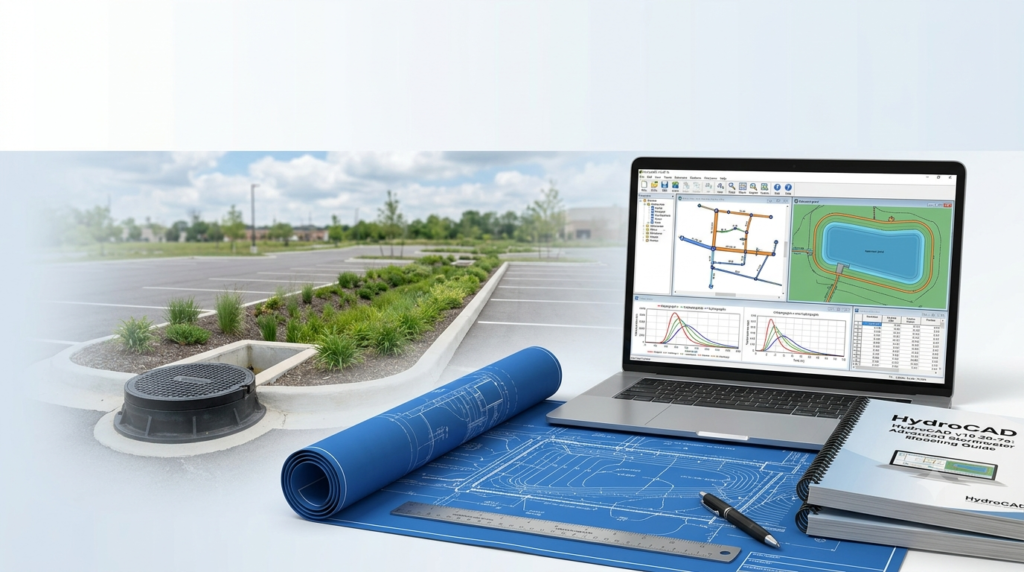
HydroCAD is a Computer-Aided Design (CAD) tool developed for civil engineers to model stormwater runoff and design drainage systems . Since its introduction in 1986, HydroCAD has become a go-to solution for professionals needing to perform complex hydrology and hydraulics calculations in an intuitive graphical environment .
The software provides on-screen routing diagrams that allow engineers to visualize and manage stormwater systems efficiently. HydroCAD supports multiple standard hydrology methods, including SCS (Soil Conservation Service), NRCS (Natural Resources Conservation Service), and SBUH (Santa Barbara Urban Hydrograph) runoff techniques . It also handles the Rational Method with automatic IDF (Intensity-Duration-Frequency) curves, making it versatile for various project requirements .
The software’s architecture enables unlimited hydrograph points, advanced pond and reach routing, coupled pond analysis with automatic tailwater calculations, and comprehensive dam breach simulations .
Key Features of HydroCAD v10.20-7a
Hydrology and Runoff Calculations
HydroCAD provides a comprehensive suite of hydrology tools that support multiple calculation methods . The software’s hydrology engine handles SCS/NRCS runoff calculations, TR-20 and TR-55 studies, Rational Method with automatic IDF curves, and SBUH runoff hydrology. Users can incorporate local rainfall data or choose from the built-in rainfall library, which has been expanded in recent releases .
Advanced Hydraulics and Pond Routing
Engineers can model complex hydraulic structures including ponds with automated storage calculations, hydrograph routing through ponds and reaches, coupled ponds with automatic tailwater, and automated culvert hydraulics calculations . The software also supports advanced flow simulations including pumps, float valves, and progressive dam breach simulations .
Direct CAD Integration and Data Import
The software offers built-in CAD watershed import functionality that allows engineers to map subcatchments, soil groups, and ground covers directly from AutoCAD drawings with a single click . This integration extends to importing and exporting data to CSV (spreadsheet) format and supports various file formats for interoperability with terrain modeling software and other data sources .
Expanded Stormwater Chamber Support
Version v10.20-7a includes the latest “v3” chamber data for products like the Prinsco Dual-Wall, Prinsco HydroStor, Aco StormBrixx, Wavin AquaCell, and ADS-Stormtech SC-310 . The chamber library has been continuously updated to support new products including the Xerxes HydroChain Vault, Ferguson R-Tank MD, Zerxes HydroChain Vault, and Good Flow stormwater chambers .
Pollutant Loading and Land-Use Analysis
HydroCAD enables land-use analysis and pollutant loading calculations, allowing each sub-area to be associated with specific land-use and pollutant concentrations . This feature supports environmental compliance by providing automatic land-use reporting and pollutant loading calculations based on established methods .
Comprehensive Reporting
The software generates detailed reports including node comparison reports with “live” report windows that continuously update as project changes are made . Engineers can also generate node profile reports, peak flow labeling, underground chamber layout with cost estimating, and consolidated pipe listings .
What’s New in the Latest Version
HydroCAD v10.20-7a represents a significant maintenance release with several important updates . The primary reason for this update is a change in Amazon Web Services (AWS) licensing infrastructure, requiring updated software code to maintain license functionality . All HydroCAD 10.2 users must install this update to continue running the software after January 6, 2025 .
New Product Support
Version v10.20-7a adds support for AutoCAD 2026, ensuring compatibility with the latest CAD software . The release also includes new chamber definitions for the Zerxes HydroChain Vault and Ferguson R-Tank MD, with updated chamber definitions for multiple existing products .
Enhanced Reporting Features
The node comparison report now features a “live” report window that remains open and continuously updates as engineers make changes to the project . Users can now move or copy pond outlets, storage definitions, sub-areas, and flow segments to another node using the right-click menu .
Improved Licensing Management
The update brings improved licensing capabilities, including an expanded License Dashboard that allows administrators to see usage for all licenses registered to an organization without entering each license code individually .
Import Capabilities
This release lets users import rating tables for Hydro-Brake vortex valves and makes improvements to the node profile reports and peak flow labeling .
System Requirements
HydroCAD v10.20-7a is compatible with virtually any 32-bit or 64-bit PC running Windows 98, ME, NT, 2K, XP, Vista, 7, 8, 10, or 11 . The software has been carefully designed to ensure a single program can be used across all supported Windows versions .
Hardware Requirements
The software requires approximately 10 MB of hard disk space, with minimal additional space for project data (approximately 10k for a 10-node project) . RAM requirements are modest, with any system capable of running Windows being sufficient for HydroCAD operations .
Display and Printing
HydroCAD runs on any Windows-compatible display system with full support for dual-monitor configurations . The software supports all Windows printers, including local, network, USB, JetDirect, and other connections, as well as specialized “printer” drivers for plotters and PDF output .
Internet and Network Support
HydroCAD requires a direct internet connection to communicate with the license server, though internet access occurs only when starting and stopping the program . The standard program is network-ready and allows license sharing between multiple users, though the software must be installed on a local hard drive rather than a server . Proxy servers are not supported at this time .
Virtual Environments
While no specific Macintosh edition is available, users have reported good results running HydroCAD on Windows emulators such as Parallels or WINE . The software runs on most virtual environments as long as user settings are retained between sessions .
Installation Guide
Downloading HydroCAD v10.20-7a
The software is distributed exclusively by download . Users should navigate to the official HydroCAD download page and select the appropriate version based on their license type . The setup program file size is approximately 5 MB . Users should save the file to their Windows desktop under the suggested file name “HydroCAD-setup.exe” .
Installation Procedure
-
Run the setup program: Click or double-click the downloaded file to begin installation .
-
Accept the license agreement: Users will be asked to formally accept the updated software license agreement .
-
Install to local drive: HydroCAD must be installed on a local drive on the PC where the software will be used . It should not be installed on a server .
-
Select standard installation: Choose the “Standard Installation” option during setup .
-
Automatic license detection: When updating an existing installation, the software will automatically use the existing license code without requiring re-entry .
Important Installation Considerations
-
No uninstall required: Users do not need to uninstall previous versions before installing the update, except when upgrading from HydroCAD 6.00 .
-
Install to same folder: Updates should always be installed to the same folder as the current installation .
-
Single active version: A PC can only have a single active version of HydroCAD at any given time .
-
Compatibility mode: HydroCAD should not be run in Windows “Compatibility mode” as this can cause hard-to-diagnose problems .
Installing Without Internet Access
If a computer does not have internet access, users can download the setup program on a different computer and move the setup file using a flash drive or other removable media .
Silent Installation for Administrators
Administrators can perform a silent uninstall by using the “undeploy” program located in the HydroCAD program folder together with the /silent option .
How to Use the Software
Getting Started
When HydroCAD starts for the first time, the online Tutorial will run automatically . New users are encouraged to review this tutorial to get up to speed quickly . The software provides help buttons on each screen that answer 99% of common questions, with a PDF copy of the Reference Manual available on the Help menu starting with HydroCAD 10.2 .
Creating a Project
Engineers begin by creating a routing diagram on screen, connecting subcatchments, ponds, and reaches . The software automatically calculates runoff, routing, and storage based on the input parameters. Users can define rainfall events using local data or the built-in rainfall library .
Working with CAD Data
Watershed data can be imported from AutoCAD drawings by mapping subcatchments, soil groups, and ground covers, then importing with a single click . The software also supports data import from various CAD systems and file formats .
Advanced Features
Engineers can model complex systems including underground storage chambers, pumps and float valves, dam breach scenarios, and pollutant loading calculations . The chamber wizard provides automated layout, modeling, and cost estimating for underground storage systems .
International Use
HydroCAD can be used internationally with support for Metric/SI units . Users can specify units for each project on the Settings|Units screen, with individual parameters also customizable .
Best Use Cases
Stormwater Management Design
HydroCAD is primarily used by civil engineers for stormwater management system design, including detention pond sizing, drainage system analysis, and storm sewer design .
Land Development Projects
The software is ideal for land development projects where runoff analysis and stormwater compliance are required . The land-use analysis and pollutant loading features support environmental permitting requirements .
Infrastructure Planning
Engineers use HydroCAD for infrastructure projects including highway drainage, airport drainage, and municipal stormwater systems .
Green Infrastructure Design
The software’s chamber library supports the design of underground storage systems, including the latest stormwater chambers from multiple manufacturers .
Dam Breach Analysis
HydroCAD offers progressive dam breach simulations for safety assessment and emergency planning .
Advantages and Limitations
Advantages
-
Cost-effective: HydroCAD offers a strong cost-to-benefit ratio compared to other stormwater modeling products .
-
User-friendly: The software is described as “intuitive and stable” with an easy learning curve .
-
Comprehensive features: Supports multiple hydrology methods, advanced routing, and a wide range of hydraulics calculations .
-
CAD integration: Direct import from AutoCAD eliminates the need for separate CAD software .
-
Lightweight: Minimal system requirements and small installation size .
-
Regular updates: Continuous updates with new chamber definitions and software compatibility .
Limitations
-
Internet required: Direct internet connection needed for license communication .
-
Windows-only: No native Macintosh version, though emulators work .
-
Proxy server limitation: Proxy servers are not supported .
-
Local installation required: Must be installed on local drive rather than server .
Alternatives to HydroCAD
Other Stormwater Modeling Software
While HydroCAD is a leading solution for stormwater modeling, several alternatives exist in the civil engineering software market. Major competitors include Bentley’s StormCAD, Autodesk’s Storm and Sanitary Analysis, XP Software’s XP-SWMM, and the EPA’s SWMM . The HydroCAD Sampler provides a free evaluation option for users to compare capabilities .
When to Choose HydroCAD
HydroCAD is particularly suitable for engineers who need a cost-effective, user-friendly solution with minimal learning curve . It offers excellent value for small to medium-sized projects and works well for firms that may not require the extensive capabilities of more expensive enterprise solutions .
Frequently Asked Questions
What is HydroCAD v10.20-7a and why do I need it?
HydroCAD v10.20-7a is a critical maintenance update that ensures the software continues to function after January 6, 2025 . The update addresses changes in Amazon Web Services licensing infrastructure and adds support for new stormwater chambers and AutoCAD 2026 . All HydroCAD 10.2 users must install this update to avoid error 211 (“open failed”) .
Is the HydroCAD v10.20-7a update free?
Yes, this is a maintenance release available to all HydroCAD 10.2 users at no charge . The update is provided free regardless of license type (annual, permanent, or Sampler) .
Which version should I download?
Users with maintenance, annual licenses, or Sampler should download the latest version . Permanent license holders not on maintenance should download the specific version for which they are licensed (e.g., v10.20-7a) .
How do I install HydroCAD v10.20-7a?
Download the setup program, run it, and select “Standard Installation” . Install to the same folder as your current HydroCAD installation, and do not uninstall first (except when upgrading from v6.00) . The installation preserves all user data and project files .
What’s new in HydroCAD v10.20-7a?
This release adds support for AutoCAD 2026 and new chamber definitions for the Zerxes HydroChain Vault and Ferguson R-Tank MD . It also includes updated chamber definitions for Prinsco Dual-Wall, Prinsco HydroStor, Aco StormBrixx, Wavin AquaCell, and ADS-Stormtech SC-310 . The node comparison report now features a “live” report window .
Can I run HydroCAD on a Mac?
HydroCAD does not offer a specific Macintosh edition, but users have reported good results running the software on a Windows Emulator such as Parallels or WINE .
What are the system requirements for HydroCAD?
HydroCAD runs on any Windows PC with Windows 98 through Windows 11, requires approximately 10 MB of hard disk space, and has minimal RAM requirements . A direct internet connection is required for license communication .
What hydrology methods does HydroCAD support?
HydroCAD supports SCS/NRCS runoff calculations, TR-20, TR-55, SBUH hydrology, and the Rational Method with automatic IDF curves . Users can incorporate local rainfall data or choose from the built-in rainfall library .
Final Thoughts
HydroCAD v10.20-7a represents a necessary update for all current users of HydroCAD 10.2 software. The update ensures continued functionality and adds valuable new features including support for the latest stormwater chambers and CAD integration.
For civil engineers working in stormwater management, HydroCAD remains a cost-effective, user-friendly solution that delivers professional-grade results. The software’s intuitive interface, comprehensive hydrology and hydraulics capabilities, and regular updates make it a trusted tool in the industry.
Users should install this update immediately to avoid service interruption and take advantage of the new features. Whether you’re designing detention ponds, analyzing drainage systems, or modeling dam breaches, HydroCAD continues to be a reliable choice for stormwater modeling professionals.
Our Paid Service
“We do not sell or provide any software. We only offer professional support services. If any software on your system is not working properly, or you are facing installation errors, crashes, or any other technical issue — just contact us. We will help you fix the problem quickly and remotely via AnyDesk. No software will be provided from our side — only expert troubleshooting and support.”