
Overview of Dental Dentrix v10.5.4.4
Table of Contents
Dental Dentrix v10.5.4.4 is a robust, enterprise-level practice management solution designed specifically for dental clinics, group practices, and dental service organizations (DSOs). This version focuses on streamlining administrative workflows, enhancing patient communication, and providing comprehensive clinical data integration.
As a leading software in the dental technology niche, Dentrix helps practices manage patient scheduling, billing, treatment planning, and electronic health records (EHR). The latest iteration, v10.5.4.4, prioritizes stability improvements and security updates, ensuring compliance with HIPAA and other healthcare data protection regulations.
Key Features of Dental Dentrix
Dentrix v10.5.4.4 offers a wide range of tools that support daily dental operations. Below are the core modules and functionalities:
-
Intelligent Patient Scheduling: Visual appointment book with drag-and-drop functionality, color-coded appointment statuses, and automated appointment reminders via text or email.
-
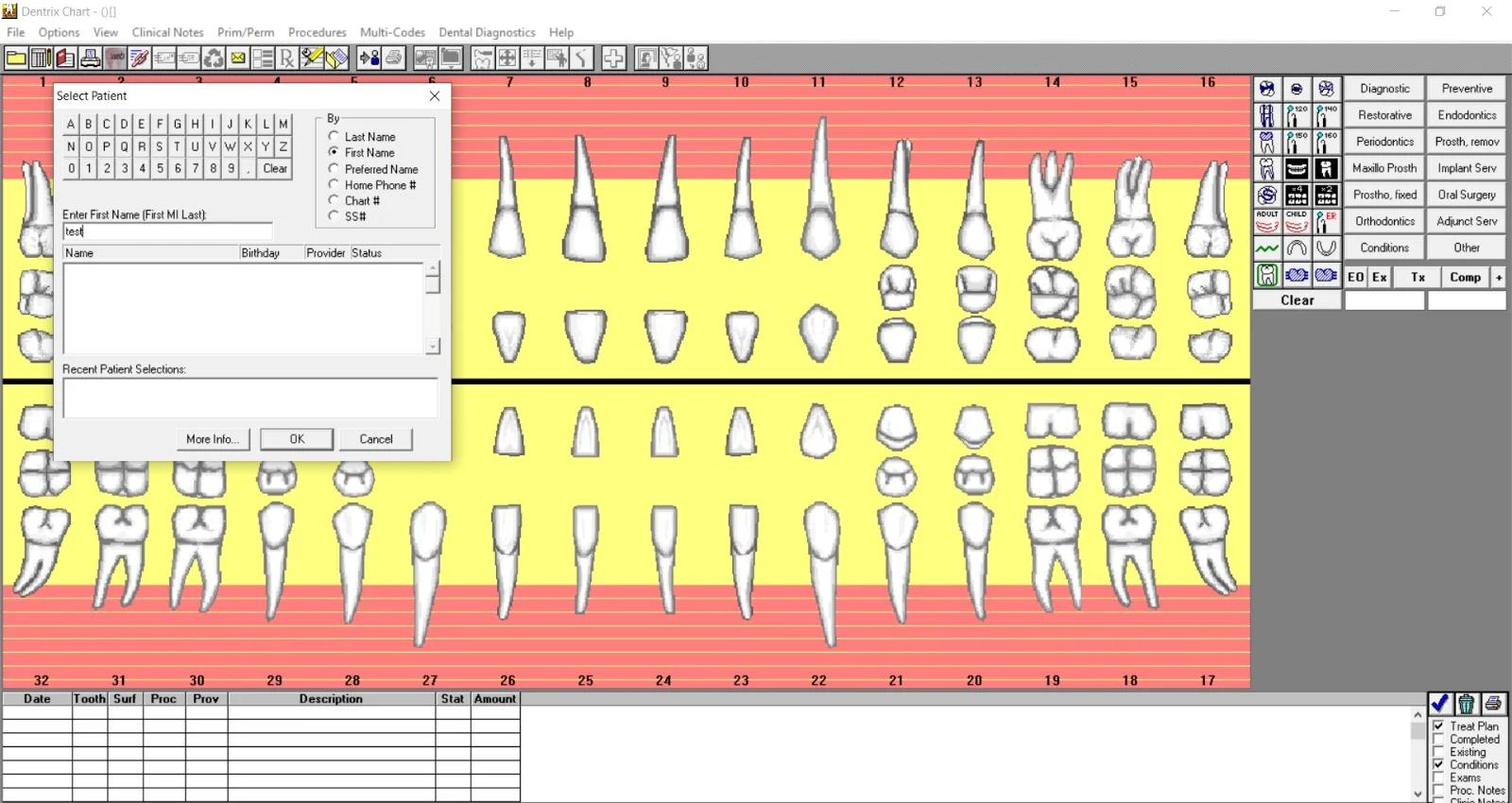
Clinical Charting & Imaging: Fully integrated periodontal charting, odontogram, and intraoral image management.
-
Treatment Planning & ePrescribe: Electronically create, present, and manage treatment plans. Includes ePrescribe integration for secure medication and prescription management.
-
Insurance & Billing Management: Automated insurance claim creation, electronic claim submission (EDI), and real-time eligibility verification.
-
Patient Communication Hub: Two-way texting, recall campaign management, and online patient portal access.
-
Reporting & Analytics: Over 250 built-in reports, including production analysis, collections tracking, and referral source tracking.
What’s New in Dental Dentrix v10.5.4.4
This maintenance release focuses on backend enhancements and user-reported quality-of-life improvements:
-
Enhanced Security Protocols: Updated API authentication methods to meet modern cybersecurity standards.
-
Faster Database Queries: Optimized SQL queries in the patient ledger and appointment finder modules, improving load times by up to 25%.
-
Improved EHR Compliance: Revised clinical note templates to align with the latest ICD-10 and CDT code changes.
-
Bug Fixes: Resolved issues related to claim batch printing and third-party imaging integrations.
System Requirements for Dental Dentrix v10.5.4.4
To ensure optimal performance, your hardware and network environment must meet or exceed these specifications.
Server Requirements
| Component | Minimum | Recommended |
|---|---|---|
| Operating System | Windows Server 2019 | Windows Server 2022 |
| Processor | Intel Xeon E-2236 | Intel Xeon Gold 5317 |
| RAM | 16 GB | 32 GB |
| Storage | 256 GB SSD (OS) + 1 TB HDD (Data) | 512 GB NVMe + 2 TB RAID 10 |
| Database | Microsoft SQL Server 2019 | Microsoft SQL Server 2022 |
Workstation Requirements
| Component | Minimum | Recommended |
|---|---|---|
| Operating System | Windows 10 Pro (64-bit) | Windows 11 Pro (64-bit) |
| Processor | Intel Core i5-8500 | Intel Core i7-11700 |
| RAM | 8 GB | 16 GB |
| Display Resolution | 1366 x 768 (1360 x 768 for charting) | 1920 x 1080 |
| Network | 1 Gbps LAN | 2.5 Gbps LAN |
Note: Dentrix v10.5.4.4 does not support macOS workstations natively. Use virtualization or Windows-based terminals.
Installation Guide for Dental Dentrix v10.5.4.4
Proper installation ensures data integrity and software stability. Follow these steps carefully.
Pre-Installation Checklist
-
Backup existing Dentrix database using the Dentrix Database Maintenance tool.
-
Disable antivirus and Windows Defender temporarily on the server.
-
Verify .NET Framework 4.8 is installed.
-
Close all third-party dental imaging software to avoid file lock conflicts.
Installation Steps
-
Run the installer as Administrator from the official DVD or network share.
-
Select “Server Installation” from the setup type menu.
-
Choose SQL Server instance (default: DENTRIX_51) or create a new instance.
-
Configure service accounts using domain credentials with limited privileges.
-
Complete workstation setup by running the client installer on each endpoint and pointing to the server hostname.
-
Re-enable security software and add Dentrix folders to the exclusion list.
How to Use Dental Dentrix for Daily Operations
Scheduling a New Patient Appointment
-
From the Office Manager module, click the Appointment Book.
-
Right-click on an available time slot and select New Appointment.
-
Search for an existing patient or click Add New Patient.
-
Fill in mandatory fields: first/last name, phone number, and reason for visit.
-
Assign a provider, operatory, and appointment type (e.g., “New Patient Exam”).
-
Click Save – the system will automatically generate a confirmation prompt.
Submitting an Insurance Claim Electronically
-
Navigate to the Patient Account → Insurance tab.
-
Click Create Claim and verify the procedure codes and fee amounts.
-
Click Validate to check for missing attachments or eligibility issues.
-
Select Send Batch to transmit via the built-in clearinghouse.
-
Monitor claim status under Transactions → EDI Log.
Best Use Cases for Dental Dentrix
-
Multi-location DSOs: Centralized reporting and cross-location patient lookup.
-
Orthodontic Practices: Use fixed-billing payment plans and progress tracking.
-
Dental Schools & Teaching Clinics: Student/module check-in with faculty approval workflows.
-
Paperless Transitioning Clinics: Full EHR adoption with digital consent forms.
Advantages and Limitations
Advantages
-
Deep clinical integration: Works with 50+ imaging sensors and intraoral cameras.
-
Scalable user permissions: Over 40 customizable security levels.
-
On-premises control: No reliance on internet connectivity for core features.
-
Mature ecosystem: Extensive third-party add-ons for CBCT, patient financing, and recall marketing.
Limitations
-
Steep learning curve: New users require 8–12 hours of formal training.
-
No cloud-native version: Remote access requires a separate VPN or terminal server.
-
Higher startup cost: Licensing fees for 5+ users can exceed $12,000 upfront.
-
Legacy UI elements: Some setup windows still use Windows 2000-era controls.
Alternatives to Dentrix v10.5.4.4
| Software | Best For | Deployment | Cloud/Hybrid | Starting Price |
|---|---|---|---|---|
| Open Dental | Budget-conscious clinics needing full source code access | On-prem or Hosted | Hybrid | $199/month (unlimited users) |
| Eaglesoft | Patterson equipment users (imaging seamlessly) | On-prem | On-prem only | $4,995 (perpetual) |
| Curve Dental | Cloud-first, multi-location with bed-to-bed workflows | Cloud-native | Full cloud | $349/month (per location) |
| Dentrix Ascend | Dentrix users wanting cloud without retraining | Cloud-native | Full cloud | Contact sales |
Frequently Asked Questions (FAQ)
1. Is Dental Dentrix v10.5.4.4 compatible with Windows 11?
Yes. Workstations running Windows 11 Pro (23H2 or later) are fully supported, provided all Windows updates are current.
2. Can I migrate data from Dentrix v10.5.4.4 to a cloud platform?
Yes. Use the built-in Data Export Tool to generate CSV or XML files. For full database migration (including imaging), Henry Schein offers a one-time professional migration service.
3. Does Dentrix require a dedicated server?
Yes, for on-premises installations. A server with Windows Server OS and SQL Server is mandatory. The software does not run in a peer-to-peer workstation environment.
4. What is the difference between Dentrix v10.5.4.4 and Dentrix Ascend?
Dentrix v10.5.4.4 is on-premises only. Dentrix Ascend is the cloud-native, browser-based sibling. Ascend requires no server but has fewer reporting modules and imaging integrations.
5. How often does Dentrix release updates?
Major feature releases occur annually. Minor maintenance versions (like 10.5.4.x) are released quarterly for bug fixes and security patches. An active support plan is required to receive updates.
6. Can I use Dentrix remotely from home?
Yes — but only through a VPN connection to your office server or via RDP (Remote Desktop) on Windows Server. There is no direct cloud login for this version.
7. What backup strategy is recommended for Dentrix?
Use SQL Server native backups (full daily, transaction log every 15 minutes) plus nightly image-level backups of the entire server. Do not simply copy the Dentrix program folder.
Final Thoughts
Dental Dentrix v10.5.4.4 remains a gold standard for established dental practices that prioritize data security, clinical depth, and offline reliability. While the on-premises model demands upfront IT investment and staff training, the resulting control over patient data and customization capabilities outperforms many cloud alternatives.
For practices already using Henry Schein hardware or needing advanced insurance workflows, Dentrix v10.5.4.4 delivers measurable ROI. However, if your team lacks dedicated IT support or desires anytime-anywhere access without a VPN, consider Dentrix Ascend or Curve Dental as valid alternatives.
Our Paid Service
“We do not sell or provide any software. We only offer professional support services. If any software on your system is not working properly, or you are facing installation errors, crashes, or any other technical issue — just contact us. We will help you fix the problem quickly and remotely via AnyDesk. No software will be provided from our side — only expert troubleshooting and support.”