
Overview of Cesbo Astra
Table of Contents
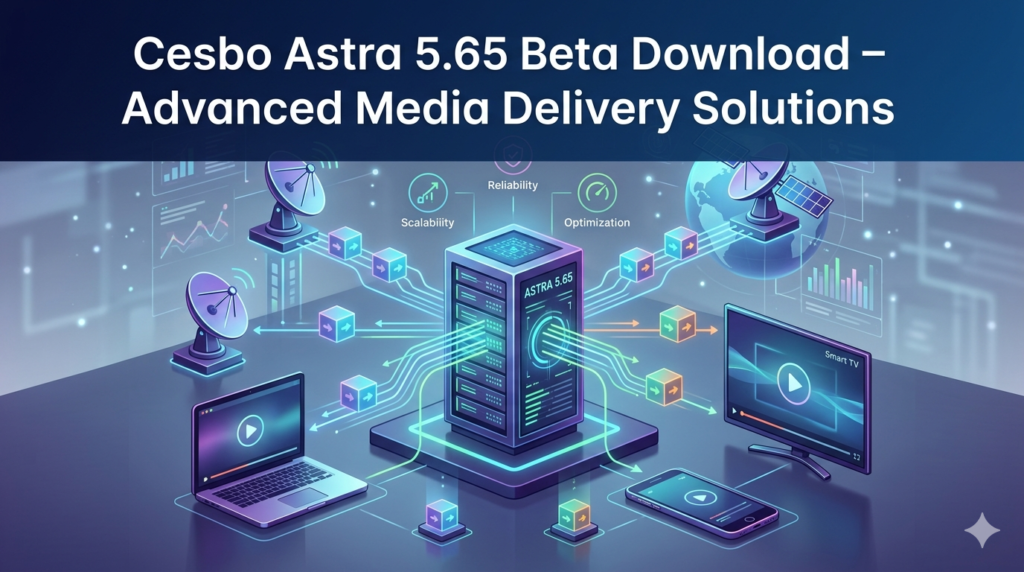
Cesbo Astra is a professional-grade IPTV streaming server and media transcoding platform designed for Linux environments. It enables users to receive, process, and redistribute video and audio streams across local networks or the internet. Unlike consumer-oriented tools, Astra focuses on low-latency delivery, advanced DVB input handling, and robust HTTP Live Streaming (HLS) output.
The software targets system administrators, small-to-medium broadcasters, hotel IPTV providers, and educational institutions. Its modular architecture allows for both simple stream relay setups and complex multi-input, multi-output transcoding pipelines. With the 5.65 Beta release, Cesbo continues to prioritize stability and real-time control.
Key Features of Cesbo Astra
Cesbo Astra distinguishes itself through a feature set optimized for professional media delivery. Below are the core capabilities that drive its adoption in the software and broadcasting niche.
1. Multi-Protocol Input Support
Astra accepts streams via UDP, HTTP, RTMP, HLS, DVB (satellite/cable/terrestrial), and file playback. This flexibility allows users to ingest content from virtually any source, including legacy broadcast hardware and modern CDNs.
2. Real-Time Transcoding
The software includes on-the-fly transcoding for video (H.264, H.265) and audio (AAC, MP3) codecs. Users can adjust bitrate, resolution, and frame rate to match client device requirements, reducing bandwidth consumption without sacrificing quality.
3. Advanced Stream Processing
-
PID filtering and remapping for transport stream control.
-
Logo and text overlay for branding.
-
Time-shift buffers for live pause and rewind functionality.
-
DVB subtitle and teletext passthrough.
4. Output Protocols
Deliver streams via HLS, MPEG-DASH, RTMP, UDP multicast, or HTTP Live Proxy. This ensures compatibility with set-top boxes, mobile apps, web players, and smart TVs.
5. RESTful API and Web Interface
Full HTTP API support enables automation of channel management, stream starting/stopping, and real-time monitoring. The web-based control panel provides a clean dashboard for status checks and log analysis.
6. EPG (Electronic Program Guide) Management
Import EPG data from XMLTV, JTV, or custom formats. Schedule recordings or use guide data for channel sorting and client display.
What’s New in Cesbo Astra 5.65 Beta
The 5.65 Beta update focuses on operational efficiency and system security. Below are the documented enhancements:
-
Optimized HLS packaging – Reduced segment generation latency for live events, improving sync across iOS and Android players.
-
Enhanced TLS encryption – Updated SSL/TLS libraries for HTTPS streams and web interface access, meeting modern security compliance standards.
-
Redesigned Web UI navigation – Simplified left-hand menu and consolidated stream status views reduce clicks for common tasks.
-
Improved DVB device handling – Better support for TBS and Digital Devices cards, including automatic detection after kernel updates.
-
Memory leak fixes – Long-running transcoding processes now show lower RAM consumption over 30+ day uptime windows.
-
New API endpoints – Programmatic access to EPG reload and individual stream logging.
Important: This is a beta release. Production deployments should remain on the stable 5.64 branch unless specific beta features are required.
System Requirements for Cesbo Astra 5.65 Beta
| Component | Minimum | Recommended |
|---|---|---|
| OS | Ubuntu 20.04 / Debian 11 | Ubuntu 22.04 LTS (or newer) |
| CPU | 2 cores (2 GHz) | 4+ cores (3+ GHz) |
| RAM | 2 GB | 8 GB (for transcoding) |
| Storage | 20 GB (logs + buffering) | 100 GB+ SSD |
| Network | 100 Mbps | 1 Gbps (static IP recommended) |
Additional dependencies: libssl, libpcre3, ffmpeg (for advanced codec support). Astra runs without a desktop environment; command-line access is sufficient.
Installation Guide for Cesbo Astra 5.65 Beta
Follow this step-by-step installation for a clean Debian/Ubuntu server.
Step 1: Update System Packages
sudo apt update && sudo apt upgrade -y
sudo apt install wget curl gnupg -y
Step 2: Download the Beta Package
Cesbo provides direct .deb and .rpm packages for the beta. Use the official repository to ensure integrity:
wget https://cesbo.com/download/astra/beta/astra_5.65-beta_amd64.deb
Step 3: Install the Package
sudo dpkg -i astra_5.65-beta_amd64.deb
sudo apt --fix-broken install -y
Step 4: Start and Enable the Service
sudo systemctl enable astra
sudo systemctl start astra
Step 5: Verify Installation
Access the web interface at http://your-server-ip:8000. Default login credentials are set during first boot (check /etc/astra/conf.xml). Change the password immediately.
How to Use Cesbo Astra: Basic Workflow
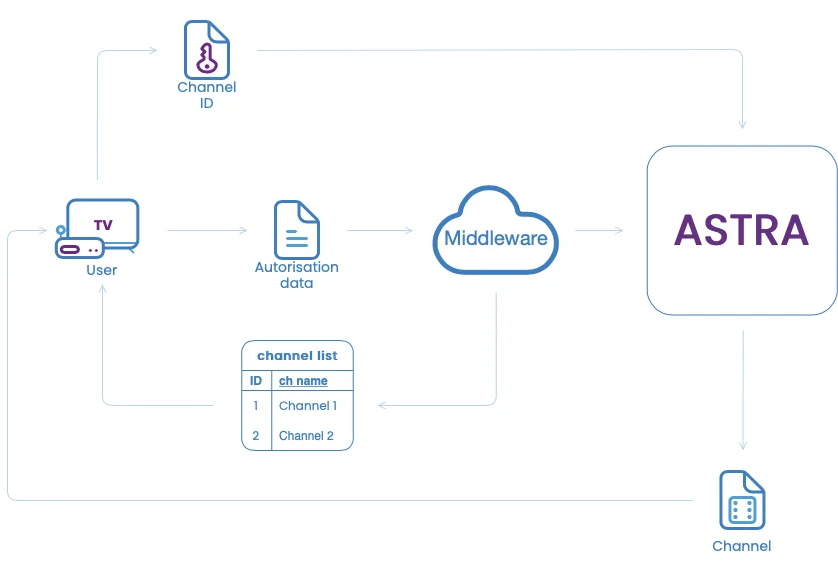
Understanding the logical flow helps both beginners and professionals.
1. Access the Web Control Panel
Navigate to http://[server-ip]:8000. Authenticate using credentials defined during setup.
2. Add an Input Stream
-
Click “Inputs” → “Add”.
-
Select protocol (e.g., UDP, HTTP, DVB).
-
Enter stream URL or device path.
-
Set buffer size (default 1024 KB works for most).
3. Configure Processing
-
Apply PID filters, transcode settings, or overlay graphics.
-
For simple relay, skip direct processing.
4. Define Output
-
Click “Outputs” → “Add”.
-
Choose HLS, RTMP, or UDP.
-
For HLS: Set segment duration (recommend 4–6 seconds for live).
-
For UDP multicast: Specify destination IP and port.
5. Start the Stream
Enable the output and monitor the traffic graph for packet loss or reconnection events. Use tcpdump or Astra’s built-in logs for troubleshooting.
Best Use Cases for Cesbo Astra
Cesbo Astra excels in professional environments where reliability and low latency are mandatory.
-
Hotel and Hospital IPTV – Distribute a limited set of local and satellite channels to hundreds of rooms using unicast HLS.
-
Campus Cable TV Replacement – Convert legacy DVB-C signals to multicast UDP for university dormitories.
-
Remote Monitoring of Broadcast Feeds – Receive contribution feeds via RTMP, transcode down to low bitrate HLS, and monitor remotely.
-
Test Environment for CDN Edge Servers – Simulate origin streaming behavior before deploying to major cloud platforms.
-
Educational Streaming Labs – Teach transcoding and packaging concepts without expensive commercial hardware.
Advantages and Limitations of Cesbo Astra
| Advantages | Limitations |
|---|---|
| Low CPU usage for simple relay operations | Steep learning curve for DVB configuration |
| No per-channel licensing fees | Limited community documentation compared to open-source tools |
| Works on modest VPS hardware | No native Windows or macOS server version |
| Stable for months of continuous operation | Advanced transcoding requires ffmpeg compilation knowledge |
| REST API enables custom dashboards | Beta versions may introduce breaking changes |
Alternatives to Cesbo Astra
Depending on your requirements, consider these legitimate alternatives:
| Software | Best For | Key Difference |
|---|---|---|
| TVHeadend | DVB server with built-in scheduling | Open-source, more tuned for home users |
| Nimble Streamer | Adaptive bitrate (ABR) packaging | Better for large-scale CDN origination |
| Flussonic Media Server | Enterprise security and DVR features | Commercial, higher cost but extensive support |
| Ant Media Server | WebRTC low-latency streaming | Superior for interactive broadcasts |
| FFmpeg + Nginx-RTMP | Maximum customization | Requires manual scripting and maintenance |
Frequently Asked Questions
Is Cesbo Astra free?
Cesbo Astra offers a free version limited to 1 Mbps output bandwidth and 5 channels. Commercial licenses start at €149 for unlimited streams.
Can I use Cesbo Astra on a Raspberry Pi?
Yes. Compile from source or use the ARM package, but transcoding is limited. For simple relay without re-encoding, a Pi 4 works adequately.
Does Astra support 4K H.265 streaming?
Yes, as long as the CPU or GPU has sufficient decoding/encoding power. Software-only transcoding of 4K H.265 requires a modern multi-core Xeon or Ryzen processor.
How do I update from 5.64 stable to 5.65 beta?
Back up /etc/astra/conf.xml, then run sudo dpkg -i astra_5.65-beta_amd64.deb. Rolling back requires reinstalling the stable package and restoring the config.
Is Cesbo Astra legal to use for streaming pay TV channels?
You must have redistribution rights. Using Astra to decrypt and restream subscription-based channels without permission violates copyright laws in most jurisdictions. Cesbo Astra is a tool; legality depends on content licensing.
What logs should I check for stream failures?
/var/log/astra/astra.log and the web interface’s “System Log” tab. For real-time debugging, run astra -c /etc/astra/conf.xml in the foreground.
Final Thoughts
Cesbo Astra 5.65 Beta represents a meaningful step forward for professionals managing IPTV infrastructure. The optimized HLS output, enhanced TLS security, and cleaner web interface reduce friction in daily operations. While beta versions require cautious deployment, the improvements targeting memory efficiency and API responsiveness are immediately valuable.
For new users, begin with the free bandwidth-limited version on a virtual private server. Master input → processing → output workflows before integrating DVB hardware or transcoding. For existing Astra administrators, test the 5.65 Beta in a staging environment — particularly if you rely heavily on HLS or the REST API.
Cesbo Astra remains a legitimate, cost-effective alternative to enterprise media servers when your team has Linux systems administration expertise. Pair it with a robust CDN or edge server for scalable, secure media delivery.
Our Paid Service
“We do not sell or provide any software. We only offer professional support services. If any software on your system is not working properly, or you are facing installation errors, crashes, or any other technical issue — just contact us. We will help you fix the problem quickly and remotely via AnyDesk. No software will be provided from our side — only expert troubleshooting and support.”