

Overview of CYMGrd 8.0 R1
Table of Contents
CYMGrd is part of the broader CYME suite of power system analysis tools. It is specifically engineered to assist engineers in creating technically sound and economical grounding grid designs. The software facilitates the rapid analysis of various design alternatives, allowing users to choose the most effective solution for any given installation . By leveraging advanced algorithms, CYMGrd helps evaluate and reinforce both new and existing grounding grids, ensuring they meet stringent safety standards.
The program is particularly valued for its compliance with international safety standards, including IEEE 80-2013, IEEE 81-1983, and IEEE 837-2002 . This compliance ensures that the designs generated are legally and technically robust, upholding the principles of safety and reliability expected in electrical engineering.
Key Features of CYMGrd Grounding Software
CYMGrd 8.0 R1 comes equipped with a robust set of features that simplify the complexities of grounding system analysis.
Analytical Capabilities
-
Finite Element Analysis: The software uses finite element analysis to evaluate the performance of ground grid conductors and rods, providing accurate modeling of complex grid geometries .
-
Safety Calculations: It performs comprehensive safety assessments, calculating maximum permissible touch and step voltages as per IEEE 80 standards, which is vital for ensuring human safety during fault conditions .
-
Soil Modeling: CYMGrd supports both uniform and two-layer soil models. Users can input field measurements to define soil resistivity, or they can select from a built-in library of typical soil types, enhancing the accuracy of the analysis .
-
Current Analysis: The module computes key parameters such as the Station Ground Resistance (Rg), Ground Potential Rise (GPR), and the Decrement Factor (DF) using bus X/R ratios and shock duration data .
Modeling and Visualization
-
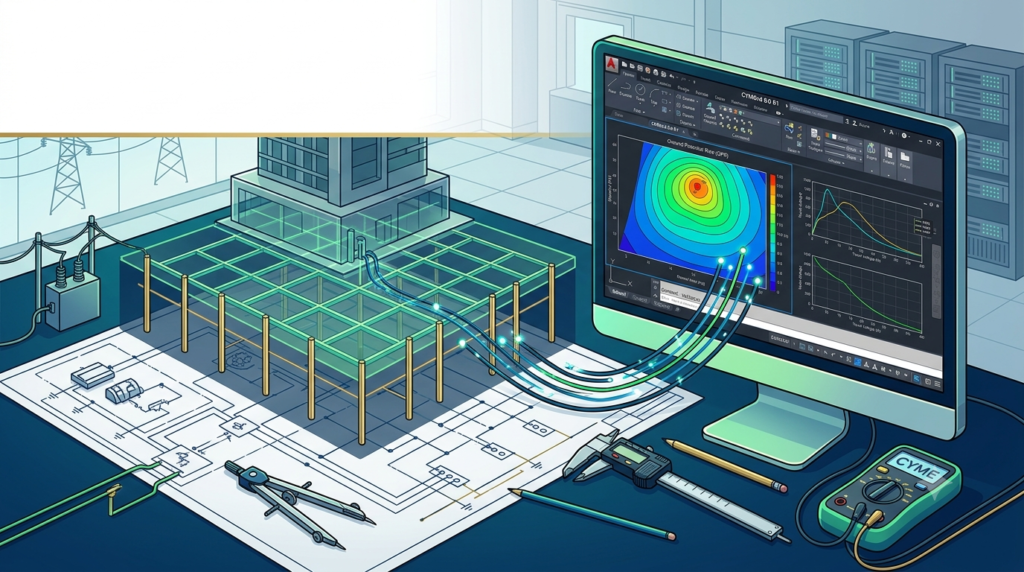
Graphical Representation: Users can create and view 2D and 3D representations of the grounding grid. This helps in visualizing potential gradients and identifying danger points effectively .
-
AutoCAD Interface: A standout feature is its tight integration with AutoCAD, enabling engineers to design a grid in AutoCAD and directly import it into CYMGrd for simulation, streamlining the workflow .
What’s New in CYMGrd 8.0 R1
The update to version 8.0 R1 introduced significant improvements to enhance performance and user experience. Key enhancements include:
-
Optimized Performance and User Interface: The software framework and user interface have been optimized for faster performance and more intuitive navigation, making it easier for engineers to execute complex simulations .
-
AutoCAD Compatibility: The interface now allows users to save files into formats compatible with any previous version of AutoCAD, ensuring seamless data exchange and collaboration .
-
Updated Standards: The software includes documented benchmark case studies for the comparison of results with 18 case studies found in IEEE STD 80 2013’s Annexes B, C, E, and H, improving validation and trust in the software’s outputs .
-
European Safety Assessment: To cater to an international user base, version 8.0 R1 also supports safety assessments compliant with European Standard EN 50522, broadening its utility .
System Requirements
To install and run CYMGrd 8.0 R1 effectively, your system should meet the following specifications :
| Component | Requirement |
|---|---|
| Operating System | Windows 7 / 8.1 / 10 / 11 (x64) |
| Processor | Pentium 2.0 GHz required; 3.00 GHz or higher recommended |
| RAM | 4 GB required; 8 GB recommended for complex simulations |
| Hard Disk Space | 350 MB of free space required |
| Display | 1920 x 1080 (16:9 widescreen) recommended; minimum 1280 x 1024 |
| .NET Framework | Microsoft 4.6 .NET (provided if not installed) |
Note: AutoCAD remains a firm software requirement if you plan to utilize the import/export functionality for grid layouts .
Installation Guide
A typical installation process for CYMGrd 8.0 R1 follows the standard procedure for Windows software. It is generally part of the larger CYME software suite installation .
-
Download the Installer: Obtain the official installation package from Eaton or an authorized distributor.
-
Run Setup: Launch the installer and select the CYMGrd module during the installation process if you have a suite license.
-
System Check: The installer will verify that your system meets the necessary requirements (e.g., .NET Framework, OS version).
-
Licensing: Enter your licensing information. CYMGrd typically requires a hardware key or a software license file provided by Eaton.
-
Completion: Follow the on-screen prompts to complete the installation.
How to Use the Software: A Step-by-Step Workflow
The true power of CYMGrd 8.0 R1 is realized through a structured workflow that seamlessly integrates design and simulation .
Step 1: Design the Grid in AutoCAD
Engineers can create the detailed layout of a grounding grid using AutoCAD. This involves defining dimensions, conductor placements, rod locations, and connections. Using a CAD platform allows for precise and highly detailed visual design .
Step 2: Import into CYMGrd
Once the preliminary design is complete, the grid layout is imported into CYMGrd . The interface enables the import of various file formats such as .DXF or .DWG .
Step 3: Define Site Parameters
In CYMGrd, engineers define the soil’s electrical properties. They can input measured soil resistivity values to model uniform or two-layer soil profiles. Other parameters like fault current magnitude, duration, and surface layer materials are also defined here .
Step 4: Perform Simulation and Analysis
The software runs powerful computational algorithms to analyze the grid’s performance. It calculates the Ground Potential Rise (GPR), touch and step voltage contours, and the leak current distribution across the grid . The results can be visualized in 2D or 3D color plots .
Step 5: Optimize and Finalize
Based on the simulation results, engineers can adjust the grid design in AutoCAD, re-import it, and re-simulate until the design is optimized for safety and cost-effectiveness . The final results and designs can be compiled into professional reports .
Best Use Cases for CYMGrd
CYMGrd is the industry standard for a wide range of critical infrastructure projects .
-
Substation Grounding: The primary use is in the design and analysis of grounding systems for electrical substations of all voltage levels .
-
Power Plants: It is utilized to ensure the safety of grounding networks at both conventional and renewable power generation facilities .
-
Industrial Complexes: Manufacturing plants and industrial facilities use the software to design safe grounding systems for their heavy electrical equipment .
-
Renewable Energy: With the growth of renewable energy, the software plays a crucial role in designing and assessing grounding for large solar farms and wind power plants .
Advantages and Limitations
Advantages
-
Standards Compliance: Ensures adherence to IEEE and IEC standards, providing a solid technical and legal foundation for designs .
-
Powerful Integration: The seamless AutoCAD integration significantly improves workflow efficiency and reduces the likelihood of manual data entry errors .
-
Comprehensive Analysis: It offers in-depth analysis of current distribution, GPR, and touch/step voltages, providing a complete picture of grid performance .
-
Rapid Prototyping: The software allows for quick iterative testing of various design alternatives, optimizing for cost and safety .
Limitations
-
Complexity: For new engineers, the learning curve can be steep due to the advanced algorithms and standards knowledge required.
-
Cost: As a specialized professional tool from a major software provider, licensing can be costly for smaller firms.
-
Soil Model Limitations: While it handles uniform and two-layer soils, more complex multi-layer soil models might require more advanced software modules.
Alternatives to CYMGrd
For engineers considering other grounding system analysis tools, several alternatives are available in the market.
XGSLab (by SINT Srl / Bentley Systems):
A powerful competitor known for its intuitive interface and worldwide standards compliance, including International (IEC), European (EN), and American (IEEE) standards . It also allows import/export from AutoCAD and offers advanced modules for frequency-dependent analysis .
SafeGrid Earthing (by ELEK):
This software is widely used by utilities and consulting companies. It features a multilayer finite element method, imports grids from AutoCAD, and calculates safety limits based on IEEE and IEC standards . It also offers a lightning protection module and advanced reporting features .
Groundinsight:
For those seeking a free and open-source alternative, Groundinsight is a Python library designed for earthing system analysis . It is modular and uses tools like NumPy and SciPy for computations, promoting accessibility and collaboration for research and education .
Frequently Asked Questions (FAQ)
1. Does CYMGrd 8.0 R1 work with AutoCAD?
Yes. The CYMGrd/AutoCAD interface module is a key feature, allowing users to seamlessly switch between the two environments. You can design grids in AutoCAD and import them into CYMGrd as .DXF or .DWG files .
2. What standards does CYMGrd 8.0 R1 comply with?
CYMGrd 8.0 R1 complies with key international standards, including IEEE 80-2013, IEEE 81-1983, and IEEE 837-2002. It also supports safety assessments per European Standard EN 50522 .
3. What are the system requirements for CYMGrd 8.0?
The software is compatible with Windows 7 to Windows 11 (x64). It requires a minimum of 4 GB RAM and 350 MB of hard disk space, though 8 GB RAM is recommended for optimal performance .
4. How does CYMGrd calculate touch and step voltages?
The software uses Finite Element Analysis to compute the leakage current distribution along the grounding grid conductors. Based on these currents, it calculates the surface potential distribution, allowing it to determine the maximum permissible and actual touch and step voltages .
5. Can CYMGrd model different types of soil?
Yes. The software offers flexible soil modeling. It can use a uniform soil model or a two-layer horizontal soil model. Engineers can define the soil resistivity values based on field measurements or select from a pre-built material library .
Final Thoughts
CYMGrd 8.0 R1 represents a significant tool for the electrical engineering community, specifically for those focused on critical safety infrastructure. Its combination of rigorous standards compliance, powerful computational algorithms, and seamless AutoCAD integration makes it an essential asset for designing safe and effective grounding systems. By enabling engineers to rapidly prototype and optimize designs, CYMGrd ensures that substations and power plants are not only efficient but also comply with the highest safety standards. Whether upgrading an old grid or designing a new renewable energy facility, CYMGrd 8.0 R1 provides the accuracy and reliability required for modern power systems engineering.
Our Paid Service
“We do not sell or provide any software. We only offer professional support services. If any software on your system is not working properly, or you are facing installation errors, crashes, or any other technical issue — just contact us. We will help you fix the problem quickly and remotely via AnyDesk. No software will be provided from our side — only expert troubleshooting and support.”