

Overview of Horosoft Professional 5.1.81
Table of Contents
Horosoft Professional is a commercial Vedic astrology software developed by Triple-S Software, an Indian organization with a history in Jyotish software dating back to 1986. The Professional edition is positioned for users who generate horoscopes at scale—professional astrologers, astrology institutions, matrimonial portals, and research scholars working with international clients.
Version 5.1.81 is a maintenance and feature update within the 5.0 generation, which replaced the discontinued 4.0 line. The 5.0 generation introduced automatic updates, a redesigned worksheet engine, expanded PDF output, and deeper support for specialized systems such as Nadi astrology with color-coded events.
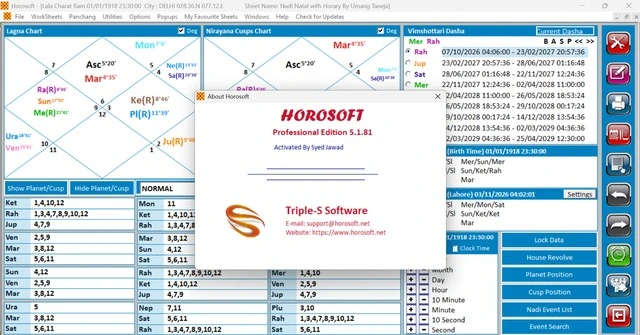
The software is not a consumer-grade “kundli maker.” It is a professional astrology worksheet platform where practitioners can build custom reports, compare multiple charts side-by-side, and apply a wide range of dasha systems and divisional chart techniques within a single interface.
Key Features of Horosoft Professional 5.1.81
Horosoft Professional 5.1.81 ships with more than 45 pre-designed astrology worksheets spanning the major schools of Vedic astrology. The feature set can be grouped into several functional areas.
Core Vedic Calculation Modules
-
Parashari System: planetary positions, Karaka Avastha, Bhava analysis, Saptak Varga, Shodash Varga (all 16 divisional charts), Sudarshan Chakra, friendship tables, Ashtakavarga, Prashtakavarga, Shadbal, Bhavbal, Vimshottari Dasha, Yogini Dasha, Kalchakra Dasha, Ashtottari Dasha, Char Dasha, ascendant prediction, Nakshatraphal, Manglik consideration, Dashaphal, Yogas, Kalsarp Yoga, and Varshphal (yearly prediction).
-
Nadi System: based on the lord–sub-lord theory pioneered by Umang Taneja, including planetary coordinates, Niryana cusps, optional color coordinates, event tagging, and event search.
-
KP (Krishnamurti Paddhati) System: lord and sub-lord positions, 1–249 sub-lord mapping, prime significators, general significators with star lord, Niryana cusp, most prime significators, and 4-step theory.
-
Lal Kitab: Teva, remedies, Varshphal, Dasha, ancestral curse analysis, and planetary predictions.
-
Jaimini System: Char Dasha, Char Karak, Karakamsha chart, Swamsha chart, Pad Lagna, and Jaimini aspects.
Worksheet and Reporting Capabilities
-
Unlimited worksheet design: a built-in worksheet creation tool lets you combine any chart, theory, or prediction on a single sheet.
-
Multi-horoscope viewing: compare charts vertically, horizontally, or in cascade view within the same workspace.
-
Full PDF support: generate complete PDF horoscopes with your own branding at the bottom of each page, and create print modules that control which topics are included.
-
Professional printing themes: optional designer themes (sold separately) for client-facing horoscope packages.
Calculation and Customization Tools
-
Chart style selection: North Indian, South Indian, East Indian, and Sri Lankan chart formats.
-
Ayanamsha and calculation settings: configurable Ayanamsha and related parameters.
-
City database: city selection with province classification and updated DST/timezone data.
-
Advanced transit and horary tools: Horary Instant Answer, Hit Theory, advanced transit, divisional chart calculations, and additional customized significators.
Learning and Support Resources
Triple-S Software provides YouTube tutorials in English and Hindi covering Nadi color events, event search, birth time rectification, Nadi match-making, custom worksheet creation, printing module creation, multi-chart viewing, chart style changes, Lal Kitab remedies, and Hit Theory.
What’s New in Horosoft Professional 5.1.81
Version 5.1.81 is identified on the official product page as the current release, updated August 13, 2025. While the publisher does not publish a granular changelog for each build on the public page, the 5.0 generation itself introduced several important upgrades over the discontinued 4.0 edition:
-
Automatic updates within the 5.0 generation, reducing the need for manual reinstallation.
-
Nadi color event system: highlights key life events such as marriage, travel, and career by color-coding corresponding Nadi coordinates.
-
Expanded PDF and print module management, including branding control and topic-level module selection.
-
Deeper multi-chart comparison workflows, with vertical, horizontal, and cascade layouts.
-
Broader Windows compatibility, including Windows 11 and ARM architecture for digital licenses.
For users migrating from 4.0, the 5.x line represents a structural upgrade rather than a cosmetic patch: the worksheet engine, PDF pipeline, and Nadi event tools are materially different from the older edition.
System Requirements
Horosoft Professional 5.1.81 has specific platform requirements that differ depending on the license type. The software is Windows-only and does not run on Apple Mac, Wine/CrossOver on Mac, or inside a virtual machine.
Digital License
| Component | Requirement |
|---|---|
| Operating system | Windows 7, Windows 8, Windows 8.1, Windows 10, Windows 11 |
| Architecture | 32-bit and 64-bit; Windows ARM supported |
| License delivery | Digital license |
Source: official product page.
USB Dongle License
| Component | Requirement |
|---|---|
| Operating system | Windows 7, Windows 8, Windows 8.1, Windows 10, Windows 11 |
| Architecture | 32-bit and 64-bit |
| License delivery | Physical USB dongle |
Source: official product page.
Important compatibility notes:
-
The software does not run on macOS, including through Wine or CrossOver.
-
Virtual machines are not supported.
-
Older Horosoft 4.0 documentation lists Windows XP and Vista, but the 5.x generation targets Windows 7 and later.
-
Disk space requirements are modest; historical Horosoft documentation cites roughly 50–60 MB of storage, though the 5.x generation with PDF modules and worksheets may require additional working space.
Installation Guide
Installation procedures vary by license type. The following steps reflect the official support guidance for the current generation.
USB Dongle License Installation
-
Remove the USB license key from the computer before beginning.
-
Request the setup link by emailing
[email protected]. -
Download the setup file from the link provided by support.
-
Run the downloaded installer and follow the on-screen instructions.
-
Complete the installation and then insert the USB license key to activate the software.
Digital License Installation
Digital-license users should follow the download and activation instructions provided with the license purchase. The official support channel is [email protected] for setup-link requests and activation troubleshooting.
Post-Installation Checklist
-
Confirm that the correct Ayanamsha setting is selected for your tradition.
-
Verify the city database and timezone data are current.
-
Run a test chart with known birth data to confirm calculation accuracy.
-
Explore the YouTube tutorial library for worksheet creation and PDF module setup.
How to Use Horosoft Professional 5.1.81
Horosoft Professional is organized around a worksheet-centric workflow. The following sequence reflects the typical professional usage pattern.
Step 1: Enter or Import Birth Data
Begin by entering the native’s name, date, time, and place of birth. The city database allows selection by province with updated DST and timezone information. For birth-time-sensitive work, the software includes birth time rectification tools that compare planetary coordinates.
Step 2: Select the Worksheet or System
Choose from the pre-designed worksheets or create a custom worksheet. The worksheet library spans Parashari, Nadi, KP, Lal Kitab, Jaimini, transit, Ashtakavarga, and match-making modules. You can place any combination of charts, tables, and predictions on a single sheet using the worksheet design tool.
Step 3: Configure Chart Style and Ayanamsha
Select the chart format appropriate for your client base—North Indian, South Indian, East Indian, or Sri Lankan—and set the Ayanamsha and calculation parameters. These settings affect every downstream calculation, so configure them before generating reports.
Step 4: Analyze and Compare
Use the multi-horoscope viewing features to compare charts vertically, horizontally, or in cascade layout. For Nadi work, enable color coordinates and event tagging to highlight marriage, career, travel, and other life-event signatures.
Step 5: Generate PDF and Print Modules
Build a PDF horoscope with your branding at the bottom of each page, and use the module management system to control which topics are included in each print or PDF output. Optional professional printing themes can be applied for client-facing deliverables.
Best Use Cases for Horosoft Professional 5.1.81
Professional Astrology Practice
Horosoft Professional is built for astrologers who serve a large client base and need repeatable, branded horoscope packages. The combination of unlimited worksheets, PDF branding, and print modules supports a production-oriented practice.
Nadi and KP Specialists
Practitioners who work primarily in the Nadi or KP systems will find dedicated modules that go beyond generic Vedic calculations. The Nadi color event system and event search tools are particularly relevant for event-based prediction workflows.
Astrology Bureaus and Matrimonial Portals
The software includes match-making worksheets with Guna, Dosha, and Manglik analysis, along with graph-based compatibility output. For portals, the web edition of Horosoft allows output redesign using VB Script, JavaScript, and ASP.
Research and Scholarly Work
The breadth of dasha systems—Vimshottari, Yogini, Kalchakra, Ashtottari, Char, and their sub-periods—makes the software suitable for comparative Jyotish research. The ability to view multiple charts simultaneously supports cross-case analysis.
Lal Kitab and Jaimini Practitioners
Dedicated Lal Kitab and Jaimini modules cover Teva, remedies, ancestral curse analysis, Char Dasha, Karakamsha, and Jaimini aspects, giving specialists in these traditions a native workflow rather than a workaround.
Advantages and Limitations
Advantages
-
Broad system coverage: Parashari, Nadi, KP, Lal Kitab, and Jaimini in one platform.
-
Professional reporting: PDF branding, print modules, and designer themes for client deliverables.
-
Worksheet flexibility: unlimited custom worksheet design and multi-chart comparison.
-
Established developer: Triple-S Software has been in the Jyotish software field since 1986.
-
Learning resources: free YouTube tutorials in English and Hindi for major workflows.
Limitations
-
Windows-only: no native macOS support and no support for Wine/CrossOver or virtual machines.
-
Commercial licensing: the software starts at a professional price point, with optional designer themes sold separately.
-
No public granular changelog: build-level changes for 5.1.81 are not individually documented on the public page, so users should confirm specifics with support.
-
Dongle logistics: USB-license users must manage a physical key and request setup files by email.
Alternatives to Horosoft Professional 5.1.81
The Vedic astrology software market includes several established alternatives. The table below compares Horosoft Professional 5.1.81 with three commonly cited options.
| Software | Platform | Core strength | Notable difference from Horosoft |
|---|---|---|---|
| Horosoft Professional 5.1.81 | Windows only | Parashari, Nadi, KP, Lal Kitab, Jaimini; professional PDF/print workflows | Deep Nadi color-event system and multi-system worksheets in one package |
| Parashara’s Light | Windows; Mac via separate builds | Classical Parashari calculations and extensive printouts | Strong reputation for positional accuracy; less emphasis on Nadi-specific event tooling |
| AstroApp | Browser-based (any OS) | Multi-tradition astrology, 3D planetarium, 59 house systems | No installation; subscription editions; broader Western and Vedic tradition coverage |
| Jagannatha Hora | Windows | Free, Parashari-focused | Free and widely used, but narrower in Nadi, KP, and Lal Kitab modules compared with Horosoft |
Parashara’s Light is often evaluated for its calculation precision against the Rashtriya Panchang, and it remains a benchmark for classical Parashari work. AstroApp appeals to practitioners who need cross-platform access and a very wide range of house systems and traditions, but it is a browser-based subscription model rather than a locally installed Windows application. Jagannatha Hora is a free option for Parashari calculations, though it does not match Horosoft’s breadth in Nadi and Lal Kitab worksheets.
Frequently Asked Questions
What is the latest version of Horosoft Professional?
The latest version listed on the official product page is 5.1.81, updated on August 13, 2025.
Does Horosoft Professional 5.1.81 run on Mac?
No. The software is Windows-only and is explicitly not compatible with Apple Mac, Wine/CrossOver on Mac, or virtual machines.
What Windows versions are supported?
For a digital license, Windows 7, 8, 8.1, 10, and 11 are supported in 32-bit and 64-bit, including Windows ARM. For a USB dongle license, Windows 7, 8, 8.1, 10, and 11 are supported in 32-bit and 64-bit; ARM is not listed for the dongle license.
How do I install Horosoft Professional with a USB dongle?
Remove the USB key, email [email protected] for the setup link, run the installer, complete installation, and then insert the USB license key.
Does Horosoft Professional support Nadi astrology?
Yes. The software includes a dedicated Nadi system based on the lord–sub-lord theory of Umang Taneja, with optional color coordinates and event search.
Can I generate branded PDF horoscopes?
Yes. The software supports complete PDF horoscope generation with branding at the bottom of each page, along with a module management system for selecting print topics.
Does Horosoft Professional include KP and Lal Kitab?
Yes. Both KP and Lal Kitab have dedicated modules. The KP module covers sub-lords, significators, and 4-step theory; the Lal Kitab module covers Teva, remedies, Varshphal, Dasha, and ancestral curse analysis.
Is Horosoft Professional suitable for beginners?
It is primarily designed for professional astrologers, bureaus, and research scholars, not casual beginners. However, Triple-S Software provides free YouTube tutorials in English and Hindi that cover worksheet creation, chart style changes, and other core workflows, which can reduce the learning curve for motivated new users.
Final Thoughts
Horosoft Professional 5.1.81 is a mature, feature-dense Vedic astrology platform aimed squarely at practitioners who need multi-system coverage, production-grade PDF reporting, and worksheet-level customization in a single Windows application. Its strongest differentiators are the integrated Nadi color-event system, the breadth of dasha and divisional-chart tools, and the ability to design unlimited custom worksheets for client-facing output.
The trade-offs are equally clear: it is Windows-only, carries a professional price point, and does not run in virtualized or Mac environments. Astrologers who need cross-platform access or a free Parashari-only tool may find Parashara’s Light, AstroApp, or Jagannatha Hora better aligned with their constraints. But for practitioners running a Nadi-, KP-, or Lal Kitab-intensive practice on Windows, Horosoft Professional 5.1.81 remains one of the most complete worksheet-driven options available in the Vedic astrology software market.
Our Paid Service
“We do not sell or provide any software. We only offer professional support services. If any software on your system is not working properly, or you are facing installation errors, crashes, or any other technical issue — just contact us. We will help you fix the problem quickly and remotely via AnyDesk. No software will be provided from our side — only expert troubleshooting and support.”