
Overview of Restaurant Maid Software
Table of Contents
Restaurant Maid is a Windows-based POS solution developed by Alexandria Computers. It serves as an all-in-one restaurant management platform that combines essential front-of-house and back-of-house operations. The software is highly recommended for general restaurants, bars, pubs, sandwich shops, pizzerias, fast food establishments, steak houses, cafes, delis, buffets, food trucks, bakeries, doughnut shops, pastry shops, catering businesses, and hotel restaurants.
What distinguishes Restaurant Maid from many competitors is its straightforward licensing model. With a one-time payment of approximately $199, users receive a lifetime license that includes updates and 365-day support—no monthly fees or recurring charges. User reviews consistently highlight this pricing structure as a major advantage, with one reviewer noting they were “so glad not having to pay expensive monthly service fees just to use a POS system”.
The software can be deployed on a single PC or across a network of multiple computers. It supports virtually all POS hardware, giving business owners flexibility in their setup choices.
Key Features of Restaurant Maid
Restaurant Maid provides a robust set of features that cover the full spectrum of restaurant operations.
Point of Sale and Order Management
The core POS functionality includes sales processing, order customization, flexible tax configuration, and payment processing. Restaurant Maid integrates with payment processors including Cayan, X-Charge, and ChargeItPro at no additional cost. The system supports multiple order types including dine-in, takeout, and delivery, with the ability to track orders across all service channels.
Table and Floor Plan Management
The software includes a visual floor plan feature that provides a bird’s-eye view of the restaurant. This allows staff to manage tables efficiently, track which tables are occupied, and coordinate service flow. Users can design and customize their restaurant floor plan directly within the software.
Employee Management and Payroll
Restaurant Maid includes comprehensive employee management tools. Features include:
-
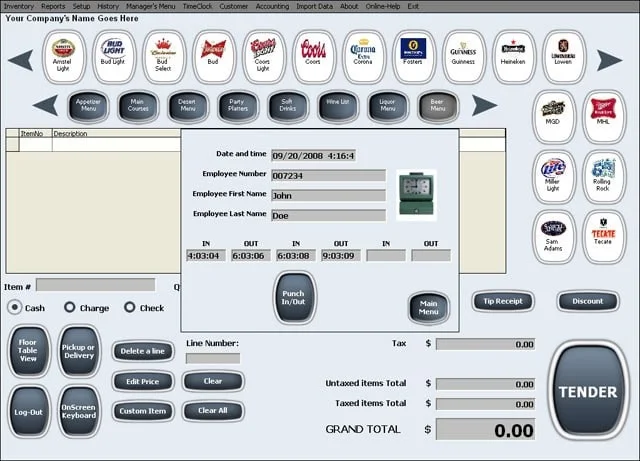
Time clock functionality for tracking employee hours
-
Commission tracking for tipped staff
-
Hourly wage management
-
Payroll report generation with paystub printing
-
Customizable security settings and access controls per employee
-
Sales tracking by employee
One user noted the software helps them “get organized” by keeping track of all tables while managing inventory in one place.
Inventory Management
The inventory system offers two methods for tracking items, with support for decimal quantities when dealing with ingredients sold by weight or length. Key inventory capabilities include:
-
Low stock alerts customizable by item and quantity
-
Multi-location inventory tracking
-
Item-specific tax rules
-
Barcode label creation for prepared food items and merchandise
-
Stock counting and variance reporting
Users report that the inventory control features exceeded expectations, calling them “more than I expected”.
Customer Management and Loyalty
The software maintains detailed customer records with easy navigation. Customer Accounts (also known as “Customer Tabs”) allow businesses to:
-
Track customer purchase history and preferences
-
Manage store credit
-
Process returns efficiently
-
Build customer loyalty through account management
Reporting and Analytics
Restaurant Maid provides comprehensive reporting capabilities to give business owners a complete overview of their operations. Reports are available based on:
-
Products and services sold
-
Customer purchase patterns
-
Class or department performance
-
Employee sales and commission data
-
Date span selection for period analysis
Users emphasize the value of these reports for making business decisions about stock management and profitability. One reviewer noted the reports help “determine what items are most profitable to our business”.
Financial Management
The software includes accounting features such as:
-
Bank deposit management
-
Bank transfer capabilities
-
Multi-account control
-
Financial accounting tools for comprehensive business oversight
Kitchen Display System
Orders can be printed and sent directly to the kitchen, streamlining the communication between front and back of house. This feature helps reduce order errors and improves service speed.
What’s New in Restaurant Maid Version 2.4
While specific version 2.4 update details are not documented in available sources, the software continues to be actively supported with ongoing updates included in the lifetime license. The development team at Alexandria Computers provides video tutorials and maintains a knowledge base to help users maximize the software’s capabilities.
User feedback suggests the software is continuously refined based on customer needs. Features like photo buttons for menu items, which make employee selection quicker and more accurate, are included in the current version.
System Requirements
Restaurant Maid is a Windows-based application that runs on:
-
Windows operating systems (specific version requirements not specified)
-
Single PC or network configurations
-
Compatibility with virtually all POS hardware
-
Support for U.S. and international date, address, and phone formats
The software supports multi-tax setups and all world currencies, with a built-in Add Currency Tool for adding currencies not listed by default.
Limitation: The software is available only for Windows platforms—it does not support iPad or mobile operating systems. Several users have noted this as a drawback, with one reviewer stating, “I would have liked to been able to use with iPad”.
Installation Guide
Step 1: System Preparation
Ensure your Windows PC meets the minimum system requirements. The software can be installed on a single computer or configured for network use across multiple stations.
Step 2: Software Installation
-
Download the Restaurant Maid installation package from the official source
-
Run the installer and follow the on-screen prompts
-
Accept the license agreement
-
Choose installation location (default recommended)
-
Complete the installation process
Step 3: Initial Configuration
-
Launch Restaurant Maid after installation completes
-
Follow the video tutorials available online—users report setup is “a walk in the park” with these resources
-
Configure your business information, tax rates, and currency settings
-
Set up your payment processing integration (Cayan, X-Charge, or ChargeItPro)
Step 4: Menu Setup
-
Enter your menu items including prices, modifiers, and categories
-
Add product photos to create visual buttons for quick selection
-
Set up recipe and ingredient tracking for inventory management
-
Configure modifiers and customization options
Step 5: Floor Plan Configuration
-
Design your restaurant layout using the floor plan tool
-
Add tables, sections, and service areas
-
Assign table numbers and capacity settings
Step 6: Employee Setup
-
Create employee profiles with security access levels
-
Set commission rates and hourly wages
-
Configure time clock and payroll settings
Users report being able to load the software and start entering menu items within minutes, highlighting the intuitive design of the installation and setup process.
How to Use Restaurant Maid
Front-of-House Operations
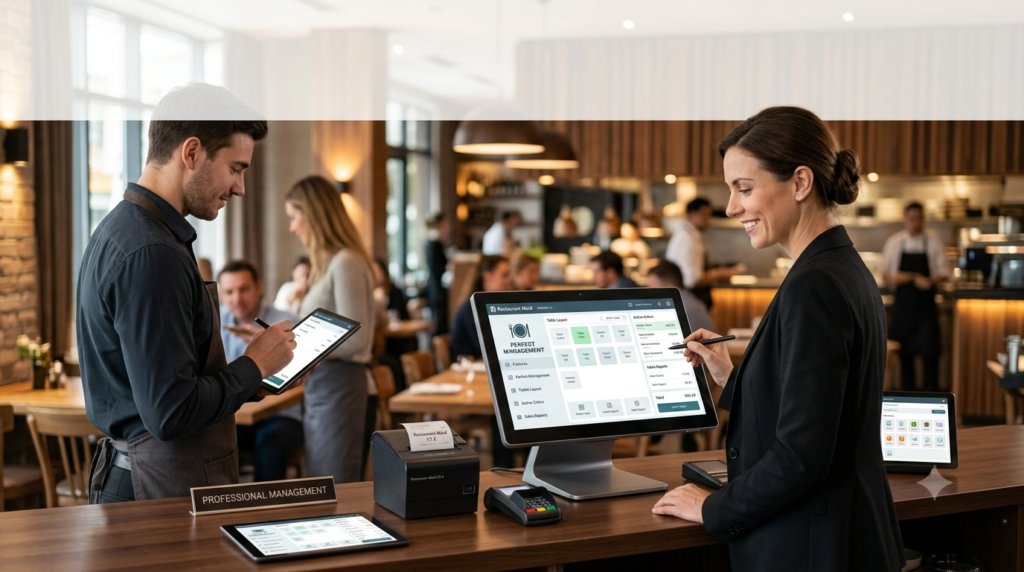
Order Taking: Employees select menu items using the visual button interface with product photos. This makes order entry quick and accurate, especially during busy service periods.
Table Management: Staff can view the floor plan, seat customers, and assign orders to specific tables. The system supports splitting bills and transferring tables as needed.
Payment Processing: The integrated payment system supports multiple payment methods including credit cards (via integrated processors) and cash. Users can process refunds and manage payment adjustments.
Order Routing: Orders can be sent directly to the kitchen display system or printed to kitchen printers, ensuring accurate order fulfillment.
Back-of-House Operations
Inventory Management: Track stock levels, receive goods, and manage inventory across multiple locations. The system alerts staff when stock reaches minimum levels.
Employee Management: Monitor employee hours, track commissions, and generate payroll reports. Security settings can be customized for each employee role.
Reporting: Generate sales reports, analyze product performance, and review customer purchase patterns. Reports can be filtered by date, employee, product category, and more.
Customer Account Management: Maintain customer records, manage tabs, and process returns or store credit adjustments.
End-of-Day Procedures
Shift Settlement: Close out shifts, reconcile cash drawers, and generate shift reports. Some users have requested more detail in shift settlement reports.
Payroll Processing: Generate paystubs and payroll reports based on hours worked, commissions earned, and deductions.
Data Backup: Regular backups ensure business continuity and data protection.
Users consistently describe the software as “user-friendly” and “easy to train new employees,” with one reviewer calling it “easy peasy POS”.
Best Use Cases
Quick-Service Restaurants
Fast food restaurants, pizzerias, and sandwich shops benefit from the rapid order entry system and kitchen display capabilities. The visual menu interface helps speed up service during peak hours.
Full-Service Restaurants
Table management, bill splitting, and customer tracking features support the complex needs of full-service dining establishments. The floor plan view helps managers optimize table turnover.
Food Trucks and Mobile Operations
The flexible deployment options make Restaurant Maid suitable for food trucks and mobile food businesses. One food truck owner switched from an iPad-based system to Restaurant Maid and noted it “blows the Shopkeep system out of the water that had numerous glitches”.
Bars and Pubs
Bar operations benefit from inventory management for alcoholic beverages, employee commission tracking, and tab management for regular customers.
Bakeries and Cafes
The decimal quantity tracking for ingredients is particularly useful for bakeries dealing with ingredients measured by weight. The customer management features help build loyalty programs.
Catering Businesses
The software handles complex orders, delivery tracking, and customer account management, making it suitable for catering operations.
Multi-Location Operations
While specific multi-location features are not heavily documented, the network deployment option supports businesses with multiple computers across different areas of the same location or potentially across multiple sites.
Advantages and Limitations
Advantages
Cost-Effective Pricing
The one-time payment model represents significant savings over subscription-based POS systems. One user noted the software is “just $199 and that’s it,” and suggested “they could charge a lot more for this software because it is worth it”.
No Monthly Fees
Business owners appreciate the absence of recurring charges, with one reviewer calling the cost savings “the best move I’ve made all year”.
Comprehensive Feature Set
Restaurant Maid includes features often offered as paid add-ons by competitors, including accounting, time clock, payroll, and employee management tools.
Easy Setup and Training
Users consistently praise the ease of setup and intuitive interface. Several reviewers noted they “set it up in minutes” and that employees can be trained quickly.
Flexible Deployment
Supports single PC or network configurations and works with virtually all POS hardware.
Strong Support
The development team at Alexandria Computers provides responsive customer service, video tutorials, and a knowledge base.
No Cloud Dependency
The software runs locally, which some users prefer over cloud-based solutions. One reviewer called it a “Simple up to date POS without all the cloud BS”.
Limitations
Windows-Only Platform
The software is not available for iPad or Mac OS. Several users have requested mobile platform support.
Button Size Limitations
Some users find the buttons small and wish they could customize button placement and screen layout more freely.
Report Design
While users find the reports helpful, some note the design “could be designed much better so they can be much more easily read”.
Visual Design
The interface has been described as needing a “more colorful look and design”.
Limited SMS Features
Some users are waiting for SMS notification features to inform customers when orders are ready.
Shift Report Detail
Users have requested more detail in shift settlement reports to help reconcile cash drawers.
Alternatives to Restaurant Maid
Several alternatives exist in the restaurant POS and management software space. The three major competitors are My Order Box, Linga Restaurant POS, and anyWarePOS. Other notable alternatives include:
Toast
A comprehensive, cloud-based restaurant management system that serves as an all-in-one solution for restaurant operations.
TouchBistro
An iPad-based POS system specifically designed for restaurants, cafes, bars, and food trucks. It offers table management, menu management, and reporting features.
Square POS
A customizable point-of-sale system suitable for businesses of various sizes. It offers integration with payment processing and inventory management.
Clover
An all-in-one POS system that integrates cash register, payment terminal, and POS system functions.
Epos Now
A POS system designed to help businesses speed up services and increase profits through customizable payment and POS systems.
Lightspeed Restaurant
A restaurant management platform that helps businesses turn tables faster and boost revenue with data-driven insights.
Odoo POS
An open-source restaurant management solution that integrates POS, inventory, and purchasing applications for comprehensive business management.
Comparison Note
While subscription-based alternatives offer cloud features and mobile support, Restaurant Maid’s one-time payment model represents a significant cost advantage. Many users have switched from subscription-based systems like Shopkeep to Restaurant Maid due to cost and reliability concerns.
Frequently Asked Questions
What types of restaurants is Restaurant Maid best suited for?
Restaurant Maid is suitable for virtually all food service businesses, including restaurants, bars, pubs, sandwich shops, pizzerias, fast food restaurants, steak houses, cafes, delis, buffets, food trucks, bakeries, doughnut shops, pastry shops, catering businesses, and hotel restaurants.
Is Restaurant Maid a cloud-based system?
No, Restaurant Maid is a Windows-based software that runs locally on your computers. Some users prefer this approach as “cloud BS” is something they want to avoid. The software can be installed on a single PC or across a network.
Can I use Restaurant Maid on an iPad?
No, Restaurant Maid is Windows-only software. Users have expressed interest in iPad compatibility, but the software is not currently available for iOS or other mobile operating systems.
What payment processors does Restaurant Maid integrate with?
Restaurant Maid integrates with Cayan, X-Charge, and ChargeItPro at no additional cost.
Is there a free trial available?
Review sites indicate that a free version and free trial may be available, but specific trial terms are not clearly documented in available sources.
What happens if I need customer support?
The software includes 365-day support with the lifetime license. Support is provided by Alexandria Computers. Users report responsive service and the availability of video tutorials and a knowledge base.
Can I use Restaurant Maid for multiple locations?
The software supports network deployment, which could potentially serve multiple locations, though detailed multi-location management features are not extensively documented. Enterprise chain solutions like Restroworks may be more suitable for large chains with hundreds of locations.
Does Restaurant Maid include inventory management?
Yes, comprehensive inventory management is a core feature. It includes low stock alerts, decimal quantity tracking, multi-location inventory, and barcode label creation.
How much does Restaurant Maid cost?
The software is available for a one-time payment of approximately $199, which includes a lifetime license, updates, and support. There are no monthly fees or recurring charges.
What reports can I generate with Restaurant Maid?
You can generate reports based on products/services, customers, classes/departments, or employees. Reports are filterable by date span and help with inventory decisions and profitability analysis.
Final Thoughts
Restaurant Maid version 2.4 stands out as a comprehensive, cost-effective POS solution for the food service industry. Its one-time payment model eliminates the recurring fees that burden many restaurant operators, while the extensive feature set covers everything from order management and table tracking to inventory control and payroll.
The software’s strengths lie in its accessibility and value proposition. Users consistently report quick setup, easy employee training, and responsive customer support. The ability to use virtually any POS hardware and deploy on single PCs or networks adds flexibility that many restaurant owners appreciate.
However, the Windows-only limitation and dated visual interface may be drawbacks for some users. The reports, while functional, could benefit from improved design and readability. For businesses seeking cloud-based solutions or mobile access, alternatives may be more appropriate.
For restaurant owners looking to reduce operational costs while maintaining comprehensive management capabilities, Restaurant Maid presents a compelling option. The positive user reviews across multiple platforms suggest satisfaction with both the software’s functionality and the company’s support.
As with any business software investment, restaurant owners should consider their specific needs, technical infrastructure, and growth plans when evaluating Restaurant Maid against alternatives. The one-time cost structure makes it a particularly attractive option for budget-conscious operators who can work within the Windows environment.
Our Paid Service
“We do not sell or provide any software. We only offer professional support services. If any software on your system is not working properly, or you are facing installation errors, crashes, or any other technical issue — just contact us. We will help you fix the problem quickly and remotely via AnyDesk. No software will be provided from our side — only expert troubleshooting and support.”