
Overview of Factory IO v2.5.10
Table of Contents
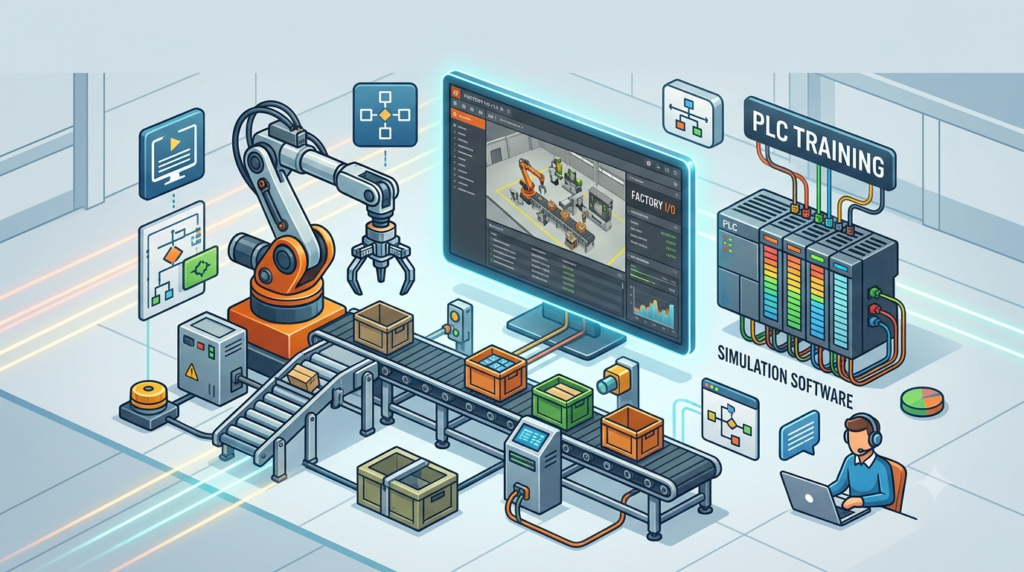
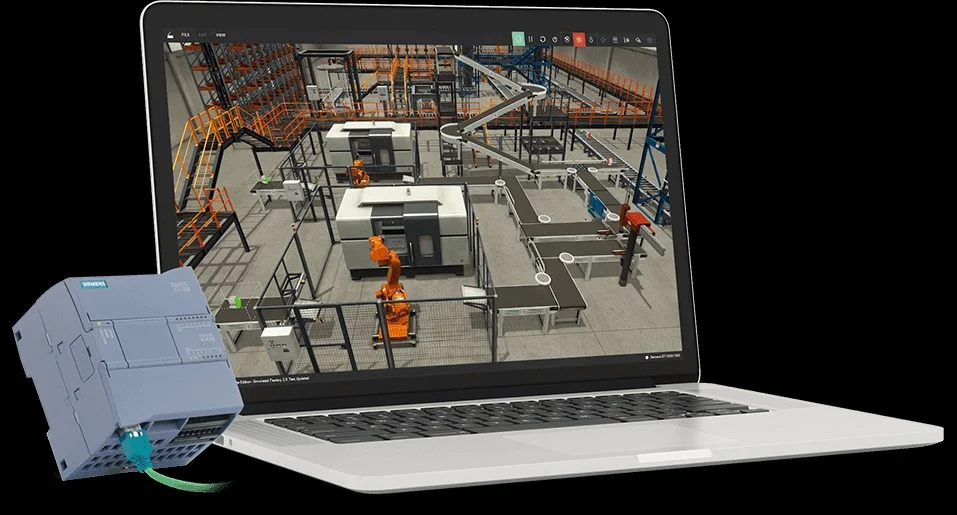
Factory IO v2.5.10 is a professional-grade 3D factory simulation software designed specifically for industrial automation training, PLC programming education, and virtual commissioning. This powerful simulation platform bridges the gap between theoretical knowledge and practical industrial applications, allowing engineers, technicians, and students to develop and test programmable logic controller (PLC) programs in a risk-free virtual environment.
Developed by the engineering team at Factory IO, this industrial simulation software recreates realistic factory floor scenarios with accurate physics, sensor feedback, and machinery behavior. The software serves as an essential training tool for automation professionals seeking hands-on experience with conveyor systems, robotic arms, sorting stations, and complete manufacturing cells without the need for physical hardware.
For PLC programmers and automation engineers, Factory IO provides an immersive 3D environment where they can connect their real PLCs or use built-in soft-PLC options to control virtual machinery. The software’s intuitive interface and extensive component library make it accessible for beginners while offering advanced features that satisfy experienced professionals working on complex automation projects.
The latest version, v2.5.10, introduces significant improvements in performance, stability, and functionality. Users benefit from enhanced graphics rendering, expanded component libraries, and refined communication protocols that ensure seamless integration with major PLC manufacturers including Siemens, Allen-Bradley, Beckhoff, and Omron.
Whether you’re an educational institution teaching industrial automation, a manufacturing company conducting employee training, or an engineer validating control strategies, Factory IO v2.5.10 offers a comprehensive solution that accelerates learning and improves design outcomes. This virtual factory simulation software eliminates costly downtime, prevents equipment damage during training, and enables experimentation with scenarios that would be dangerous or impractical in real production environments.
Key Features of Factory IO v2.5.10
3D Simulation Environment
Factory IO delivers an immersive three-dimensional workspace that replicates real industrial settings with remarkable accuracy. The simulation engine incorporates realistic physics, material flow dynamics, and machine behavior that respond authentically to control inputs. Users can navigate through factory layouts, observe machinery operation from any angle, and monitor system performance in real-time.
The 3D environment supports multiple viewing modes, including first-person navigation for detailed inspection and top-down perspectives for overall system monitoring. Lighting effects, material textures, and component animations create a visually compelling experience that enhances training effectiveness and user engagement.
Extensive Component Library
The software includes a comprehensive collection of industrial components and machinery commonly found in modern manufacturing facilities. Users can access a growing parts catalog containing:
-
Conveyor systems: Straight, curved, inclined, and accumulation conveyors with adjustable speed and direction controls
-
Robotic arms: Articulated robots with multi-axis control capabilities for pick-and-place operations
-
Sensors: Photoelectric sensors, inductive proximity sensors, ultrasonic sensors, and vision systems
-
Actuators: Pneumatic cylinders, electric actuators, and servo motors with precise position control
-
Material handling equipment: Palletizers, elevators, diverters, and stacking systems
-
Processing stations: Drilling machines, welding stations, packaging equipment, and quality inspection units
Each component features configurable parameters that allow users to match specific operational requirements and simulate various production scenarios.
PLC Connectivity and Communication
Factory IO supports multiple communication protocols for connecting real PLC hardware or software-based controllers. The software offers native integration with:
-
OPC UA: Universal communication protocol for industrial automation
-
Modbus TCP/IP: Widely used serial communication protocol
-
Siemens S7 Protocol: Direct connection to Siemens PLC systems
-
Allen-Bradley DF1: Communication with Rockwell Automation controllers
-
Beckhoff ADS: Integration with Beckhoff TwinCAT systems
-
CODESYS: Support for CODESYS-based automation solutions
This multi-protocol support ensures compatibility with virtually any PLC system, making Factory IO an ideal training platform regardless of the controller hardware used in your organization.
Built-in Soft-PLC Option
For users without physical PLC hardware, Factory IO includes a built-in soft-PLC simulator that enables complete programming and testing within the software environment. This feature allows beginners to learn PLC programming fundamentals without investing in expensive hardware or waiting for equipment delivery.
The soft-PLC supports standard programming languages including ladder logic, function block diagrams, and structured text. Users can write, test, and debug programs directly within Factory IO, observing real-time effects on virtual machinery. This capability proves invaluable for educational institutions and individuals developing their automation skills.
Scenario Builder and Training Modules
Factory IO includes a powerful scenario builder that enables the creation of structured training exercises and testing scenarios. Instructors can develop step-by-step lessons, timed challenges, and performance evaluation modules that track student progress and identify areas requiring additional focus.
Pre-built training scenarios cover common industrial applications such as:
-
Basic conveyor control and material sorting
-
Pick-and-place operations with robotic manipulators
-
Packaging line automation and quality control
-
Multi-station production cells with coordinated control
-
Safety system integration and emergency response protocols
These ready-to-use modules accelerate onboarding and provide immediate hands-on experience with realistic automation challenges.
Real-time Data Visualization
The software provides comprehensive visualization tools that display process variables, system status, and performance metrics in real-time. Users can monitor:
-
Input/output states for all connected components
-
Sensor readings and threshold conditions
-
Cycle times and production throughput
-
Alarm conditions and fault diagnostics
-
Energy consumption and efficiency metrics
This data visualization capability helps users understand the relationship between control logic and physical system behavior, reinforcing learning through immediate feedback.
What’s New in Factory IO v2.5.10
The v2.5.10 release represents a significant milestone in Factory IO’s development, introducing substantial improvements across performance, functionality, and user experience. This update reflects extensive user feedback and the development team’s commitment to delivering industry-leading simulation capabilities.
Enhanced Graphics and Rendering
Version 2.5.10 implements a new graphics rendering engine that delivers smoother animations, improved lighting effects, and more realistic material textures. The enhanced visual quality creates an immersive training environment that more closely resembles actual factory conditions. Users can rotate, zoom, and pan through the 3D workspace with fluid responsiveness, even when working with complex, component-rich scenes.
The improved rendering engine also optimizes performance, allowing Factory IO to run efficiently on a wider range of hardware configurations. This accessibility ensures that users can benefit from the software regardless of their computing resources.
Expanded Component Library
The latest version introduces several new industrial components to the parts catalog, expanding the range of automation scenarios users can simulate. New additions include:
-
Advanced conveyor systems: Multi-lane conveyors with independent speed control and accumulation zones
-
AGV (Automated Guided Vehicle) systems: Programmable mobile robots for material transport
-
Vision inspection stations: Camera-based quality control systems with configurable inspection parameters
-
Collaborative robots: Cobot simulations with safety-rated speed and force limitations
-
Storage and retrieval systems: Automated warehouse equipment with inventory management capabilities
These new components enable users to simulate modern, industry 4.0 manufacturing environments with greater accuracy and depth.
Improved PLC Communication
v2.5.10 enhances communication stability and reliability across all supported protocols. The update includes:
-
Reduced latency in OPC UA connections for more responsive control
-
Improved error handling and automatic reconnection for interrupted communications
-
Expanded data type support for more flexible tag mapping
-
Enhanced diagnostic tools for troubleshooting connection issues
-
Support for the latest firmware versions of major PLC manufacturers
These improvements ensure dependable connectivity between Factory IO and real automation hardware, maintaining the software’s reputation as a trustworthy training and validation platform.
User Interface Refinements
The user interface receives thoughtful updates that streamline workflows and improve productivity. Enhancements include:
-
A redesigned toolbar with intuitive icons and logical grouping of functions
-
Improved component search and filtering for faster parts selection
-
Enhanced scene management tools with version control capabilities
-
Simplified tag configuration with automatic mapping suggestions
-
Updated tutorial and help resources accessible directly within the software
These interface improvements reduce the learning curve for new users while accelerating workflow for experienced professionals.
Performance Optimizations
The development team focused on improving software performance across all usage scenarios. v2.5.10 delivers:
-
Faster scene loading and component instantiation
-
Reduced memory usage during complex simulations
-
Optimized physics calculations for smoother real-time behavior
-
Improved multi-threading support for better utilization of modern processors
-
Faster simulation startup times for rapid testing iterations
These performance gains translate to increased productivity and a more enjoyable user experience.
Bug Fixes and Stability Enhancements
The update addresses numerous reported issues from previous versions, resulting in improved overall stability and reliability. Fixes include:
-
Resolution of occasional crashes during extended simulation sessions
-
Correction of physics anomalies in specific component interactions
-
Elimination of visual artifacts in complex scenes
-
Fix for communication timeouts in high-traffic scenarios
-
Resolution of import/export errors for scene files
These refinements ensure Factory IO operates as a stable, dependable platform for critical training and validation activities.
System Requirements for Factory IO v2.5.10
Minimum Hardware Requirements
| Component | Requirement |
|---|---|
| Operating System | Windows 10 (64-bit) or Windows 11 (64-bit) |
| Processor | Intel Core i5 or AMD equivalent (2.5 GHz or faster) |
| RAM | 8 GB (16 GB recommended) |
| Graphics | DirectX 11 compatible GPU with 2 GB VRAM |
| Storage | 10 GB available hard drive space |
| Display | 1920 x 1080 resolution or higher |
| Network | Internet connection for license activation and updates |
Recommended Hardware Specifications
For optimal performance, especially when working with complex simulations or multiple concurrent users, Factory IO recommends:
| Component | Recommendation |
|---|---|
| Processor | Intel Core i7 or AMD Ryzen 7 (3.0 GHz or faster) |
| RAM | 16 GB or more |
| Graphics | NVIDIA GeForce RTX series or equivalent with 4 GB+ VRAM |
| Storage | SSD with 20 GB available space |
| Display | Dual monitors at 1920 x 1080 or higher resolution |
Software Prerequisites
Factory IO v2.5.10 requires the following software components:
-
Microsoft .NET Framework 4.8 or higher
-
DirectX 11 runtime
-
Compatible graphics drivers with latest updates
-
For PLC connectivity: Protocol-specific drivers and middleware
-
OPC UA connections require OPC Foundation compliant client libraries
Supported Operating Systems
The software officially supports:
-
Windows 10 Professional/Enterprise (64-bit) version 21H2 or newer
-
Windows 11 Pro/Enterprise (64-bit)
-
Windows Server 2019 or 2022 (for network installations)
Network Requirements
For users accessing Factory IO across networks or utilizing remote PLC connections:
-
TCP/IP network connectivity
-
Firewall exceptions for Factory IO communication ports
-
For OPC UA: network bandwidth of 1 Mbps or greater
-
For Modbus TCP: reliable LAN connection with < 10ms latency
Installation Guide for Factory IO v2.5.10
Preparation Before Installation
Before beginning the installation process, complete the following preparatory steps:
-
Verify system compatibility: Ensure your computer meets the minimum hardware and software requirements
-
Backup existing data: If you have previous Factory IO scenes or projects, create backup copies
-
Close other applications: Close all running applications to prevent installation conflicts
-
Disable antivirus temporarily: Some security software may interfere with installation (re-enable after completion)
-
Check disk space: Confirm at least 10 GB of free storage is available
-
Prepare license information: Have your license key or subscription credentials ready
Download and Install
Step 1: Obtain the Installer
Download the Factory IO v2.5.10 installer package from the official website or your organization’s software distribution portal. Always use official sources to ensure software integrity and security.
Step 2: Run the Installer
-
Locate the downloaded installer file (typically named “FactoryIO_v2.5.10_Setup.exe”)
-
Right-click the file and select “Run as administrator” to ensure proper installation privileges
-
If a User Account Control prompt appears, click “Yes” to allow installation
Step 3: Follow Installation Wizard
The installation wizard will guide you through the setup process:
-
Language Selection: Choose your preferred installation language
-
License Agreement: Read and accept the End User License Agreement
-
Installation Location: Select the destination folder (default: C:\Program Files\Factory IO)
-
Components Selection: Choose which components to install (recommended: full installation)
-
Start Menu Folder: Confirm the start menu shortcuts location
Step 4: Installation Progress
Wait for the installation process to complete. This typically takes 5-15 minutes depending on system speed and selected components. During this time, the wizard will copy files, register DLLs, and configure system settings.
Step 5: Finalize Installation
-
Click “Finish” to complete the installation
-
If prompted, restart your computer to finalize system changes
-
Launch Factory IO from the desktop shortcut or start menu
License Activation
Factory IO requires license activation before full functionality is available:
-
Launch Factory IO
-
Navigate to “Help” > “License Manager”
-
Choose activation method:
-
Online activation: Enter your license key and click “Activate” (requires internet)
-
Offline activation: Generate a machine ID, submit to the license portal, and enter the received activation code
-
-
For trial users: Select “Start Trial” to begin a limited-time evaluation
-
Confirm successful activation by checking the license status in the Help menu
Post-Installation Configuration
After successful installation and activation, consider the following configuration steps:
-
Update graphics drivers: Ensure your GPU drivers are up to date for optimal performance
-
Configure PLC communication settings: Set up communication protocols for your automation hardware
-
Customize user preferences: Adjust display settings, keyboard shortcuts, and default parameters
-
Install additional content: Download optional component packs or training materials
-
Set up user accounts: For multi-user installations, configure user profiles and permissions
Installation Troubleshooting
Common Issues and Solutions:
| Issue | Solution |
|---|---|
| “Installation failed” error | Run installer as administrator, disable antivirus temporarily |
| Missing DLL files | Ensure .NET Framework 4.8 is installed |
| Graphics rendering problems | Update graphics drivers, check DirectX version |
| License activation fails | Verify internet connection, check license key accuracy |
| Performance issues | Close other applications, reduce graphics quality settings |
How to Use Factory IO v2.5.10
Getting Started with the Interface
When you launch Factory IO, you’ll encounter a user-friendly interface organized for efficient workflow:
Main Interface Components:
-
Menu Bar: Access to file operations, tools, settings, and help resources
-
Toolbar: Quick access to commonly used functions and component tools
-
Scene Browser: Navigation panel showing all components in the current scene
-
3D Workspace: Primary work area where components are placed and arranged
-
Properties Panel: Display and edit selected component parameters
-
Tag Monitor: View and manage I/O tags connected to PLC variables
-
Status Bar: Current simulation status and notifications
Creating Your First Scene
Step 1: New Project Setup
-
Click “File” > “New Scene” or press Ctrl+N
-
Select a template or start with an empty scene
-
Name your project and set file location
Step 2: Adding Components
-
Open the component library from the toolbar
-
Browse or search for desired components
-
Drag and drop components from the library into the 3D workspace
-
Position components using snap-to-grid or precise coordinate input
-
Rotate components as needed using rotation handles
Step 3: Connecting Components
-
Select component connections from the properties panel
-
Define material flow paths between stations
-
Set up conveyor linking for continuous material movement
-
Configure sensor placements and coverage zones
Step 4: Configuring Component Parameters
-
Select any component to view its properties
-
Adjust parameters such as speed, timing, dimensions
-
Configure I/O tags for PLC connection
-
Set material properties and behavior
Step 5: Setting Up PLC Communication
-
Access the tag configuration panel
-
Create tags corresponding to PLC variables
-
Map tags to component inputs and outputs
-
Establish communication with physical or soft PLC
-
Test connection and verify data exchange
Running a Simulation
Control Simulation:
-
Click “Run” or press F5 to start simulation
-
Use “Pause” to halt simulation without resetting
-
Click “Stop” or press Shift+F5 to end simulation
-
Use “Reset” to return simulation to initial state
Monitoring Simulation:
-
Watch real-time component behavior in the 3D workspace
-
Monitor I/O states in the tag monitor panel
-
View performance metrics in the status bar
-
Use data logging features for analysis
Debugging:
-
Set breakpoints at specific simulation points
-
Step through simulation cycles for detailed analysis
-
Use the built-in oscilloscope for signal visualization
-
Access diagnostic logs for troubleshooting
Advanced Features and Techniques
Scenario Programming:
-
Create custom training scenarios using the scenario builder
-
Define objectives, step-by-step guides, and evaluation criteria
-
Implement checkpoints and progress tracking
-
Generate performance reports for students or team members
Custom Component Creation:
-
Design custom components using provided templates
-
Define behavior parameters, I/O mapping, and physics properties
-
Import external 3D models for specialized equipment
-
Save custom components for reuse across projects
Scripting and Automation:
-
Use built-in scripting language for complex automation
-
Implement custom logic beyond standard PLC control
-
Create automated testing sequences
-
Develop custom data analysis routines
Multi-User Collaboration:
-
Set up network sharing for team projects
-
Implement version control for collaborative development
-
Use commenting and annotation for documentation
-
Share scenes and component libraries across workgroups
Best Use Cases for Factory IO v2.5.10
Educational Institutions and Training Programs
Factory IO serves as an indispensable tool for technical education across various academic levels:
University Engineering Programs:
-
Industrial Engineering: Study manufacturing processes, workflow optimization, and production efficiency
-
Mechanical Engineering: Understand mechanical system control, automation integration, and machine dynamics
-
Electrical Engineering: Learn PLC programming, control system design, and industrial networking
-
Computer Science: Explore embedded systems, real-time programming, and industrial software development
Technical and Vocational Schools:
-
PLC programming courses: Hands-on practice with virtual PLCs
-
Automation technician training: Safe environment for learning maintenance and repair procedures
-
Mechatronics programs: Integrated study of mechanical, electrical, and control systems
-
Industry 4.0 certification: Exposure to smart manufacturing technologies and concepts
Corporate Training Departments:
-
New hire orientation: Accelerate onboarding with practical automation experience
-
Skill development: Continuous learning for engineering and maintenance staff
-
Cross-training: Build understanding between operational and technical teams
-
Safety training: Practice emergency procedures in risk-free environment
Manufacturing and Industrial Applications
Process Validation and Optimization:
-
Control logic testing: Validate PLC programs before deployment
-
Production line design: Optimize workflow and capacity planning
-
Throughput analysis: Identify bottlenecks and improvement opportunities
-
Quality control strategies: Develop and test inspection procedures
System Integration Projects:
-
New equipment integration: Test compatibility with existing systems
-
Retrofit planning: Validate upgrade strategies before implementation
-
Multi-vendor coordination: Ensure interoperability of diverse equipment
-
Network architecture design: Evaluate communication topologies
Continuous Improvement:
-
Process refinement: Test improvement hypotheses in virtual environment
-
Lean manufacturing: Implement and validate lean strategies
-
Six Sigma projects: Conduct experiments without production disruptions
-
Smart factory initiatives: Develop Industry 4.0 use cases
Research and Development
Academic Research:
-
Automation research: Study emerging control strategies
-
Human-machine interaction: Evaluate interface designs and user experiences
-
Artificial intelligence: Test AI-based control in industrial contexts
-
Sustainability studies: Analyze energy efficiency and resource utilization
Industrial R&D:
-
Product development: Test new manufacturing equipment designs
-
Process innovation: Develop novel production methodologies
-
Technology evaluation: Assess new automation technologies
-
Prototype validation: Verify equipment concepts before physical construction
Professional Certification Preparation
Factory IO provides excellent preparation for various industry certifications:
-
Siemens S7 certification: Practice Siemens-specific programming in realistic environments
-
Allen-Bradley/Rockwell certification: Develop RSLogix and Studio 5000 expertise
-
Automation technician certifications: Build practical skills for exam success
-
Industry-specific certifications: Prepare for automotive, pharmaceutical, food & beverage manufacturing requirements
Advantages and Limitations of Factory IO v2.5.10
Key Advantages
Cost-Effective Training Solution:
Factory IO eliminates the need for expensive physical equipment, floor space, and maintenance costs associated with traditional hands-on training. Organizations can scale training programs without proportional capital investment, making automation education accessible to more individuals and departments.
Risk-Free Learning Environment:
Students and trainees can make mistakes, test extreme scenarios, and explore system limitations without risking equipment damage, injury, or production downtime. This freedom encourages experimentation and deeper understanding of system behavior.
Realistic Simulation Experience:
The high-fidelity 3D environment, accurate physics, and authentic component behavior create a training experience that translates effectively to real-world situations. Users develop genuine skills that apply directly to physical equipment operation.
Flexible PLC Integration:
Support for multiple communication protocols and both hardware and software PLCs provides unprecedented flexibility in training configurations. Organizations can standardize on Factory IO regardless of the PLC brands used in their facilities.
Rapid Prototyping and Testing:
Engineers can quickly test control strategies, evaluate alternative approaches, and validate changes before implementing in production. This accelerates development cycles and reduces costly errors.
Scalable Platform:
From single-user learning to enterprise-wide training programs, Factory IO scales to meet diverse organizational needs. The software’s architecture supports growing complexity and user base expansion.
Limitations and Considerations
Hardware Dependency:
While Factory IO eliminates the need for most physical equipment, users still require compatible computing hardware and optionally physical PLCs for certain training scenarios. This hardware requirement represents an upfront investment consideration.
Learning Curve:
Although Factory IO offers an intuitive interface, users unfamiliar with industrial automation may require initial training to navigate the software effectively. The comprehensive feature set, while powerful, can initially appear overwhelming.
Limited Customization:
While the component library is extensive, users seeking to simulate highly specialized or custom-built equipment may find the available options insufficient. Custom component creation requires additional effort and expertise.
Simulation Fidelity Limitations:
While realistic, Factory IO simulations cannot perfectly replicate all physical phenomena of real equipment. Users should understand these limitations when using the software for critical validation.
Internet Dependency for Certain Features:
License activation and software updates require internet connectivity, which may present challenges for restricted network environments.
Potential for Skill Transfer Issues:
Some users may rely too heavily on the forgiving nature of virtual environments, developing habits that don’t perfectly transfer to physical equipment where consequences are more immediate.
Alternatives to Factory IO v2.5.10
Direct Competitors
| Software | Key Features | Best For | Primary Differences |
|---|---|---|---|
| SIMIT (Siemens) | Siemens integration, professional simulation | Siemens-centric organizations | Tighter Siemens integration, enterprise-focused |
| Automation Studio (B&R) | Multi-platform support, advanced motion control | Complex motion applications | More advanced motion control, B&R ecosystem focus |
| LabVIEW (NI) | Data acquisition, test automation | Research and test environments | Broader non-automation applications, different user base |
| EasyPLC | Lower cost, basic features | Budget-conscious training | Less sophisticated simulation, fewer components |
| PLCSIM (Siemens) | PLC simulation only | PLC testing without 3D | No 3D visualization, simulation-only focus |
Open Source and Low-Cost Options
OpenPLC:
-
Open-source PLC simulation environment
-
Limited 3D visualization capabilities
-
Community-driven development and support
-
Minimal hardware requirements
-
Good for basic programming education
CodeSys Simulation:
-
Free simulation capability within CodeSys environment
-
Limited 3D visualization, primarily 2D HMI focus
-
Integrated with CodeSys programming tools
-
Suitable for CodeSys-focused development
Factory I/O Lite:
-
Free version with reduced component library
-
Good for getting started with basic concepts
-
Limited scene complexity and capabilities
-
Suitable for initial learning phase
Comparison Considerations
When evaluating Factory IO alternatives, consider:
Compatibility Requirements:
-
PLC brands supported
-
Communication protocols available
-
Operating system compatibility
-
Hardware specifications
Training Objectives:
-
Educational level of users
-
Specific skills to develop
-
Certification preparation needs
-
Industry requirements
Implementation Factors:
-
Available budget
-
Existing infrastructure
-
Staff expertise
-
Scalability needs
Support and Resources:
-
Technical documentation quality
-
Training materials availability
-
Community and user forums
-
Vendor support options
Frequently Asked Questions
What is Factory IO and who is it designed for?
Factory IO is a 3D industrial simulation software designed for PLC training and automation education. It serves industrial engineers, automation technicians, students, and educators seeking hands-on experience with industrial control systems in a virtual environment. The software accommodates users ranging from beginners learning PLC fundamentals to experienced professionals validating complex production line controls.
What hardware requirements does Factory IO v2.5.10 need?
The minimum requirements include a 64-bit Windows 10 or 11 system, Intel Core i5 or AMD equivalent processor, 8 GB RAM, DirectX 11 compatible GPU with 2 GB VRAM, and 10 GB available storage. For optimal performance with complex simulations, Factory IO recommends a Core i7 or Ryzen 7 processor, 16 GB RAM, dedicated graphics with 4 GB+ VRAM, and SSD storage.
Can I use Factory IO with my existing PLC hardware?
Yes, Factory IO supports multiple communication protocols including OPC UA, Modbus TCP/IP, Siemens S7 protocol, Allen-Bradley DF1, Beckhoff ADS, and CODESYS. This broad compatibility allows seamless integration with most major PLC manufacturers’ hardware. Users can connect physical PLCs or use the built-in soft-PLC option.
What new features are available in version 2.5.10?
Version 2.5.10 introduces enhanced graphics rendering, expanded component library with AGV systems and collaborative robots, improved PLC communication stability, refined user interface, significant performance optimizations, and numerous bug fixes. These improvements deliver smoother operation, more realistic visualization, and enhanced connectivity reliability.
Is Factory IO suitable for complete beginners?
Absolutely. Factory IO’s intuitive interface, built-in tutorials, and available training scenarios make it accessible to users with limited or no prior PLC experience. The software’s step-by-step guidance helps users develop skills progressively from simple conveyor control to complex multi-station automation systems. Instructors can use the scenario builder to create structured learning pathways tailored to different skill levels.
What types of industrial components are available?
The component library includes conveyor systems (straight, curved, inclined, accumulation), articulated robotic arms, various sensors (photoelectric, proximity, ultrasonic), actuators (pneumatic cylinders, electric motors, servo drives), processing stations (drilling, welding, packaging), and material handling equipment. The library continues to expand with each version, adding modern components like AGV systems and collaborative robots.
Can I create custom training scenarios?
Yes, the scenario builder allows instructors and advanced users to create structured training exercises, timed challenges, and performance evaluation modules. Users can define specific objectives, establish grading criteria, track student progress, and generate detailed performance reports. This feature makes Factory IO particularly valuable for educational institutions and corporate training programs.
How does Factory IO handle multi-user collaboration?
Factory IO supports network sharing for team projects, allowing multiple users to collaborate on scene development, share component libraries, and work on integrated automation projects. Version control features, commenting capabilities, and annotation tools facilitate effective teamwork and knowledge sharing across departments or educational groups.
What kind of technical support is available?
Factory IO provides comprehensive technical support including online documentation, video tutorials, user forums, email support, and in some cases phone support for enterprise customers. Additionally, many educational institutions and training providers offer courses and workshops specifically focused on Factory IO usage and PLC programming with the software.
Is there a free trial or educational discount?
Factory IO offers a limited-time trial version that provides full functionality for evaluation purposes, allowing users to test the software’s capabilities before purchasing. Educational institutions often qualify for significant discounts, with special pricing for classroom use, campus-wide licenses, and student versions. Contact the official Factory IO sales team for specific pricing information related to educational programs.
Final Thoughts
Factory IO v2.5.10 stands as a comprehensive industrial simulation solution that effectively bridges theory and practice in the automation industry. The software’s commitment to realistic simulation, broad PLC compatibility, and educational focus makes it an essential tool for organizations serious about automation training and development.
The latest version’s improvements in performance, graphics, and component availability demonstrate the development team’s ongoing dedication to user needs and industry trends. As manufacturing continues its digital transformation journey, tools like Factory IO will play increasingly critical roles in developing skilled workers, validating control systems, and enabling innovation in safe, cost-effective virtual environments.
For educational institutions, the software offers an accessible pathway to hands-on automation education that prepares students for successful careers. For manufacturing organizations, it provides a practical solution for continuous employee development, process validation, and system optimization without disrupting production.
While alternatives exist, Factory IO’s balance of usability, capability, and value positions it as a leading choice for both beginners and experienced automation professionals. The software’s continued evolution ensures it remains relevant to evolving industrial needs, supporting the development of skills and systems that drive manufacturing excellence.
Organizations considering investment in automation training should carefully evaluate Factory IO against their specific requirements, but the software’s track record and comprehensive feature set make it a compelling option for most applications. The combination of realistic simulation, flexible PLC integration, and educational tools creates a platform that effectively prepares individuals and organizations for the demands of modern industrial automation.