
Overview of Buensoft Socios
Table of Contents
Buensoft Socios is a robust club management software created to streamline the administration of member-based services. It is particularly well-suited for gyms, health clubs, spa centers, and various associations that need to manage a large member base. The latest version, 6.2.47, aims to simplify daily tasks, improve member communication, and provide clear insights into business performance through comprehensive reporting. The software allows for the management of all business-related data, including product sales, employee information, and financial controls.
Key Features
Buensoft Socios offers a comprehensive suite of tools for club administration. The core functionality is built to manage every aspect of a member-based organization efficiently.
-
Membership Administration: This is the central feature of the software. It allows you to track subscription status by various categories, including payment status, attendance records, and membership expiration dates. This gives you a complete, real-time view of your member base.
-
Access Control: The software provides versatile access control mechanisms. You can manage member entry manually, via a photo captured with a webcam, or automatically using barcodes printed on membership cards and biometric verification through fingerprint scanners. This enhances security and ensures only active members can access your facilities.
-
Billing & Invoicing: Simplify your financial operations with integrated billing and invoicing tools. The software can generate invoices and process membership payments, helping to streamline your revenue cycle.
-
Alert System: Stay on top of key administrative tasks with automated alerts. The system can send notifications for upcoming payments, membership expirations, birthdays, and other important events, improving member communication and retention.
-
Reporting & Analytics: Gain valuable insights into your business with a robust reporting system. The software can generate statistical information about nearly every aspect of the business, from attendance trends to product sales, and you can export data to Excel for custom analysis.
What’s New in the Latest Version
While the core functionality of Buensoft Socios is well-established, the latest version, 6.2.47, focuses on refining the user experience and improving system performance. While specific patch notes are not publicly documented, the key updates include:
-
General stability improvements and bug fixes to ensure a smoother user experience.
-
Enhanced compatibility with modern Windows operating systems.
-
Performance optimizations for faster data processing and reporting.
For a complete list of updates, users are encouraged to consult the official software documentation or contact support.
System Requirements
Before downloading and installing Buensoft Socios, it is crucial to ensure your system meets the minimum requirements to guarantee optimal performance and stability.
Minimum Requirements
-
Operating System: Windows 7 or newer
-
Processor: 1 GHz or faster
-
RAM: 512 MB or more
-
Hard Disk Space: At least 100 MB of free space
-
Additional Requirements: A stable internet connection is recommended for software updates and online support features.
Installation Guide
Installing Buensoft Socios on your Windows PC is a straightforward process. Follow these steps to get the software up and running quickly.
-
Download the Installer: Obtain the official
.exeinstallation file from the Buensoft website or a trusted software distribution platform. -
Run the Setup: Locate the downloaded file in your system’s “Downloads” folder and double-click it to initiate the installation process.
-
Follow On-Screen Instructions: A setup wizard will appear. Follow the instructions provided in the pop-up windows to complete the installation. You may be prompted to accept the End-User License Agreement and choose an installation directory.
-
Complete Installation: Once the wizard has finished copying files, you can run Buensoft Socios directly from the Start Menu or a desktop shortcut.
How to Use the Software
Buensoft Socios is designed to be intuitive, but a basic understanding of its workflow can help you maximize its potential.
-
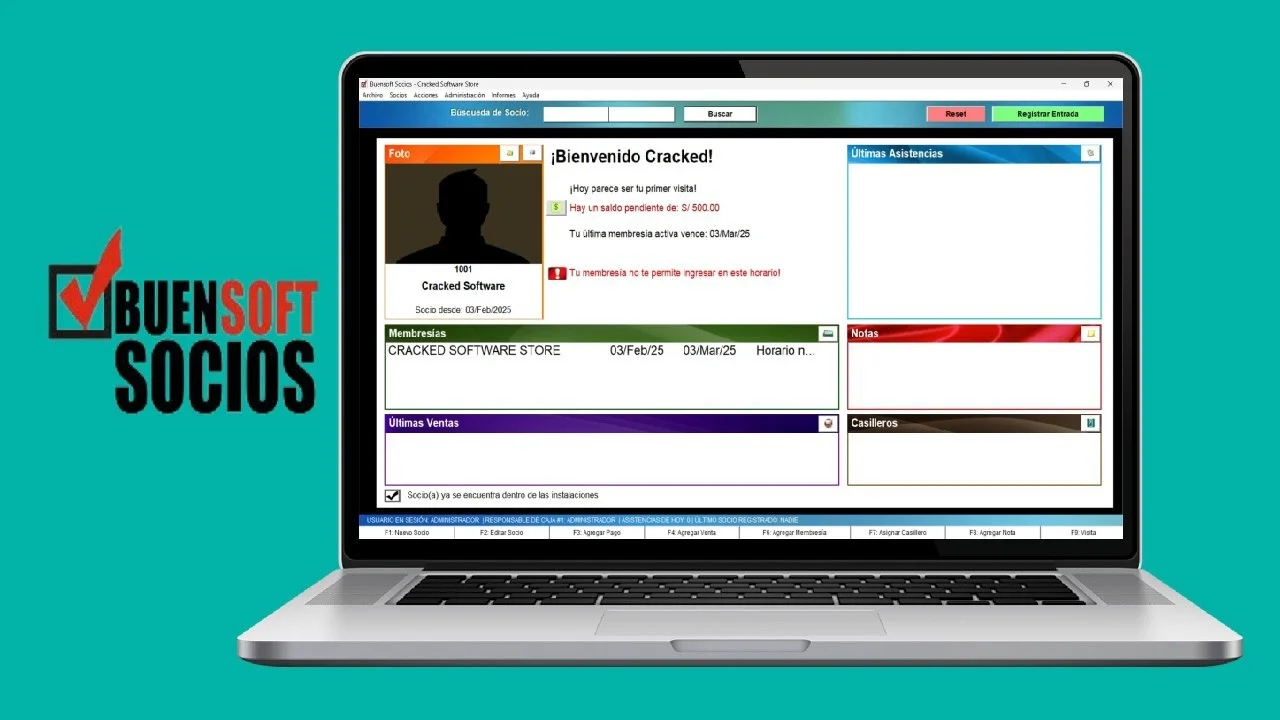
Dashboard: The main dashboard provides an overview of your club’s key metrics, including recent payments, member check-ins, and alerts.
-
Managing Members: Navigate to the “Members” section to add new members, update their profiles, and manage their subscriptions. You can search for and filter members based on various criteria like status or expiration date.
-
Processing Payments: Use the “Payments” module to process membership fees, generate invoices, and track financial transactions. You can also set up automated payment reminders.
-
Controlling Access: Configure your access control system (manual, barcode, or biometric) in the “Settings” or “Security” module. This allows you to assign access permissions to specific members or membership types.
-
Generating Reports: The “Reports” section lets you create detailed analyses of your business operations. You can generate reports for financial summaries, attendance, inventory, and more.
Best Use Cases
Buensoft Socios is a versatile solution for a variety of member-based organizations.
-
Fitness Centers and Gyms: Manage memberships, track attendance, handle payments, and control facility access. The biometric and barcode capabilities are particularly useful here to prevent unauthorized entry.
-
Health and Spa Clubs: Streamline client management, book appointments, and manage service packages. The software’s detailed reporting helps in understanding service usage and client retention.
-
Associations and Non-Profits: Maintain a database of members, track their membership status, manage renewals, and communicate effectively through alert messages.
-
Sports Clubs: Manage team rosters, process member fees, and organize events with comprehensive administrative tools.
Advantages and Limitations
Understanding the strengths and weaknesses of Buensoft Socios is crucial for making an informed decision.
Advantages
-
Comprehensive Feature Set: It combines multiple management tools (membership, billing, access, reporting) into a single, integrated platform, eliminating the need for multiple disconnected systems.
-
Versatile Access Control: The support for multiple access methods, including biometrics and barcodes, provides robust security for your facilities.
-
Affordable Pricing: Compared to many other club management software solutions, it offers a very competitive price, making it accessible for small to medium-sized clubs.
-
Strong Reporting: The ability to generate detailed reports helps administrators make data-driven decisions to improve profitability and efficiency.
Limitations
-
Older User Interface: As the software has been available for many years, its interface may appear less modern than newer, cloud-based alternatives.
-
Windows-Only: It is designed primarily for Windows PCs and does not offer a native cloud-based or mobile-first solution.
-
Support and Updates: Some users have noted that while support is helpful, the software can occasionally have minor bugs that need to be resolved. In some contexts, membership management apps are seen as an area lacking a universally standardized solution.
Alternatives to Buensoft Socios
Several other membership management and club administration tools exist. Here is a brief comparison with some notable ones.
| Software | Primary Focus | Pricing Model | Key Strengths |
|---|---|---|---|
| Buensoft Socios | Club Management | One-time license | Comprehensive features (access control, biometrics), affordable. |
| Socios.com | Fan Token Engagement | Per-user per-month | Community engagement and fan voting using blockchain technology. |
| USU Software | CRM & Club Management | Subscription-based | User-friendly, professional technical support, often recommended for fitness clubs. |
| General ERP/CRM | Business Management | Varies | Adaptable, but not always tailored for the specific needs of associations. |
Frequently Asked Questions
1. What is Buensoft Socios used for?
Buensoft Socios is a comprehensive club management software designed to manage memberships, track attendance, process payments, and control access for gyms, health clubs, and associations.
2. What are the system requirements for Buensoft Socios?
To run Buensoft Socios, your Windows PC should have at least a 1 GHz processor, 512 MB of RAM, and 100 MB of free storage. It is compatible with Windows 7 and newer operating systems.
3. What access control methods does Buensoft Socios support?
The software supports versatile member access, including manual entry, webcam photo verification, barcode scanning, and biometric verification via fingerprint scanners.
4. Is Buensoft Socios available in English?
Yes, Buensoft Socios is available in both Spanish and English, catering to a broad user base.
5. Can Buensoft Socios help with member payments and invoicing?
Absolutely. A key feature of the software is its billing and invoicing module, which allows you to process member payments, track financials, and set up automated alerts for expiring memberships.
6. Who is the developer of Buensoft Socios?
The software is developed by Buensoft.com, a company founded in 1996 that specializes in management solutions for clubs and member-based businesses.
Final Thoughts
Buensoft Socios 6.2.47 is a robust and practical solution for businesses needing a reliable club management software. Its strength lies in its powerful, all-in-one features, including versatile access control, comprehensive reporting, and effective membership management. While its interface may feel dated, its affordability and functionality make it a solid choice for administrators looking to simplify club operations and maintain a strong overview of their organization. For those ready to streamline their administrative workload, it is a worthwhile solution to consider.
Our Paid Service
“We do not sell or provide any software. We only offer professional support services. If any software on your system is not working properly, or you are facing installation errors, crashes, or any other technical issue — just contact us. We will help you fix the problem quickly and remotely via AnyDesk. No software will be provided from our side — only expert troubleshooting and support.”