

Overview of Altair StarVision PRO v2025.0.0
Table of Contents
Altair StarVision PRO v2025.0.0 is a high-performance mixed-mode debugger designed for complex system-on-chip (SoC) and analog/mixed-signal (AMS) design verification. This advanced silicon debugging tool addresses the growing complexity of modern integrated circuit (IC) development, where semiconductor debug can consume more than a quarter of the entire development process.
The platform provides seamless integration across multiple design abstractions—register-transfer level (RTL), gate-level, SPICE-level, and post-layout parasitic data—enabling engineers to visualize, analyze, and resolve design issues across the entire chip development workflow. StarVision PRO serves as a unified debug cockpit that transforms complex text-based netlists into interactive graphical circuit representations, significantly accelerating cause-effect analysis and design optimization.
As part of Altair’s comprehensive Silicon Debug Tools family, StarVision PRO works alongside specialized solutions including SpiceVision PRO for transistor-level analysis, RTLvision PRO for digital RTL debugging, and GateVision PRO for gate-level netlist debug. This integration provides design teams with a complete ecosystem for verifying and debugging today’s most complex heterogeneous designs.
Key Features
Mixed-Signal Design Verification
StarVision PRO delivers comprehensive debugging capabilities for complex chip designs and intellectual property (IP) building blocks. Engineers can leverage smart incremental schematic navigation, logic cone extraction, digital and analog waveform viewing, and RTL source code exploration—all within a unified environment. The tool’s automatic logic recognition engine converts pure SPICE-level netlists into digital logic symbols, enabling efficient transistor-level design exploration and analysis.
Unified Platform for Any Chip, SoC, or IP
The platform smoothly integrates and validates complex SoC designs, handling all digital, analog, or mixed-signal design components and any hard or soft IP building blocks. StarVision PRO supports multiple data formats including SystemVerilog, VHDL, Verilog-AMS, SPICE, HSPICE, Spectre, Calibre, CDL, and Eldo. This versatility makes it an essential tool for engineers working with diverse design sources and third-party IP integration.
Graphical Visualization and Design Navigation
StarVision PRO transforms complex text-based design descriptions into intuitive graphical representations. Key visualization capabilities include:
-
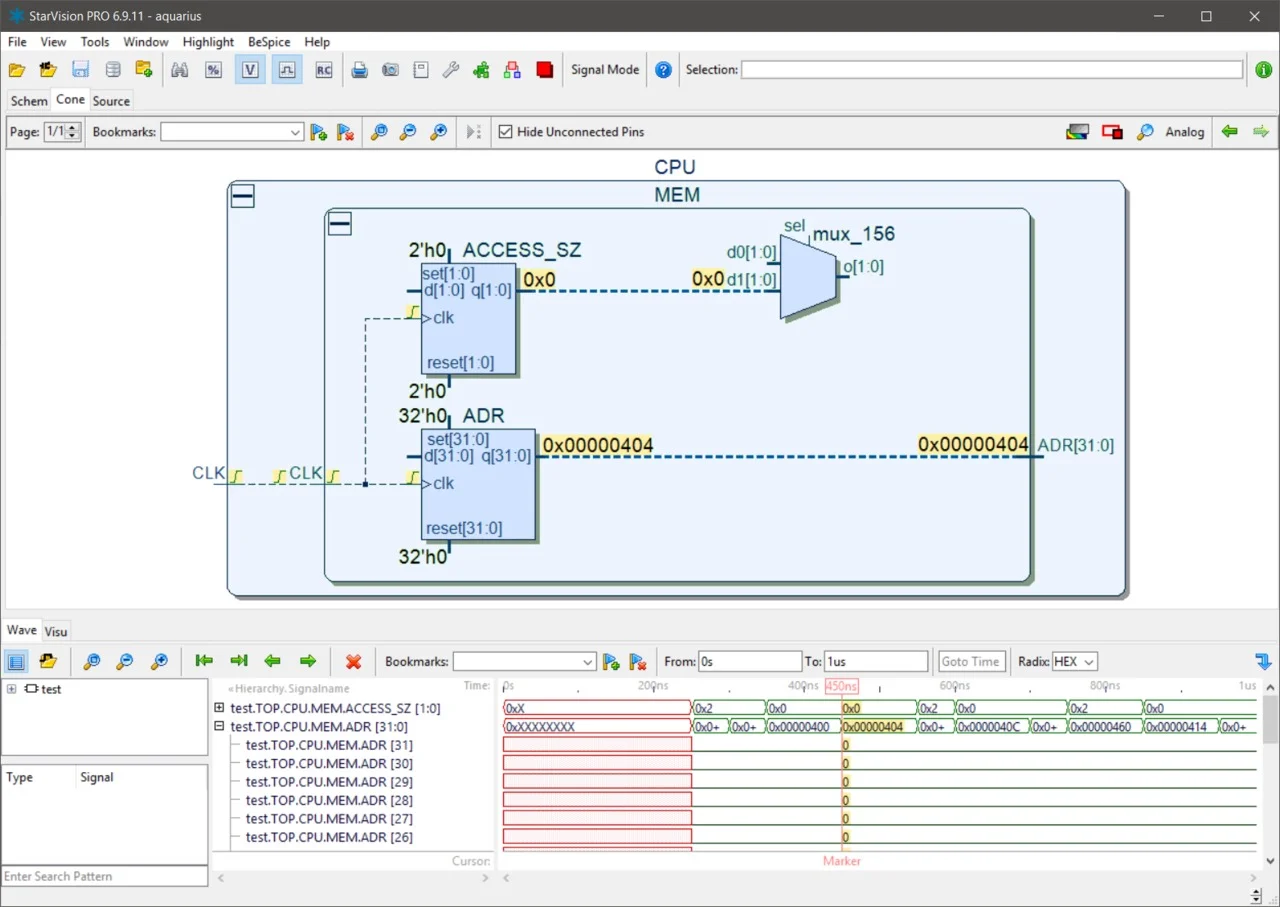
Cone View: Incremental schematic navigation for easy design exploration and complexity reduction
-
Design Hierarchy View: Tree-structured component management for system overview and component integration analysis
-
Logic Cone Extraction: Configurable path extraction to trace errors from observation points to root causes
-
Abstract SoC View: Automatic generation of functional block displays with configurable abstraction levels, providing rapid SoC overview and understanding of component structures and interactions
Waveform Viewer and Signal Tracing
The fully integrated digital waveform browser supports interactive signal tracing across source code, schematic views, and waveform windows. StarVision PRO compiles simulation outputs into high-performance databases to accelerate waveform browsing and signal tracing. Analog waveform visualization capabilities enable cross-probing between schematic views and waveform displays for efficient signal analysis.
Parasitic Analysis
StarVision PRO enables visualization, analysis, and pruning of parasitic networks in post-layout formats including DSPF, RSPF, and SPEF. Designers can automatically create or prune SPICE netlist fragments for critical circuit fragment debugging and simulation. This capability is essential for identifying and resolving performance issues related to parasitic effects in advanced process nodes.
Clock Tree and Clock Domain Extraction
Automatic clock tree and clock domain extraction and visualization enable rapid detection and resolution of clock domain problems. The tool automatically analyzes clock signals and provides real-time, configurable views of clock networks and domains, including clock domain crossing (CDC) logic extraction.
Smart Customization and Open APIs
StarVision PRO provides comprehensive API access for extensive customization:
-
Tcl UserWare API: Allows tool flow integration, definition of electrical rule checks, and development of customized analysis scripts
-
C Code Customization: Provides full access to the tool database and internal data structures for application-specific C code integration
-
Plugin Architecture: Includes 200+ plugin examples for searching, executing, and deploying customized tool functions across development teams
-
Batch Processing: Supports automated analysis, rule checking, and critical path extraction for efficient design verification workflows
Virtuoso/SKILL Export Option
The optional Virtuoso/SKILL export feature enables schematic and schematic fragment export to the Cadence design tool platform for further optimization, reuse, or debug within the Cadence tool flow.
What’s New in StarVision PRO v2025.0.0
Version 2025.0.0 represents the latest evolution of the StarVision PRO debug platform, building upon the tool’s legacy of advanced visualization and debugging capabilities. The 2025 release continues the tool family’s trajectory of enhanced performance and expanded functionality.
Enhanced Performance and Capacity
The 2025 release leverages the 64-bit database architecture to handle very large designs with higher performance and increased capacity. Engineers working with complex SoCs containing millions of instances benefit from improved loading times and responsive graphical interactions.
Platform Compatibility Updates
StarVision PRO v2025.0.0 supports modern Linux distributions (RHEL, Fedora, Ubuntu) on Intel x86_64 architecture, with glibc requirements above version 2.12. Windows support is available for Intel x86_64 systems running Windows 7 and later. The tool provides packages for both current and legacy Linux distributions to accommodate diverse enterprise environments.
Licensing and Deployment
The tool is available under Altair Units (AU) licensing, requiring 50 AUs for the core StarVision PRO debug solution. Optional features include:
-
SpiceParser: 10 AUs (leveled)
-
RTLParser: 10 AUs (leveled)
-
NetlistParser: 10 AUs (leveled)
-
SV_Skill_Export: 20 AUs (stacked)
-
SV_WaveForm_Analog: 10 AUs (stacked)
-
SV_Parasitic: 10 AUs (stacked)
System Requirements
Supported Operating Systems and Hardware
| Operating System | Processor Hardware | Requirements |
|---|---|---|
| Windows | Intel x86_64 | Windows 7 and later |
| Linux (RHEL, Fedora, Ubuntu) | Intel x86_64 | glibc > 2.12 (legacy packages available for glibc 2.5-2.12) |
Licensing Requirements
-
Floating license environment requires flexnet.tgz package setup
-
Altair Units (AU) licensing with 50 AUs for core functionality
-
Network license server setup with lmgrd
Installation Guide
Linux Installation
-
Create installation directory:
textmkdir -p /tools/Altair/StarVision
-
Extract the software:
texttar -xf starvision-2025-linux.tar.gz -C /tools/Altair/StarVision
-
Organize the installation:
textcd /tools/Altair/StarVision mv starvision-2025 2025
-
Configure licensing:
textcp license.dat /tools/Altair/StarVision/2025/flexnet-11.16.3/linux64/ cd /tools/Altair/StarVision/2025/flexnet-11.16.3/linux64/ ./lmgrd -c license.dat -l license.log tail license.log
-
Set environment variables (using modulefile example):
text#%Module1.0 module-whatis "Altair StarVision Pro 2025" setenv STARVISION_HOME $env(ALTAIR_HOME)/StarVision/2025 prepend-path PATH $env(STARVISION_HOME)/linux64 setenv DCONCEPT_LICENSE_FILE 27006@localhost
Windows Installation
For Windows systems, extract the installation package to the desired location and set appropriate environment variables for PATH and license configuration.
Launching StarVision PRO
starvisionpro
Demo files are available in the $STARVISION_HOME directory for testing and familiarization.
How to Use the Software
Getting Started with Design Debug
-
Load Your Design: Use the Unified File Open Dialog to load complex mixed-language SoC designs and libraries. StarVision PRO supports Verilog, VHDL, SystemVerilog, SPICE, and multiple other formats.
-
Explore the Design Hierarchy: Navigate component relationships through the tree-structured design hierarchy view, gaining system overview and component integration understanding.
-
Visualize Circuits: Transform text-based netlists into interactive schematics using the graphical visualization engine. Schematics provide easier and faster debugging for complex circuits.
-
Perform Cause-Effect Analysis: Utilize the Cone View for incremental schematic navigation to trace errors from observation points to actual causes. Configure path extraction to automatically identify and extract critical paths in your design.
-
Analyze Simulation Results: Use the waveform viewer for interactive signal tracing across schematic and source code views. Cross-probe between schematic views and waveform displays for efficient signal analysis.
-
Debug Mixed-Signal Designs: Leverage the integrated mixed-mode debug capabilities to find connection points where analog and digital circuits meet and ensure clean transitions.
-
Customize Your Workflow: Develop Tcl scripts or C code plugins to automate design rule checks, perform custom analyses, and extend tool functionality.
Advanced Debugging Workflows
Post-Layout Debugging: Visualize and analyze parasitic networks (SPEF, DSPF) to identify and resolve performance issues related to parasitic effects. Create SPICE netlist fragments for critical circuit fragment simulation.
Clock Domain Analysis: Automatically extract and visualize clock trees and clock domains to rapidly detect and resolve clock domain crossing issues.
IP Integration: Visualize unfamiliar third-party IP blocks to enable rapid IP integration and problem resolution. The visualization technology makes unfamiliar parts of the SoC easy to understand.
Circuit Fragment Management: Save and export circuit netlists in multiple formats (SPICE, Verilog, SPEF, DSPF) for future reuse as IP or for partial simulation.
Best Use Cases
SoC Design Verification
For complex system-on-chip designs containing analog components, third-party IP, and multi-core processors, StarVision PRO provides the unified debug environment needed to efficiently identify and resolve issues across all design abstractions. Design teams can reduce debug time and accelerate time-to-market.
Mixed-Signal Circuit Debug
Engineers working with analog/digital interfaces benefit from the tool’s ability to seamlessly combine SPICE and transistor analysis with digital RTL and gate-level debug. The automatic logic recognition engine makes transistor-level design exploration accessible and efficient.
IP Integration and Validation
Third-party IP integration requires understanding unfamiliar code. StarVision PRO’s visualization technology makes SoC components easy to understand, enabling rapid IP integration and problem resolution. The platform supports virtually all design data formats, enabling exploration and analysis of almost any SoC and IP building block.
Post-Layout Performance Optimization
Parasitic analysis capabilities enable visualization and analysis of parasitic networks in post-layout formats. Designers can identify critical path issues and optimize performance by pruning and exporting netlists for further simulation and analysis.
Automated Design Rule Checking
The Tcl UserWare API and batch processing capabilities enable automated electrical rule checking and custom analysis workflows. Teams can develop and deploy standardized verification routines across the organization.
Advantages and Limitations
Advantages
-
Comprehensive Mixed-Signal Support: Seamlessly handles digital, analog, and mixed-signal designs across all abstraction levels
-
Superior Visualization: Transforms complex text-based designs into intuitive graphical representations, significantly accelerating debug and design understanding
-
IP Integration Efficiency: Visualization technology makes unfamiliar IP blocks easy to understand, enabling rapid integration and problem resolution
-
Extensibility: Open APIs and plugin architecture allow extensive customization and automation of design workflows
-
High Capacity: 64-bit database architecture handles very large designs with excellent performance
-
Integrated Waveform Analysis: Fully integrated waveform browser with cross-probing capabilities enhances signal analysis efficiency
-
Parasitic Analysis: Built-in capabilities for post-layout debugging and performance optimization
Limitations
-
Licensing Cost: Altair Units licensing requires significant investment, particularly for advanced features
-
Learning Curve: The comprehensive feature set may require training for new users to fully leverage customization capabilities and advanced debug workflows
-
Platform Constraints: Primarily optimized for Linux and Windows x86_64 environments with specific glibc requirements
-
Third-Party Integration: Optional features like Virtuoso/SKILL export require additional licensing and may have compatibility considerations
Alternatives to StarVision PRO
| Tool | Developer | Key Focus | Differentiation |
|---|---|---|---|
| Synopsys Verdi | Synopsys | SoC debug and verification | Industry-standard debug platform with extensive ecosystem support |
| Cadence SimVision | Cadence | Mixed-signal simulation and debug | Deep integration with Cadence simulation and design flows |
| Mentor Questa | Siemens EDA | Functional verification and debug | Strong in verification management and coverage analysis |
| RTLvision PRO | Altair | Digital RTL debugging | Specialized RTL debug companion tool within Altair ecosystem |
| SpiceVision PRO | Altair | Transistor-level debugging | Specialized SPICE analysis and visualization |
| GateVision PRO | Altair | Gate-level netlist debugging | Specialized gate-level debug for complex SoC netlists |
Frequently Asked Questions
What types of designs does StarVision PRO support?
StarVision PRO supports system-on-chip (SoC), analog/mixed-signal (AMS), and integrated circuit (IC) designs across multiple abstraction levels including RTL, gate-level, SPICE-level, and post-layout parasitic data. The platform handles SystemVerilog, VHDL, Verilog-AMS, SPICE, HSPICE, Spectre, Calibre, CDL, and Eldo formats.
Is StarVision PRO compatible with other Altair Silicon Debug Tools?
Yes, StarVision PRO is part of Altair’s Silicon Debug Tools family and integrates with SpiceVision PRO for transistor-level analysis, RTLvision PRO for digital RTL debugging, and GateVision PRO for gate-level debug. This integration provides a complete debug ecosystem for semiconductor design teams.
What customization options are available?
StarVision PRO provides comprehensive customization through Tcl UserWare API for script automation and electrical rule checks, C API for application-specific C code integration, and a plugin architecture with 200+ examples for developing and deploying custom tool functions. The plugin manager helps search, execute, and deploy custom code across development teams.
What operating systems are supported?
StarVision PRO supports Linux distributions (RHEL, Fedora, Ubuntu) on Intel x86_64 with glibc > 2.12, and Windows (7 and later) on Intel x86_64. Legacy Linux packages are available for distributions with glibc 2.5-2.12.
How does StarVision PRO handle parasitic analysis?
The platform enables visualization, analysis, and pruning of parasitic networks in post-layout formats including DSPF, RSPF, and SPEF. Engineers can automatically create or prune SPICE netlist fragments for critical circuit fragment debugging and simulation, helping identify and resolve performance issues related to parasitic effects in advanced process nodes.
What is Altair Units (AU) licensing?
StarVision PRO is available under Altair Units licensing, with 50 AUs required for the core debug solution. Optional features include SpiceParser (10 AUs), RTLParser (10 AUs), NetlistParser (10 AUs), SV_Skill_Export (20 AUs), SV_WaveForm_Analog (10 AUs), and SV_Parasitic (10 AUs).
Can StarVision PRO be used for IP integration?
Yes, the platform is particularly well-suited for IP integration. The visualization technology makes unfamiliar SoC components and third-party IP blocks easy to understand, enabling rapid IP integration and problem resolution. Support for multiple data formats allows engineers to explore and debug virtually any SoC and IP building block.
What waveform analysis features are available?
StarVision PRO includes a fully integrated digital waveform browser with interactive signal tracing across source code, schematic views, and waveform windows. The tool compiles simulation outputs into high-performance databases to accelerate waveform browsing and signal tracing. Analog waveform visualization enables cross-probing between schematic and waveform views for efficient signal analysis.
Final Thoughts
Altair StarVision PRO v2025.0.0 represents a significant advancement in semiconductor debugging and visualization technology. As SoC designs continue to grow in complexity, incorporating more analog components, diverse IP blocks, and multi-core processors, the need for unified debug platforms becomes increasingly critical.
StarVision PRO excels in providing a comprehensive debug solution for complex mixed-signal designs across all abstraction levels. Its superior visualization capabilities, open API architecture, and extensive customization options make it an invaluable tool for design teams seeking to accelerate development cycles and improve design quality. The ability to understand, debug, and optimize complex SoC designs within a single environment addresses the fundamental challenge that semiconductor debug accounts for more than a quarter of the entire development process.
For design teams, the investment in StarVision PRO translates to faster debug cycles, improved IP integration efficiency, and enhanced design understanding. The platform’s extensibility ensures that organizations can adapt the tool to their specific workflows, developing automated design rule checks, custom analyses, and specialized functions that address unique design challenges.
To maximize the value of StarVision PRO, design teams should leverage the tool’s customization capabilities, establish standardized debug workflows, and provide training for engineers to fully exploit the platform’s advanced features. The plugin architecture and API access enable organizations to develop and share custom tool functions across teams, improving overall verification productivity and design quality.
While alternatives exist in the EDA market, StarVision PRO distinguishes itself through its powerful visualization technology, mixed-signal integration capabilities, and extensive customization options. For engineers working on complex SoC and mixed-signal designs, StarVision PRO v2025.0.0 represents a compelling solution for accelerating debug and delivering defect-free semiconductor designs to manufacturing.
Our Paid Service
“We do not sell or provide any software. We only offer professional support services. If any software on your system is not working properly, or you are facing installation errors, crashes, or any other technical issue — just contact us. We will help you fix the problem quickly and remotely via AnyDesk. No software will be provided from our side — only expert troubleshooting and support.”


