
Overview of Voxeldance Additive
Table of Contents
Voxeldance Additive is a professional 3D print preparation software developed by VoxelDance, a company known for its expertise in industrial additive manufacturing. Unlike basic slicers, this software suite is engineered for precision and efficiency, catering to high-end applications in sectors like aerospace, healthcare, and jewelry design.
The Voxeldance Additive software ecosystem is built to handle complex geometries and large datasets. It offers sophisticated algorithms for automatic support generation, lattice structures, and nesting—capabilities that are essential for maximizing productivity and material usage. The v5.1.2.25 version builds on this solid foundation, focusing on user interface refinements and algorithm speed to significantly reduce the time from 3D model to printed part.
Key Features of Voxeldance Additive v5.1.2.25
This software is packed with features that distinguish it from more basic 3D slicer software. Here is a breakdown of its core functionalities:
1. Advanced Support Generation:
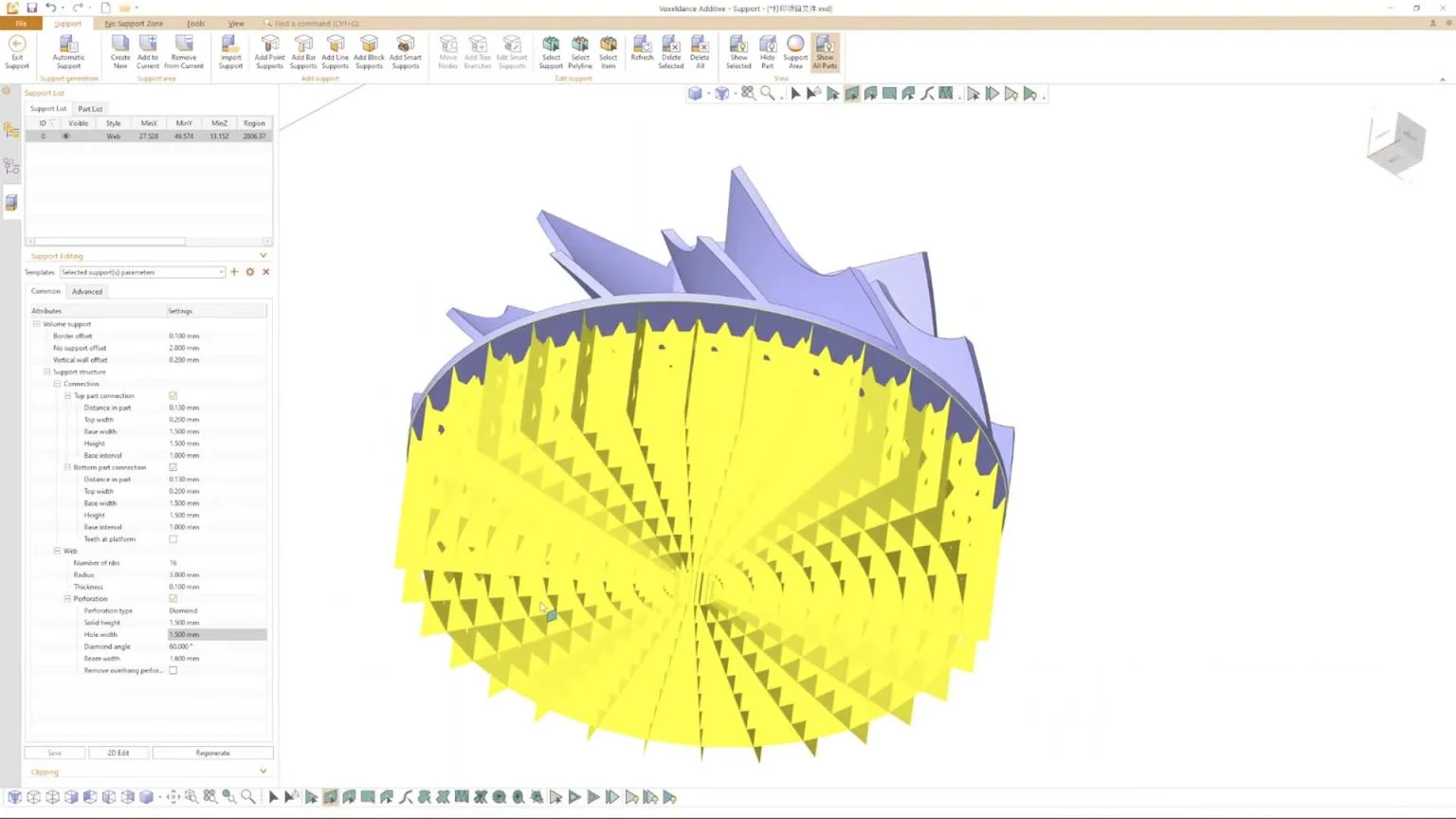
Voxeldance Additive uses an intelligent algorithm to automatically generate custom supports. It analyzes the model’s geometry to create optimal tree-like or block supports. In version 5.1.2.25, the software allows for more granular editing, enabling users to manually add, remove, or adjust supports for maximum precision.
2. Efficient Nesting and Packing:
A critical aspect of additive manufacturing is maximizing build plate utilization. The software features a powerful nesting engine that automatically arranges multiple parts on the build platform. This feature not only saves material but also minimizes print time, making it a vital tool for mass production. Users can control the gap between parts and the distance from the platform edge.
3. Lattice Structure Design:
For applications requiring lightweight yet strong parts, the lattice functionality is invaluable. Voxeldance Additive allows users to generate complex lattice structures to replace solid infills, reducing weight and saving material. This is particularly useful in aerospace and automotive industries.
4. Boolean Operations and Model Repair:
The software provides a suite of 3D modeling tools. It can handle complex Boolean operations like union, subtraction, and intersection between different models. Additionally, its automatic repair tool can fix manifold errors and reversed normals in STL, 3MF, and OBJ files, ensuring watertight models ready for slicing.
5. Multi-Laser and Multi-Platform Support:
For industrial users, this software supports multi-laser printing configurations. It can automatically split the slicing and scanning paths for multiple lasers, significantly boosting printing speed. It also manages multiple print platforms simultaneously.
What’s New in Voxeldance Additive v5.1.2.25
The Voxeldance Additive 5.1.2.25 update introduces several enhancements aimed at improving the user experience and software performance. The official changelog highlights the following improvements:
-
Optimized Slicing Algorithm: The slicing engine has been updated to process larger files and more complex models with significantly less memory usage and faster processing times.
-
Enhanced UI: The user interface has been refined to be more intuitive. Developers have streamlined the workflow for support editing and preview generation, making it easier for users to navigate between different tasks.
-
Improved STL Import/Export: Version 5.1.2.25 offers better handling of large STL file formats, reducing the risk of crashes when importing highly detailed models. It also supports 3MF and OBJ files.
-
Bug Fixes: Various performance bugs have been addressed to ensure greater stability across Windows x64 systems.
System Requirements for Voxeldance Additive v5.1.2.25
To run Voxeldance Additive v5.1.2.25 for Windows, your system must meet the following specifications. This ensures the software functions optimally, especially when dealing with large datasets.
| Component | Minimum Requirement | Recommended Requirement |
|---|---|---|
| Operating System | Windows 10 (64-bit) | Windows 11 (64-bit) |
| Processor | Intel Core i5 or AMD Ryzen 5 | Intel Core i7/AMD Ryzen 7 |
| Memory (RAM) | 8 GB | 16 GB or more |
| Graphics Card | NVIDIA GeForce GTX 1060 | NVIDIA Quadro/RTX or equivalent |
| Storage | 5 GB available space | 10 GB SSD available space |
| Display | 1920 x 1080 resolution | 4K UHD (3840 x 2160) |
Installation Guide for Voxeldance Additive
Installing the Voxeldance Additive v5.1.2.25 x64 version is a straightforward process. Follow this guide for a successful installation.
-
Obtain the Software: Download the official installer from the VoxelDance website or your authorized reseller.
-
Run Installer: Locate the downloaded
.exefile. Right-click and select “Run as administrator” to ensure proper permissions. -
Accept License Agreement: Read the End-User License Agreement (EULA) and accept the terms to proceed.
-
Select Destination: Choose the installation folder for the Voxeldance Additive software. The default location is typically in
C:\Program Files. -
Install: Click “Install” and wait for the installation process to complete. This may take a few minutes.
-
Launch: Once the installation is finished, check the option to launch Voxeldance Additive or find the shortcut on your desktop. You will be prompted to activate your license.
How to Use Voxeldance Additive: A Quick Workflow
Using Voxeldance Additive effectively requires understanding its basic workflow. Here is a step-by-step guide for beginners.
1. Import Your Model:
Launch the software and click “Import” to load your 3D model. Drag-and-drop functionality is also supported for STL, 3MF, and OBJ files. The software will show a 3D preview of your part.
2. Repair and Analyze:
Once the model is imported, use the “Repair” tool to check for errors. The software will automatically highlight any issues like open edges or inverted normals. Click “Auto-Repair” to fix these, ensuring your model is watertight.
3. Position and Orient:
Use the transformation tools (rotate, scale, move) to orient the model on the build plate. Proper orientation is crucial for minimizing supports and ensuring structural integrity during the print.
4. Generate Supports:
Click the “Support” generation button. The software will analyze the geometry. You can adjust parameters like density, tip diameter, and overhang angle. Review the supports and edit them manually if necessary.
5. Slice and Preview:
Navigate to the slicing tab. Select your printer type and material settings. Click “Slice” to generate the G-code. The software allows you to preview the print path layer by layer before sending it to the printer. This layer-by-layer preview is a key feature of any powerful slicer software.
Best Use Cases for Voxeldance Additive
This software is ideal for professionals in several industries. Here are some of the most common applications:
-
Aerospace: For printing lightweight, durable components using metal 3D printing. The software’s lattice and support features are crucial here.
-
Dental & Medical: Used for creating custom dental implants, surgical guides, and prosthetics where precision is non-negotiable.
-
Jewelry & Art: For printing complex, high-detail wax models or metal parts. The support system ensures fine details are maintained.
-
Automotive: To prototype and produce functional parts and jigs, optimizing build plates to reduce costs.
Advantages and Limitations of Voxeldance Additive
Understanding the pros and cons helps potential users make informed decisions.
Advantages:
-
High Precision: Advanced algorithms offer excellent accuracy in support generation and slicing.
-
Speed: Nesting and multi-laser support drastically reduce setup and print time.
-
Professional Output: It is designed for industrial use, minimizing print failures.
-
Comprehensive Features: It combines support, lattice, repair, and nesting tools in one platform.
Limitations:
-
Learning Curve: The Voxeldance Additive software has a steep learning curve for absolute beginners.
-
Cost: It is a premium software, making it more suitable for businesses than hobbyists.
-
Specific OS: Limited to Windows OS; no native support for Mac or Linux without virtualization.
Alternatives to Voxeldance Additive
While Voxeldance Additive is excellent, several other additive manufacturing software options exist.
-
Materialise Magics: A dominant player in the market, Magics is known for its comprehensive data and build preparation tools. It is more expensive and has an even steeper learning curve.
-
3DXpert: This software is a strong competitor that handles CAD data directly, supporting a smoother transition from design to print. It is excellent for hybrid manufacturing.
-
Netfabb (Autodesk): Another powerful tool for mesh repair and additive preparation. It is integrated with other Autodesk products, making it suitable for existing AutoCAD users.
-
Ultimaker Cura: While a great open-source slicer, it is limited compared to Voxeldance Additive. It lacks industrial features like advanced nesting and lattice generation. It is better suited for hobbyists or desktop printers.
Frequently Asked Questions
1. What is Voxeldance Additive used for?
Voxeldance Additive is a professional 3D printing software used for preparing, slicing, and optimizing 3D models for industrial-grade printers. It helps users generate supports, lattice structures, and efficiently nest parts on the build platform.
2. What are the system requirements for Voxeldance Additive v5.1.2.25?
To run Voxeldance Additive v5.1.2.25, you need a Windows 10/11 (64-bit) system with an Intel Core i5 or higher processor, 8GB of RAM (16GB recommended), and a dedicated graphics card like an NVIDIA GeForce GTX 1060 or better.
3. Does Voxeldance Additive support metal 3D printing?
Yes, it is fully compatible with metal 3D printing workflows. It provides essential features for metal additive manufacturing, such as support generation, multi-laser slicing, and efficient nesting to maximize productivity.
4. How does Voxeldance Additive compare to Magics or Cura?
Voxeldance Additive positions itself between advanced and basic software. Compared to Magics, it is more user-friendly and cost-effective. Compared to Cura, it offers far more professional features like advanced nesting, lattice generation, and industrial support editing.
5. What file formats does Voxeldance Additive support for import?
The software supports several common 3D file formats for import, including STL, 3MF, and OBJ. This allows you to work with designs from most major CAD software like SolidWorks, Fusion 360, and Blender.
6. Is there a free trial available for Voxeldance Additive?
Yes, VoxelDance typically offers a free trial version of the Voxeldance Additive software on their official website. This allows potential users to evaluate its features and compatibility with their workflow before purchasing a license.
Final Thoughts
Voxeldance Additive v5.1.2.25 stands out as a robust and feature-rich 3D printing software solution for the modern manufacturing environment. While it may be overkill for a hobbyist with a desktop printer, its advanced support generation, nesting algorithms, and lattice design tools are indispensable for professionals in the dental, aerospace, and automotive industries. The v5.1.2.25 update reinforces its position by enhancing speed and stability, making it a reliable companion for your additive manufacturing workflow. If your work demands precision and efficiency, this software is a worthwhile investment.
Our Paid Service
“We do not sell or provide any software. We only offer professional support services. If any software on your system is not working properly, or you are facing installation errors, crashes, or any other technical issue — just contact us. We will help you fix the problem quickly and remotely via AnyDesk. No software will be provided from our side — only expert troubleshooting and support.”