
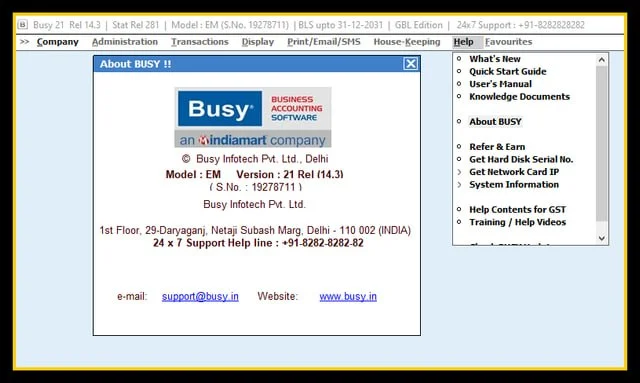
Overview of BUSY v21 Release 14.3
Table of Contents
BUSY v21 is an integrated business accounting and management software developed by Busy Infotech Private Limited, a company incorporated in 1997 with a focus on creating robust financial software for the Indian market. The software is designed to be a complete GST solution, managing everything from billing and inventory to tax filing for small and medium-sized businesses.
The v21 Release 14.3 update represents more than just a minor patch; it is a significant upgrade that introduces features aimed at modernizing business workflows. These include enhanced audit trails, seamless integration with Google Sheets, and compatibility with the latest statutory requirements like MSME registration and e-invoicing. The software is available in different editions—Basic, Standard, and Enterprise—to cater to the varying needs of different business sizes and complexities.
Key Features of BUSY v21 Release 14.3
BUSY v21 offers a rich set of features that make it a comprehensive tool for businesses. Its core capabilities are designed to handle the entire financial lifecycle of an MSME.
-
Financial Accounting and Management: The software provides a complete suite for managing financial transactions, including ledger management, journal entries, and the generation of critical reports like trial balance, profit and loss statements, and balance sheets. It supports multi-currency transactions, which is beneficial for businesses involved in international trade.
-
Inventory Management: BUSY allows businesses to manage inventory efficiently across multiple locations. Features include stock level tracking, purchase and sales order processing, and detailed stock valuation. The v21 update has also introduced automatic batch number creation for improved date-wise or party-wise stock tracking.
-
Statutory Compliance and GST: A standout feature of BUSY is its strong focus on statutory compliance, particularly for the Goods and Services Tax (GST) in India. It simplifies GST compliance through functionalities like direct upload of GSTR1, GSTR 2B reconciliation, and comprehensive GST report generation.
-
Invoicing and Billing: The software offers highly configurable invoicing options, allowing businesses to create professional invoices that meet their specific needs. It also supports e-invoicing and e-way bill generation, which are mandatory for many businesses under GST regulations. A standout addition in v21 is the ability to send messages directly through the WhatsApp API, enhancing customer communication.
-
MIS and Reporting: BUSY provides a powerful reporting engine that gives businesses valuable insights into their operations. Users can access customizable MIS reports for various aspects of their business, including sales, purchases, inventory, and financial performance. The v21 update has also added new reports for auditors, such as a list of transactions on holidays and highest and lowest value transactions.
-
TDS / TCS Management: The software includes features to manage Tax Deducted at Source (TDS) and Tax Collected at Source (TCS), ensuring businesses can easily comply with these statutory requirements.
What’s New in BUSY v21 Release 14.3
The latest version brings several key enhancements designed to improve functionality, usability, and compliance.
-
Compulsory Detailed Audit Trail: As per MCA guidelines, BUSY v21 introduces a detailed audit trail feature that provides a complete log of every transaction. This includes additions, modifications, and deletions, ensuring full transparency and compliance for auditors and chartered accountants.
-
Google Sheets Integration: This feature allows users to import masters and vouchers directly from Google Sheets, streamlining data migration and reducing manual data entry errors.
-
Direct WhatsApp API Integration: Users can now send messages and share invoices directly with customers through WhatsApp, improving communication and speeding up the billing process.
-
MSME Type and Udyam Registration: The software now allows businesses to maintain MSME type and Udyam number for the company and its parties, helping in compliance with government regulations.
-
Enhanced GSTR 2B Reconciliation: This feature simplifies the reconciliation of purchase data with the GSTR 2B form, making the GST filing process more accurate and less time-consuming.
-
Dynamic QR Code and E-way Bill Cancellation: New updates include support for dynamic QR codes on invoices and the ability to cancel e-way bills and e-invoices directly from the voucher cancellation screen.
System Requirements for BUSY v21
Before installing BUSY v21, it is important to ensure your system meets the minimum requirements for optimal performance. BUSY is a Windows-based desktop application.
| Requirement | Minimum Specification |
|---|---|
| Operating System | Windows 7 and above |
| Processor | 1 GHz or higher |
| RAM | 2 GB or more |
| Hard Disk Space | 2 GB of free space |
| Platform | Windows Desktop only |
Installation Guide for BUSY v21
Installing BUSY v21 is a straightforward process. A free trial is available for users to evaluate the software before purchasing.
-
Visit the Official Website: Go to the official BUSY website at
busy.in. -
Navigate to Downloads: Click on the “Resources” option in the header menu and select the “Downloads” tab.
-
Download the Setup: Locate the BUSY 21 setup file and download it to your computer.
-
Run as Administrator: It is recommended to right-click on the downloaded installer and select “Run as administrator” to ensure the installation process has the necessary permissions.
-
Follow On-Screen Instructions: Proceed through the installation wizard, following the on-screen prompts.
-
Troubleshooting: If you face issues, ensure your system meets the requirements and temporarily disable any antivirus or firewall software before running the installer.
How to Use BUSY v21
Using BUSY for day-to-day accounting involves setting it up with your business details and then regularly entering transactions. The software automatically updates ledgers, balances, and financial reports.
-
Initial Setup: For first-time users, the process begins with creating a company file. This involves defining your business details, creating a chart of accounts (ledgers for customers, suppliers, bank accounts, tax heads, etc.), and entering opening balances.
-
Daily Workflow: The daily routine primarily involves passing vouchers for routine transactions. This includes:
-
Sales Vouchers: Recording sales transactions to generate invoices.
-
Purchase Vouchers: Recording purchases from suppliers.
-
Payment and Receipt Vouchers: Tracking all cash and bank transactions.
-
Journal Vouchers: For adjustments and non-cash transactions.
-
-
Report Review: Regularly review key reports like the trial balance, stock status report, and GST reports to ensure that all entries are posting correctly and the books are accurate.
Best Use Cases for BUSY v21
BUSY is versatile and serves a wide range of businesses, particularly those in India. It is best suited for:
-
Small and Medium-Sized Enterprises (SMEs): The software’s comprehensive yet scalable nature makes it an ideal fit for SMEs looking for an all-in-one accounting and business management solution.
-
Trading Companies: Businesses that manage significant inventory benefit from BUSY’s advanced inventory management features, multi-location tracking, and batch management.
-
Manufacturing Units: With features for production/BOM and detailed inventory, BUSY can handle the complex accounting and inventory needs of small to medium manufacturers.
-
Chartered Accountants (CAs) and Accountants: The software’s robust reporting, audit trail, and GST compliance tools make it a favorite among accounting professionals who manage the books for multiple clients.
Advantages and Limitations of BUSY v21
Like any software, BUSY v21 has its strengths and weaknesses based on user reviews and its technical makeup.
Advantages
-
GST-Ready: One of its most significant advantages is its comprehensive support for GST compliance, making tax filing easier.
-
User-Friendly: Many users praise its intuitive interface and ease of use for non-accounting personnel.
-
Customizable Invoicing: The ability to create highly configurable invoices is a major plus for businesses looking to maintain their brand identity.
-
Powerful Reporting: The range of MIS and financial reports provides deep insights into business performance.
-
Offline Operation: For businesses that prefer a desktop-based solution without relying on a constant internet connection, BUSY is a reliable choice.
Limitations
-
No Native Cloud Application: BUSY is primarily a desktop software. Users often have to use third-party RDP (Remote Desktop Protocol) clients for remote access, which can be cumbersome and increase costs.
-
Customer Support: Reviews about customer support are mixed, with some users reporting excellent service and others complaining about poor vendor support and high Annual Maintenance Contract (AMC) costs.
-
High AMC and Renewal Costs: While the initial purchase is a one-time fee, some users feel the annual renewal costs are high.
-
Data Vulnerability: Since the software runs on a local server, data can be lost if the PC fails. This is a major disadvantage for users without a robust data backup plan.
Alternatives to BUSY v21
For businesses evaluating BUSY, several other popular accounting solutions in India serve as strong alternatives.
| Software | Key Features | Key Differentiators | Starting Price (approx.) |
|---|---|---|---|
| TallyPrime | Accounting, inventory, GST compliance, payroll, and reporting. | Market leader in India; user-friendly; offers extensive support and ecosystem. | ₹630 (one-time) |
| QuickBooks | Cloud-based accounting; strong bank synchronization; expense tracking; invoicing. | Cloud-native; powerful automation; popular globally. | $38/month |
| Odoo | Open-source ERP with integrated accounting; customizable; large app ecosystem. | Highly customizable; scalable for various business needs. | $31.10/month |
| Xero | Beautiful online accounting software; ideal for small businesses and accountants. | Cloud-based; strong for service-based businesses and accountants. | $25/month |
| Sage Accounting | Financial management for small and medium businesses. | Strong focus on security features. | $20/month |
Frequently Asked Questions
Q1: What is the latest version of BUSY?
The latest stable version is BUSY v21 Release 14.3. You can download it from the official BUSY website.
Q2: How can I download BUSY 21 software?
You can download the setup file for free from the official BUSY website. Navigate to “Resources” and then “Downloads” to find the BUSY 21 setup.
Q3: Is there a free trial available for BUSY?
Yes, BUSY offers a 15-day free trial for users to test the software before purchase.
Q4: What are the main editions of BUSY 21 available?
BUSY 21 is available in three main editions: Basic, Standard, and Enterprise. Each edition comes with different features and is available as a single-user or multi-user license.
Q5: What are the system requirements for installing BUSY?
Your system should have Windows 7 or later, a 1 GHz processor, at least 2 GB of RAM, and 2 GB of free hard disk space.
Q6: Is BUSY software cloud-based or offline?
BUSY is primarily an offline, desktop-based software for Windows. It does not have a native cloud application, but remote access can be achieved through third-party RDP services.
Q7: Does BUSY support e-invoicing and e-way bills?
Yes, BUSY v21 supports both e-invoice and e-way bill generation. It also allows users to cancel e-way bills directly from the voucher cancellation screen.
Q8: How can I purchase the BUSY 21 license?
You can purchase a license through a network of more than 450 registered channel partners and thousands of resellers across India or by contacting the company directly.
Final Thoughts
BUSY v21 Release 14.3 is a robust and feature-rich accounting software that excels in providing a comprehensive solution for Indian MSMEs. Its strength lies in its powerful GST compliance tools, sophisticated inventory management, and highly configurable reporting, making it a reliable workhorse for businesses managing their finances offline. The latest updates, including the detailed audit trail and WhatsApp integration, demonstrate a commitment to meeting modern business needs.
However, the lack of a native cloud application and the high cost of AMC may be deterrents for some businesses. For those who prioritize an offline, desktop-based system and are willing to invest in strong local support, BUSY v21 remains a top-tier choice. However, businesses looking for a native cloud solution might find that the alternatives offer a better fit for their operational style. Careful evaluation of your business needs, budget, and technical preferences is key to making the right decision.
Our Paid Service
“We do not sell or provide any software. We only offer professional support services. If any software on your system is not working properly, or you are facing installation errors, crashes, or any other technical issue — just contact us. We will help you fix the problem quickly and remotely via AnyDesk. No software will be provided from our side — only expert troubleshooting and support.”