
Overview of the Software
Table of Contents
Cross Section Analysis & Design is a comprehensive structural analysis tool designed for civil and structural engineers who need accurate section property calculations. The software handles any arbitrary cross-section shape, making it versatile for complex structural design projects .
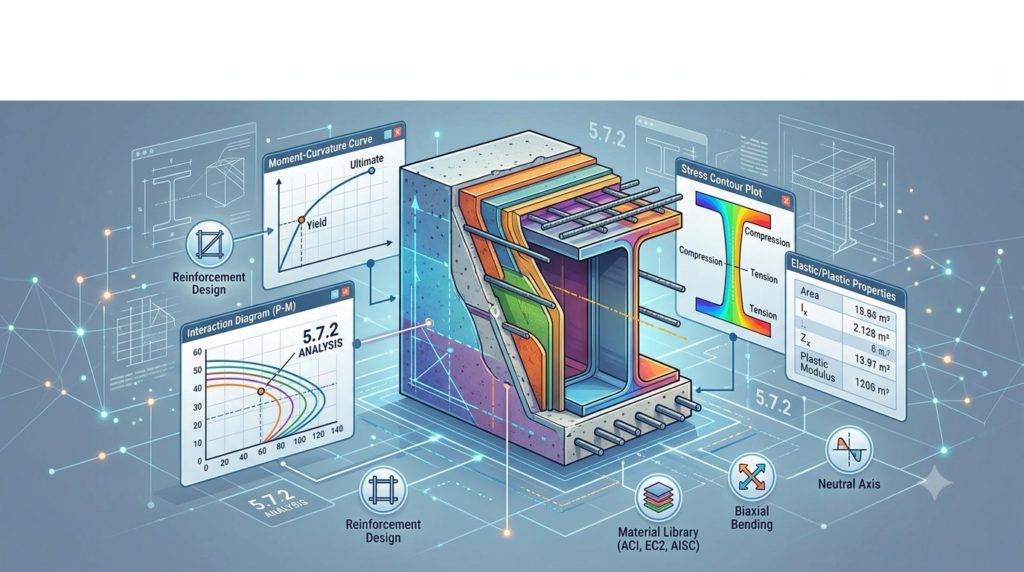
The application excels at calculating sectional properties and generating key visual outputs including:
-
Moment-Curvature diagrams
-
Interaction diagrams and interaction surfaces
-
Strain distributions with neutral axis location
-
Stress contour plots
This structural design software follows major international building codes for reinforced concrete sections, including ACI 318, BS 8110, AASHTO, UBC, AS 3600, IS 456, and CSA A233 . Additionally, it supports user-defined material properties such as linear, bilinear, trilinear, and parabolic stress-strain relationships.
The software functions as a complete rebar calculator, allowing engineers to design and verify reinforcement in concrete sections efficiently . Its versatility makes it suitable for both simple section checks and complex custom geometry analysis.
Key Features
Arbitrary Cross-Section Geometry Support
The cross-section analysis tool imposes no limitations on shape, materials, or loads. Engineers can draw any geometry using the intuitive user interface or import standard steel sections from a comprehensive shape library . Supported standard section libraries include:
-
AISC (American Institute of Steel Construction)
-
Australian-New Zealand standards
-
BS (British Standards)
-
Chinese standards
-
European standards
-
Indian standards
-
Aluminum standards
Advanced Calculation Capabilities
The section properties calculator performs a wide range of computations :
-
Sectional properties (area, centroid, moments of inertia, section modulus)
-
Biaxial bending and axial load analysis
-
Elasticity modulus calculation per concrete regulations
-
Strength reduction factor determination
The structural section analysis module automatically implements equivalent rectangular stress distribution for ultimate limit state (ULS) calculations when the “Default rectangular by code for ULS” function is enabled .
Material Definition and Management
Users can define multiple material types :
-
Concrete with code-specific properties
-
Reinforcement steel
-
Linear, bilinear, trilinear, and parabolic material models
Results Visualization
The engineering section design software provides clear visual outputs:
-
Export geometry images to JPEG, BMP, or GIF formats
-
Stress distribution contours
-
Strain diagrams with neutral axis location
What’s New in Version 5.7.2
Version 5.7.2 of this reinforced concrete design software includes several enhancements over previous versions:
-
Improved interface responsiveness for complex section calculations
-
Updated code compliance for ACI 318 and Eurocode standards
-
Enhanced rebar design module with faster convergence algorithms
The latest version represents DiPCSoft’s commitment to providing structural engineers with reliable, accurate section analysis tools that keep pace with evolving building codes .
System Requirements
Operating Systems: Windows XP, Windows 7, Windows 8, Windows 10, and Windows 11 .
Memory: Minimum 4 GB RAM recommended for complex section analysis.
Processor: Intel Core i3 or equivalent (i5 or higher recommended for large projects).
Storage: 500 MB available disk space for installation.
Display: 1024 x 768 resolution minimum (1920 x 1080 recommended).
The software is designed to run efficiently on standard engineering workstations without specialized hardware requirements.
Installation Guide
Step 1: Obtain the Software
Download the Cross Section Analysis & Design 5.7.2 installer from the official DiPCSoft website or authorized distributor.
Step 2: Run the Installer
-
Close all other applications before installation
-
Right-click the installer file and select “Run as Administrator”
-
Follow the installation wizard prompts
Step 3: Accept License Terms
Read and accept the End User License Agreement (EULA). The software is commercially licensed; ensure you have a valid license key .
Step 4: Select Installation Directory
Choose the installation folder (default: C:\Program Files\DiPCSoft\Cross Section Analysis & Design).
Step 5: Complete Installation
Click “Install” and wait for the process to complete. Launch the application and enter your license credentials to activate.
How to Use the Software
Drawing Cross-Section Geometry
The section editor allows geometry creation through two methods :
-
Direct drawing using the graphical interface
-
Coordinate input by entering vertex coordinates in a dedicated form
Users can perform basic editing operations: copy, rotate, mirror, replicate, delete, and undo/redo actions.
Defining Materials
Configure material properties through the Materials Manager:
-
Select material type (concrete, reinforcement, or custom)
-
Define stress-strain relationship (linear, bilinear, trilinear, parabolic)
-
Specify code-specific parameters
-
Save material definitions for reuse
Running Analysis
-
Complete geometry definition and material assignment
-
Configure analysis parameters (loads, code selection, safety factors)
-
Run the section analysis
-
Review results including moment-curvature and interaction diagrams
Exporting Results
Export calculated data and images:
-
Geometry images in JPEG, BMP, or GIF formats
-
Calculation reports
-
Diagrams and plots
Best Use Cases
Reinforced Concrete Column Design
The software excels at designing and verifying reinforced concrete columns under combined axial load and biaxial bending. Structural engineers can determine required reinforcement, verify capacity, and generate interaction diagrams for design documentation .
Complex Section Analysis
For non-standard or built-up sections, the arbitrary geometry capability proves invaluable. Engineers working on bridge piers, retaining walls, or special architectural elements can analyze sections not available in standard shape libraries.
Code Verification
The software supports multiple design codes, making it suitable for international projects :
-
ACI 318 for US projects
-
Eurocode 2 for European projects
-
BS 8110 for UK projects
-
AS 3600 for Australian projects
-
AASHTO for bridge structures
Educational and Research Applications
Engineering educators and researchers use the software to demonstrate section behavior, investigate alternative designs, and validate analytical solutions.
Advantages and Limitations
Advantages
-
Versatile geometry handling: No shape limitations
-
Multiple code compliance: International design standard support
-
Comprehensive output: Multiple diagram types and visualization options
-
User-defined materials: Flexible material modeling
-
Rebar calculator: Built-in reinforcement design capability
Limitations
-
Learning curve: The interface requires familiarization due to extensive features
-
Windows-only: Limited to Windows operating systems
-
Commercial license: Requires paid license for full functionality
-
No built-in BIM integration: Limited interoperability with structural analysis software
Alternatives to the Software
RSECTION by Dlubal
A powerful cross-section analysis software offering effective section properties calculation for thin-walled and thick-walled sections . Strong integration with RFEM and RSTAB structural analysis programs.
Advance Design Cross Sections Module by Graitec
Provides cross-section analysis and design capabilities with support for reinforced concrete, steel, and timber . Features include DXF import, parametric modeling, and Eurocode compliance.
Analysis3D by Cuylaerts Engineering
Freeware finite element analysis software with structural optimization capabilities. Includes extensive cross-section libraries and design code support .
SCIA Engineer General Cross-section Editor
Offers CAD-like cross-section definition with parametric modeling and construction stage capabilities .
Frequently Asked Questions
What types of cross-sections can Cross Section Analysis & Design handle?
The software can analyze any arbitrary cross-section shape, including standard rolled sections, built-up sections, and custom geometries. It supports multiple materials within a single section and handles both solid and hollow shapes .
Which building codes does the software support?
Cross Section Analysis & Design complies with major international codes including ACI 318, Eurocode 2, BS 8110, AASHTO, UBC, AS 3600, IS 456, and CSA A233 for reinforced concrete design .
Can I import standard steel sections from libraries?
Yes, the software includes a comprehensive shape library covering AISC, European, British, Australian, Indian, Chinese, and Aluminum standards. Users can import sections directly from these libraries .
What output diagrams does the section analysis generate?
The software generates Moment-Curvature diagrams, Interaction diagrams, strain distribution plots, neutral axis location visualization, and stress contour plots .
Is the software suitable for beginners?
While the software is primarily designed for professional engineers, it includes tooltips and a help manual to assist with learning. The interface is feature-rich, requiring some experimentation to master .
What is the difference between Cross Section Analysis & Design and other structural analysis tools?
Unlike general structural analysis software, this application focuses specifically on cross-section behavior under biaxial bending and axial loads. It provides detailed section property calculations and reinforcement design capabilities rather than full structure analysis .
Does the software support user-defined materials?
Yes. Users can define materials with linear, bilinear, trilinear, or parabolic stress-strain relationships. Concrete and reinforcement steel properties can be customized to match project requirements .
Final Thoughts
Cross Section Analysis & Design 5.7.2 from DiPCSoft stands as a capable and versatile solution for structural engineers requiring detailed cross-section analysis and design capabilities. Its support for arbitrary geometries, multiple design codes, and comprehensive output makes it a valuable addition to any structural engineering toolkit .
The software’s flexibility in handling complex shapes and materials, combined with code-compliant reinforcement design, addresses the practical needs of both consulting engineers and researchers. While the learning curve may require investment, the depth of analysis available justifies the time spent .
For professionals working with reinforced concrete sections requiring biaxial bending and axial load analysis, this software represents a reliable choice that balances capability with usability.
Our Paid Service
“We do not sell or provide any software. We only offer professional support services. If any software on your system is not working properly, or you are facing installation errors, crashes, or any other technical issue — just contact us. We will help you fix the problem quickly and remotely via AnyDesk. No software will be provided from our side — only expert troubleshooting and support.”