
Overview of Cubase Pro 15
Table of Contents
Cubase Pro 15 is Steinberg’s flagship digital audio workstation, designed for professional music production, audio recording, mixing, and mastering. As one of the longest-running DAWs in existence, Steinberg Cubase has evolved into a mature, dependable platform that balances decades of refinement with cutting-edge innovation .
The software excels as a comprehensive production environment, handling everything from MIDI composition and scoring to audio editing and stem mastering. Its workflow improvements in version 15, combined with new creative tools like the Melodic Pattern Sequencer and expanded modulation system, position it as a top-tier choice for serious music producers .
For composers, recording engineers, and sound designers, Cubase Pro 15 offers a depth of features that reward the time invested in learning its intricacies. While the learning curve is notably steep, the payoff is access to one of the most powerful and flexible DAWs on the market .
Key Features of Cubase Pro 15
Professional MIDI Production Environment
Cubase Pro 15 shines in MIDI production, with editing capabilities that many consider best-in-class. The MIDI editor window includes probabilistic functions for gating notes and randomising velocity ranges, encouraging creative experimentation alongside precise technical control . This combination of creative tools and meticulous editing options reflects Cubase’s identity as both a creative space and a studio workhorse.
Audio Recording, Editing, and Mixing
The audio capabilities of Cubase Pro are rock-solid, suitable for everything from small bedroom setups to large-scale professional recording sessions with outboard gear . The software includes 96 built-in audio effects and over 50 GB of samples and loops, providing an extensive toolkit right out of the box . The VariAudio pitch correction and audio warping tools allow detailed manipulation of recorded performances.
Drum Track Sequencer with Melodic Mode
Originally introduced in Cubase 14, the Drum Track sequencer expands in version 15 with a new Melodic Mode. This allows users to sequence both rhythmic and melodic patterns, with generative tools for adding note ties, jumps, repeats, and legato options . One-click editing features make it easy to change sequence resolution or length, streamlining pattern creation.
Modulators and Sound Design Tools
Cubase Pro 15 incorporates 11 Bitwig-inspired Modulators, including options like Wavefold LFO and Sample & Hold . These allow sound designers to animate parameters with movement, randomness, and rhythmic variation without drawing traditional automation. The Mod Scripter feature enables users with JavaScript skills to create custom modulators, pushing the boundaries of creative sound design .
Hitpoint Editing for Audio Manipulation
For users working with loops and rhythmic material, Hitpoint editing remains a standout feature. It analyzes transients, enabling users to slice loops into fragments and reassemble them into new grooves and variations while preserving the original character . This functionality is particularly valuable for sample pack creators and producers working extensively with audio loops.
Expression Maps and Orchestral Tools
Cubase Pro’s Expression Maps provide streamlined control over articulations in large orchestral libraries. Version 15 introduces the ability to set independent delay compensation for each articulation, enabling precise alignment of rhythmic ostinatos . Users can import preset mappings from third-party libraries, with seamless integration for leading orchestral collections.
Score Editor and Dorico Integration
The overhauled Score Editor in Cubase Pro 15 offers improved notation capabilities and tighter integration with Steinberg’s dedicated scoring software, Dorico . This makes it significantly more powerful than many competing DAWs’ scoring features, with the ability to export Cubase scores directly into Dorico for further development.
Scalable and Customisable Interface
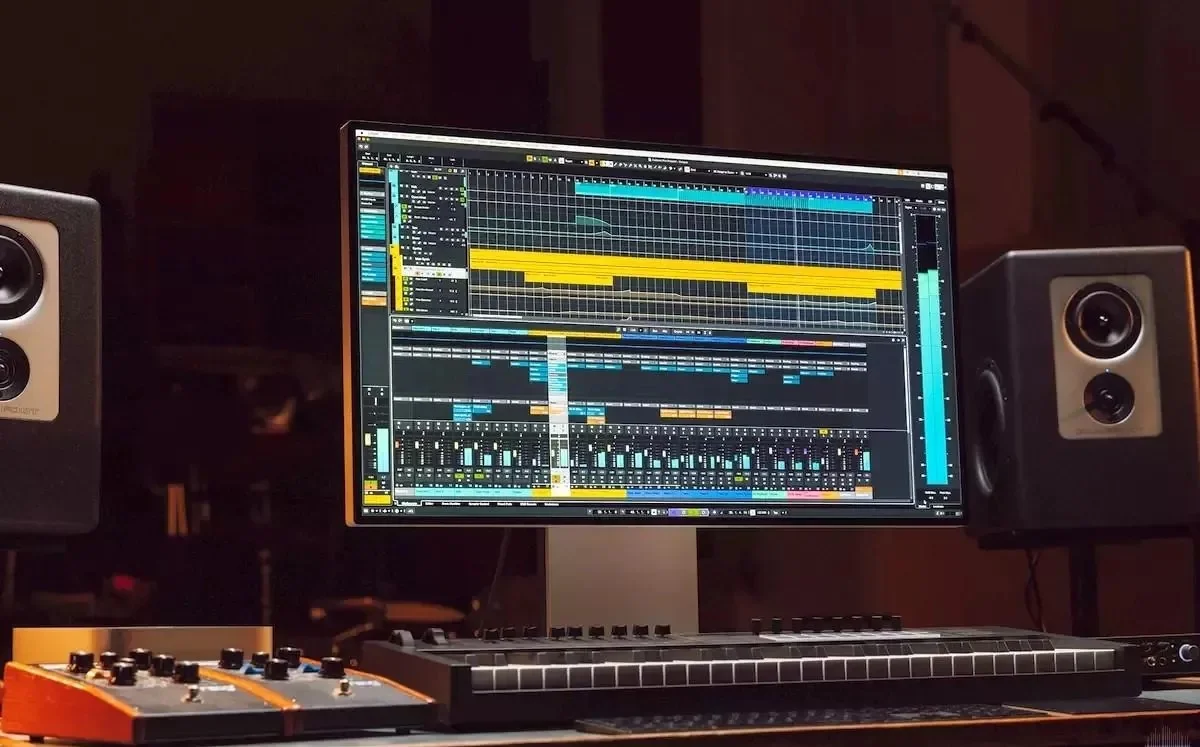
Cubase Pro 15 features a highly customisable user interface with global UI scaling options to maximise screen real estate . Users can design custom colour schemes and tailor the layout to their workflow preferences, ensuring efficient navigation in complex projects.
What’s New in Cubase Pro 15
Redesigned Hub with Project Preview
The redesigned Hub window offers enhanced project organisation with a functional and aesthetically pleasing interface . The new project preview feature allows users to preview projects directly in the Hub before loading them, saving significant time when working with hundreds of sessions . Audio driver settings can be configured directly from the Hub, streamlining the setup process.
Omnivocal Vocal Synthesis
Developed in collaboration with Yamaha, the new Omnivocal instrument uses synthesis to produce vocal performances paired with MIDI notes and text input . While still developing in the initial beta version, it offers an intriguing option for generating backing vocals and exploring synthetic vocal textures .
Melodic Pattern Sequencer
The expanded Pattern Editor now includes a Melodic Mode, enabling both monophonic and polyphonic sequencing . Scale-based editing, shape generators, and controlled randomness help users create coherent musical patterns quickly, bridging the gap between generative ideas and musical structure.
Expanded Modulation System
Building on Bitwig’s influence, Cubase Pro 15’s modulation system introduces 11 modulators with scripting functionality . Parameters can be animated with rhythmic variation and randomness without cluttering the main automation lanes, encouraging experimentation and keeping projects organised .
Improved Automation Workflow
Version 15 streamlines the automation process. Touching any parameter immediately makes it available for automation, speeding up workflow and keeping users in the creative flow . This seemingly small change significantly enhances the efficiency of automation-heavy tasks.
Stem Separation
Cubase Pro 15 introduces built-in stem separation, allowing users to isolate vocals, drums, bass, and other instruments from mixed audio . While the implementation uses fixed processing depth and produces a somewhat processed sound compared to dedicated separation tools, it serves as a useful analytical and remix tool within the DAW environment .
Dorico Integration and Score Editor Updates
The improved integration with Steinberg’s Dorico notation software allows seamless score export for further development. The refreshed Score Editor translates real-time MIDI performances into readable notation more effectively than previous versions .
MacOS 26 Tahoe Support
Cubase Pro 15 supports the latest macOS 26 Tahoe, ensuring compatibility with Apple’s newest operating system alongside continued Windows support .
System Requirements
To run Steinberg Cubase Pro 15 efficiently, your system should meet the following specifications:
Operating Systems
-
Windows: Windows 10 (64-bit, version 22H2) or later
-
macOS: macOS 14 (Sonoma) or later, including macOS 26 Tahoe
Hardware Requirements
-
Processor: Multi-core processor (Intel i5, AMD Ryzen, or Apple Silicon)
-
RAM: 8 GB minimum (16 GB or more recommended for complex projects)
-
Storage: 85 GB free storage space for installation and content
-
Display Resolution: Minimum 1440 x 900; 1920 x 1080 recommended
-
Internet Connection: Required for license activation and product registration
Plugin Compatibility
-
64-bit environment for VST plugins
Installation Guide for Cubase Pro 15
Step 1: Purchase and Download
-
Visit the official Steinberg website to purchase Cubase Pro 15
-
Create or log in to your Steinberg account
-
Download the Cubase Pro 15 installer from your user account area
Step 2: System Preparation
-
Ensure your operating system is updated to a compatible version
-
Verify you have sufficient free storage space (at least 85 GB)
-
Close other applications to prevent conflicts during installation
Step 3: Run the Installer
-
Launch the downloaded installer
-
Follow the on-screen prompts, accepting the license agreement
-
Select the installation location (default is typically recommended)
Step 4: License Activation
-
Connect to the internet
-
Launch Cubase Pro 15
-
Enter your activation code when prompted
-
The software will validate your license online
-
Installation on up to three computers is permitted
Step 5: Initial Setup
-
The redesigned Hub will open on first launch
-
Configure your audio device settings using the audio setup helper
-
Use the waveform icon to test audio output with a sample voice test
How to Use Cubase Pro 15: Essential Workflows
Configuring the Audio Setup
The Hub window allows easy audio device configuration before opening projects . Test audio output using the built-in voice sample feature, ensuring proper routing and latency settings for your audio interface.
Setting Up a New Project
-
From the Hub, select “Create New Project”
-
Choose a project template or start from an empty project
-
Configure project settings including sample rate, bit depth, and time signature
-
Save your project file in an organised location
Working with MIDI
-
Create a MIDI track
-
Use the Chord Track or Chord Pads to establish harmonic structure
-
Record MIDI input or program patterns in the MIDI editor
-
Apply velocity randomisation and probabilistic gating for variation
-
Use the Pattern Editor with new Melodic Mode for rhythmic and melodic sequences
Recording Audio
-
Set up your audio inputs in the VST Connections window
-
Create an audio track and select your input source
-
Enable monitoring and record enable
-
Record your performance
-
Use VariAudio for pitch correction or editing
Automation Workflow
-
Touch any parameter you want to automate
-
The parameter becomes available for automation immediately
-
Draw automation curves or record automation in real-time
-
Use the automation panel for detailed editing
Working with Modulators
-
Select a track or instrument that supports modulation
-
Add a modulator from the 11 available options
-
Route the modulator to target parameters
-
Adjust modulator settings including LFO shapes, sample-and-hold, and wavefolding
-
Optionally, use Mod Scripter for custom JavaScript modulation
Stem Separation
-
Import a mixed audio track into Cubase Pro 15
-
Access the stem separation tool from the audio menu
-
Select which stems to extract
-
Process the audio (fixed processing depth applies)
-
Isolate vocals, drums, bass, and other instruments
Best Use Cases for Cubase Pro 15
Professional Music Production
Cubase Pro 15 is trusted by Billboard Hot 100 producers worldwide . Its comprehensive feature set handles everything from songwriting and recording to mixing and mastering within a single environment.
Film and Media Scoring
The advanced MIDI editing, Expression Maps, and improved Score Editor with Dorico integration make Cubase Pro 15 ideal for film and television composers . The ability to handle large orchestral templates with independent articulation delay compensation is particularly valuable .
Sound Design and Sample Creation
For sound designers creating sample packs and loops, Cubase Pro 15 offers precise control over audio, transients, and micro-timing . Hitpoint editing and the new modulation system provide powerful tools for creative audio manipulation .
Stem Mastering
Professional mastering engineers frequently use Cubase Pro 15 for stem mastering work, appreciating its precise automation and clean signal processing . The combination of Cubase for processing and WaveLab for final delivery is a common professional workflow .
Electronic Music Production
The Pattern Editor with Melodic Mode, generative tools, and 11 modulators make Cubase Pro 15 highly capable for electronic music creation . The creative workflow encourages experimentation while maintaining professional production standards.
Advantages and Limitations of Cubase Pro 15
Advantages
Exceptional MIDI Production
Cubase Pro 15 offers one of the best MIDI production environments in any DAW, with probabilistic functions, generative tools, and comprehensive editing capabilities . The MIDI workflow is consistently praised by professionals .
Professional Audio Quality
The audio engine and stock plugins deliver professional-grade results, making Cubase suitable for both tracking and mixing in high-end studios .
Deep Feature Set
The breadth of features—from composition and recording to mixing and mastering—means Cubase can handle virtually any music production task . For professionals, this reduces the need for third-party software.
Extensive Stock Content
Over 50 GB of samples, loops, and 96 included audio effects provide a substantial creative toolkit out of the box. The included synths like Padshop 2 and Retrologue compete well with other leading DAWs’ stock offerings .
Creative Sound Design Tools
The 11 modulators, scripting functionality, and generative sequencing tools offer creative possibilities beyond traditional DAW workflows . These features encourage experimentation and depth in sound design .
Limitations
Steep Learning Curve
New users frequently find Cubase Pro 15 overwhelming . The sheer depth of features requires significant time investment to master . Many users need to consult manuals and tutorials more than with other DAWs .
Premium Price Point
At £481 / $579 for the Pro version, Cubase is more expensive than many DAWs . While Artist (£273 / $329) and Elements (£83 / $99) tiers offer more accessible entry points, the Pro edition represents a significant investment .
Stem Separation Quality Lags
Compared to dedicated tools or Apple Logic Pro’s implementation, Cubase’s built-in stem separation produces results that sound “heavily processed” . The fixed processing depth cannot be adjusted to improve quality .
Resource Intensive
With 85 GB storage requirements and growing file size , Cubase Pro 15 demands substantial system resources. Complex projects may require more than the minimum 8 GB RAM .
Modulator System Less Extensive than Competitors
While the 11 modulators are valuable, they are “far less extensive” than Bitwig’s implementation . Users seeking the deepest modulation capabilities may still prefer specialised environments.
Alternatives to Cubase Pro 15
Apple Logic Pro 11.2
Apple’s Logic Pro is Cubase’s strongest competitor, particularly for Mac users. At $199.99, Logic offers exceptional value and a massive sound library . Its Stem Splitter currently outperforms Cubase’s implementation . However, Logic is Mac-only and prioritises accessibility over power-user depth .
Ableton Live 12 Suite
Ableton Live’s Session View and Max for Live integration make it a powerful option for electronic producers . Its unique workflow particularly suits loop-based creation and live performance . However, it’s more expensive than Cubase at $599 for Suite .
FL Studio 2025
FL Studio’s lifetime free updates and best-in-class piano roll make it an attractive alternative . The Producer Edition at $199 offers strong value, and the pattern-based workflow suits beat-making and electronic production . FL Studio is particularly popular in hip-hop and trap production .
Pro Tools
For audio recording and mixing professionals, Pro Tools remains the industry standard in many studios . Cubase audio capabilities are comparable , but Pro Tools is more expensive and less accessible for independent producers.
Steinberg Nuendo
For users needing advanced audio post-production, scoring, and multimedia features, Nuendo extends Cubase Pro capabilities with specialised tools . If your work focuses on film, game audio, or broadcast, Nuendo may be the better choice .
Frequently Asked Questions About Cubase Pro 15
Is Cubase Pro 15 worth the upgrade from Cubase 14?
Yes. Users report noticeable workflow improvements, better performance, and time-saving features . Key additions include the redesigned Hub with project preview, Omnivocal vocal synthesis, the Melodic Pattern Sequencer, 11 modulators, and improved automation workflow . For long-time Cubase users, the upgrade is worth it .
What’s the difference between Cubase Pro 15 and Cubase Artist 15?
Cubase Pro includes additional features including the 11 modulators, more advanced MIDI tools, and expanded mixing capabilities . Artist covers most users’ needs , but professionals requiring the full feature set should invest in Pro . The price difference is approximately £200 ($250) .
Can Cubase Pro 15 run on Windows 10?
Yes, Cubase Pro 15 requires Windows 10 (64-bit, version 22H2) or later . It also supports Windows 11.
How much storage does Cubase Pro 15 need?
Cubase Pro 15 requires approximately 85 GB of free storage space for installation and content . This is significantly larger than previous versions .
Is Cubase Pro 15 suitable for beginners?
Cubase Pro has a steep learning curve and is not recommended as a first DAW for beginners . Users should consider Cubase Elements or Artist, or other DAWs that prioritise accessibility . However, users willing to invest time in learning Cubase can unlock exceptional capabilities .
What is the price of Cubase Pro 15?
Cubase Pro 15 is priced at approximately £481 / $579 / €579 . Student discounts and crossgrade pricing from other DAWs may be available .
What’s the best Cubase version for orchestral composition?
Cubase Pro is recommended for orchestral composition due to its Expression Maps, Score Editor, Dorico integration, and advanced MIDI features . For particularly complex scoring requirements, consider Steinberg Nuendo .
How does Cubase Pro 15’s stem separation compare to other tools?
Cubase Pro 15’s stem separation is functional but not competitive with dedicated tools. In comparative testing, it produced “heavily processed” results and fell short of Apple Logic Pro’s Stem Splitter, SpectraLayers Pro, and third-party options . Its fixed processing depth cannot be adjusted for improved quality .
Final Thoughts on Cubase Pro 15
Steinberg Cubase Pro 15 stands as one of the most powerful and versatile digital audio workstations available in 2026. Its comprehensive feature set, professional audio quality, and deep MIDI production capabilities make it an essential tool for serious music producers, composers, and sound designers .
The latest version brings meaningful improvements, from the redesigned Hub and creative modulators to the Omnivocal instrument and improved automation workflow . For existing Cubase users, the upgrade offers a polished, modernised experience with clear workflow benefits .
However, Cubase Pro 15 is not for everyone. The substantial learning curve and premium pricing make it best suited for experienced producers and professionals . Beginners may find more accessible options in Cubase Artist or Elements, or in competitors like FL Studio, Ableton Live, or Logic Pro .
Ultimately, Cubase Pro 15 earns its reputation as a top-tier professional DAW . It provides the depth, reliability, and creative tools that professionals demand, with the flexibility to handle anything from a simple singer-songwriter project to a full film score or complex electronic production. As one experienced user noted, “This is the most versatile DAW I’ve ever used, and it’s also one of the most powerful” . For those willing to invest the time to master it, Cubase Pro 15 delivers exceptional returns.
Our Paid Service
“We do not sell or provide any software. We only offer professional support services. If any software on your system is not working properly, or you are facing installation errors, crashes, or any other technical issue — just contact us. We will help you fix the problem quickly and remotely via AnyDesk. No software will be provided from our side — only expert troubleshooting and support.”