
Overview of ReadyVoucher Hotspot Management Software
Table of Contents
Managing a public Wi-Fi hotspot can be a complex task. Whether you run a coffee shop, a hotel, a university campus, or a large public venue, providing reliable and controlled internet access is essential. This is where ReadyVoucher 2.19 comes into play. It is a specialized software solution designed to streamline the process of creating, managing, and printing vouchers for MikroTik RouterOS hotspot gateways.
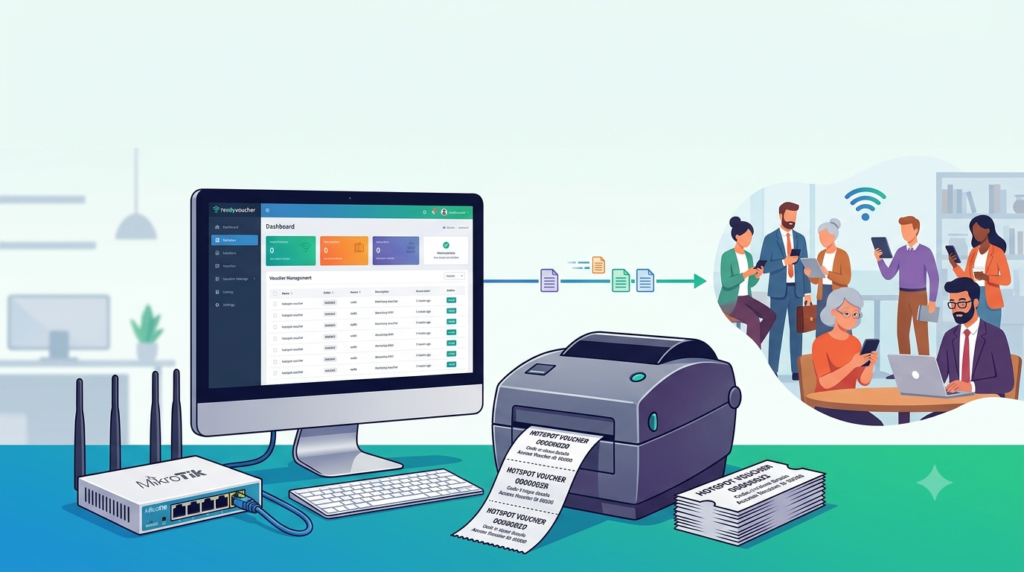
This hotspot voucher printing software acts as a powerful management tool that integrates directly with your MikroTik router. It allows administrators to generate time-based or data-based access codes that can be printed and distributed to users. By using ReadyVoucher, businesses can effectively monetize their Wi-Fi networks, control bandwidth usage, and provide a seamless experience for end-users, all through an intuitive interface.
The software eliminates the manual process of creating and tracking vouchers, offering a professional and efficient system that saves time and reduces administrative overhead. It is a complete MikroTik voucher management system that has become a favorite among network administrators for its reliability and ease of use.
Key Features of ReadyVoucher 2.19
ReadyVoucher is packed with features designed to make hotspot management as efficient as possible. Here are some of its core functionalities:
User-Friendly and Intuitive Interface
ReadyVoucher boasts a clean, modern, and easy-to-navigate interface. The dashboard provides a quick overview of your system status, active vouchers, and network activity, making it suitable for both beginners and experienced network professionals.
Advanced Voucher Generation Engine
The software offers unparalleled flexibility in voucher creation. You can generate vouchers based on specific criteria:
-
Time-Based Vouchers: Create access for a set duration like 1 hour, 24 hours, or 7 days.
-
Data-Based Vouchers: Offer access based on data consumption, such as 1GB or 10GB.
-
One-Time and Multi-Use Vouchers: Define if a voucher can be used once or multiple times.
-
Custom Pricing: Attach specific prices to different voucher profiles for easy monetization.
Automated Voucher Printing
The primary function of this MikroTik voucher maker is its seamless printing capability. You can design and print vouchers in bulk, complete with usernames, passwords, and optional QR codes. These QR codes allow users to automatically connect to the network with a single scan, significantly reducing login friction.
Direct Integration with MikroTik RouterOS
ReadyVoucher communicates directly with your MikroTik router using the RouterOS API. This integration allows for real-time synchronization, meaning that as soon as a voucher is printed, it is active on the router. There is no need for manual data entry.
Comprehensive Reporting and Statistics
Gain valuable insights into your network’s performance. The software provides detailed reports on:
-
Voucher usage and redemption rates.
-
User session history and peak usage times.
-
Revenue generated from paid vouchers.
-
Bandwidth consumption patterns.
Real-Time Voucher Status Monitoring
You can instantly check the status of any generated voucher within the system. The software will show if a code is unused, active, or expired, helping with customer support and network management.
Multi-Language Support
Recognizing its global user base, ReadyVoucher supports over ten languages, making it accessible to users worldwide.
Secure and Reliable
The software is designed with security in mind. All user data and transactions are handled securely, ensuring the integrity of your network and customer information.
What’s New in ReadyVoucher Version 2.19
The latest version of this MikroTik hotspot software, ReadyVoucher 2.19, comes with several important updates and performance enhancements:
-
Enhanced API Stability: Improved the communication protocol with the latest MikroTik RouterOS versions (v6 and v7) for a more stable and reliable connection.
-
Updated QR Code Technology: The QR code generation engine has been optimized for faster scanning compatibility with modern smartphones.
-
Performance Optimizations: Backend improvements have resulted in faster voucher generation and printing times, especially when handling large batches.
-
Bug Fixes: This version addresses minor bugs reported in previous iterations, ensuring a smoother and more bug-free user experience.
-
User Interface Tweaks: Subtle refinements to the user interface have been made to improve navigation and clarity, especially within the reporting module.
Upgrading to ReadyVoucher 2.19 ensures you benefit from these improvements, guaranteeing a more efficient and reliable voucher management process.
System Requirements
Before downloading and installing, ensure your system meets the following minimum requirements to run this voucher printing software effectively.
Hardware Requirements
-
Processor: 1.8 GHz or higher (x86 or x64 architecture).
-
RAM: 4 GB or more (8 GB is recommended for better performance).
-
Hard Disk Space: 200 MB of free space for software installation (additional space for database and logs).
-
Display: Minimum resolution of 1366 x 768.
Supported Operating Systems
-
Windows 7 (Service Pack 1 and above)
-
Windows 8.1
-
Windows 10 (all supported versions)
-
Windows 11
-
Windows Server 2016, 2019, and 2022
Software Prerequisites
-
Microsoft .NET Framework 4.5 or higher installed on the system.
MikroTik Router Compatibility
-
RouterOS: Version v6.0 and above, including the latest v7 releases.
-
Hardware: Compatible with all MikroTik router models running the supported RouterOS versions.
Step-by-Step Installation Guide
Installing ReadyVoucher is a straightforward process. Follow these steps to set up the software on your Windows machine.
Step 1: Download the Installer
Obtain the official ReadyVoucher 2.19 software installer from the developer’s official website or a trusted authorized distributor. Avoid downloading from unverified sources to ensure software integrity and security.
Step 2: Run the Installer
Navigate to your download folder and double-click the ReadyVoucherSetup.exe file. If you see a User Account Control (UAC) prompt, click “Yes” to allow the installation to proceed.
Step 3: Accept the License Agreement
Carefully read the End-User License Agreement (EULA). Check the box that says “I accept the agreement” and click “Next.”
Step 4: Choose Installation Location
The default installation path is C:\Program Files (x86)\ReadyVoucher. You can keep this or click “Browse” to select a different folder. Click “Next” to continue.
Step 5: Select Start Menu Folder
Choose a folder for the program’s shortcuts in the Windows Start Menu. The default is “ReadyVoucher.” Click “Next.”
Step 6: Additional Tasks
You will be given options to create a desktop icon and a quick launch icon. Select your preferences and click “Next.”
Step 7: Install
Review your settings and click “Install” to begin the process. The installation will take only a few moments.
Step 8: Complete Installation
Once the installation is complete, you can choose to launch ReadyVoucher immediately. Click “Finish” to close the setup wizard.
Post-Installation Setup
After installation, the first time you run the software, you will need to configure it by adding your MikroTik router’s details (IP address, username, password) and selecting your preferred database type (e.g., SQLite, MySQL).
How to Use ReadyVoucher for Effective Network Management
The core function of this Wi-Fi voucher software is to generate and manage access codes. Here’s a simple guide on how to use its most important features.
1. Configuring Your MikroTik Router
Before using ReadyVoucher, ensure your MikroTik hotspot is set up correctly.
-
Open ReadyVoucher and go to the “Settings” or “System Configuration” area.
-
Navigate to the “MikroTik Connection” section.
-
Enter your router’s IP address, the API port (typically 8728 for non-SSL and 8729 for SSL), your admin username, and password.
-
Click “Test Connection” to verify the software can communicate with your router.
2. Creating a Voucher Profile
A profile defines the parameters (time, data, price) of a voucher.
-
Click on the “Profiles” tab.
-
Click “Add New Profile” and give it a descriptive name (e.g., “Daily Pass,” “1GB Data Pack”).
-
Under the “Settings” tab, define the profile’s validity period (e.g., 24 hours) or data limit (e.g., 1024 MB).
-
Configure the price and any other options like user comments.
-
Save the profile.
3. Generating and Printing Vouchers
This is the primary function of this MikroTik voucher software.
-
Go to the “Vouchers” or “Generate” tab.
-
Select the profile you just created.
-
Define the quantity of vouchers you wish to generate (e.g., 50).
-
Choose the design template for your printout.
-
Click the “Generate and Print” button. The software will create the vouchers, upload them to your MikroTik router, and send them directly to your default printer.
4. Monitoring the Network
Use the “Online Users” or “Sessions” tab to see who is currently connected to the hotspot.
-
You can view usernames, IP addresses, and connection duration.
-
If necessary, you can manually disconnect a specific user.
5. Creating Revenue Reports
Access the “Reports” module to analyze network performance.
-
Generate sales reports by filtering between specific dates.
-
Export these reports as PDF or Excel files for your accounting records.
Best Use Cases for ReadyVoucher Hotspot Voucher Printing Software
ReadyVoucher is an ideal solution for a wide array of businesses and organizations that need to manage and monetize public Wi-Fi.
1. Hotels, Hostels, and Resorts: Provide guests with a Wi-Fi voucher upon check-in. This ensures that only paying guests have access, and you can offer different speed or time packages for premium service.
2. Coffee Shops and Restaurants: Offer free Wi-Fi with a time-limited voucher (e.g., 2 hours) to prevent customers from lingering too long and encourage turnover. Alternatively, sell premium, faster Wi-Fi access.
3. Public Spaces and Libraries: Manage internet usage in public areas by offering free time-based vouchers to all visitors, ensuring fair access for everyone.
4. Educational Campuses and Universities: Provide students and staff with unique, secure access to the campus network. Vouchers can be generated for a semester-long period.
5. Events and Conferences: Set up a temporary hotspot for conference attendees. Print vouchers on tickets or provide them as a separate handout to enable quick and easy access to the event’s internet.
6. Internet Cafes and Gaming Centers: Sell internet access by the hour or by data packages. The software makes it easy to generate and track thousands of vouchers daily.
ReadyVoucher: Advantages and Limitations
Like any software, ReadyVoucher has its strengths and potential drawbacks. Here is an objective look.
Advantages
-
Cost-Effective Solution: It is a one-time purchase, making it a more affordable long-term option compared to many subscription-based cloud solutions.
-
Lightweight and Fast: The software is not resource-intensive, meaning it can run on standard office computers without issue.
-
No Internet Dependency: Once installed, the software runs locally and only needs to communicate with your internal network, making it stable and independent of external internet outages.
-
Direct MikroTik API Integration: Ensures fast, native communication with the router, leading to high reliability.
-
Highly Customizable Printing: Offers advanced control over the design and layout of printed vouchers.
Limitations
-
Windows-Only: The software is currently only available for the Microsoft Windows operating system.
-
Requires a Machine to be Dedicated: For the software to be active and monitor vouchers in real-time, the computer running it must be on. However, once vouchers are generated, the computer can be turned off without disrupting existing active sessions.
-
Manual Setup: Initial configuration requires a basic understanding of network and MikroTik router settings.
Top Alternatives to ReadyVoucher
While ReadyVoucher is an excellent choice, you might also consider these other Wi-Fi management software options depending on your specific needs.
1. MikroTik User Manager
This is the official, built-in user management solution for RouterOS. It is a free tool that provides standard functionality for creating and managing hotspot users.
-
Pros: Free and tightly integrated with MikroTik.
-
Cons: The user interface is not as modern or intuitive as third-party solutions. Printing capabilities are very limited.
2. WiFiDog
A popular open-source captive portal solution. It works as an alternative to MikroTik’s built-in hotspot and is often used for community or free Wi-Fi projects.
-
Pros: Open-source and highly customizable. No licensing fees.
-
Cons: Requires significant technical expertise to set up and maintain. It also requires a separate web server to run.
3. Cloud-Based Solutions (e.g., Mango, Purple)
These are Software-as-a-Service (SaaS) platforms that manage your entire Wi-Fi network from a cloud dashboard.
-
Pros: No local software to install. Feature-rich, with advanced analytics and marketing integrations.
-
Cons: Recurring monthly subscription costs. Requires a stable internet connection for the router to communicate with the cloud service.
Frequently Asked Questions (FAQs)
1. What is ReadyVoucher used for?
ReadyVoucher is a hotspot voucher printing software specifically designed to work with MikroTik routers. It allows network administrators to generate, manage, and print access vouchers for Wi-Fi hotspots, making it ideal for businesses, hotels, and public venues that need to control or monetize internet access.
2. Is ReadyVoucher 2.19 compatible with the latest MikroTik RouterOS v7?
Yes, version 2.19 of ReadyVoucher has been specifically updated to ensure full compatibility with MikroTik’s RouterOS v7, in addition to v6.
3. How does ReadyVoucher connect to my MikroTik router?
The software connects to your router using the native MikroTik RouterOS API. This provides a secure and reliable channel for data synchronization and user management.
4. Can I create different types of vouchers?
Absolutely. The software allows you to create time-based vouchers (e.g., 24 hours) and data-based vouchers (e.g., 5GB). You can also create packages with different pricing structures.
5. What should I do if my antivirus software flags the ReadyVoucher installer?
Occasionally, some antivirus programs may falsely identify software installers as a threat. This is known as a “false positive.” You can resolve this by adding the file or the installation folder to your antivirus software’s “exclusions” or “whitelist.” Always ensure you have downloaded the software from an official source.
6. Is training required to use ReadyVoucher?
No extensive training is needed. The software is designed with a user-friendly interface that is intuitive to navigate. Administrators can quickly learn to generate vouchers and manage users within minutes.
7. What should I do if a voucher code does not work for a user?
You can use the “Voucher Status” lookup feature within the software. This allows you to check the code’s validity, whether it has been used, or if it has expired, so you can provide immediate support to the user.
8. What is a QR code on a voucher, and how does it work?
A QR code is a type of barcode that can be scanned by a smartphone camera. When a voucher is printed with a QR code, users can simply open their phone’s camera, scan the code, and be automatically connected to the Wi-Fi network, without needing to type in a username and password.
Final Thoughts
ReadyVoucher 2.19 stands out as a powerful, reliable, and cost-effective solution for managing MikroTik hotspot networks. Its intuitive design, robust features, and seamless integration with RouterOS make it a go-to tool for any business or organization looking to provide professional Wi-Fi services.
Whether you are a network novice setting up a small café hotspot or a seasoned administrator managing a large university campus, this MikroTik hotspot software provides the tools you need. From advanced voucher generation to insightful reporting, ReadyVoucher simplifies the process and provides a valuable return on investment.
By implementing this hotspot voucher software, you can move away from manual, time-consuming methods and embrace a professional, automated system that enhances both your operational efficiency and your end-user’s experience.
Our Paid Service
“We do not sell or provide any software. We only offer professional support services. If any software on your system is not working properly, or you are facing installation errors, crashes, or any other technical issue — just contact us. We will help you fix the problem quickly and remotely via AnyDesk. No software will be provided from our side — only expert troubleshooting and support.”