
Overview of the Software
Table of Contents
CAD DLL 16 is a dynamic-link library (DLL) solution designed to add professional CAD capabilities to custom applications. It serves as a robust toolkit for developers working across multiple sectors, including mechanical engineering, architecture, building design, circuit technology, cartography, and various analytic systems .
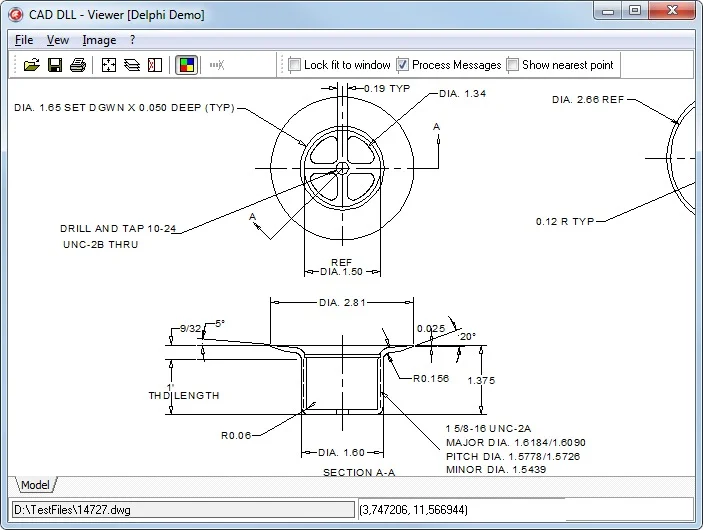
The library’s primary function is to provide a programming interface for handling complex CAD data. This means developers can use CAD DLL 16 to build applications that can visualize, create, modify, convert, and print CAD drawings. A significant advantage of using this library is its independence; it does not require AutoCAD or any other third-party software to be installed on the end-user’s machine . This makes distribution and deployment of your application much simpler and more cost-effective.
Supported Development Environments
Because CAD DLL 16 is built on standard DLL technology, it is compatible with a wide range of programming environments. The package includes ready-to-use demo applications with source code for popular development tools, making integration straightforward :
Key Features
CAD DLL 16 is packed with features designed to handle the complexities of CAD data efficiently. Below is a breakdown of its core capabilities.
Extensive Format Support
The library supports importing and exporting a comprehensive list of file formats, making it a versatile solution for any CAD-related project .
Supported Import Formats:
-
CAD Formats: DWG (up to AutoCAD 2026), DXF, DWF, HPGL, PLT
-
Vector Formats: SVG, CGM, EMF, WMF
-
3D Formats: STEP, IGES, SLDPRT, SLDASM, X_T, X_B, BREP, STL, SAT/SAB, FSAT, OBJ, 3DS, SMT, IPT, IFC
-
Raster Formats: PNG, BMP, JPG, GIF, TIFF
Supported Export Formats:
-
Vector Formats: DWG, DXF, PDF, SVG, CGM, HPGL, EMF, WMF
-
3D Formats: STEP, SAT, SAB, STL, OBJ
-
Raster Formats: BMP, JPG, GIF, PNG, and more
-
G-code: For CNC machine compatibility.
Core Functional Capabilities
The functionality of CAD DLL 16 can be broadly categorized to help you understand its value proposition .
-
High-Speed Visualization: The library is optimized for fast and accurate rendering of complex CAD drawings, allowing for smooth zooming, panning, and rotation.
-
Access to Entity Properties: Developers can easily access and modify the properties of any CAD entity, such as coordinates, text strings, layer information, and more.
-
Automatic Conversion: The library supports automatic export to AutoCAD DWG/DXF and other CAD formats through Windows Metafile technology. This allows you to save anything your software plots or prints directly to a CAD format.
-
G-Code Generation: A valuable feature for manufacturing and engineering applications, CAD DLL 16 can generate G-code directly from DWG and DXF files for use with CNC machines .
-
Performance and Stability: Version 16 includes an accelerated XML API performance, numerous bug fixes, and overall performance improvements .
CAD DLL Editions
The library is available in different editions to cater to various project needs, with the Enterprise edition offering the most comprehensive feature set .
| Features | Standard | Enterprise |
|---|---|---|
| Import | ✓ | ✓ |
| Viewing | ✓ | ✓ |
| Viewing of 3D Formats | ✓ | |
| Access to Entity Properties | ✓ | ✓ |
| Creation of Drawings (API) | ✓ | ✓ |
| Export to Raster Formats | ✓ | ✓ |
| Export to Vector Formats | ✓ | |
| DWG/DXF to G-code | ✓ |
What’s New in the Latest Version
CAD DLL 16 represents a significant upgrade from previous versions, introducing improved import and export capabilities, new export formats, and better stability and performance .
2D Enhancements
-
New Export Formats: Added the ability to export to DWG and DXF formats for versions 2010, 2013, and 2018 .
-
Improved Import and Export: The import process for DWG, DXF, DWF, HPGL, and SVG formats has been enhanced for better accuracy and speed. Export to DWG, DXF, SVG, and PDF has also been improved .
3D Enhancements
-
Improved Import: The library now offers better support for importing 3D solid models from SLDPRT, SLDASM, STEP, X_T, X_B, and ACIS formats .
-
Improved Export: Export to STEP and ACIS formats has been refined .
Performance and Stability
-
Faster XML API: The XML API performance has been accelerated, leading to quicker data processing .
-
Bug Fixes: The update includes numerous bug fixes and general performance improvements, making the library more stable and reliable .
System Requirements
Before installing CAD DLL 16, ensure your development and target environments meet the following requirements.
For Development
-
Operating System: Windows 11 or Windows 10 .
-
Processor: A modern, multi-core processor (2.5-2.9 GHz base with 8 logical cores, 3+ GHz recommended) .
-
Memory: 16 GB of RAM is recommended for handling large CAD files .
-
Disk Space: At least 600 MB of free hard disk space .
-
Development Environment: A compatible IDE like Microsoft Visual Studio (2005 or newer) for your chosen programming language .
For End-User Systems
-
The application built with CAD DLL 16 will require a compatible Windows operating system.
-
Crucially, the end-user system does not need to have AutoCAD or any other CAD software installed .
Installation Guide
The installation process for CAD DLL 16 is straightforward. Typically, it involves the following steps:
-
Acquire the Software: Download the official installer package from the CADSoftTools website. A 45-day trial version is often available for testing .
-
Run the Installer: Execute the downloaded setup file.
-
Follow the Prompts: Accept the license agreement and choose the installation directory.
-
Installation Complete: Once the installation is finished, the library files will be placed in the designated folder.
Activation and Licensing
-
Trial Version: The trial version can be used for 45 days to evaluate the library’s capabilities.
-
Full Version: To use the library beyond the trial period, you must purchase a license. You will receive a license key to activate the full version.
-
Upgrades: If you have a license for a previous version, you are eligible for a special upgrade price to version 16. Contact CADSoftTools support at [email protected] for assistance with the upgrade .
Important: The software is legally protected. Using or distributing illegal versions such as cracks, keygens, or pirated copies is strictly prohibited and unsafe.
How to Use the Software
Using CAD DLL 16 in your application involves integrating the library into your development project. The general workflow for a developer is as follows:
-
Reference the Library: Add a reference to the “CAD.dll” file in your development project (e.g., in Visual Studio, use “Add Reference” and browse to the DLL).
-
Review Documentation: CADSoftTools provides extensive documentation, including help files and API references, to guide you through the library’s functions and classes.
-
Explore Demos: The package includes demo projects with source code for various languages. These demos are an excellent starting point to understand how to perform common tasks, such as opening a DWG file and displaying it on a form .
-
Write Your Code: Use the library’s API to create, modify, convert, and save CAD files within your application.
Example: Importing and Viewing a DWG File
A typical task would be to import a DWG file for viewing. The process generally involves:
-
Using the library to load the file from a specified path.
-
Accessing the drawing entities.
-
Rendering the drawing to a canvas or picture box in your application.
-
The demo projects demonstrate this entire process clearly and provide the necessary code snippets.
Best Use Cases
CAD DLL 16 is a versatile library used in a wide range of applications across various industries.
Engineering and Manufacturing
-
CNC Machine Programming: The ability to generate G-code directly from DWG and DXF files is a powerful feature for automating CNC workflows .
-
Data Conversion: Use it to build tools that convert legacy CAD data from older formats to newer, more accessible ones.
-
Quality Control Applications: Create applications that analyze CAD drawings for errors or compliance with standards.
Architecture and Construction
-
Viewer Applications: Develop standalone viewers for architects and contractors to review DWG and DXF files without needing a full AutoCAD license.
-
Document Management Systems: Integrate the library into a DMS to generate preview thumbnails and extract metadata from CAD files.
-
Building Information Modeling (BIM) Preprocessors: Use it as a tool to prepare and convert CAD data for import into BIM software like Revit.
Software Development
-
Custom CAD Software: Use this SDK as a base to build a specialized CAD application for a specific niche, without starting from scratch.
-
Analytic Systems: Integrate CAD data analysis into cartography, GIS, and other analytic applications .
-
Web Applications: The library is compatible with ASP.NET, allowing for web-based CAD viewing and processing .
Advantages and Limitations
Advantages
-
No AutoCAD Needed: A major benefit is that end-users do not need to install AutoCAD, reducing costs and simplifying deployment .
-
Broad Format Support: The extensive list of supported import and export formats ensures compatibility with nearly any CAD workflow .
-
Multi-Language Support: The DLL can be used with any development environment that supports DLL technology, such as C#, Delphi, and Visual Basic .
-
Cross-Platform Compatibility: While CAD DLL is for Windows, CADSoftTools offers libcad.so for developers who need a library compatible with Linux .
-
Powerful Features: It provides high-speed visualization, access to entity data, and even G-code generation .
Limitations
-
Windows-Centric: The CAD DLL solution is designed for Windows. For other platforms, a separate product is required .
-
No Built-In UI: The library provides the back-end functionality; developers are responsible for building the front-end user interface.
-
Licensing Cost: As a commercial product, it requires purchasing a license for use in production applications.
Alternatives to the Software
While CAD DLL 16 is a robust solution, several alternatives exist depending on the platform and your specific needs.
| Software | Key Features | Platform | Primary Language | Key Advantage |
|---|---|---|---|---|
| CAD DLL 16 | Full format support, G-code generation | Windows | Multiple (DLL) | The focus of this article. |
| CAD .NET 16 | .NET 8 integration, measuring tools | .NET Framework/Core | C#, VB.NET | Excellent for modern .NET development. |
| libcad.so | Compatibility with Linux | Linux | Multiple | Serves developers targeting Linux environments. |
| CAD VCL Multiplatform 16.2 | For Delphi and C++Builder, cross-platform support | Windows, macOS, Linux | Delphi, C++ | Strong choice for Delphi/C++Builder developers. |
| Autodesk ObjectARX | Official API for customizing AutoCAD | Windows | C++ | Builds plugins directly into AutoCAD. |
Frequently Asked Questions
What is CAD DLL 16 used for?
CAD DLL 16 is a software development library that allows programmers to add professional CAD functionality to their applications. It’s used to read, edit, write, convert, and visualize CAD files like DWG and DXF without needing AutoCAD .
What file formats does CAD DLL 16 support?
It supports a vast array of formats. For import, it handles DWG (up to AutoCAD 2026), DXF, DWF, HPGL, SVG, STEP, SLDPRT, and many more. For export, it can save to DWG, DXF, PDF, SVG, and G-code, among others .
How much does CAD DLL 16 cost and how can I upgrade from an older version?
Pricing is available upon request from CADSoftTools. If you own a license for a previous version, you can upgrade to version 16 at a special price by contacting their sales team at [email protected] .
Do I need AutoCAD to use applications built with CAD DLL 16?
No, this is one of the library’s primary advantages. End users do not need AutoCAD or any other third-party application installed to run software developed with CAD DLL 16 .
What are the system requirements for CAD DLL 16?
The library itself is compatible with Windows operating systems. For development, a modern Windows PC with a recommended 16GB of RAM and a compatible IDE (like Visual Studio) is recommended .
Is there a trial version of CAD DLL 16 available?
Yes, CADSoftTools offers a fully functional 45-day trial version for evaluation purposes .
How do I install CAD DLL 16?
You install it by running the official setup file provided by CADSoftTools. The process involves accepting the license agreement and choosing an installation directory. The package also includes demo projects with source code to help you get started .
Final Thoughts
CAD DLL 16 is a comprehensive and powerful SDK for developers who need to incorporate robust CAD capabilities into their applications. Its wide-ranging format support, independence from AutoCAD, and compatibility with multiple development languages make it a versatile and valuable tool for numerous industries. For existing customers, the upgrade to version 16 offers significant benefits, including improved import/export, better 3D support, and enhanced performance .
If you are considering developing custom CAD software, starting a project involving CAD data conversion, or building a specialized CAD viewer, CAD DLL 16 provides a solid, feature-rich foundation that can save significant development time and resources. To get started, download the 45-day trial and explore the extensive demo projects included in the package.
Our Paid Service
“We do not sell or provide any software. We only offer professional support services. If any software on your system is not working properly, or you are facing installation errors, crashes, or any other technical issue — just contact us. We will help you fix the problem quickly and remotely via AnyDesk. No software will be provided from our side — only expert troubleshooting and support.”