
Overview of Innova Drilling & Intervention Engineering
Table of Contents
Innova Drilling & Intervention Engineering is an integrated software platform developed by Innova Engineering. It is specifically engineered to address the challenges of well construction, drilling operations, and well intervention. The software provides a suite of analytical tools that allow engineers to simulate, design, and optimize drilling and intervention programs, ultimately enhancing safety and reducing non-productive time (NPT).
The software serves as a critical decision-support system, moving beyond simple calculations to offer dynamic simulations. By leveraging advanced algorithms, it helps predict potential hazards and optimize parameters for efficient and safe operations. As a result, it is widely regarded in the petroleum engineering sector as a vital tool for well integrity management and operational risk assessment.
Key Features of the Software
The value of Innova Drilling & Intervention Engineering v2.7.0.0 lies in its comprehensive feature set, which addresses nearly every phase of a well’s lifecycle.
Torque and Drag Analysis
One of the core modules is the torque and drag analysis tool. This feature allows engineers to model drill string mechanics in both vertical and horizontal wells. It helps predict the forces required to rotate and move the string, which is vital for preventing stuck pipe incidents and selecting appropriate surface equipment.
-
Friction Factor Calculation: Accurately determines the coefficient of friction in the wellbore.
-
Hookload Prediction: Estimates the weight on the hook for precise rig management.
-
Wellbore Tortuosity: Models the effect of the well path on string mechanics.
Hydraulics Modeling
Effective drilling fluid management is crucial for well control. The hydraulics modeling module simulates fluid flow and pressure drops within the circulating system. This is essential for optimizing pump rates and ensuring proper hole cleaning.
-
Equivalent Circulating Density (ECD): Calculates the effective density of the fluid when circulating.
-
Surge and Swab Pressures: Models the pressure spikes caused by pipe movement, preventing formation fracturing or kicks.
-
Cutting Transport: Simulates the ability of the fluid to lift cuttings out of the annulus.
Well Control Simulation
The software provides an advanced well control simulation environment. This allows engineers to train for and plan responses to kicks and blowouts. The module models the behavior of influx fluids at various depths and pressures, ensuring that well control procedures are robust and effective.
-
Kick Tolerance: Determines the maximum volume of influx a well can safely handle.
-
BOP Stack Modeling: Simulates the operation of Blowout Preventer stacks.
-
Dynamic Kill Calculations: Assists in planning dynamic kill strategies.
Casing and Tubing Design
Innova Drilling & Intervention Engineering v2.7.0.0 includes a robust module for casing and tubing design. It considers burst, collapse, and tensile loads under various operating conditions and temperatures. This ensures the structural integrity of the wellbore for its entire operational life.
-
Load Case Analysis: Evaluates multiple scenarios, including production, drilling, and abandonment.
-
Connector Selection: Recommends suitable connections based on load requirements.
-
Wear Analysis: Assesses the impact of casing wear on structural strength.
Intervention Engineering Modules
For workover and intervention operations, the software offers specialized tools. These are used to plan and execute operations like coiled tubing, snubbing, and wireline services. This ensures that interventions are conducted efficiently and without compromising well safety.
What’s New in v2.7.0.0
The latest version, Innova Drilling & Intervention Engineering v2.7.0.0, introduces several significant enhancements over its predecessors. These updates focus on improving user experience and expanding analytical capabilities.
-
Enhanced 3D Visualization: The updated user interface offers more robust 3D wellpath visualization, allowing for better interpretation of complex data.
-
Automated Reporting: Streamlines the creation of detailed engineering reports and data exports, saving valuable time.
-
Improved Hydraulics Engine: The algorithm for calculating ECD and surge/swab pressures has been refined for greater accuracy in high-pressure, high-temperature (HPHT) environments.
-
Direct API Integration: New capabilities allow for direct integration with major data acquisition and well monitoring systems, enabling real-time engineering analysis.
System Requirements
To ensure optimal performance, your system must meet the minimum requirements for Innova Drilling & Intervention Engineering.
Operating System Requirements
The software is designed to run on Microsoft Windows environments.
-
Supported OS: Windows 10 and Windows 11 (64-bit versions).
-
Database Support: The latest version is compatible with Microsoft SQL Server and Oracle Database for enterprise deployments.
Hardware Requirements
-
Processor: Intel Core i5 or AMD equivalent (Core i7 recommended).
-
RAM: Minimum 16 GB; 32 GB is recommended for handling large models.
-
Storage: At least 20 GB of free disk space.
-
Graphics: Dedicated GPU with OpenGL support (NVIDIA Quadro recommended for 3D visualization).
Additional Requirements
-
An active license from Innova Engineering is required to run the software. This license can be managed via a hardware key or network licensing.
Comprehensive Installation Guide
Installing Innova Drilling & Intervention Engineering is a standard process, but certain steps are critical for a successful deployment.
-
Prerequisites: Ensure your system meets all hardware and OS requirements. You will need administrative privileges on your local machine.
-
Obtain the Software: Obtain the official installation package from Innova Engineering. Do not use unofficial sources, as this is the fastest way to introduce malware into your engineering environment.
-
Run the Installer: Right-click the installer and select “Run as administrator” to prevent write permission issues.
-
Follow the Wizard: The installation wizard will guide you through the process. You will need to agree to the End-User License Agreement (EULA) and choose an installation directory.
-
License Activation: Once the installation is complete, launch the software and activate your license using the credentials provided by Innova Engineering.
-
Software Updates: After installation, check the Innova Engineering portal for the latest software updates and patches to ensure you are running the most stable version.
How to Use the Software
While the software is complex, a typical workflow follows a logical sequence.
-
Project Setup: Create a new project and define the well properties, including the target, coordinates, and environment.
-
Wellpath Planning: Design the trajectory of the well using the directional drilling software modules.
-
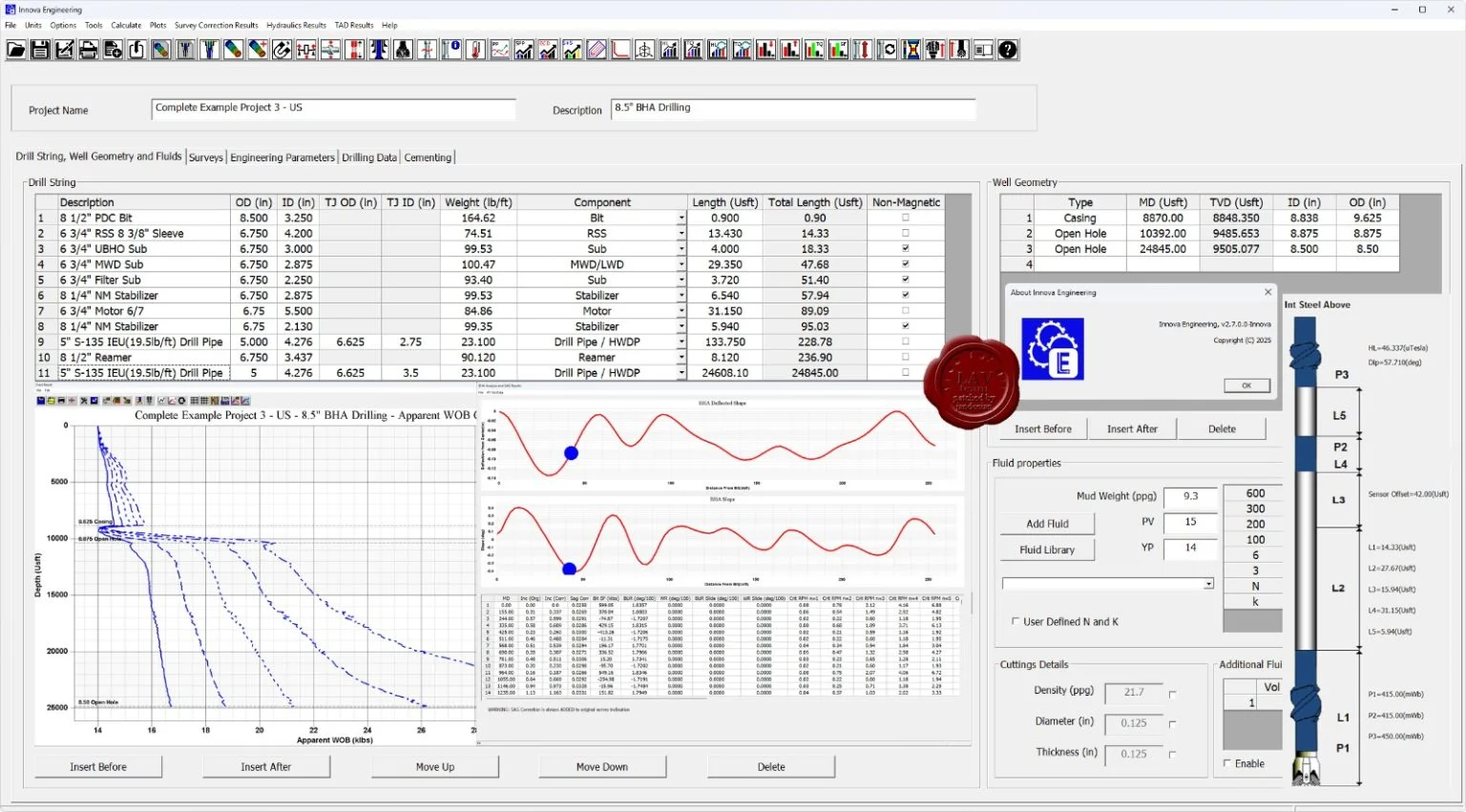
Data Input: Enter the required data, such as fluid properties, casing sizes, and drill string components.
-
Select Module: Choose the appropriate module for your task, such as torque-drag or hydraulics.
-
Run Simulation: Execute the analysis. The software will process the input and calculate the outputs.
-
Interpret Results: The software will present results via graphs, charts, and 3D models.
-
Iterate: Adjust parameters and re-run simulations to optimize the design.
Best Use Cases for Innova Engineering Software
The software is versatile and can be deployed across various operational stages.
-
Pre-Well Planning: Engineers can use the software to design well trajectories, casing, and cementing programs before the rig arrives on location, saving significant time and money.
-
Real-Time Operations: With real-time data integration, it is used to monitor drilling parameters and adjust plans instantly, ensuring optimal performance.
-
Offshore Drilling: The software’s ability to model subsea environments and BOP stacks makes it essential for offshore drilling operations where margins for error are extremely small.
-
Workover and Intervention: It is used to simulate and plan for complex interventions, ensuring that operations are safe and effective without damaging the wellbore.
-
Post-Well Analysis: After drilling, the software is used to analyze performance and identify areas for improvement in future wells.
Advantages and Limitations
Understanding the pros and cons of the software helps in making an informed decision.
Advantages
-
Comprehensive Suite: Replaces multiple single-purpose tools with a single, integrated platform.
-
Accurate Simulations: Developed using industry-standard algorithms that provide highly reliable results.
-
Enhanced Safety: The focus on modeling hazardous scenarios like kicks leads to safer operations.
-
Professional Support: Users have access to the technical support team at Innova Engineering.
Limitations
-
Cost: The software is a premium solution and is priced accordingly, making it a significant investment.
-
Steep Learning Curve: The advanced features can be intimidating for less experienced engineers and require training.
-
Resource-Intensive: Requires high-end hardware to run complex models smoothly.
Alternatives to Innova Drilling & Intervention Engineering
While Innova Engineering provides a powerful solution, several other software packages serve the market.
| Software | Key Focus | Pros | Cons |
|---|---|---|---|
| Landmark Drilling & Production | Comprehensive Well Planning | Excellent data management and integration. Industry standard in many regions. | Steeper learning curve than some competitors. |
| Schlumberger Petrel | Seismic Interpretation to Well Design | Strong integration with geological models. | Can be more expensive and resource-heavy. |
| Pegasus Vertex | Drilling Software | Very user-friendly interface. Excellent for torque-drag and hydraulics. | Fewer integrated modules than Innova. |
| Drillbench | Dynamic Drilling Simulation | Excellent for transient pressure modeling and kick analysis. | More specialized than Innova. |
Frequently Asked Questions
What are the primary applications of Innova Drilling & Intervention Engineering?
This software is primarily used for drilling simulation, well design, and planning for well intervention operations. It helps engineers analyze torque, drag, hydraulics, and casing integrity.
What is the latest version of Innova Engineering Software?
The current reviewed version is Innova Drilling & Intervention Engineering v2.7.0.0. For the absolute latest information, always check the official Innova Engineering portal.
Is Innova Drilling & Intervention Engineering compatible with other well planning software?
Yes, the software supports various data formats to allow for seamless integration with other well planning software and enterprise systems, including common formats like LAS and CSV.
What hardware is best for running Innova software?
For optimal performance, especially with complex 3D models, a powerful workstation with a multi-core processor and a dedicated graphics card is recommended.
What kind of license does Innova Drilling & Intervention Engineering use?
Innova Engineering provides various flexible software licensing options, including permanent and annual licenses, managed via a hardware key or network server.
Final Thoughts
Innova Drilling & Intervention Engineering v2.7.0.0 is a premier engineering suite that offers an impressive range of tools for any oil and gas professional. Its strength lies in combining multiple engineering disciplines into a single, unified platform for well engineering. This integration, combined with accurate simulation engines, makes it invaluable for ensuring safety and efficiency.
The software is best suited for organizations and engineers who are dedicated to high-level planning and risk management. While the investment and learning curve are significant, the potential return in terms of operational safety and cost savings is substantial. If you are serious about optimizing your drilling and intervention projects, Innova Engineering provides the tools necessary for success.
Our Paid Service
“We do not sell or provide any software. We only offer professional support services. If any software on your system is not working properly, or you are facing installation errors, crashes, or any other technical issue — just contact us. We will help you fix the problem quickly and remotely via AnyDesk. No software will be provided from our side — only expert troubleshooting and support.”