
Overview of WhatBot Plus Software
Table of Contents
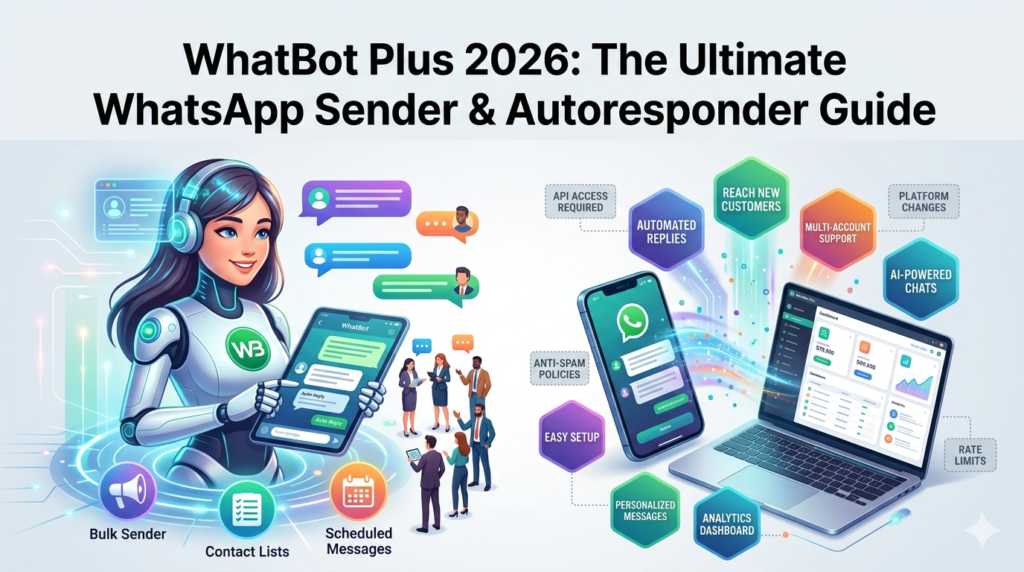
WhatBot Plus is a powerful WhatsApp automation software designed for businesses, freelancers, and marketers seeking to streamline their WhatsApp communication. This bidirectional software serves two primary functions: bulk WhatsApp message sending and automated customer responses.
WhatBot Plus operates using WAPI technology, making it an ideal solution for small to medium-sized businesses that rely on WhatsApp for customer communication. The software allows users to send newsletter campaigns via WhatsApp while also enabling interactive customer experiences through automated reply systems.
For businesses looking to scale their WhatsApp marketing efforts without additional staff, WhatBot Plus provides a complete automation toolkit that handles both outbound marketing campaigns and inbound customer service interactions.
Key Features of WhatBot Plus
Auto Responder Functionality
The WhatsApp autoresponder feature enables businesses to automatically engage customers. The system delivers a welcome message to users who contact your number and creates dynamic command menus for automated information delivery.
Key Auto Responder capabilities include:
-
Automated responses based on precise rules and configurable commands
-
Dynamic menus with commands (including nested options for detailed information)
-
Welcome messages with customizable text and attachments
-
Multimedia support for text, images, links, and emojis
-
Message tracking for all received communications
-
Manual response options for personalized customer handling
The welcome message only sends once per 24 hours per contact, preventing message fatigue while ensuring every new conversation starts professionally. This approach aligns with WhatsApp’s acceptable usage policies while maximizing customer engagement.
Bulk Sender Capabilities
The WhatsApp bulk sender feature empowers businesses to reach large audiences directly from their PC, including contacts not saved in the phone’s address book.
Bulk sending features include:
-
Contact import from Excel, CSV, or TXT files
-
Direct WhatsApp import for contacts and groups
-
Advanced filtering for WhatsApp number verification
-
Message scheduling for optimized campaign timing
-
Random delays between messages to reduce ban risks
-
Personalization variables, random tags, and spintax support
Safety note: The software offers two sending modes—Safe Mode, which sends messages only to contacts you’ve previously conversed with (offering minimal ban risk), and Blind Mode, which contacts all imported numbers. Using protective features like random delays and message personalization is recommended when using Blind Mode.
ChatGPT Integration (2026 Update)
WhatBot Plus now supports ChatGPT integration for automated WhatsApp responses, representing a significant advancement in AI-powered business messaging.
ChatGPT integration setup includes:
-
OpenAI API key configuration within program settings
-
System message configuration to define AI behavior and brand voice
-
User input examples with website URLs for AI training
-
Automated intelligent responses to customer queries
When configured, ChatGPT processes incoming messages and generates contextually appropriate responses automatically. Users must fund their OpenAI account with a minimum balance (approximately $5 USD provides 2-3 months of usage for typical business applications).
What’s New in WhatBot Plus 2026
The 2026 version of WhatBot Plus introduces several powerful enhancements:
-
ChatGPT AI Integration: Full support for AI-powered WhatsApp messaging, enabling natural language responses to customer inquiries without manual intervention
-
Enhanced Dynamic Menu System: Improved nested command capabilities for creating more sophisticated interactive customer experiences
-
Advanced Contact Management: Streamlined import/export functionality with better support for custom variables in messaging campaigns
-
Platform Compatibility: Full support for Windows 11/10 (32-bit and 64-bit), Windows 8, and macOS
System Requirements
Supported Operating Systems:
| Platform | Compatibility |
|---|---|
| Windows | Windows 11/10 (32 & 64-bit), Windows 8 |
| macOS | Mac OS X (requires Firefox browser) |
Demo version limitations:
-
Maximum 20 characters per automatic response
-
Manual contact import only
-
Limited to testing program functionality
-
Up to 5 numbers per manual import
Full version features:
-
1-year license for 1 PC
-
Unlimited WhatsApp sender functionality
-
Unlimited auto responder capabilities
-
Unlimited text and image messages
-
Dynamic menu creation with nested commands
-
Contact import/export
-
Price: $39.90 USD
Installation Guide for WhatBot Plus
Step 1: Download the Software
Visit the official WhatBot Plus website and download the appropriate version for your operating system. Both Windows and Mac versions are available.
Note: For macOS users, Firefox is required for the software to function correctly and display the WhatsApp QR code for scanning.
Step 2: Obtain Demo or Full Version
The free demo version allows testing program functionality with limited features. For full functionality, purchase the commercial license for $39.90 USD per PC per year.
Step 3: Two-Device Setup (Auto Responder Testing)
To test the WhatsApp auto-reply feature, you need two devices with different WhatsApp accounts:
-
Device 1 (BOT): Your business phone or secondary device (will send automatic replies)
-
Device 2 (Personal): Your personal account (send test messages to the BOT)
How to Use WhatBot Plus
Configuring the Auto Responder
The WhatsApp autoresponder setup follows these steps:
Step 1: Configure Welcome Message
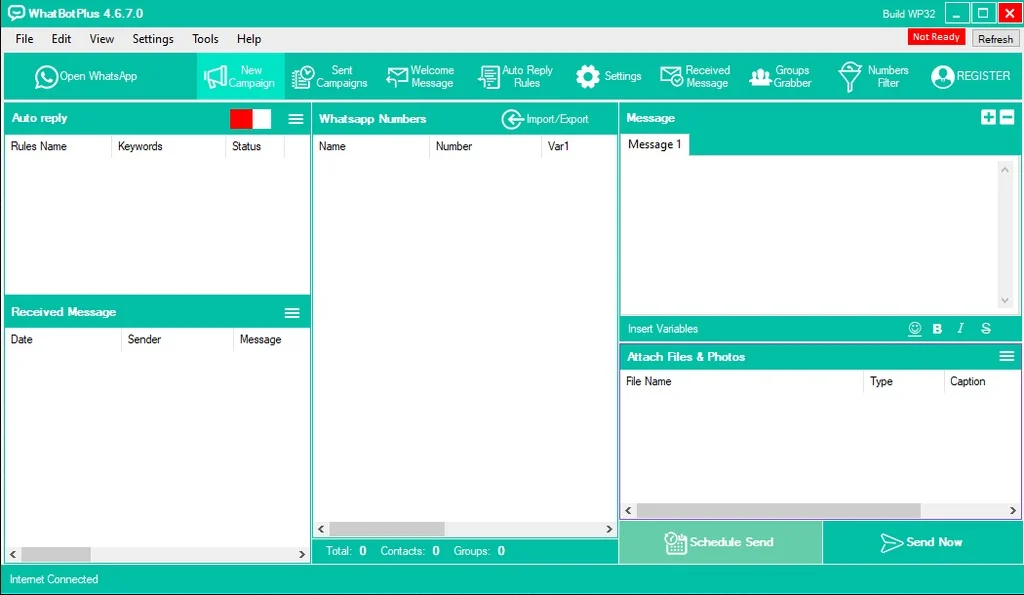
Click the Welcome Message button to create the automated greeting customers receive when contacting your business via WhatsApp.
Example welcome message structure:
Dear Customer, thank you for contacting us! Please choose from following commands:
Enter 1 to view our Products list
Enter 2 to view our special Offers
Enter 3 to receive information about our Company
Step 2: Set Up Auto Reply Rules
Click Auto Reply Rules and configure specific responses for each command:
-
Rule Name: Title for the response rule
-
Keyword: User command (e.g., “1”, “2”, “3”)
-
Message: The text response to send
-
Attachment: Optional multimedia to accompany the response
-
Enable Rule: Toggle the rule on for activation
Step 3: Activate the Service
Click Open WhatsApp and ensure the Auto Reply slider is set to green (active). Scan the QR code to link your WhatsApp account to the software.
Step 4: Test Functionality
Send messages from the second device to the BOT phone. After receiving the welcome message, test different commands to verify proper auto-reply functionality.
Using the Bulk Sender
Step 1: Open WhatsApp
Click the Open WhatsApp button and scan the QR code to connect your WhatsApp account to the software.
Step 2: Import Contacts
Click Imports and select your import method:
-
From Excel, CSV, or TXT files (Full version)
-
Manual entry (Demo version, maximum 5 numbers)
-
All WhatsApp contacts (Full version)
-
Group contacts (Full version)
Pro tip: Importing names with numbers enables personalized message variables, allowing automatic insertion of contact names into each message.
Step 3: Compose and Send Messages
Write your message, add attachments if needed, and select sending mode:
-
Safe Mode: Sends only to contacts you’ve previously spoken with (lower ban risk)
-
Blind Mode: Sends to all contacts, even unsaved numbers (requires protective measures)
Best Use Cases for WhatBot Plus
Small Business Customer Support:
Automated responses for common inquiries, order status updates, and product information reduce manual workload while maintaining 24/7 availability
E-commerce Marketing Campaigns:
Bulk WhatsApp messaging for product launches, special offers, and seasonal promotions reaches customers directly without requiring their contact info in your phonebook
Lead Generation and Nurturing:
Automatic contact registration captures potential leads the moment they message your business, enabling immediate engagement and systematic follow-up
Event Management:
Automated event reminders, schedule updates, and attendee communications through WhatsApp automation keep participants informed efficiently
Advantages and Limitations of WhatBot Plus
Advantages
-
Comprehensive Tool: All-in-one solution covering both WhatsApp marketing and customer service automation
-
User-Friendly Interface: Designed for non-technical users to set up complex automated workflows
-
Personalization Options: Variables, random tags, and spintax for highly customized messaging
-
Safety Features: Number filtering, message scheduling, and random delays reduce ban risks
-
Affordable Pricing: Single PC license at $39.90 USD provides comprehensive functionality
Limitations
-
WhatsApp Policy Compliance: Software must be used responsibly to avoid account restrictions
-
Two-Device Requirement: Auto responder requires a dedicated phone as BOT
-
API Dependency: ChatGPT integration requires separate OpenAI account funding
-
Demo Limitations: Free version restricts auto-reply word count and contact import methods
Alternatives to WhatBot Plus
1. Official WhatsApp Business App
-
Free but limited automation capabilities
-
Suitable for very small businesses with minimal messaging needs
2. WhatsApp Business API
-
Official Meta solution with higher reliability
-
More expensive with complex setup requirements
-
Better for larger enterprises requiring official integration
3. Other Third-Party WhatsApp Tools
-
Various WhatsApp sender applications exist with different features
-
Consider factors like safety features, price, and ChatGPT integration when evaluating alternatives
Why Choose WhatBot Plus:
-
Combines bulk WhatsApp sending and autoresponder in one solution
-
ChatGPT integration provides AI-powered responses
-
Affordable price point compared to WhatsApp Business API
-
User-friendly interface accessible to non-technical users
-
Safety features designed to reduce WhatsApp ban risks
Frequently Asked Questions
1. What is WhatBot Plus used for?
WhatBot Plus is a WhatsApp automation software used for sending bulk WhatsApp messages and creating automatic replies to customer inquiries. It helps businesses scale their WhatsApp marketing and customer service operations.
2. Is WhatBot Plus free?
WhatBot Plus offers a free demo version for testing purposes, but the demo has limitations including restricted auto-reply character count (20 characters maximum) and manual contact import only. The full version costs $39.90 USD per PC per year.
3. How do I set up automatic replies with WhatBot Plus?
Set up automatic replies by installing the software, clicking Open WhatsApp to scan the QR code, configuring your welcome message, creating auto-reply rules with keywords, and activating the auto-reply toggle. Test with a second device to ensure proper functionality.
4. Can WhatBot Plus send bulk WhatsApp messages?
Yes, WhatBot Plus includes a WhatsApp bulk sender feature that allows sending messages to contacts imported from Excel, CSV, or TXT files, as well as contacts from your WhatsApp account or groups.
5. Does WhatBot Plus support ChatGPT integration?
Yes, the 2026 version of WhatBot Plus supports ChatGPT integration for intelligent automated responses. Users need to configure their OpenAI API key within the software settings for this feature to work.
6. What are the system requirements for WhatBot Plus?
WhatBot Plus supports Windows 11/10 (32-bit and 64-bit), Windows 8, and macOS. For Mac users, Firefox is required to properly display the WhatsApp QR code connection page.
7. Is WhatBot Plus safe to use with WhatsApp?
WhatBot Plus includes safety features like random message delays, number filtering, and message scheduling to minimize ban risks. However, users should adhere to WhatsApp’s terms of service and use the software responsibly to maintain account stability.
Final Thoughts
WhatBot Plus 2026 emerges as a comprehensive WhatsApp marketing and automation solution suitable for businesses of all sizes. Its combination of bulk sending capabilities, autoresponder functionality, and ChatGPT AI integration provides a complete toolkit for modern businesses leveraging WhatsApp for customer communication.
The software’s affordability ($39.90 USD per year) and user-friendly interface make it accessible to small businesses and freelancers, while its advanced features (including dynamic menus, personalization, and ChatGPT integration) satisfy more complex marketing automation requirements.
Businesses should prioritize:
-
Responsible usage following WhatsApp’s guidelines
-
Implementing safety features to protect account stability
-
Testing automated workflows thoroughly before deployment
-
Upgrading to the full version for comprehensive functionality
For businesses seeking to scale their WhatsApp marketing efforts, reduce manual customer service workload, and implement AI-powered messaging, WhatBot Plus 2026 represents a compelling solution worth exploring through its demo version before committing to the full license.
Our Paid Service
“We do not sell or provide any software. We only offer professional support services. If any software on your system is not working properly, or you are facing installation errors, crashes, or any other technical issue — just contact us. We will help you fix the problem quickly and remotely via AnyDesk. No software will be provided from our side — only expert troubleshooting and support.”