
Overview of OLI Systems 2010 Software Suite
Table of Contents
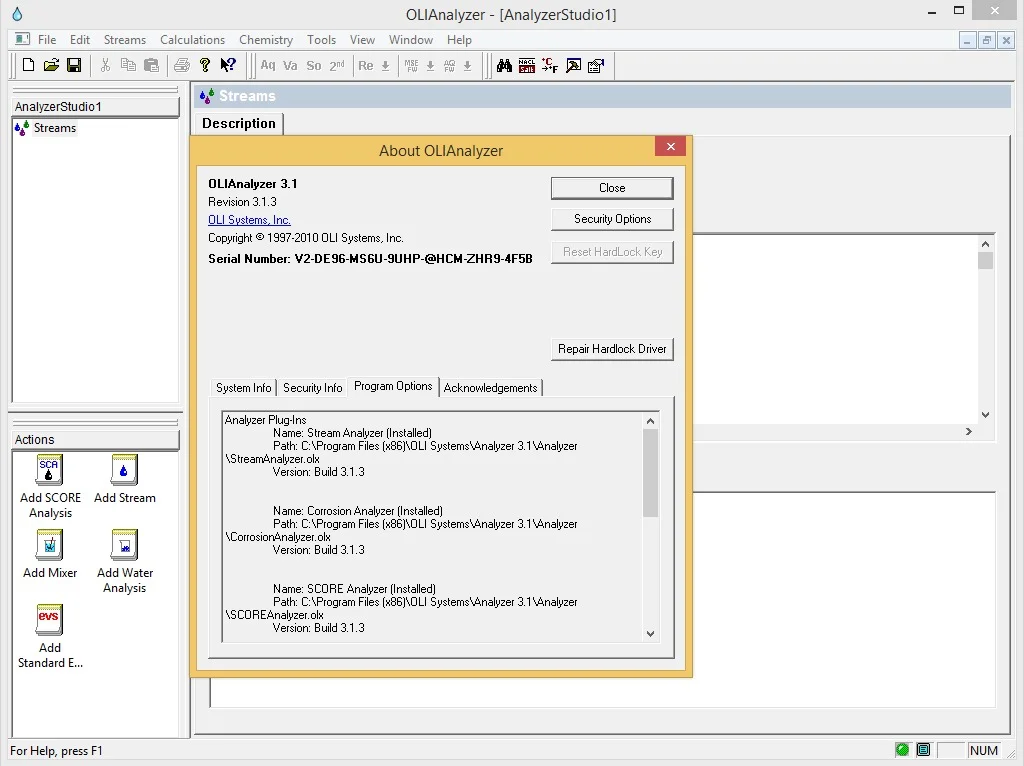
OLI Systems 2010 is a professional-grade software package designed for thermodynamic and process simulation of aqueous electrolyte systems. This suite comprises two powerful tools: OLI Analyzer version 3.1.3 and OLI ScaleChem version 4.0.3 . Developed by OLI Systems, Inc., a leader in electrolyte simulation technology since 1971, this software provides engineers, researchers, and process specialists with robust capabilities for modeling complex chemical behaviors in water-based solutions.
The software suite employs the Mixed Solvent Electrolyte (MSE) thermodynamic framework, enabling accurate predictions of phase equilibria, chemical speciation, and mineral scaling tendencies . For professionals working in industries such as oil and gas production, chemical processing, water treatment, and geothermal energy, the OLI Systems 2010 package offers essential computational tools for process optimization and problem-solving.
Key Features of Analyzer 3.1.3 and ScaleChem 4.0.3
OLI Analyzer 3.1.3 Capabilities
OLI Analyzer serves as a comprehensive thermodynamic simulation platform for aqueous systems. Key features include:
Chemical Equilibrium Calculations: The software computes equilibrium compositions for complex electrolyte systems, determining speciation, pH, ionic strength, and phase distributions across multiple temperature and pressure conditions .
Process Simulation: Analyzer enables modeling of chemical processes such as carbonation reactions, crystallization, and precipitation sequences. Users can explore how variables like concentration, temperature, and pressure influence reaction pathways and product yields .
Data Reconciliation: The platform includes sophisticated reconciliation options for measured data, allowing users to adjust pH, alkalinity, and density values to match experimental observations. This feature is particularly valuable when working with field samples where measurement uncertainties exist .
Thermodynamic Property Prediction: The software calculates critical properties including density, electrical conductivity, osmotic pressure, and total dissolved solids, providing comprehensive characterization of aqueous systems.
OLI ScaleChem 4.0.3 Capabilities
OLI ScaleChem is specialized software for predicting mineral scaling in oil and gas production environments. Key features include:
Scale Tendency Prediction: The software calculates the scaling potential of various minerals, including carbonates, sulfates, and sulfides, across different temperature and pressure conditions . This capability helps operators identify and prevent scale formation that can impair production efficiency.
Brine Analysis: ScaleChem supports detailed brine composition analysis, with species entered as ionic concentrations along with specifications for pH, total inorganic carbon, and alkalinity .
Oil and Gas Phase Modeling: The software accommodates hydrocarbon characterization through pure components, pseudocomponents, and distillation curve data. This enables realistic modeling of multiphase systems encountered in production operations .
Compatibility Assessment: ScaleChem determines whether different brines can be mixed without causing precipitation, helping operators develop injection strategies that minimize formation damage .
Saturation Calculations: The software computes water content in gas and oil phases under various conditions, ensuring accurate predictions for systems where drying effects could lead to erroneous scale estimates .
Standard and Expanded Solids: ScaleChem evaluates up to 58 solid phases, with the original “Standard” set of 9 solids expanded to include 49 additional minerals relevant to upstream operations .
What’s New in Version 4.0.3 of ScaleChem
OLI ScaleChem 4.0.3 introduced significant enhancements over earlier versions:
Oil Phase Modeling: The 4.0.3 release added full oil phase capabilities, allowing comprehensive multiphase equilibrium calculations involving water, oil, and gas simultaneously .
Expanded Solids Database: The software expanded its mineral database from the original 9 solids to 58 phases, significantly improving predictive accuracy for complex brine chemistries .
Improved Fitting Parameters: Better data fitting was implemented for all standard scale types, enhancing prediction reliability for field applications .
Enhanced Hydrocarbon Characterization: The updated version provides improved characterization methods for petroleum fractions, including API-5 and API-8 methods, Cavett correlations, and Lee-Kesler thermodynamic correlations .
System Requirements for OLI Systems 2010
For optimal performance of the OLI Systems 2010 suite, the following system specifications are recommended :
Operating System: Microsoft Windows environment is required. The software is natively supported on Windows Desktop and Windows Server platforms. macOS and Linux users must employ a Windows virtual machine to run the software.
Processor: Minimum 1 GHz, recommended 2.5 GHz or higher.
RAM: Minimum 8 GB, recommended 16 GB for complex simulations.
Disk Space: Minimum 4 GB free space, recommended 20 GB for storing project files and data.
Additional Considerations: The software operates on Windows 10 (22H2 or newer) and Windows 11 (24H2). Network license servers require Windows Server 2022 or newer . Users should note that Apple Silicon (ARM) processors are not natively supported, and while Windows 11 for ARM may function via virtual machine, result accuracy cannot be guaranteed due to architectural differences.
Installation Guide
First-Time Installation
-
Download Installation Files: Obtain the OLI Systems 2010 installer package from the official OLI Systems distribution channel.
-
Verify System Requirements: Ensure your system meets the minimum specifications outlined above.
-
Run the Installer: Execute the installation file with administrator privileges on Windows systems.
-
Select Components: Choose to install OLI Analyzer 3.1.3, OLI ScaleChem 4.0.3, or both components as needed.
-
License Configuration: Following installation, you will need to configure your license. Options include individual (softkey) licenses, named user licenses, or network license server configurations .
Network License Setup
For organizations deploying OLI software across multiple users:
-
Install the OLI Network License Server on a dedicated Windows Server machine.
-
Configure the server with the appropriate license file provided by OLI Systems.
-
Client installations must be configured to point to the network license server address .
Important Note: When installing on Windows Server 2022, the pre-packaged drivers may be flagged by the operating system. Users should contact OLI Support to obtain updated drivers compatible with the server environment .
How to Use OLI Analyzer and ScaleChem
Getting Started with OLI Analyzer 3.1.3
-
Define Your Chemistry: Start by creating a new project and defining the aqueous chemistry. Enter cation, anion, and neutral species concentrations with appropriate units .
-
Set Conditions: Specify temperature, pressure, and flow rates for your system.
-
Select Reconciliation Options: Choose from Concentration Data Only, Measured pH and Alkalinity, or other reconciliation types based on available data .
-
Run Calculations: Execute the simulation and review results including speciation, pH, density, and phase behavior.
-
Analyze Results: Use the built-in reporting and visualization tools to interpret simulation outputs.
Using OLI ScaleChem 4.0.3
-
Input Selection: Add brine, oil, and gas analyses through the Actions Panel. For brines, specify ionic concentrations and measured properties. For oils, use pure components, pseudocomponents, or distillation data .
-
Calculation Selection: Choose from available calculation types:
-
Scaling Scenario: Evaluate mineral scaling across temperature and pressure changes
-
Scale Contour: Generate 2D contour plots of scaling over temperature-pressure matrices
-
Mixing Water: Assess compatibility between brines at different ratios
-
Saturator: Determine saturation with respect to specific minerals
-
-
Define Conditions: Set temperature and pressure profiles for the calculation sequence.
-
Execute and Review: Run the calculation and examine scaling reports, which display solid concentrations relative to the liquid phase volume .
-
Interpret Trends: Use plotting and reporting features to identify scaling risks and optimize production parameters.
Best Use Cases
Oil and Gas Production
OLI ScaleChem is extensively used for scale management in upstream operations. Typical applications include:
Scale Risk Assessment: Operators use the software to predict where and under what conditions mineral scale will form along production wells and surface facilities. This enables proactive treatment strategies and chemical selection.
Injection Water Compatibility: When implementing waterflooding or produced water reinjection, ScaleChem determines whether injection water will cause scaling when mixed with formation brines .
Chemical Scale Treatment Evaluation: Engineers use simulation results to test the efficacy of scale inhibitors and optimize dosing rates.
Chemical Process Engineering
OLI Analyzer supports process design and optimization across various chemical industries:
Carbonation Process Optimization: The software models processes like sodium chromate carbonation, exploring concentration, temperature, and pressure effects to identify optimal equilibrium conditions .
Crystallization and Precipitation Studies: Engineers investigate the conditions that promote or prevent solid formation, optimizing product purity and yield.
Corrosion Assessment: By predicting solution chemistry, including pH and species concentrations, Analyzer helps assess corrosion potential in process equipment.
Water Treatment and Environmental Applications
Water Chemistry Modeling: Understanding brine composition and behavior is essential for desalination, produced water treatment, and environmental compliance.
Mineral Scaling Prevention: In industrial water systems, ScaleChem predictions help prevent costly scale deposition in heat exchangers, pipelines, and boilers.
Advantages and Limitations
Advantages of OLI Systems 2010
Scientific Foundation: The software is built on over 50 years of OLI Systems’ electrolyte thermodynamics expertise, with rigorous validation against experimental data.
Comprehensive Database: The thermodynamic databank includes thousands of species and their parameters, enabling accurate predictions across wide ranges of temperature, pressure, and composition .
Multiphase Capability: The suite handles water, oil, and gas phases simultaneously, essential for realistic petroleum engineering applications .
Flexible Input Options: Users can work with pure components, defined hydrocarbon pseudocomponents, or complete distillation curves .
Industrial Relevance: ScaleChem predictions directly address practical concerns in oil and gas production, with specific focus on scaling issues that have significant operational impact.
Limitations
Platform Dependency: The software requires Microsoft Windows environments, necessitating virtual machines for macOS or Linux users .
Computational Intensity: Complex simulations with many components and phases require significant processing power and memory, especially when performing surveys across parameter ranges.
Version-Specific Interfaces: The 2010 release (versions 3.1.3 and 4.0.3) operates on older technology. Modern releases (OLI Studio versions 9.0 and higher) incorporate enhanced MSE-based modeling and improved initialization routines .
User Learning Curve: Effective use requires understanding of thermodynamics, phase equilibria, and the specific input conventions of the software.
Alternatives to OLI Systems 2010
Modern OLI Releases
The current OLI Studio and OLI Flowsheet products represent the evolution of the OLI Systems technology. These modern releases offer enhanced MSE modeling, improved user interfaces, expanded databanks, and better integration between different calculation types . Users requiring ongoing support and updates should consider upgrading to current versions.
Other Process Simulation Platforms
Aspen Plus: Provides electrolyte modeling capabilities through its Property Package system, with broad chemical process simulation features.
ChemCAD: Includes electrolyte simulation tools suitable for various chemical engineering applications.
GWB (Geochemist’s Workbench): Specializes in aqueous geochemistry and reactive transport modeling, useful for environmental and geothermal applications.
PHREEQC: An open-source tool for geochemical calculations, though with different capabilities and limitations compared to commercial OLI products.
Frequently Asked Questions
Q: What is the difference between OLI Analyzer and OLI ScaleChem?
A: OLI Analyzer is a general-purpose electrolyte simulation tool for chemical equilibrium and process modeling, while OLI ScaleChem specifically focuses on predicting mineral scale formation in oil and gas production environments. ScaleChem includes specialized features for brine, oil, and gas systems encountered in upstream operations .
Q: What operating systems are compatible with OLI Systems 2010?
A: The software runs on Microsoft Windows environments, including Windows 10 and Windows Server. It does not natively support macOS or Linux, but can run on these platforms through virtual machines running Windows .
Q: How does ScaleChem calculate solid concentrations?
A: ScaleChem reports solid concentrations as mass per unit volume, where the volume reference is the associated liquid phase (brine). This industry-standard convention ensures that concentrations reflect the actual production impact, as solids are dispersed in the liquid phase .
Q: What is the difference between Standard Solids and Expanded Solids in ScaleChem?
A: Standard Solids refers to the original 9 minerals evaluated in early ScaleChem versions, while Expanded Solids includes 49 additional minerals, totaling 58 potential solid phases. The expansion was made possible by modern computing power and enhances predictive accuracy .
Q: Can I run OLI software on Apple Silicon (M1/M2/M3) Macs?
A: OLI does not provide ARM-native versions. While Windows 11 for ARM can run in virtual machines on Apple Silicon hardware, result accuracy is not guaranteed due to architectural differences. OLI recommends Intel-based systems for production use .
Q: How do I reconcile measured pH and alkalinity data in the software?
A: Use the Reconcile Tab in Analyzer or ScaleChem, selecting the “Measured pH and Alkalinity” option. The software adjusts titrant amounts (HCl) and CO2 levels to match specified values while maintaining electroneutrality. The default alkalinity titration endpoint is pH 4.5 .
Q: What is the MSE framework mentioned in OLI documentation?
A: MSE stands for Mixed Solvent Electrolyte, a thermodynamic modeling framework that accurately represents aqueous electrolyte systems, including water-oil-gas multiphase behavior. Modern OLI software versions incorporate advanced MSE calculations not fully supported in the 2010 release of ScaleChem .
Final Thoughts
OLI Systems 2010, comprising Analyzer 3.1.3 and ScaleChem 4.0.3, remains a valuable tool for professionals working with aqueous electrolyte chemistry. The software’s scientific foundations, built over decades of research at OLI Systems, Inc., provide reliable thermodynamic predictions essential for process optimization, scale management, and chemical engineering applications.
While newer OLI Studio products offer enhanced capabilities, including more robust MSE modeling and updated user interfaces, the 2010 suite continues to serve users requiring its specific features and calculations. For those working in oil and gas production, water treatment, or chemical processing, understanding ScaleChem’s approach to mineral scaling and Analyzer’s comprehensive equilibrium calculations provides significant practical benefits.
When implementing the software, users should ensure their systems meet the specified requirements and that license configurations are correctly established through official channels. For ongoing development and access to the latest thermodynamic databanks, consideration should be given to upgrading to current OLI product lines.
Our Paid Service
“We do not sell or provide any software. We only offer professional support services. If any software on your system is not working properly, or you are facing installation errors, crashes, or any other technical issue — just contact us. We will help you fix the problem quickly and remotely via AnyDesk. No software will be provided from our side — only expert troubleshooting and support.”