
Overview of PlayoutONE Standard
Table of Contents
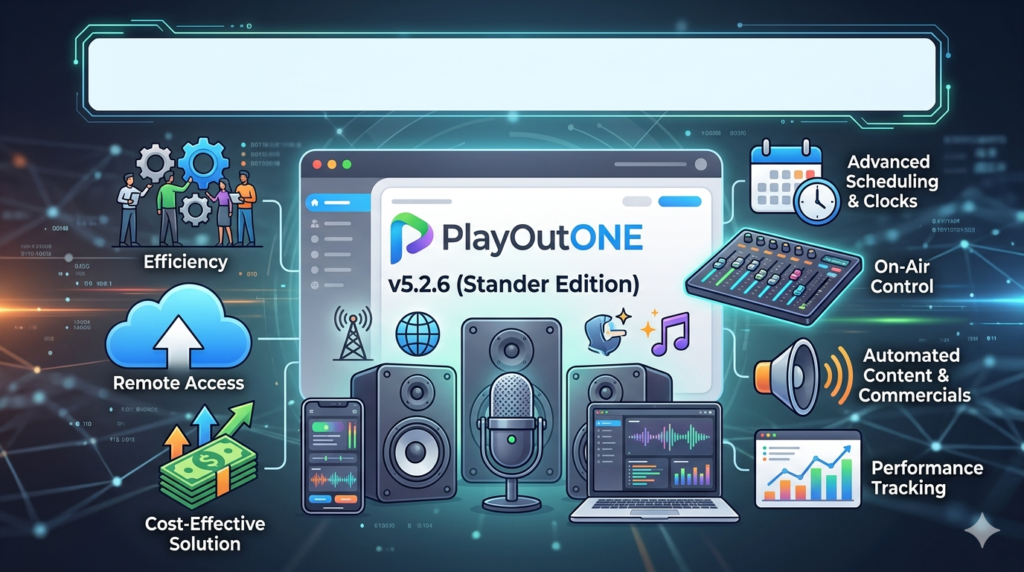
PlayoutONE Standard is a professional-grade radio automation software designed for individuals, hobbyists, and community broadcasters. Developed by Aiir, this powerful broadcast automation solution has helped countless radio enthusiasts bring their creative ideas to life. Originally priced at £99, PlayoutONE Standard is now available as a completely free download, making it one of the most accessible radio playout solutions on the market.
The software provides core playout functionality, allowing users to build and manage playlists, organize audio libraries, and experiment with different broadcast formats. As the co-founder Dave Brierley-Jones explains, PlayoutONE Standard “opened the door for people who simply loved radio and wanted to experiment, create and broadcast”. This free radio automation software is designed for Windows environments and serves as an ideal entry point for aspiring broadcasters who want to learn the fundamentals of radio station management without financial barriers.
PlayoutONE Standard version 5.4 represents the final feature-complete release, with all latest bug fixes included. While the software no longer receives active support or updates from Aiir, it remains a reliable and battle-tested system that has been used and loved by broadcasters for years. For users who require professional support and advanced features, Aiir offers PlayoutONE Pro as an upgrade path with subscription-based access.
Key Features
Core Playout Functionality
PlayoutONE Standard delivers comprehensive radio automation capabilities:
-
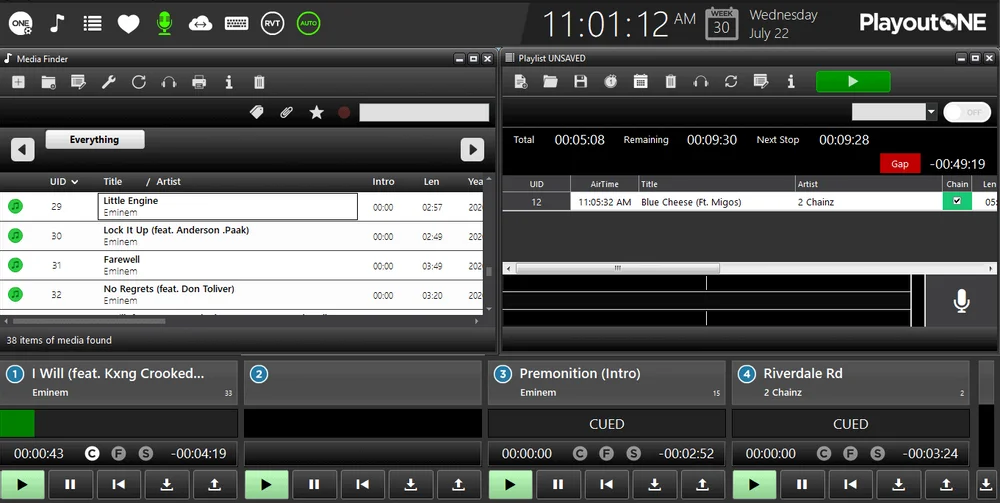
Playlist Creation and Management: Build and organize playlists efficiently for your radio station
-
Audio Library Management: Organize your music, jingles, and audio content
-
Broadcast Scheduling: Plan and automate your broadcast schedule
-
Format Experimentation: Test different programming formats with easy-to-use tools
Companion Tools Included
The free package includes several companion applications at no additional cost:
| Tool | Function | Limitation |
|---|---|---|
| LiveStream | Broadcast live audio with encoding capabilities | Free to use |
| Auto Importer | Automate music import tasks | 1 job limit |
| FileCopy | Move audio files between locations | 1 job limit |
LiveStream Capabilities
The included LiveStream application provides robust streaming functionality:
-
Audio Encoding: Supports MP3, AAC, AAC+, OPUS, and OGG formats
-
Streaming Output: Send streams to Shoutcast and Icecast servers
-
VST Plugin Support: Process audio with DSP plugins like Stereo Tool
-
Silence Detection: Automatic failover with local audio loop
-
Audio Recording: Save broadcast audio copies with flexible scheduling
-
Multiple Encoders: Create multiple encoders for different streaming destinations
System Architecture
PlayoutONE Standard utilizes a SQL database backend for managing playlists and audio metadata. This architecture enables efficient library management and reliable broadcast scheduling.
What’s New in the Latest Version
Free Release Model
The most significant update is that PlayoutONE Standard is now completely free to download and use. This is not a trial version or limited-time offer—the software is permanently free with no licensing costs.
Version 5.4 Final Status
Version 5.4 represents the final feature-complete release of PlayoutONE Standard. Key points about this version:
-
Feature Complete: All core functionality is present and stable
-
Bug Fixes Included: Version 5.4 includes all known bug fixes
-
No Further Updates: The software will not receive new features or updates
-
No Technical Support: Provided “as-is” without ongoing support
Companion App Updates
LiveStream, Auto Importer, and FileCopy are all available for free use. Auto Importer and FileCopy are limited to one job each, sufficient for simple automation tasks.
System Requirements
Minimum Hardware Specification
Based on Aiir’s official documentation for PlayoutONE Pro (applicable to Standard as well):
Operating System
-
Windows 11 Pro (fresh installation recommended)
-
Windows 10 Pro may also work but Windows 11 is preferred
Processor Requirements
-
Intel i7 8th generation or later
-
Intel Core/Core Ultra 7 or later
-
AMD Ryzen 7 3000 Series or later
Important Notes:
-
Mobile processors (laptops, mini PCs, all-in-ones) are not supported
-
8th generation Intel or equivalent is the minimum
-
Processor must be from a reputable manufacturer with proven desktop-class performance
Memory & Storage
-
16GB RAM minimum
-
Solid-state drive with at least 100GB free for operating system
-
Traditional hard drives can be used for audio storage
Network
-
1Gbps wired connection required
Production Machine Requirements
For non-critical production or office machines:
-
Intel i5 7th generation or later
-
AMD Ryzen 3 3000 Series or later
-
8GB RAM minimum
-
Standard storage (SSD or HDD supported)
Virtual Machine Support
PlayoutONE Standard may run on virtual machines, but note that professional support is not provided. Virtual machine users should ensure dedicated resources and proper configuration.
Hardware Warning
Aiir strongly recommends using supported hardware specifications. The company does not support laptops, micro PCs, or all-in-one systems due to thermal throttling issues that can affect audio playback reliability.
Installation Guide
Step 1: Prepare Your System
-
Operating System: Ensure you have Windows 11 Pro installed on a dedicated workstation
-
Hardware Check: Verify your system meets the minimum requirements
-
Clean Installation: A fresh Windows installation is recommended for optimal performance
-
Remove Conflicting Software: Uninstall any existing automation software to prevent database conflicts
Step 2: Download PlayoutONE Standard
-
Visit the official Aiir website: aiir.com/playoutonestandard[citation:1]
-
Locate the download section for PlayoutONE Standard
-
Download the installer package
Step 3: Installation Process
-
Run the installer as administrator
-
Follow the on-screen instructions for installation
-
Choose installation location (default is recommended)
-
Complete the installation and restart if prompted
Step 4: Initial Setup
-
Launch PlayoutONE Standard
-
Configure audio devices: Set your input and output devices
-
Configure SQL database: The software requires SQL Express (automatically installed)
-
Create your first station: Set up basic station parameters
Step 5: Configure Companion Tools
-
LiveStream: Configure streaming settings and encoders
-
Auto Importer: Set up automated file import (1 job limit)
-
FileCopy: Configure file movement automation (1 job limit)
How to Use the Software
Creating Playlists
-
Access the playlist section from the main dashboard
-
Add tracks by dragging from your audio library
-
Organize items using the playlist editor
-
Configure transitions and timing between tracks
-
Save your playlist for scheduled playback
Managing Audio Library
-
Import music using the library management tools
-
Organize content by categories or formats
-
Edit metadata for proper broadcast information
-
Monitor audio levels and quality
Setting Up Voicetracks
PlayoutONE Standard supports basic voicetrack functionality:
-
Create recording sessions for voice content
-
Add background beds for professional-sounding recordings
-
Schedule voicetracks within your playlists
Configuring LiveStream
-
Set up your audio source in LiveStream
-
Select encoding parameters (MP3, AAC, etc.)
-
Configure streaming endpoint (Shoutcast/Icecast)
-
Apply DSP/VST processing if desired
-
Enable silence detection for automatic failover
-
Start streaming with the built-in encoder
Remote Voice Tracking
PlayoutONE Standard includes remote voice tracking capabilities, allowing station talent to record shows and broadcast from anywhere. This feature enables flexible content creation and scheduling.
Best Use Cases
For Hobbyists and Beginners
PlayoutONE Standard excels as a learning tool for those entering the radio broadcasting world:
-
Experiment with formats without financial commitment
-
Learn radio automation fundamentals with professional-grade software
-
Practice voice tracking and show creation at home
-
Test different programming styles for various audiences
For Community Stations
Community broadcasters benefit from the free licensing model:
-
Lower operational costs with zero licensing fees
-
Reliable playout for community radio projects
-
Simple automation for regular programming
-
Accessible entry point for volunteers and new staff
For Content Creators
Podcasters and online content creators can leverage PlayoutONE Standard for:
-
Creating professional audio content
-
Managing audio libraries efficiently
-
Streaming shows to multiple platforms
-
Recording content for podcast distribution
For Educational Use
Radio training institutions and journalism programs can utilize PlayoutONE Standard for:
-
Hands-on broadcast training
-
Teaching automation principles
-
Student project development
-
Budget-friendly curriculum integration
Advantages and Limitations
Advantages
Cost-Effective Solution
-
Completely free with no hidden costs
-
No subscription fees required
-
One-time download with permanent access
Professional-Grade Features
-
Battle-tested technology used by industry professionals
-
Full automation capability for broadcast radio
-
Multiple companion tools included
Legacy Stability
-
No forced updates or changes
-
Reliable performance for basic broadcast needs
-
Proven track record in real broadcast environments
Accessible Entry Point
-
Zero financial barriers to entry
-
Ideal for newcomers to broadcast automation
-
Low-risk platform for experimentation
Limitations
No Technical Support
-
Available “as-is” without any support
-
Community help available via Facebook groups and forums
-
No 24-hour off-air emergency support
No Future Updates
-
Feature-complete with no planned enhancements
-
Security updates not provided
-
Compatibility with future Windows versions not guaranteed
System Requirements
-
Needs modern hardware (8th gen Intel or newer)
-
No support for laptops or mobile processors
-
Dedicated workstation required
Limited Job Automation
-
Auto Importer and FileCopy limited to 1 job each
-
Basic automation suitable for simple projects
-
Advanced automation requires Pro version upgrade
No Cloud Support
-
Self-hosted solution only
-
No cloud deployment options
-
Local infrastructure required
Alternatives to PlayoutONE Standard
PlayoutONE Pro
The professional version from Aiir offers extensive capabilities for full-time broadcasting:
-
Dynamic broadcast logs for complex scheduling
-
Web-based remote broadcasting capability
-
Professional support including 24-hour emergency line
-
Regular feature updates and active development
-
Multi-station support without hardware limitations
Other Radio Automation Solutions
Cinegy Air
-
Professional broadcast automation supporting up to 8K resolution
-
Software-based system for SD/HD/UHD playout
-
Cloud and on-premise deployment options
-
Advanced graphics integration
Imagine Communications Gallium
-
Enterprise-grade workflow orchestration
-
Scalable playout for multiple channels
-
Software-defined architecture
-
OPEX deployment models
PlayIt Live
-
Alternative free/low-cost radio automation
-
Supports voice tracking with bed capability
-
User-friendly interface for beginners
Frequently Asked Questions
Is PlayoutONE Standard really free?
Yes, PlayoutONE Standard is completely free to download and use. This is a permanent change, not a limited-time offer or trial version. You can download the software and use it indefinitely without any payment or subscription.
Can I use PlayoutONE Standard for a professional radio station?
While PlayoutONE Standard is a capable software, Aiir recommends PlayoutONE Pro for professional, on-air environments. Standard is best suited for hobbyists, community stations, and experimentation. Professional environments benefit from the support and advanced features of Pro.
What hardware do I need for PlayoutONE Standard?
PlayoutONE requires a Windows 11 Pro dedicated workstation with an 8th generation Intel i7 (or equivalent), 16GB RAM, SSD storage, and a 1Gbps wired network connection. Laptops, mini PCs, and all-in-ones are not supported.
Will PlayoutONE Standard receive updates?
No, PlayoutONE Standard version 5.4 is feature-complete and will not receive any further updates. The software is available “as-is” with all current bug fixes included. Future Windows versions may not be fully supported.
What’s the difference between Standard and Pro?
PlayoutONE Standard is designed for hobbyists and home use with single-hour templates. PlayoutONE Pro is designed for full-time broadcast with dynamic logs, web-based remote broadcasting, professional support, and regular updates.
Is support available for PlayoutONE Standard?
Official support is not available for PlayoutONE Standard. However, users can find guides on the Aiir website and community support through social media groups such as Facebook where users share tips and advice.
Can I use PlayoutONE Standard on a virtual machine?
While possible, virtual machine deployment is not officially supported for Standard. Pro version has documented VM requirements, but Standard is provided as-is and may experience performance issues in virtualized environments.
How do I get started with PlayoutONE Standard?
Visit aiir.com/playoutonestandard to download the software. Ensure your system meets minimum requirements, install on a clean Windows 11 Pro system, and follow the basic setup guide to begin broadcasting.
Final Thoughts
PlayoutONE Standard represents a significant opportunity for aspiring broadcasters, hobbyists, and community radio stations. By making this battle-tested radio automation software free, Aiir has removed one of the biggest barriers to entry in broadcast radio—financial cost.
The software’s proven reliability, professional-grade features, and the inclusion of valuable companion tools like LiveStream make it an excellent choice for anyone looking to experiment with radio broadcasting. While the lack of future updates and support means it’s not suitable for all professional environments, it remains a solid foundation for learning the craft of radio automation.
For those who find themselves needing more advanced capabilities or professional support, PlayoutONE Pro provides a clear upgrade path with expanded features and dedicated assistance. However, for the vast majority of newcomers and community broadcasters, PlayoutONE Standard v5.4 offers everything needed to start broadcasting immediately.
As Dave Brierley-Jones noted, “Anyone with the passion and curiosity to try can now take their first steps without worrying about cost”. With PlayoutONE Standard, radio broadcasting is more accessible than ever before.
Our Paid Service
“We do not sell or provide any software. We only offer professional support services. If any software on your system is not working properly, or you are facing installation errors, crashes, or any other technical issue — just contact us. We will help you fix the problem quickly and remotely via AnyDesk. No software will be provided from our side — only expert troubleshooting and support.”