

Overview of Actipro Universal Windows Controls
Table of Contents
Actipro Universal Windows Controls is a premium suite of professional user interface components designed specifically for developers building Universal Windows Platform (UWP) applications. This comprehensive toolkit, developed by Actipro Software LLC, provides over 20 advanced UI controls that enable developers to create immersive, feature-rich Windows apps with native performance and modern user experiences .
Actipro Software, founded in 1999 and headquartered in Cleveland, Ohio, has established itself as a trusted provider of commercial .NET components. With over 7,000 organizations worldwide relying on their products, Actipro has built a reputation for delivering high-quality, meticulously crafted UI solutions . The Universal Windows Controls suite represents their commitment to supporting Microsoft’s UWP ecosystem, offering developers the tools they need to build applications that leverage the full capabilities of Windows 10 and Windows 11 platforms.
The version 22.1.0365 release continues this tradition of excellence, incorporating numerous enhancements and bug fixes that improve stability, performance, and developer productivity. This build, released on November 29, 2023, demonstrates Actipro’s ongoing investment in their UWP product line and their responsiveness to developer feedback .
Key Features of Actipro Universal Windows Controls
The Universal Windows Controls suite encompasses a diverse collection of UI components, each designed to address specific application development needs. Here’s a detailed look at the major feature categories:
Advanced Docking and MDI (Multiple Document Interface)
One of the flagship components in the suite is the Docking/MDI control, which provides sophisticated window management capabilities. Developers can implement professional-grade docking interfaces similar to those found in Visual Studio or Microsoft Office. Key capabilities include:
-
Dockable windows that can be positioned, floated, or tabbed
-
Auto-hide functionality for maximizing workspace efficiency
-
MDI (Multiple Document Interface) support for applications requiring multiple document views
-
Floating windows that can be repositioned independently within the main application view
The Docking/MDI control is particularly valuable for complex applications where users need to manage multiple information panels simultaneously. It’s worth noting that the UWP version of the Docking/MDI product hosts floating windows within the main view, providing a seamless user experience while maintaining platform compatibility .
SyntaxEditor for Code Editing
SyntaxEditor is a powerful code editing component that offers syntax highlighting, code completion, and advanced text editing features. This control is ideal for applications that incorporate code editing, scripting, or structured text input. Features include:
-
Syntax highlighting for multiple programming languages
-
IntelliPrompt with parameter info and code completion
-
Line number display and code folding
-
Customizable text rendering and editing behaviors
-
Support for .NET Languages Add-on with updated VB grammar support in version 22.1.0365
Charting and Data Visualization
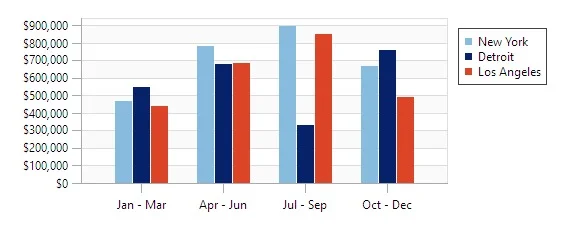
The suite includes comprehensive charting controls for creating professional data visualizations. Developers can implement various chart types, including:
-
Line, bar, and pie charts
-
Financial and statistical charts
-
Real-time data visualization
-
Customizable styling and animations
Ribbon Interface
For applications requiring a modern, feature-rich toolbar interface, the Ribbon control provides Office-style command organization. This component enables:
-
Tabbed command organization
-
Contextual tabs for context-sensitive commands
-
Application menu and quick access toolbar
-
Customizable command galleries and dropdowns
Advanced Navigation Controls
Navigation is crucial for modern applications, and Actipro provides several controls to enhance user experience:
-
Breadcrumb control for hierarchical navigation
-
Navigation bar with collapsible panels
-
Viewbox for scalable content rendering
-
Carousel for interactive content presentation
Data Input and Editing
The suite includes numerous controls for data entry and manipulation:
-
PropertyGrid for object property editing
-
ColorPicker for color selection
-
Range controls with min/max values
-
Masked text input for formatted data entry
-
Auto-complete text boxes
UI Enhancement Controls
Additional controls add polish and professional finish to applications:
-
Shadow effects for depth and visual hierarchy
-
Toast notifications for user alerts
-
Progress indicators for operation feedback
-
Status bars with integrated notification areas
What’s New in Version 22.1.0365
The 22.1.0365 release brings several important improvements and fixes that enhance the development experience and application quality. Based on the release notes from ComponentSource, this update includes :
.NET Languages Add-on Enhancements
-
Updated VB grammar support to handle optional first arguments in argument lists, improving code parsing accuracy for Visual Basic developers
-
Enhanced syntax highlighting and code analysis capabilities
SyntaxEditor Fixes and Improvements
-
Resolved an issue where moving the caret to a new view line while IntelliPrompt parameter info was displayed would not reposition the popup correctly
-
Fixed issues with .NET Languages Add-on that could affect code completion and parameter info display
Build Stability
This version includes additional stability improvements and bug fixes that contribute to more reliable application development and deployment.
System Requirements
Before integrating Actipro Universal Windows Controls into your development workflow, ensure your system meets these requirements:
Development Environment
-
Operating System: Windows 10 (version 1809 or later) or Windows 11
-
Development Tools: Microsoft Visual Studio 2019 (version 16.3 or later) or Visual Studio 2022
-
SDK: Windows 10 SDK (10.0.17763.0 or later)
-
Target Framework: .NET Core 3.1 or later, .NET 5, .NET 6, or .NET for Universal Windows apps
Runtime Requirements
-
Platform: Universal Windows Platform (UWP) applications
-
Windows Version: Windows 10 (version 1809 or later) or Windows 11
-
Device Family: Supports all Windows 10/11 device families including Desktop, Mobile, Xbox, and IoT Core
Recommended Hardware
-
Processor: 1.8 GHz or faster processor
-
RAM: 4 GB (8 GB recommended)
-
Storage: 500 MB available space
Installation Guide
Installing Actipro Universal Windows Controls is straightforward, whether you’re setting up a new project or adding the controls to an existing application. Follow these steps:
Step 1: Download the Evaluation or Licensed Version
Visit the Actipro Software download page to obtain the appropriate version . Options include:
-
Free Evaluation: Includes all UWP controls and related SyntaxEditor add-ons for testing purposes
-
Licensed Version: Available for purchase with full commercial usage rights
Step 2: Install the Software
Run the installer executable and follow the on-screen instructions. The installation process typically includes:
-
Accepting the license agreement
-
Choosing installation directory (default is Program Files)
-
Selecting which components to install
-
Completing the installation process
Step 3: Activate Your License
For licensed versions, you’ll need to activate your license:
-
Locate the license activation utility in the installation folder
-
Enter your license key or license file
-
Complete the activation process (internet connection required for online activation)
Step 4: Add References to Your Project
Once installed, add references to Actipro controls in your UWP project:
-
Open your project in Visual Studio
-
Right-click References in Solution Explorer
-
Select Add Reference
-
Browse to the Actipro installation folder
-
Select the required DLL files (e.g., ActiproSoftware.Shared.Uwp.dll, ActiproSoftware.Controls.Uwp.dll)
Step 5: Set Up XAML Namespaces
Add namespace declarations to your XAML pages:
xmlns:actipro="using:ActiproSoftware.Controls"
xmlns:syntaxeditor="using:ActiproSoftware.SyntaxEditor"
Step 6: Test Your Installation
Create a simple page with an Actipro control to verify everything works correctly:
<Page ...>
    <Grid>
        <actipro:Button>
            <!-- Your content -->
        </actipro:Button>
    </Grid>
</Page>
How to Use the Software
Getting Started with Docking/MDI
The Docking/MDI control is one of the most powerful components in the suite. Here’s how to create a basic docking interface:
-
Add the DockingManager to your layout:
<actipro:DockingManager x:Name="dockingManager"> <!-- Child windows and panels --> </actipro:DockingManager> -
Create dockable windows:
<actipro:DockingWindow Title="Properties"> <TextBlock Text="Property values go here" /> </actipro:DockingWindow> -
Implement window management:
-
Use the
Dockmethod to position windows -
Enable auto-hide with
AutoHideModeproperty -
Support floating windows with
Floatingproperty
-
Implementing SyntaxEditor
-
Add SyntaxEditor to your XAML:
<syntaxeditor:SyntaxEditor x:Name="codeEditor" />
-
Configure language support:
codeEditor.Language = new CSharpSyntaxLanguage();
-
Enable IntelliPrompt:
codeEditor.IntelliPromptEnabled = true;
codeEditor.AutoCompleteEnabled = true;
Creating Charts
-
Define chart data:
var chartData = new ObservableCollection<DataPoint>
{
    new DataPoint { Category = "Jan", Value = 100 },
    new DataPoint { Category = "Feb", Value = 150 },
    // Additional data points
};
-
Configure chart appearance:
<actipro:Chart>
    <actipro:Series ItemsSource="{Binding ChartData}"
                   XValuePath="Category"
                   YValuePath="Value" />
</actipro:Chart>
Best Use Cases
Actipro Universal Windows Controls excel in various application scenarios:
Enterprise Desktop Applications
For applications handling complex data and workflows, the Docking/MDI control enables sophisticated window management. Law firms, financial institutions, and healthcare organizations benefit from customizable dashboards where users can arrange information panels to match their specific workflows.
Code Editors and Integrated Development Environments
The SyntaxEditor component is ideal for building code editors, query builders, or any application requiring structured text editing. Whether you’re creating a SQL query tool, a JSON editor, or a full-featured IDE, SyntaxEditor provides the advanced text manipulation capabilities needed for professional development tools.
Data Analysis and Visualization Applications
The charting controls enable businesses to build powerful data dashboards and analytics tools. Financial trading platforms, scientific data analysis tools, and business intelligence dashboards leverage these controls to present complex data in accessible formats.
Content Management Systems
The navigation and input controls support content creation and management applications. The Ribbon interface provides intuitive access to formatting and editing tools, while the PropertyGrid simplifies metadata editing and content configuration.
Custom Windows Apps Requiring Advanced UI
Any application that demands a polished, professional user interface can benefit from the comprehensive control set. The suite’s attention to detail and visual polish helps applications compete with Microsoft’s own first-party apps.
Advantages and Limitations
Advantages
Comprehensive Control Set: With over 20 controls covering docking, editing, charting, navigation, and data input, the suite provides a complete UI toolkit for UWP development.
Professional Polish: Actipro’s attention to detail is evident in the controls’ visual refinement and smooth user interactions. This extra polish helps applications achieve a professional look and feel without extensive customization .
Strong Vendor Reputation: With over 7,000 customers and more than 105 countries represented, Actipro has a proven track record of reliability and customer satisfaction . Their support team typically responds within one business day .
Well-Documented: Comprehensive documentation, code samples, and QuickStarts help developers get up to speed quickly . The suite runs through Visual Studio’s Code Analyzer with zero warnings, indicating high code quality .
Microsoft Partner: As a Visual Studio partner, Actipro maintains close integration with Microsoft technologies, ensuring compatibility with the latest development tools .
Limitations
UWP Platform Focus: The controls are specifically designed for UWP applications and may not be suitable for older WinForms or WPF projects (though Actipro offers separate products for those platforms).
Limited Cross-Platform Support: While UWP applications can run on multiple Windows devices, these controls do not support non-Windows platforms. However, Actipro does offer Avalonia controls for cross-platform .NET development.
Floating Window Constraints: In the UWP version, floating windows are confined to the main application view rather than extending outside the window boundaries . This is a platform limitation rather than a control limitation.
Steep Learning Curve: The comprehensive feature set means developers need time to learn the full capabilities and best practices for using the controls effectively.
Licensing Costs: As a commercial product, Actipro Universal Windows Controls requires licensing fees for commercial use. However, the costs are offset by the development time saved and the quality of the final product.
Alternatives to Actipro Universal Windows Controls
While Actipro offers one of the most comprehensive UWP control suites, several alternatives exist for different needs and budgets:
Telerik UI for UWP
Telerik provides a similarly comprehensive suite of UWP controls, including charting, grids, scheduling, and data visualization. Telerik is known for strong documentation and support, making it a good alternative for teams already using Telerik products in other platforms.
Syncfusion Essential Studio for UWP
Syncfusion offers a large collection of UWP controls with a subscription model that includes all platforms. Their suite includes over 60 controls covering data grids, charts, diagrams, and more. Syncfusion is often more affordable for teams needing multiple platforms.
ComponentOne Studio UWP Edition
GrapeCity’s ComponentOne provides another comprehensive UWP control collection with a focus on data visualization and enterprise application development. Their FlexGrid and FlexChart controls are particularly well-regarded.
Free and Open-Source Options
For developers with limited budgets, some open-source UWP control libraries are available:
-
Windows Community Toolkit: Microsoft’s open-source toolkit provides basic UWP controls and helpers
-
UWP Community Toolkit: Community-driven collection of UWP components
-
Microsoft.UI.Xaml: Microsoft’s official WinUI library for UWP and Win32 applications
Comparison Table
| Feature | Actipro | Telerik | Syncfusion | ComponentOne |
|---|---|---|---|---|
| Docking/MDI | ✓ | ✓ | ✓ | Partial |
| Advanced Charting | ✓ | ✓ | ✓ | ✓ |
| Syntax Editor | ✓ | ✓ | ✓ | X |
| Ribbon Control | ✓ | ✓ | ✓ | ✓ |
| Pricing Model | Per-developer | Per-developer | Subscription | Per-developer |
| Support | Excellent | Excellent | Good | Good |
| Documentation | Extensive | Extensive | Extensive | Good |
Frequently Asked Questions
Is Actipro Universal Windows Controls compatible with .NET 6 and .NET 7?
Yes, Actipro Universal Windows Controls supports .NET Core 3.1, .NET 5, .NET 6, and later .NET versions for Universal Windows apps. The controls work with Visual Studio 2019 and Visual Studio 2022 .
Can I use Actipro UWP controls with WinUI applications?
Actipro Universal Windows Controls are designed for UWP applications, which share many concepts with WinUI. For WinUI 3 applications, you may want to check Actipro’s documentation for specific compatibility guidance, or consider their other product lines that support WinUI.
Is there a free trial available for Actipro Universal Windows Controls?
Yes, Actipro offers a free evaluation version that includes all UWP controls and related SyntaxEditor add-ons . The evaluation version allows you to test the controls in your development environment before purchasing a commercial license.
Can I use third-party controls inside Actipro’s DockingManager?
Yes, you can use any UWP controls inside Actipro’s docking windows, whether they are native UWP controls, custom controls you’ve created, or controls from other third-party vendors .
Does Actipro Universal Windows Controls support dark themes and theming?
Yes, the suite includes built-in theme support and can adapt to system theme settings, including dark mode, light mode, and custom color schemes.
How frequently does Actipro update the Universal Windows Controls?
Actipro regularly releases updates and bug fixes. The 22.1.0365 build was released in November 2023 . The company has a history of maintaining active development on their UWP products, migrating their controls to support new Windows features as they become available .
Does the suite include source code?
Actipro offers source code availability for an additional licensing fee. This allows developers to customize controls and debug issues more thoroughly.
What level of support is provided?
Actipro provides premium technical support via their discussion forums and direct email. The support team typically responds within one business day and is known for being responsive and helpful .
Final Thoughts
Actipro Universal Windows Controls 22.1.0365 represents a mature, professional-grade UI toolkit for UWP application development. With a robust feature set spanning docking, editing, charting, and navigation, the suite provides developers with comprehensive tools to build polished Windows applications.
The latest version’s improvements, particularly the updates to the SyntaxEditor and .NET Languages Add-on, demonstrate Actipro’s ongoing commitment to maintaining and improving their UWP product line. While the controls require a commercial license for use, the development time savings and quality of the final application often justify the investment, especially for enterprise applications requiring professional user interfaces.
For developers building UWP applications that demand advanced UI capabilities, Actipro Universal Windows Controls offers a compelling solution backed by over two decades of .NET component development experience. The controls’ attention to detail, extensive documentation, and responsive support make them a valuable addition to any developer’s toolbox.
Our Paid Service
“We do not sell or provide any software. We only offer professional support services. If any software on your system is not working properly, or you are facing installation errors, crashes, or any other technical issue — just contact us. We will help you fix the problem quickly and remotely via AnyDesk. No software will be provided from our side — only expert troubleshooting and support.”