
Overview of Leapfrog Software
Table of Contents
Leapfrog is a dynamic 3D geological modelling and analysis platform designed for geoscience professionals across mining, civil engineering, energy, and environmental sectors. The software pioneered implicit modelling technology, allowing users to build and refine complex geological models rapidly from raw data.
The 2026.1.1 release builds upon this foundation by introducing advanced algorithms, deeper platform integration, and dedicated workflows that address the entire project lifecycle—from drillhole design through to resource estimation and stakeholder communication.
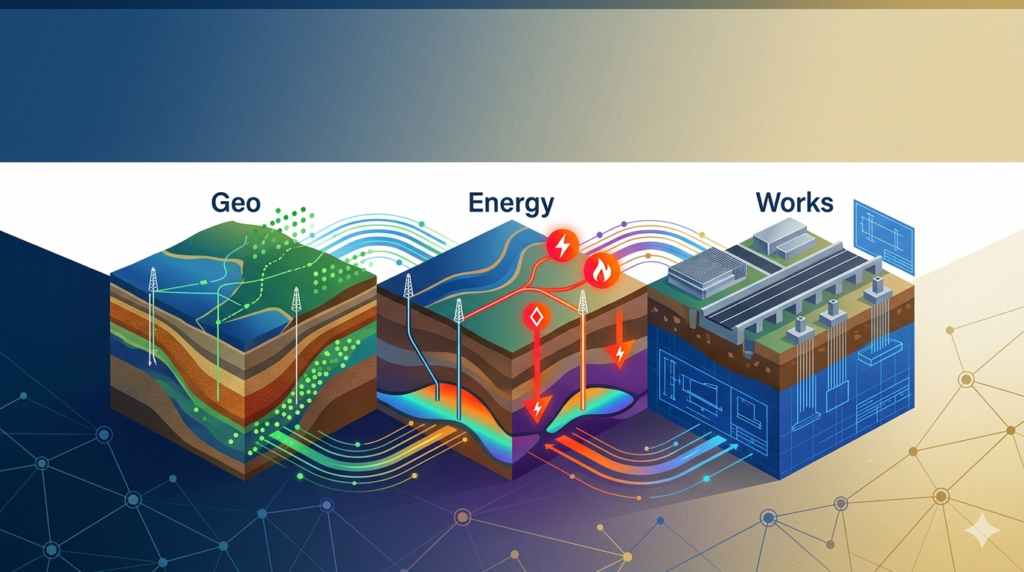
The Leapfrog suite includes specialized editions for different industry needs:
-
Leapfrog Geo: 3D geological modelling and analysis for mining and exploration
-
Leapfrog Edge: Comprehensive mineral resource estimation and geostatistical modelling
-
Leapfrog Works: Ground modelling for civil engineering and environmental projects
-
Leapfrog Energy: Subsurface modelling for geothermal, oil, and gas applications
Key Features
Dynamic 3D Geological Modelling
Leapfrog’s implicit modelling engine enables geologists to create geologically realistic surfaces and volumes directly from drillhole data, points, and structural measurements. The software automatically updates models when new data becomes available, eliminating time-consuming manual remodelling.
Advanced Stratigraphic Modelling
Version 2026.1 introduces an advanced stratigraphy surface feature powered by a new algorithm and the Stratigraphic Data Explorer interface. This enhancement produces geologically sound results for layer thickness analysis, pinch-out identification, and tight fold geometry modelling. Models maintain dynamic links to underlying data, reducing manual editing requirements.
Drillhole Planning and Design
The new grid-pattern planning tool enables rapid deployment of large-scale drilling campaigns with live 3D interaction capabilities. Geologists can snap collars directly to geological surfaces and exercise precise control over collar and target point positioning. These refinements significantly reduce time spent adjusting planned drillholes.
Integration with Seequent Evo
Leapfrog 2026.1.1 features enhanced integration with Seequent Evo, the company’s cloud-based geoscience platform. This connectivity promotes unified workflows across different geological analysis tools and enables seamless data sharing between desktop and cloud environments.
Resource Estimation Workflow
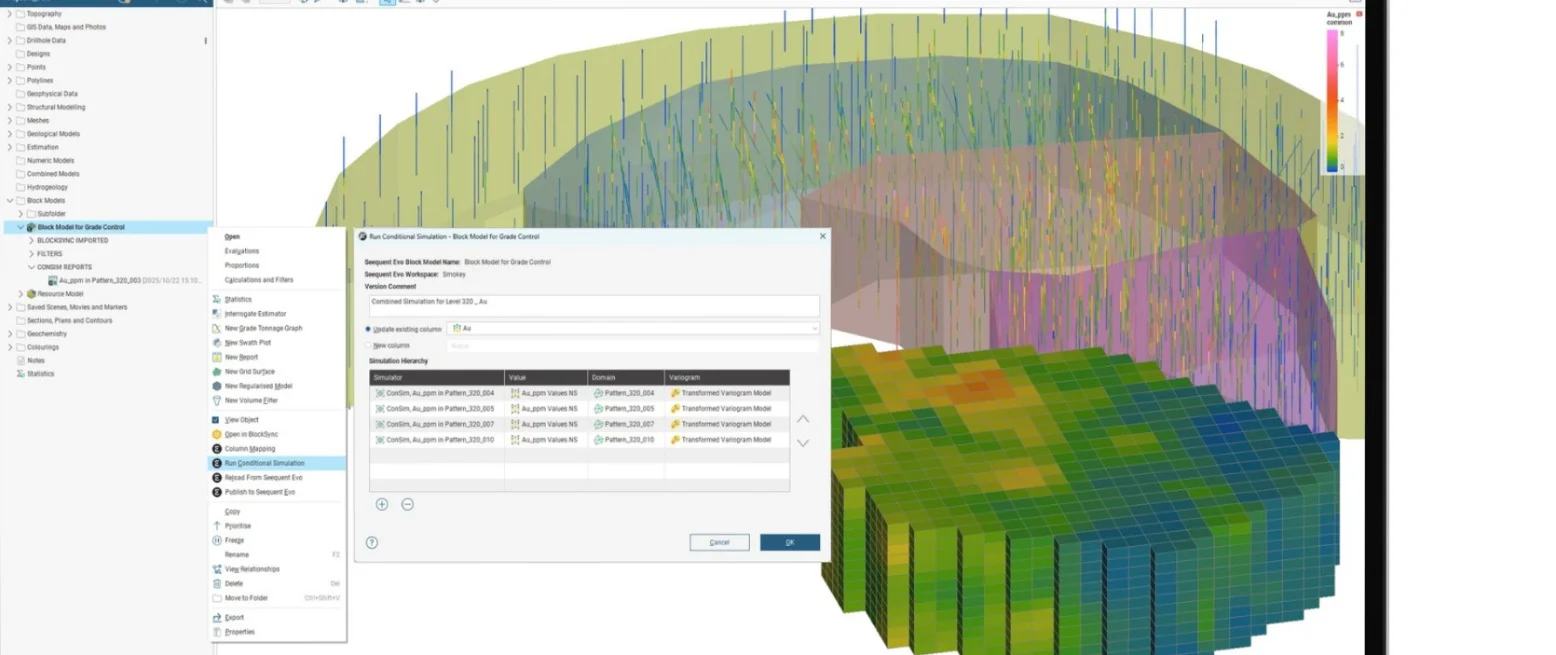
For resource geologists, the release introduces a dedicated data preparation system within Leapfrog Edge. This integrated approach creates rigorous end-to-end environments for geostatistical modelling while reducing dependence on external tools and manual processes.
Cross-Section Communication Tools
Enhanced cross-section capabilities allow users to generate both orthogonal projections for technical accuracy and illustrative projections for effective communication with non-technical stakeholders. This dual functionality saves time in reporting and improves project communication.
What’s New in Version 2026.1.1
The 2026.1.1 release represents a significant advancement in subsurface modelling capabilities across the Leapfrog suite. Key updates include:
For Leapfrog Geo Users
-
Grid-Pattern Planning Tool: Rapid layout of systematic drill patterns with live 3D interaction while maintaining flexibility to edit individual targeted holes precisely
-
Advanced Stratigraphy Surface: Faster, more data-driven geological modelling in complex settings with new algorithm and Stratigraphic Data Explorer interface
-
Collar Snapping: Intuitive new interactions for snapping collars directly to geological surfaces with improved control over positioning
-
Integration with AXIS Connect: Direct connection between drillhole planning and drill rig execution through Orica Digital Solutions’ platform, powered by Seequent Evo
For Leapfrog Edge Users
-
Dedicated Data Preparation Workflow: Streamlined, transparent approach to resource estimation with structure and confidence built into the geostatistical modelling process
-
Interactive Capping and Declustering Tools: Rapid scenario testing and comparison capabilities supporting more informed modelling decisions
-
End-to-End Estimation Environment: Reduced reliance on external tools and manual processes for rigorous, defensible outcomes
For Leapfrog Works Users
-
Refreshed Structural Trend Workflows: Faster modelling with fewer manual edits through an updated interface with new controls for filtering input data and adjusting clustering settings
-
Streamlined Model Updates: Enhanced incorporation of field mapping data through polylines, allowing new data to be appended to existing polyline objects
-
Multi-Dimensional Attribution: Ability to associate standardised classifications with volumes, improving workflow efficiency for ground works
For Leapfrog Energy Users
-
Enhanced Interoperability: Improved integration with OpenGround, the cloud-connected geotechnical data management tool, streamlining ground investigations
-
Advanced Visualisation: New capabilities for visualising downhole survey data to aid drilling analysis and validation of drillhole orientation
System Requirements
Leapfrog 2026.1.1 requires a 64-bit version of Microsoft Windows 11 operating system. For optimal performance, Seequent recommends meeting or exceeding the following specifications:
Minimum Requirements
| Component | Specification |
|---|---|
| Operating System | Microsoft Windows (64-bit) 11 |
| Processor | Intel Core i3, i5, i7 or i9 CPU (2nd Generation) or later, Intel Xeon, AMD FX or Ryzen |
| System Memory | 4 GB RAM |
| Storage | Hard Disk (HDD) 250 GB capacity, 25 GB free space |
| Display | 1920 x 1080 resolution |
| Graphics | NVIDIA GeForce 900, 1000, 1600, 2000 series, P series, RTX series; AMD RX, VII series, W series |
Recommended Requirements
| Component | Specification |
|---|---|
| Operating System | Microsoft Windows (64-bit) 11 |
| Processor | Intel Core i7-7700k, i7-8700k, i9-9900k |
| System Memory | 32 GB RAM |
| Storage | Solid-State (SSD) 1 TB or larger capacity, 100 GB free space |
| Display | 2560 x 1440 resolution |
| Graphics | NVIDIA GeForce GTX 1050/1050 Ti, 1060, 1660/1660 Ti; AMD Radeon RX 570, RX 590 |
Important Notes
-
Graphics processors must have at least 4 GB memory
-
Running Leapfrog in a virtualised environment is supported with conditions (contact Seequent support)
-
Remote desktop connections or remote login systems are not supported
-
Opening projects over network connections is not supported
-
Touch-screen hardware is not supported
Installation Guide
Preparing for Installation
Before installing Leapfrog 2026.1.1, ensure you have:
-
A valid subscription license or authorized access
-
The latest version of Windows 11 (64-bit)
-
Sufficient system resources meeting minimum requirements
-
Administrative privileges on your computer
-
A stable internet connection for license validation
Installation Steps
-
Sign Out of Current Version: Before upgrading, sign out of your current version of the application. Failing to sign out before attempting to upgrade may prevent access to the software, requiring your seat to be re-issued by Seequent support
-
Access MySeequent Portal: Log in to your MySeequent account at the user portal
-
Download the Installer: Navigate to the download section and select Leapfrog 2026.1.1
-
Run the Installer: Execute the downloaded installation file and follow the on-screen prompts
-
Configure Installation Settings: Select your preferred installation location and component options
-
Complete Installation: Allow the installation process to complete and restart your computer if prompted
-
Sign In and Validate: Launch Leapfrog and sign in with your credentials to validate your license
Troubleshooting Common Issues
-
License Validation Failures: Verify your internet connection and ensure you’ve signed out of any previous versions
-
Performance Issues: Check that your graphics card meets the 4 GB memory requirement
-
Virtual Environment Support: Contact your regional Seequent representative for configuration guidance if using virtualised environments
How to Use the Software
Getting Started with Leapfrog Geo
-
Create a New Project: Launch Leapfrog Geo and select “New Project”. Set your project location and data directory
-
Import Data: Use the import function to bring in drillhole data, points, surfaces, and structural data. Leapfrog supports a wide range of formats including CSV, AGS, LAS, Shapefiles, and industry-standard geological formats such as GOCAD, Datamine, Surpac, and Vulcan
-
Build Your Geological Model: Use the implicit modelling tools to generate surfaces and volumes from your data. The dynamic linking allows model updates when new data is added
-
Apply Structural Trends: Define structural trends to make implicitly modelled surfaces and volumes geologically meaningful. In version 2026.1.1, refreshed trend workflows enable faster setup with fewer manual edits
-
Generate Cross-Sections: Create both orthogonal and illustrative cross-sections for technical analysis and stakeholder communication
-
Export Results: Export models, surfaces, and cross-sections in various formats including PDF, DXF, DWG, and industry-specific geological formats
Working with Leapfrog Edge for Resource Estimation
-
Prepare Estimation Data: The new dedicated data preparation folder within Leapfrog Edge streamlines the estimation workflow
-
Perform Geostatistical Analysis: Use interactive tools for capping, declustering, and variography to model grade distributions
-
Run Resource Estimation: Execute end-to-end estimation workflows within a rigorous, traceable environment
-
Validate and Report: Generate comprehensive reports with confidence measures for resource reporting requirements
Using Leapfrog Works for Civil Projects
-
Import Site Investigation Data: Bring in borehole logs, field mapping data, and survey information
-
Build Ground Models: Create 3D geological models for site characterisation and design optimisation
-
Apply Multi-Dimensional Attribution: Associate standardised classifications with modelled volumes for streamlined project workflows
-
Generate Volumes: Create earthworks volumes directly from attributed polylines for quick project evaluation
Best Use Cases
Mining and Mineral Exploration
Leapfrog Geo and Leapfrog Edge are essential tools for mining companies seeking to:
-
Reduce drilling costs through accurate targeting and faster planning cycles
-
Build and update geological models rapidly as exploration progresses
-
Conduct rigorous resource estimation for reporting compliance
-
Design optimal drilling campaigns with the new grid-pattern planning tool
Civil Engineering and Infrastructure Projects
Leapfrog Works supports geotechnical engineers and engineering geologists by:
-
Creating comprehensive ground models for site characterisation
-
Communicating ground conditions effectively with stakeholders and contractors
-
Generating accurate earthworks volumes for project planning
-
Supporting building information modelling (BIM) workflows through attributed models
Energy Sector Applications
Leapfrog Energy enables geoscientists to:
-
Model subsurface conditions for geothermal energy projects
-
Support oil and gas exploration with dynamic geological modelling
-
Analyse downhole survey data for drilling validation
-
Integrate with OpenGround for streamlined ground investigations
Environmental Projects
Environmental geoscientists use Leapfrog for:
-
Contaminant plume modelling and analysis
-
Groundwater flow model preparation
-
Site characterisation for remediation projects
-
Risk assessment and management
Advantages and Limitations
Advantages
-
Implicit Modelling Technology: Pioneering approach that dramatically reduces modelling time compared to traditional methods
-
Dynamic Data Linking: Models automatically update when new data is added, eliminating manual remodelling
-
Comprehensive Format Support: Wide range of import and export formats supporting interoperability with other geoscience software
-
Industry-Specific Editions: Tailored workflows for mining, civil, energy, and environmental applications
-
Seamless Cloud Integration: Enhanced connectivity with Seequent Evo for unified geoscience workflows
-
Improved Communication Tools: Enhanced cross-sections for both technical accuracy and stakeholder communication
-
Reduced Manual Intervention: New features in 2026.1.1 minimise manual editing through automated workflows
Limitations
-
Windows-Only: Software is designed exclusively for 64-bit Windows operating systems
-
High System Requirements: Complex models require substantial system resources, particularly graphics memory and RAM
-
Network Access Restrictions: Projects cannot be opened directly over network connections; files must be stored locally
-
Remote Desktop Not Supported: Remote access solutions are not supported, limiting remote work options
-
Virtual Environment Constraints: Virtualised environments require special configuration and Seequent support approval
-
Learning Curve: Advanced modelling techniques require training and experience to master
-
Subscription-Based Licensing: Requires ongoing subscription for continued use and updates
Alternatives to Leapfrog
While Leapfrog leads the market in implicit geological modelling, several alternatives exist for different use cases and requirements:
Surpac (by Hexagon)
A comprehensive geology and mine planning solution widely used in the mining industry. Surpac is particularly strong in open-pit and underground mine design, with capabilities in geological modelling, resource estimation, and mine planning. It uses a more traditional explicit modelling approach compared to Leapfrog’s implicit technology.
Datamine (by Datamine Software)
A comprehensive mining software suite offering geological modelling, resource estimation, mine planning, and scheduling capabilities. Datamine’s Studio products provide strong interoperability with various data formats and industry-standard workflows.
Vulcan (by Maptek)
A 3D modelling and mine planning software widely used in the mining industry. Vulcan offers comprehensive tools for geological modelling, resource estimation, and mine design. It is particularly strong in block modelling and mine scheduling.
Micromine
An integrated mining software solution offering exploration, geological modelling, resource estimation, and mine design capabilities. Micromine is widely used in exploration and resource estimation workflows.
GOCAD Mining Suite (by Mira Geoscience)
A 3D geological modelling and geophysical data integration platform designed for mining and exploration. GOCAD is particularly strong in structural modelling and geophysical data integration.
Comparison Considerations
When evaluating alternatives to Leapfrog, consider:
-
Modelling Approach: Implicit modelling (Leapfrog) vs. explicit modelling (traditional alternatives)
-
Industry Focus: Mining-specific vs. multi-industry capabilities
-
Workflow Integration: Compatibility with existing systems and data formats
-
Learning Curve: Training requirements and user adoption
-
Cost: Licensing models and total cost of ownership
-
Support and Updates: Vendor reliability and community support
Frequently Asked Questions
What is the latest version of Leapfrog software?
The latest version is Leapfrog 2026.1.1, released by Seequent, The Bentley Subsurface Company. This version includes significant updates across all Leapfrog editions, including Leapfrog Geo, Leapfrog Edge, Leapfrog Works, and Leapfrog Energy.
What are the system requirements for Leapfrog 2026.1.1?
Leapfrog 2026.1.1 requires 64-bit Windows 11 with a minimum of 4 GB RAM and a graphics card with at least 4 GB memory. Recommended specifications include an Intel Core i7 processor, 32 GB RAM, and an SSD with 1 TB capacity.
How do I upgrade to Leapfrog 2026.1.1?
Current subscribers can download the new version from the MySeequent user portal. Important: Sign out of your current version before upgrading to avoid license issues. After signing out, follow the standard upgrade path through the portal.
What file formats does Leapfrog support?
Leapfrog supports extensive import and export formats including AGS, CSV, Shapefiles, LAS, DWG, DXF, GOCAD, Datamine, Surpac, and Vulcan formats. It also supports various grid formats, images, and geophysical data formats.
Is remote desktop access supported for Leapfrog?
No, running Leapfrog via remote desktop connections or remote login systems is not supported. This limitation should be considered when planning remote access to the software.
Can I run Leapfrog in a virtual environment?
Running Leapfrog in a virtualised environment is supported with conditions. Contact your regional Seequent support representative for more information on configuration requirements.
What’s new in the 2026.1.1 release?
Key features include an advanced stratigraphy surface for complex geological settings, a grid-pattern drillhole planning tool, dedicated data preparation workflow for resource estimation in Leapfrog Edge, refreshed structural trend workflows for Leapfrog Works, and enhanced integration with Seequent Evo and Orica AXIS Connect.
Final Thoughts
Leapfrog 2026.1.1 represents a significant step forward in subsurface modelling technology, addressing the critical needs of geoscience professionals across multiple industries. The release demonstrates Seequent’s continued commitment to innovation in implicit modelling technology, with powerful new features that reduce manual intervention, improve decision-making, and enable more efficient workflows.
For mining professionals, the new drillhole planning and resource estimation capabilities promise to reduce drilling costs and improve targeting precision. Civil engineers benefit from enhanced ground modelling and communication tools, while energy professionals gain improved interoperability and analysis capabilities.
The integration with Seequent Evo points to an increasingly connected future where desktop modelling seamlessly integrates with cloud-based analysis and collaboration. This hybrid approach positions Leapfrog as a forward-looking solution that can evolve with the changing needs of the geoscience industry.
Whether you are an exploration geologist, resource estimator, engineering geologist, or energy geoscientist, Leapfrog 2026.1.1 offers powerful tools to transform raw data into actionable subsurface insights with greater speed, confidence, and precision than ever before.
Our Paid Service
“We do not sell or provide any software. We only offer professional support services. If any software on your system is not working properly, or you are facing installation errors, crashes, or any other technical issue — just contact us. We will help you fix the problem quickly and remotely via AnyDesk. No software will be provided from our side — only expert troubleshooting and support.”