

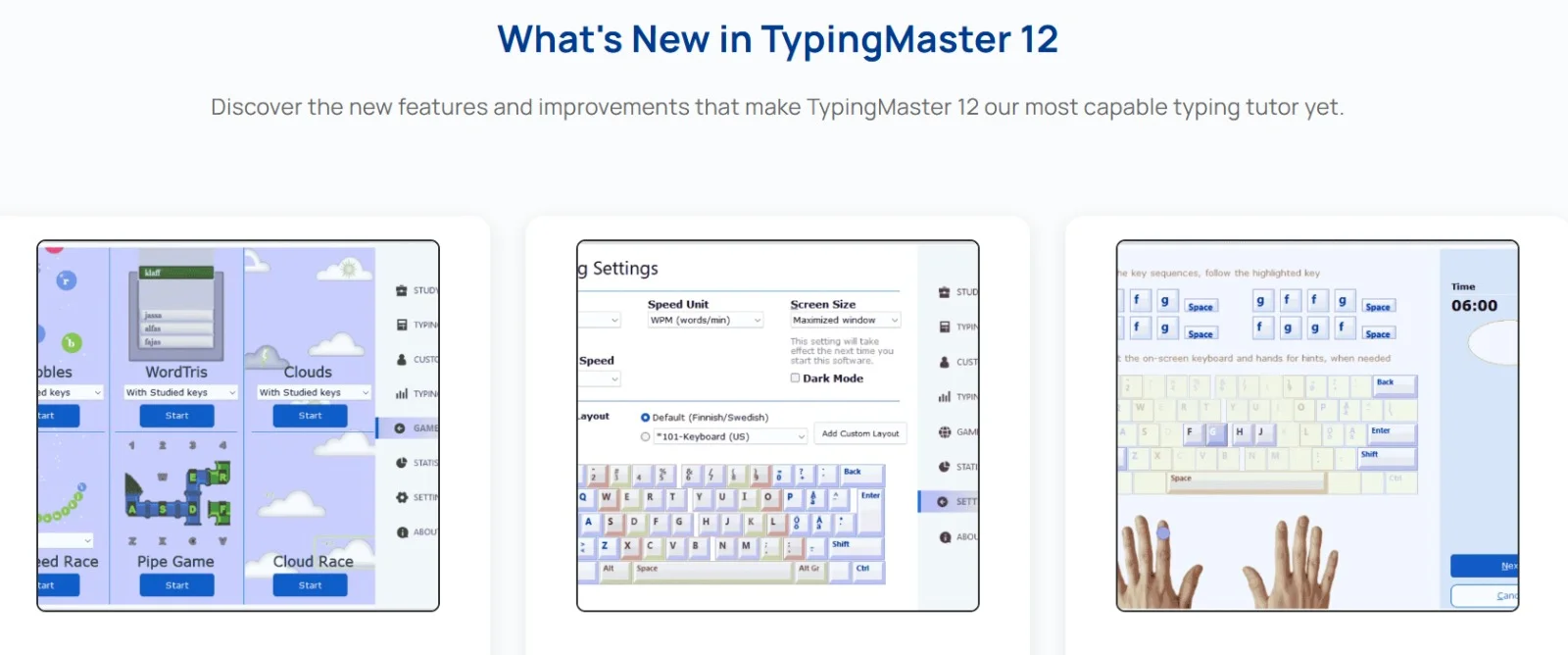
Overview of TypingMaster 12
Table of Contents
TypingMaster 12 is a Windows-based typing training application developed by TypingMaster Inc. It focuses on converting hunt-and-peck typing habits into touch typing fluency. The software analyzes individual weak points and creates adaptive exercises to target specific problem keys and finger movements.
The program includes a rich set of tools such as a graphical keyboard heatmap, on-screen instructor, and progress tracking dashboards. Users can train using built-in lessons, import custom text, or practice with games that reinforce accuracy under time pressure.
TypingMaster 12 is commonly used in educational institutions, corporate training environments, and by home users seeking to improve digital productivity. Its structured methodology aligns with recognized keyboarding standards, making it a trusted solution for typing certification preparation.
Key Features
TypingMaster 12 offers a robust feature set for comprehensive typing education.
-
Adaptive Training Plan – The software creates a tailored learning path based on an initial diagnostic test. It automatically adjusts difficulty as your skills improve.
-
Real-Time Feedback – Visual and audio cues highlight correct finger placement, timing, and error patterns instantly.
-
Graphical Keyboard Heatmap – A color-coded heatmap shows which keys cause frequent mistakes, helping you target weak areas.
-
Typing Games and Drills – Engaging mini-games like “Bubbles” and “KeyBricks” improve speed without boredom.
-
Detailed Progress Reports – View speed measured in words per minute (WPM), accuracy percentages, and error frequency over days, weeks, or months.
-
Custom Text Practice – Import your own documents, emails, or code snippets to practice on real-world material.
-
On-Screen Keyboard with Finger Guidance – An interactive keyboard displays correct finger assignments in real time.
-
Multi-User Support – Ideal for schools or shared computers, with individual profiles and progress tracking for each user.
What’s New in TypingMaster 12
The latest version introduces several improvements over previous releases.
-
Modernized User Interface – A cleaner, less distracting layout with dark mode support for extended practice sessions.
-
Enhanced Heatmap Analytics – More granular tracking of finger-specific errors, including left vs. right hand imbalance.
-
Cloud Progress Sync – Save your training data to the cloud and resume from any Windows device.
-
Expanded Lesson Library – New industry-specific modules for programming, medical transcription, and legal documentation.
-
Improved Game Mechanics – Faster loading times and more responsive controls in typing games.
-
Accessibility Enhancements – Better screen reader compatibility and high-contrast theme options.
System Requirements
Before installing TypingMaster 12, ensure your system meets the following requirements.
Minimum requirements:
-
Operating system: Windows 10 (32-bit or 64-bit)
-
Processor: 1 GHz or faster
-
RAM: 2 GB
-
Storage: 500 MB free disk space
-
Display: 1024 x 768 resolution
Recommended requirements:
-
Operating system: Windows 11
-
Processor: 2 GHz dual-core or better
-
RAM: 4 GB or more
-
Storage: 1 GB SSD space for faster loading
-
Display: 1366 x 768 or higher
Additional requirements:
-
Active internet connection for cloud sync and software updates
-
Standard USB or laptop keyboard (mechanical keyboards also supported)
-
.NET Framework 4.8 or later (installed automatically if missing)
Installation Guide
Follow these steps to install TypingMaster 12 on your Windows computer.
Step 1: Download the installer
Visit the official TypingMaster website and download the legitimate setup file. Avoid third-party sources to ensure software integrity.
Step 2: Run the installer
Locate the downloaded file (typically TypingMaster12_Setup.exe) and double-click it. If prompted by User Account Control, click “Yes” to allow installation.
Step 3: Choose installation type
Select “Standard Installation” for most users. The software will install to C:\Program Files\TypingMaster 12. A “Portable” option is available for USB drives.
Step 4: Complete setup
Follow the on-screen prompts. The installation takes less than two minutes on modern hardware.
Step 5: Launch and activate
Open TypingMaster 12 from the desktop shortcut or Start menu. Enter your license key if you purchased a paid version. A free trial is available with limited features.
How to Use TypingMaster 12
Using TypingMaster 12 effectively requires following a structured learning approach.
1. Take the initial diagnostic test
When you first launch the software, complete the 5-minute placement test. This allows TypingMaster 12 to assess your current WPM and accuracy baseline.
2. Review your personalized plan
Based on your test results, the software generates a daily training schedule. It suggests 15–20 minute sessions, 4–5 times per week for optimal improvement.
3. Start with basic finger positioning
Follow the on-screen keyboard guide. The software uses the home row method (ASDF for left hand, JKL; for right hand). Resist looking at your physical keyboard.
4. Progress through lesson modules
Lessons are grouped by difficulty:
-
Beginner: Home row mastery and basic words
-
Intermediate: Upper and lower rows, shift key usage
-
Advanced: Numbers, symbols, and punctuation
-
Professional: Speed drills and complex text passages
5. Monitor your heatmap regularly
After each session, check the graphical keyboard heatmap. Red zones indicate frequent errors. Use the “Drill Problem Keys” feature to focus specifically on those letters.
6. Practice with custom content
Copy-paste your own work documents or school assignments into the custom text editor. This transfers your training gains directly to real tasks.
7. Take weekly progress tests
Every seven days, complete a timed test without on-screen guidance. Compare results against your initial baseline to measure improvement.
Best Use Cases
TypingMaster 12 serves a wide range of users and scenarios.
Students and young learners
Schools use TypingMaster 12 to teach keyboarding fundamentals. The game-based modules keep children engaged while building essential computer literacy.
Remote workers and administrators
Improving typing speed from 40 WPM to 65 WPM saves roughly one hour per day for heavy computer users. The software helps remote workers complete emails, reports, and data entry faster.
Job seekers and certification candidates
Many clerical and administrative roles require minimum typing speeds of 50–60 WPM. TypingMaster 12 prepares users for standard typing tests used in hiring processes.
Professionals with repetitive strain concerns
The software encourages proper ergonomic form, reducing unnecessary finger travel and wrist movement. This can help alleviate discomfort from long typing sessions.
Non-native English speakers
TypingMaster 12 includes lessons focused on English letter frequency and common word patterns, aiding language learners who also need typing skills.
Programmers and developers
Custom text import allows coding practice with indentation, brackets, and special characters—skills often missed by generic typing tutors.
Advantages and Limitations
Advantages:
-
Adaptive difficulty prevents frustration and boredom
-
Detailed heatmap analytics are superior to most competitors
-
Offline functionality works without constant internet access
-
Multi-user support adds value for families and classrooms
-
Affordable one-time purchase (no subscription required)
Limitations:
-
Windows only (no native macOS or Linux versions)
-
Interface design feels slightly dated compared to web-based tutors
-
Limited mobile support; the companion app offers fewer features
-
Advanced typing games require a paid license after trial period
-
No built-in video tutorials for visual learners
Alternatives to TypingMaster 12
Several other typing tutors may better suit specific needs.
| Software | Platform | Best for | Pricing model |
|---|---|---|---|
| TypingMaster 12 | Windows | Detailed heatmap analytics | One-time purchase |
| Keybr | Web | Random letter generation | Free |
| Typing.com | Web, Chrome | Schools and classrooms | Freemium |
| Ratatype | Web | Quick typing tests | Free |
| Typesy | Windows, Mac, Web | Video instruction | Subscription |
| Klava | Web (Russian layout) | Cyrillic typing practice | Free |
When to choose an alternative:
-
For Mac users: Consider Typesy or the web-based Typing.com
-
For free budget: Keybr provides excellent algorithmic lessons at no cost
-
For schools needing LMS integration: Typing.com offers teacher dashboards
Frequently Asked Questions
Is TypingMaster 12 free?
TypingMaster 12 offers a limited free trial with basic lessons. Full access to adaptive training, heatmap analytics, and all games requires a one-time license purchase from the official website.
How long does it take to improve typing speed with TypingMaster 12?
Most users see a 10–15 WPM improvement within 4 weeks of consistent practice (15 minutes daily). Achieving professional speeds of 70+ WPM typically takes 2–3 months.
Can TypingMaster 12 help correct bad typing habits?
Yes. The heatmap and real-time feedback specifically target poor habits like overusing the index finger or incorrect hand positioning. The software forces proper finger-key assignments.
Does the software work with ergonomic or split keyboards?
Yes. TypingMaster 12 supports any standard keyboard layout, including Microsoft Natural Ergonomic and split mechanical keyboards. The on-screen keyboard adapts to QWERTY, AZERTY, and QWERTZ layouts.
Can I use TypingMaster 12 without an internet connection?
Yes. The core training features work completely offline. Only cloud sync, software updates, and some social sharing features require internet access.
What languages does TypingMaster 12 support?
The software includes full lessons for English, Spanish, French, German, and Dutch. Keyboard layouts are available for over 20 languages, though lesson content is primarily in English.
Is TypingMaster 12 suitable for children?
Yes. The software includes a “Junior Mode” with simpler instructions, larger UI elements, and typing games appropriate for ages 7 and up. Parental controls can limit access to progress reports.
Final Thoughts
TypingMaster 12 remains a solid choice for Windows users seeking a data-driven approach to typing improvement. Its adaptive learning engine and detailed heatmap analytics set it apart from simpler web-based tutors. While the lack of native macOS support is a drawback, the software excels at what it promises: measurable gains in typing speed and accuracy through structured, feedback-rich practice.
For best results, commit to short daily sessions rather than infrequent long marathons. Use the heatmap to identify persistent error keys, and regularly practice with your own real-world text. With consistent effort, TypingMaster 12 can transform hunt-and-peck typing into confident, fluid touch typing.
Our Paid Service
“We do not sell or provide any software. We only offer professional support services. If any software on your system is not working properly, or you are facing installation errors, crashes, or any other technical issue — just contact us. We will help you fix the problem quickly and remotely via AnyDesk. No software will be provided from our side — only expert troubleshooting and support.”