

Overview of Wowza Streaming Engine
Table of Contents
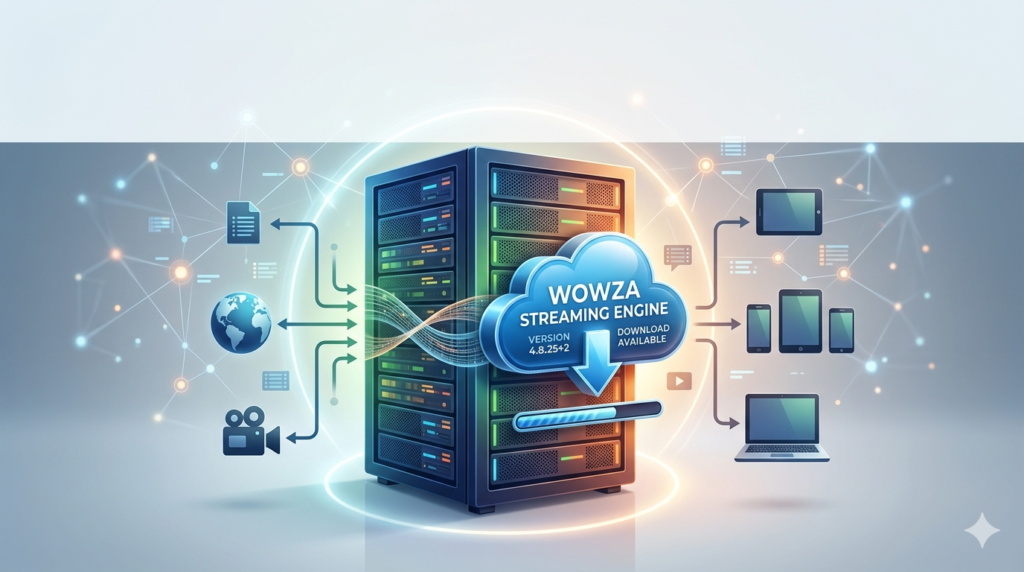
In the rapidly evolving landscape of digital media, organizations require reliable, scalable, and secure solutions for delivering video content. Wowza Streaming Engine is a robust, server-based software platform designed for professional-grade video streaming. Unlike simplified cloud-only services, Wowza gives broadcasters, educators, and enterprises granular control over how they encode, transcode, and deliver live and on-demand video.
This software supports millions of concurrent viewers while maintaining low latency and high fidelity. Whether you are hosting a global product launch or building an e-learning platform, Wowza Streaming Engine provides the infrastructure to manage video workflows from ingest to playback.
The software processes incoming streams using standard protocols such as RTMP, SRT, and RTSP, then repackages them for delivery to virtually any device—including smartphones, smart TVs, gaming consoles, and web browsers.
Key Features of Wowza Streaming Engine
Wowza Streaming Engine includes a comprehensive feature set that addresses the technical demands of modern video delivery. Below are its core capabilities:
-
Multi-Protocol Ingestion and Delivery
Accept streams via RTMP, SRT, MPEG-TS, RTSP, and WebRTC. Deliver to HLS, MPEG-DASH, Smooth Streaming, and CMAF formats. -
Adaptive Bitrate (ABR) Streaming
Automatically adjusts video quality based on each viewer’s available bandwidth and device capabilities, reducing buffering and rebuffering events. -
Transcoding and Transmuxing
Convert incoming streams to multiple output formats and bitrates in real time without requiring external encoding hardware. -
Edge and Origin Server Architecture
Scale delivery globally by configuring origin-edge clusters, reducing latency and origin server load. -
DVR and Catch-Up TV
Enable time-shifted viewing by recording live streams to disk, allowing users to pause, rewind, or resume playback. -
Security and Digital Rights Management (DRM)
Protect content using secure tokens, IP whitelisting/blacklisting, RTMPE, and integration with third-party DRM providers (e.g., Verimatrix, BuyDRM). -
REST API and Modular Architecture
Automate server configuration, monitor health metrics, and build custom modules using Java or other JVM languages.
What’s New in Version 4.8.25+
The 4.8.25+ release builds upon Wowza’s existing reliability with targeted improvements for low-latency streaming and operational efficiency. Key updates include:
-
Enhanced SRT (Secure Reliable Transport) Support
Improved packet retransmission logic and connection bonding for unreliable networks such as public internet or cellular uplinks. -
Reduced HLS Latency
Optimized segment duration and playlist updates, achieving sub-4-second latency when combined with appropriate player configurations. -
Performance Improvements for NVIDIA GPUs
Updated NVENC encoder integration reduces CPU usage during high-volume transcoding workloads. -
API Enhancements
New endpoints for stream monitoring and dynamic stream target management, simplifying integration with automation tools like Ansible or Terraform. -
Updated Security Patches
Addressed potential vulnerabilities in underlying dependencies, ensuring compliance with enterprise security policies.
System Requirements
Before installing Wowza Streaming Engine, verify that your environment meets or exceeds these specifications. Requirements vary based on expected viewer count and transcoding needs.
| Component | Minimum | Recommended (Production) |
|---|---|---|
| Operating System | Ubuntu 20.04 LTS, Windows Server 2019, or CentOS 7 | Ubuntu 22.04 LTS or Windows Server 2022 |
| CPU | 4 cores (2.0 GHz) | 8+ cores (3.0+ GHz) |
| RAM | 8 GB | 16–32 GB |
| Storage | 50 GB SSD (for logs and recordings) | 200+ GB NVMe SSD |
| Network | 100 Mbps dedicated uplink | 1 Gbps or higher |
| Java | OpenJDK 11 or Oracle JDK 11 | OpenJDK 11 with tuned garbage collection |
For high-availability deployments, use two or more origin servers behind a load balancer and edge servers in geographically distributed data centers.
Installation Guide
Installing Wowza Streaming Engine involves downloading the official package from Wowza Media Systems, then running the platform-specific installer. No cracked, patched, or unofficial versions are required—Wowza offers a fully functional 30-day trial license.
Step-by-step installation (Ubuntu Linux example):
-
Download the installer
Visit the official Wowza website and obtain the.debor.tar.gzpackage for Linux. -
Install dependencies
sudo apt update && sudo apt install -y openjdk-11-jre-headless
-
Run the installer
sudo dpkg -i WowzaStreamingEngine-4.8.25+2-linux-x64-installer.deb
-
Follow the setup wizard
-
Accept the license agreement.
-
Specify the installation directory (default:
/usr/local/WowzaStreamingEngine). -
Set the administrator username and password.
-
Enter your trial or paid license key.
-
-
Start the service
sudo systemctl start WowzaStreamingEngine
sudo systemctl enable WowzaStreamingEngine
-
Access the Engine Manager
Open a browser tohttp://your-server-ip:8088/enginemanagerand log in.
How to Use Wowza Streaming Engine
Once installed, you can begin streaming by creating an application inside Wowza. An application defines how incoming streams are processed, stored, and delivered.
Basic live streaming workflow:
-
Log into Engine Manager
Navigate to the Applications tab. -
Create a new application
-
Name:
live -
Type: Live
-
Set stream publishing and playback authentication (optional).
-
-
Configure stream sources
In the application settings, define stream files or live encoders. For a hardware encoder (e.g., OBS Studio, vMix), set the RTMP publish URL:
rtmp://your-server-ip:1935/live -
Publish a stream
Configure your encoder to push to the RTMP URL with a stream name, such asmyevent. -
Play back the stream
Use any HLS-compatible player (e.g., hls.js, Video.js, or VLC) with the following URL:
https://your-server-ip:1936/live/myevent/playlist.m3u8
For on-demand (VOD) streaming, place MP4 files in the application’s content directory. Wowza will automatically generate ABR renditions and manifest files.
Best Use Cases for Wowza Streaming Engine
Wowza Streaming Engine serves industries that demand professional control, low latency, and high concurrency. Common deployments include:
-
Live Sports and Events
Broadcast to millions of viewers with sub-5-second latency using SRT ingest and HLS delivery. -
Corporate All-Hands and Investor Calls
Secure internal communications using token authentication and private RTMPe endpoints. -
E-Learning Platforms
Deliver live lectures with DVR functionality so students can rewind and catch up in real time. -
24/7 Linear Channels
Combine VOD assets and live sources into a continuous MPEG-DASH or HLS stream using Wowza’s scheduler module. -
Video Surveillance and IoT Feeds
Ingest RTSP from IP cameras and republish as low-bitrate HLS for remote viewing on mobile devices.
Advantages and Limitations
Advantages
-
Unmatched protocol flexibility – Supports legacy RTMP and modern SRT/WebRTC side by side.
-
On-premises or cloud deployment – Run on your own hardware, AWS, Azure, or any VM provider.
-
No per-stream or per-viewer fees – License is server-based, making costs predictable at scale.
-
Detailed analytics and logging – Access connection logs, bitrate histories, and error diagnostics.
Limitations
-
Steeper learning curve – Requires understanding of streaming protocols, codecs, and server administration.
-
Resource-intensive transcoding – High-volume ABR transcoding demands substantial CPU or GPU resources.
-
Manual scaling configuration – Unlike SaaS platforms, you must architect edge/origin clusters yourself.
-
No built-in CDN – You must integrate with a third-party CDN (e.g., Akamai, CloudFront) for global scale.
Alternatives to Wowza Streaming Engine
Depending on your technical requirements, the following alternatives may be more suitable:
| Software | Best For | Key Difference from Wowza |
|---|---|---|
| Ant Media Server | Ultra-low latency (WebRTC) | Native WebRTC ingest, simpler cluster management |
| Nimble Streamer | Lightweight transcoding and packaging | Lower resource footprint, fewer advanced features |
| MistServer | Open-source, easy setup | Limited scalability and enterprise support |
| Adobe Media Server | Legacy RTMP applications | Dwindling ecosystem, not recommended for new projects |
| Cloud SaaS (Mux, API.video) | Developers avoiding server management | No server control; usage-based pricing |
Wowza remains the preferred choice when you need on-premises control, legacy protocol support, and predictable licensing.
Frequently Asked Questions
1. Is Wowza Streaming Engine compatible with OBS Studio?
Yes. OBS Studio can publish RTMP streams to Wowza. Simply set the server URL to rtmp://your-wowza-ip:1935/live and the stream key to any unique name.
2. Can Wowza Stream to Facebook Live or YouTube simultaneously?
Yes. Use Wowza’s “Stream Targets” feature to push a single incoming stream to multiple destinations such as Facebook Live, YouTube Live, or Twitch.
3. What is the maximum number of concurrent viewers supported?
There is no hard limit in the software. The practical limit depends on your server hardware, network bandwidth, and delivery architecture. With edge servers and CDN integration, millions of viewers are possible.
4. Does Wowza support 4K and HDR video?
Yes. Wowza can ingest and transcode 4K streams using HEVC (H.265). HDR metadata (HDR10, HLG) is preserved through the pipeline when using compatible players.
5. How do I secure my Wowza streams from unauthorized access?
Implement token-based authentication using the Wowza Security Module. Generate dynamic tokens that expire after a set time or require valid referrer headers.
6. Can I install Wowza Streaming Engine on a Raspberry Pi?
Technically yes, but performance is severely limited. A Raspberry Pi 4 can handle one or two low-bitrate streams. For production use, dedicated server hardware is required.
7. What is the difference between Wowza Streaming Engine and Wowza Cloud?
Streaming Engine is self-hosted software. Wowza Cloud is a fully managed SaaS platform. Choose Streaming Engine for complete control; choose Cloud for reduced operational overhead.
Final Thoughts
Wowza Streaming Engine remains a cornerstone technology for organizations that refuse to compromise on video quality, security, or protocol flexibility. Its ability to ingest virtually any source format and deliver to any endpoint—while offering granular server-side control—makes it superior to one-size-fits-all SaaS platforms for mission-critical workflows.
The 4.8.25+ release continues Wowza’s tradition of stability while introducing meaningful improvements in SRT performance and HLS latency. For broadcast engineers, IT teams, and media architects, investing time in learning Wowza pays dividends through lower long-term costs and greater creative freedom.
If you are evaluating streaming servers, download the official 30-day trial from Wowza Media Systems. Test with your actual encoders, player infrastructure, and expected concurrency levels. The software’s transparency and detailed logging will reveal exactly how it performs under your specific conditions—without guesswork or hidden per-stream fees.
Our Paid Service
“We do not sell or provide any software. We only offer professional support services. If any software on your system is not working properly, or you are facing installation errors, crashes, or any other technical issue — just contact us. We will help you fix the problem quickly and remotely via AnyDesk. No software will be provided from our side — only expert troubleshooting and support.”