
Overview of the Software
Table of Contents
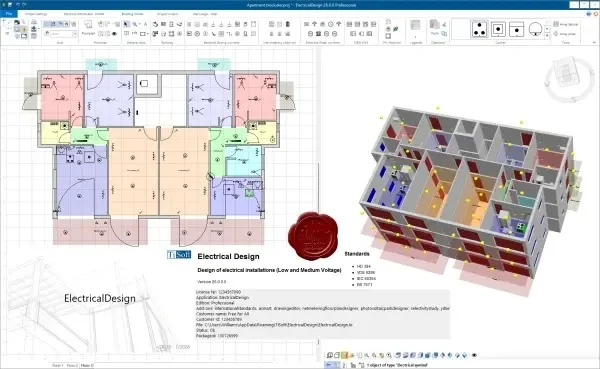
TiSoft Electrical Design v26.0.0.0 is a professional-grade Computer-Aided Design (CAD) software specifically engineered for electrical engineering projects. This tool enables designers, contractors, and engineers to create detailed electrical schematics, panel layouts, wiring diagrams, and bill of materials (BOM) with industrial precision. Unlike generic drawing tools, this software automates compliance with international electrical standards, reducing manual calculation errors and improving project documentation efficiency. The latest version focuses on workflow automation and enhanced interoperability with mechanical CAD platforms.
Key Features
The software includes several core modules that address the entire electrical design lifecycle:
-
Automated Schematic Design: Drag-and-drop component library with over 20,000 pre-validated symbols (IEC/ANSI standards).
-
Real-Time Error Checking: Automatic detection of short circuits, overloaded circuits, and missing wire connections.
-
Intelligent Panel Layouts: Generate 2D and 3D control panel views with automatic component spacing and thermal simulation.
-
Dynamic BOM Generation: Every component added to the schematic instantly updates the bill of materials, including pricing and supplier part numbers.
-
Report Engine: Export detailed wire lists, terminal plans, and cable schedules to Excel or PDF.
-
PLC I/O Integration: Directly import I/O lists from Siemens, Rockwell, and Schneider Electric PLCs to auto-generate wiring diagrams.
Collaboration Tools
Version v26.0.0.0 introduces cloud-based markup tools, allowing teams to leave revision comments directly on specific wires or components without altering the original design.
What’s New in the Latest Version (v26.0.0.0)
Building on the stability of previous releases, this version focuses on performance and integration:
-
Multi-Core PDF Generation: Exporting large project PDFs is now up to 60% faster, especially for projects with over 500 sheets.
-
Native DXF/DWG Import: Directly import floor plans from AutoCAD as underlays without file conversion loss.
-
Harness Design Module: A new dedicated environment for cable harness design, including wire length calculation based on 3D routing paths.
-
Component Cloud Library: Real-time search for manufacturer-specific components (e.g., Eaton, ABB, Phoenix Contact) with direct insertion into the active schematic.
-
Project Comparison Tool: Side-by-side comparison of two project versions, highlighting changes in wire numbering and component tags.
System Requirements
To run TiSoft Electrical Design v26.0.0.0 efficiently, your workstation must meet the following specifications:
Minimum Requirements:
-
OS: Windows 10 Pro (64-bit) or Windows 11
-
CPU: Intel Core i5 (10th gen) or AMD Ryzen 5
-
RAM: 8 GB (16 GB recommended for large projects)
-
GPU: Dedicated GPU with 2GB VRAM (OpenGL 4.5 compatible)
-
Storage: 10 GB free SSD space
-
Display: 1920 x 1080 resolution
Installation Guide
Follow these steps for a standard installation of the licensed software:
-
Download the installer from the official TiSoft customer portal using your active subscription credentials.
-
Temporarily disable real-time antivirus scanning (re-enable after installation).
-
Right-click
TiSoft_Electrical_v26.0.0.0_Setup.exeand select Run as Administrator. -
Accept the End-User License Agreement (EULA).
-
Select “Full Installation” for all modules or “Custom” to omit the harness module.
-
Enter your license key provided via email after purchase. Do not use any third-party key generators; these are unsafe and violate software terms.
-
Wait for the progress bar to complete. A system restart is typically required.
-
After restart, launch the software and activate your license via the online activation wizard.
How to Use the Software
Creating Your First Project
-
Launch the software and click New Project.
-
Define your electrical standards (IEC for Europe; ANSI for North America).
-
Set wire numbering conventions (e.g., “101, 102” or “L1, L2”).
-
Click Create.
Designing a Basic Motor Control Circuit
-
Drag a circuit breaker, contactor, overload relay, and motor from the library onto the schematic sheet.
-
Use the Auto-Connect tool to click between component terminals.
-
Right-click a wire and select Assign Wire Number.
-
Press F7 to run the real-time electrical rules check.
Generating Outputs
Once your schematic is complete: Navigate to Project → Export → Panel Layout to automatically generate the physical backplate drawing with drill hole locations.
Best Use Cases
TiSoft Electrical Design v26.0.0.0 excels in specific professional scenarios:
-
Industrial Control Panels: Designing UL 508A or IEC 61439 compliant panels with automatic short-circuit current ratings (SCCR) calculation.
-
Building Services (HVAC): Creating power and control schematics for air handling units, pumps, and fans.
-
Machine Building (OEMs): Developing reusable macro modules for standard machine sections (e.g., conveyor modules).
-
Cable Harness Manufacturing: Producing formboard drawings with exact cut lengths for automotive or aerospace harnesses.
-
Legacy Drawing Migration: Using the DXF import tool to convert old AutoCAD electrical drawings into intelligent, data-rich projects.
Advantages and Limitations
Advantages
-
High Automation: Reduces repetitive tasks (auto-numbering wires, cross-referencing contacts) by 70% compared to manual drafting.
-
Standard Compliance: Built-in libraries for IEC 60617, IEEE 315, and JIC standards reduce compliance risk.
-
Bi-Directional Updates: Changes in the schematic automatically update the panel layout and BOM.
-
API Access: Advanced users can write Python scripts to automate custom part numbering.
Limitations
-
Learning Curve: Full proficiency requires 2–4 weeks of dedicated training for engineers used to basic CAD.
-
No Native Mac Support: Requires virtualization software (Parallels, VMware) on Apple Silicon Macs.
-
Subscription Model: No perpetual license option; requires annual payment for updates and cloud features.
-
Large Assembly Performance: Projects exceeding 10,000 components may experience lag on minimum-spec hardware.
Alternatives to the Software
If TiSoft Electrical Design does not fit your workflow, consider these verified alternatives:
| Software | Best For | Key Difference | Starting Price (Annual) |
|---|---|---|---|
| EPLAN Electric P8 | Large enterprise & data management | Superior database integration, steeper price | $4,500+ |
| SOLIDWORKS Electrical | Mechanical & electrical co-design | Full bidirectional integration with SOLIDWORKS 3D | $3,995+ |
| AutoCAD Electrical | Engineers familiar with AutoCAD environment | Uses native DWG format; weaker automatic panel layout | $1,975+ |
| SEE Electrical | Small to medium panel builders | Simpler UI, lower cost, fewer automation features | $1,200+ |
| QElectroTech | Open-source hobbyist projects | Free, but no professional support or PLC integration | Free |
Frequently Asked Questions
1. Is TiSoft Electrical Design v26.0.0.0 compatible with Windows Server?
Yes, it is tested on Windows Server 2019 and 2022 for multi-user network licensing environments, but not for standard workstation use.
2. Can I import my existing symbol library from AutoCAD Electrical?
Direct symbol migration is not supported. However, you can export blocks from AutoCAD as DXF and rebuild intelligence in TiSoft using the “Symbol Builder” wizard.
3. Does this software calculate wire sizes based on load and length?
Yes, the built-in Cable Sizing Module performs voltage drop and ampacity calculations per NEC or IEC 60364 standards and suggests the minimum wire gauge.
4. How do I move my license to a new computer?
Open the license manager within the software, click Deactivate, then reinstall on the new computer and activate. You can do this up to 6 times per year.
5. Does v26.0.0.0 include a library for renewable energy components (solar inverters, battery storage)?
Yes, the industrial library was expanded in v26 to include common PV combiner boxes, hybrid inverters from SMA and Fronius, and DC disconnect switches.
6. Can I open projects created in version 24 or 25?
Yes. Upon opening a legacy project, the software will create an automatic backup (.bkp) and then convert the file format to v26. This conversion is one-way (you cannot open v26 files in v24).
7. Is training available directly from TiSoft?
Yes, they offer paid online instructor-led courses ($595 per seat) and an on-demand video library (free with an active maintenance subscription).
Final Thoughts
TiSoft Electrical Design v26.0.0.0 represents a significant leap forward for professional electrical engineers who demand automation without sacrificing control. While the subscription cost and learning curve may deter casual users, the software justifies its price through tangible time savings in error checking, BOM management, and panel layout generation. The new harness design module and DWG import capabilities make this version particularly compelling for OEMs and system integrators. For teams currently using manual drafting or generic CAD, upgrading to a dedicated electrical CAD tool like TiSoft is the most direct path to reducing production errors and improving cross-departmental collaboration. Always ensure you download the software from the official TiSoft portal or authorized resellers to guarantee you receive legitimate, update-supported, malware-free software.
Our Paid Service
“We do not sell or provide any software. We only offer professional support services. If any software on your system is not working properly, or you are facing installation errors, crashes, or any other technical issue — just contact us. We will help you fix the problem quickly and remotely via AnyDesk. No software will be provided from our side — only expert troubleshooting and support.”