
Overview of the Software
Table of Contents
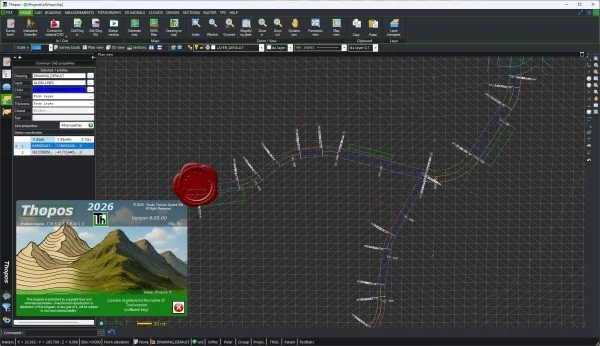
Studio Tecnico Guerra Thopos 2026 v8.05.00 is a comprehensive software suite designed for engineering, architecture, and construction professionals. This latest iteration integrates advanced computer-aided design (CAD) capabilities with robust structural analysis and building information modeling (BIM) features.
Developed by Studio Tecnico Guerra, this tool serves as a primary platform for technical design, project documentation, and regulatory compliance within the Italian and European construction markets. Unlike generic drawing tools, Thopos is tailored for the specific workflows of studi tecnici, offering native support for local construction norms (NTC 2018) and material standards.
Key Features
The software delivers a specialized set of tools that differentiate it from standard CAD platforms:
-
Integrated CAD and BIM Environment: Transition seamlessly between 2D drafting and 3D BIM modeling within a single interface.
-
Structural Calculation Engine: Perform automated structural analysis for reinforced concrete, steel, and wood elements in accordance with NTC 2018 and Eurocode standards.
-
Direct PDF Import and Overlay: Import existing technical drawings in PDF format and use them as a traceable underlay for new designs.
-
Automated Project Documentation: Generate metric computations, material takeoffs, and technical reports with regulatory compliance stamps.
-
Point Cloud and Photogrammetry Support: Import and manage survey data from laser scanners or drones for renovation projects.
-
Customizable Object Libraries: Access and extend object libraries for doors, windows, stairs, structural profiles, and electrical symbols.
What’s New in Studio Tecnico Guerra Thopos 2026 v8.05.00
Version 8.05.00 of the 2026 release focuses on performance, cloud collaboration, and refined BIM interoperability:
-
Improved IFC 4.3 Export/Import: Enhanced data fidelity when exchanging models with Revit, Archicad, and Allplan.
-
Cloud Project Sharing: A new module allowing team members to review, comment, and version-control projects via secure cloud storage.
-
Real-Time Section Analysis: Faster 3D section cuts and real-time stress visualization for structural verification.
-
Updated Material Database: Added new green building materials (CLT, LVL, recycled steel) with full mechanical properties.
-
Native DWG 2026 Support: Direct read/write compatibility with the latest AutoCAD file format.
System Requirements
To run Studio Tecnico Guerra Thopos 2026 v8.05.00 smoothly, your workstation should meet the following specifications:
| Component | Minimum Requirement | Recommended |
|---|---|---|
| OS | Windows 10 Pro (64-bit) | Windows 11 Pro for Workstations |
| CPU | Intel Core i5-11400 / AMD Ryzen 5 5600X | Intel Core i7-13700K / AMD Ryzen 9 7950X |
| RAM | 16 GB | 32 GB or more |
| GPU | 4 GB VRAM (DirectX 12 compatible) | 8 GB VRAM (NVIDIA RTX series) |
| Storage | 50 GB SSD free space | 1 TB NVMe SSD |
| Display | Full HD (1920×1080) | 4K (3840×2160), dual monitors |
| License | Hardware USB dongle or online activation | Online floating license |
Installation Guide
Follow these steps to correctly deploy Thopos 2026 v8.05.00 on your professional workstation:
Pre-installation Checklist
-
Disable antivirus real-time protection temporarily (re-enable after installation).
-
Close all other CAD or analysis tools.
-
Ensure you have administrative rights.
-
Your valid license key (provided at purchase) ready.
Step-by-Step Installation
-
Download the official installer from your Studio Tecnico Guerra customer portal.
-
Right-click the
Thopos_2026_v8.05.00_Setup.exefile and select Run as Administrator. -
Accept the license agreement (read the legal terms carefully).
-
Choose Full Installation (recommended for most users) or Custom to exclude certain modules.
-
Select the destination folder (default:
C:\Program Files\Studio Tecnico Guerra\Thopos 2026). -
Click Install and wait for the process to complete (typically 10–20 minutes).
-
When prompted, connect your USB hardware dongle or enter your online activation code.
-
Click Finish and restart your computer.
How to Use the Software
Mastering the core workflow of Thopos 2026 involves four main phases:
1. Project Initialization
-
Launch the software and go to File > New Project.
-
Input project metadata (client name, site location, regulatory reference).
-
Select the measurement system (metric/imperial) and national annex (e.g., Italy NTC 2018).
2. 2D Drafting and 3D Modeling
-
Use the Draw palette to create walls, slabs, beams, and columns.
-
Toggle between 2D Wireframe and 3D View using the status bar.
-
Apply layers, lineweights, and hatches according to your office standards.
3. Structural Analysis
-
Select the elements to analyze (e.g., a beam or entire frame).
-
Click Analysis > Run Structural Verification.
-
Review safety coefficient reports and graphical stress diagrams.
-
Auto-generate a compliance report for submission to building authorities.
4. Export and Delivery
-
Use File > Export to generate PDF drawings, DWG files, or IFC models.
-
Create a Project Booklet (metric computation + drawings + analysis) in one click.
Best Use Cases
Studio Tecnico Guerra Thopos 2026 v8.05.00 excels in these professional scenarios:
-
✅ Structural retrofitting of historic buildings: Use point cloud import to model existing conditions, then design reinforced concrete or steel reinforcements.
-
✅ Residential and commercial building design: End-to-end workflow from architectural concept to structural verification.
-
✅ Precast concrete element detailing: Generate shop drawings and reinforcement bending schedules.
-
✅ Construction site safety plans (PSC): Produce graphic plans required by Italian Legislative Decree 81/2008.
-
✅ BIM coordination with MEP engineers: Export clean IFC models to clash detection tools.
Advantages and Limitations
Advantages
-
Deep integration with Italian and European technical standards.
-
One-time purchase (perpetual license) available, unlike subscription-only competitors.
-
Native support for metric computation (computo metrico) – a rare feature outside Italy.
-
Responsive local technical support (Italian and English languages).
Limitations
-
Steep learning curve for users without prior CAD or BIM experience (training recommended).
-
Limited third-party plugin ecosystem compared to AutoCAD or Revit.
-
Hardware requirements are higher than average for 2D-only drafting tools.
-
Cloud collaboration features are newer and less mature than Autodesk BIM 360.
Alternatives to Studio Tecnico Guerra Thopos 2026
Depending on your needs, consider these professional alternatives:
| Software | Best For | License Type | Key Difference |
|---|---|---|---|
| Autodesk Revit | Full BIM and multidisciplinary coordination | Subscription only | Industry standard, steep price |
| Nemetschek Allplan | Architectural and structural BIM | Subscription & Perpetual | Stronger for large infrastructure |
| SAP2000 | Advanced structural analysis (FEM) | Subscription & Perpetual | No BIM environment, analysis only |
| Dlubal RFEM | Non-linear structural analysis | Subscription & Perpetual | Highly specialized FEA |
| ArchiCAD | Architect-led BIM | Subscription & Perpetual | Weaker structural analysis |
Frequently Asked Questions
1. What is the primary difference between Thopos and AutoCAD?
Thopos is vertical software for engineering and construction professionals, featuring built-in structural analysis, metric computation, and regulatory compliance. AutoCAD is a general-purpose CAD platform requiring additional plugins for such tasks.
2. Does Studio Tecnico Guerra Thopos 2026 support NTC 2018?
Yes, version 8.05.00 fully implements the Italian NTC 2018 technical standards for construction, including all material coefficients and load combinations.
3. Can I open and edit my existing DWG files from other CAD software?
Absolutely. Thopos 2026 directly reads and writes DWG files up to the 2026 format, preserving layers, blocks, and line types.
4. Is a cloud or offline license available for this software?
Both options exist. You can purchase a perpetual offline license (USB hardware dongle) or a subscription-based online license (floating, team sharing).
5. Which operating systems are compatible with Thopos 2026 v8.05.00?
It runs natively on Windows 10 (64-bit) and Windows 11. It is not tested on macOS or Linux. Parallels or virtual machines may cause performance issues.
6. Does the software include a training mode or tutorial library?
Yes. The default installation includes interactive tutorials (found under Help > Getting Started) and a library of example projects for residential, commercial, and seismic retrofitting.
7. How often does Studio Tecnico Guerra release updates?
Minor updates (e.g., v8.05.01) arrive quarterly for bug fixes. Major annual releases (e.g., Thopos 2027) offer new features and are paid upgrades for perpetual license holders.
8. Can I use Thopos for wood and steel structural design?
Yes. The material library includes glulam, LVL, solid timber, hot-rolled steel sections (IPE, HEA, HEB), and cold-formed steel profiles.
Final Thoughts
Studio Tecnico Guerra Thopos 2026 v8.05.00 stands as a reliable, legally compliant, and technically robust solution for Italian and European engineering firms. While it does not aim to replace general-purpose tools like Revit or AutoCAD for every task, it offers exceptional value for professionals who need an integrated workflow from CAD drafting to structural verification and metric computation.
The new cloud sharing and IFC improvements in version 8.05.00 address previous collaboration weaknesses, making it a stronger competitor in the mid-range BIM market. For sole practitioners and small to medium studi tecnici, the perpetual license option remains a financially sound choice compared to subscription-only alternatives.
Our Paid Service
“We do not sell or provide any software. We only offer professional support services. If any software on your system is not working properly, or you are facing installation errors, crashes, or any other technical issue — just contact us. We will help you fix the problem quickly and remotely via AnyDesk. No software will be provided from our side — only expert troubleshooting and support.”