

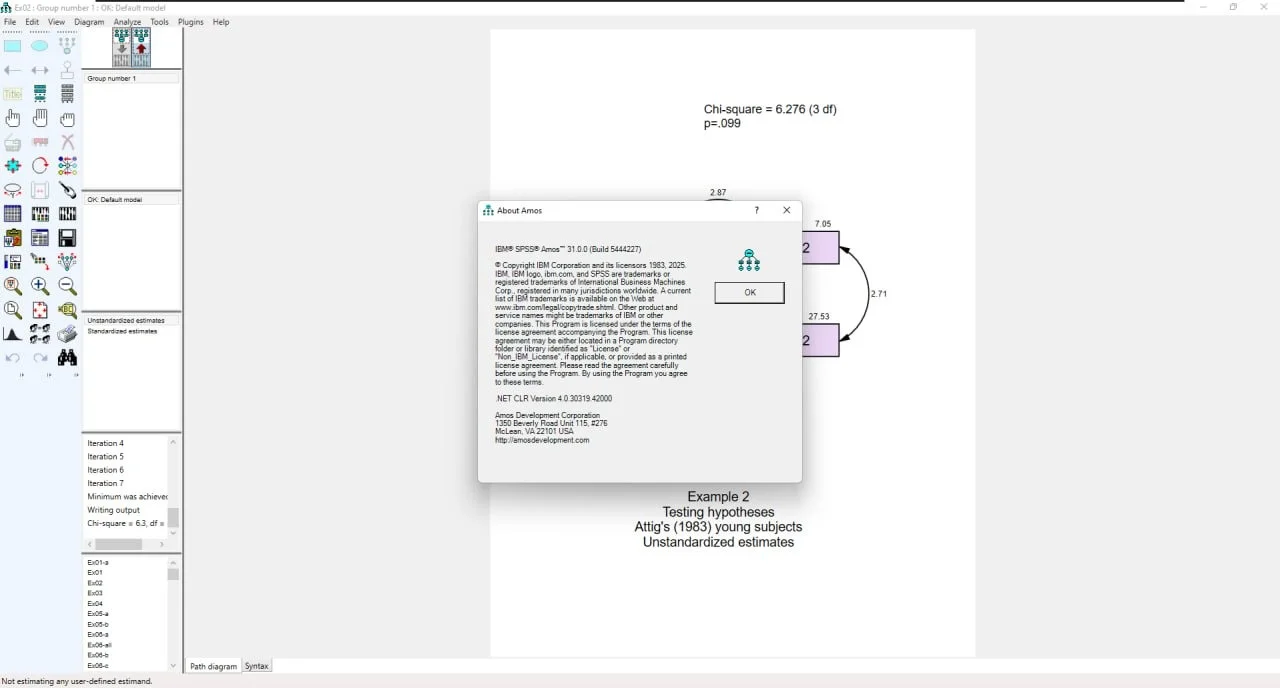
Overview of the Software
Table of Contents
IBM SPSS Amos (Analysis of Moment Structures) is a specialized software for structural equation modeling, path analysis, and confirmatory factor analysis. It is used to specify, estimate, assess, and present models to show hypothesized relationships among variables. Unlike traditional statistical methods that analyze individual relationships one at a time, SEM enables the examination of complex, multivariate relationships between observed and latent variables.
Key aspects of SPSS Amos include:
-
Graphical User Interface: Users can draw path diagrams using simple drag-and-drop drawing tools instead of writing equations or typing commands.
-
Programmatic Interface: For more complex models, non-graphical scripting capabilities allow users to automate analyses and generate similar models that differ slightly.
-
Integration with SPSS: As part of the IBM SPSS ecosystem, Amos seamlessly works with SPSS data files (.sav) and outputs.
-
Academic and Research Focus: The software is widely used in social sciences, psychology, economics, and market research for hypothesis testing and theory validation.
Key Features
SPSS Amos 31 offers a robust set of features designed to simplify SEM and enhance research accuracy.
Structural Equation Modeling (SEM)
The core strength of SPSS Amos is its SEM capabilities. The software allows researchers to create models that realistically reflect complex relationships, enabling any numeric variable—whether observed or latent—to predict any other numeric variable. This flexibility is crucial for developing attitudinal and behavioral models that more accurately represent real-world phenomena than standard multivariate statistics techniques.
Bayesian Analysis
SPSS Amos incorporates Bayesian analysis to improve estimates of model parameters. Users can specify informative prior distributions, and the software uses the underlying Markov chain Monte Carlo (MCMC) computational method, which is fast and can be adjusted automatically. This feature supports estimation with ordered categorical and censored data and allows for creating models based on non-numerical data without assigning numerical scores.
Data Imputation
The software offers various data imputation methods to handle missing data effectively. These include regression imputation for creating a single completed data set, and stochastic regression imputation or Bayesian imputation to create multiple imputed data sets. Users can also impute missing values or latent variable scores directly within the tool, preserving statistical power and reducing bias.
Graphical and Non-Graphical Modeling
SPSS Amos provides two primary approaches for model specification. The graphical interface allows for intuitive model construction by drawing path diagrams. The non-graphical interface, leveraging scripting capabilities, is ideal for running large, complicated models quickly and for generating similar models with slight variations. This dual approach caters to both beginners and advanced users.
Exploration Techniques
Model specification search is available to help researchers choose the best-fitting model from a large number of candidate models. After fitting a model, the SPSS Amos path diagram visually displays the strength of the relationship between variables, aiding in the discovery of unexpected relationships.
What’s New in the Latest Version
SPSS Amos 31 includes several enhancements and updates that improve performance and usability. While IBM provides comprehensive release notes on their official documentation site, version 31 is designed to maintain the core functionality users rely on while ensuring compatibility with current operating systems and hardware.
Based on user feedback and academic requirements, improvements in the latest version focus on:
Better Visualization: Enhanced visual outputs for path diagrams, making it easier to present complex relationships in research papers and presentations.
Increased Computational Speed: The software is optimized for faster analysis, particularly beneficial when working with large datasets or running computationally intensive models like Bayesian estimation.
Improved Support for Large Datasets: Version 31 handles larger datasets more efficiently, addressing a key need for researchers in the social and management sciences who work with extensive survey data.
More Accurate Model Fit Statistics: Minor refinements are included to ensure that model fit statistics are more precise, aligning with the latest methodological recommendations in the field.
System Requirements
Before installing SPSS Amos 31, ensure your system meets the following minimum requirements. These specifications are based on information from official sources and academic institutions:
-
Operating System: Windows (64-bit and 32-bit). Note: SPSS Amos is not natively supported on macOS or Linux.
-
Processor: Intel or AMD x86 processor running at 1 gigahertz (GHz) or higher.
-
RAM: 2 gigabytes (GB) or more. Larger datasets and complex models may benefit from additional memory.
-
Hard Disk Space: 1 gigabyte (GB) of available storage.
-
Monitor: 1024 x 768 resolution or higher.
-
Administrator Privileges: Required for installation.
For the most up-to-date system requirements, IBM recommends visiting their official compatibility report website: https://www.ibm.com/software/reports/compatibility/clarity/softwareReqsForProduct.html[citation:6][citation:8].
Installation Guide
Installing SPSS Amos 31 is a straightforward process, but it requires careful attention to licensing. The following steps are based on official IBM documentation.
Installation from a Downloaded File:
-
Log on to your computer with administrator privileges.
-
Double-click the downloaded file (e.g.,
ISSA0_1.0_MP_ML.exe) and extract all files to a location on your computer. -
Using Windows Explorer, browse to the location where you extracted the files.
-
Right-click
setup.exeand select Run as Administrator. -
Follow the on-screen instructions, including accepting the license agreement and choosing the installation folder (default is recommended).
-
After installation is complete, you will need to activate the product using the license authorization wizard.
Licensing Your Product:
After installing, you must configure your license. The type of license you have determines the activation process. The two most common types are:
-
Concurrent User License: This license type requires connection to a Sentinel RMS License Manager server. During activation, you must enter the server’s computer name or IP address.
-
Authorized User License: This license is associated with a specific user and typically requires an authorization code. It cannot be used on remote desktops or Citrix environments.
If you have a commuter license, you can check out a license for offline use. This is particularly useful for researchers who need to work on their models while traveling. To check out a license, open the software, navigate to File > Manage License, and use the Launch Commuter Utility Tool. Remember to check the license back in when you reconnect to the network to free it up for other users.
How to Use the Software
SPSS Amos is designed to be intuitive, particularly for users familiar with SPSS. However, following a structured workflow is recommended, especially for beginners.
Getting Started Workflow:
-
Prepare Your Data: Ensure your data is properly formatted in SPSS (.sav) format. Amos handles numeric variables effectively, and you should have a clear theoretical model in mind before starting.
-
Launch Amos Graphics: Open IBM SPSS Amos 31 Graphics from the Start Menu.
-
Load Your Dataset: Use the file menu to open your saved SPSS data file (e.g.,
weighted_data.sav). -
Draw Your Model: Use the drawing tools in the graphical interface to create your path diagram. Specify the relationships between your observed and latent variables. This is the visual representation of your hypotheses.
-
Select Analysis Options: Click on the ‘Calculate Estimates’ button to run the analysis. Amos will use your data to estimate the model parameters.
-
Interpret the Output: Amos generates a variety of outputs, including regression weights, model fit indices, and path diagrams showing the strength of relationships between variables.
-
Modify and Refine: Based on the output, you may need to refine your model to achieve a better fit. Amos provides modification indices to suggest improvements.
Understanding the Interface:
The Amos Graphics interface is centered around a canvas where you draw your model. Key components include:
-
Drawing Tools: To add observed variables, latent variables, and paths.
-
Data Management: To import data and select variables for analysis.
-
Analysis Properties: To set estimation methods, choose output options, and handle missing data.
-
Output Viewer: To view results, including model fit statistics, parameter estimates, and modification indices.
Best Use Cases
SPSS Amos is a versatile tool with applications across various fields of research.
-
Social Sciences: Testing theoretical frameworks in psychology, sociology, and political science, such as understanding the factors that influence voting behavior or the relationship between personality traits and life satisfaction.
-
Market Research: Developing customer satisfaction models, analyzing brand perception, and identifying key drivers of consumer loyalty.
-
Healthcare Research: Analyzing the effectiveness of treatments, understanding the pathways of disease transmission, or modeling patient outcomes based on multiple risk factors.
-
Education: Evaluating the impact of teaching methods on student performance, studying the relationship between socioeconomic status and academic achievement, or analyzing factors that contribute to student retention.
-
Organizational Behavior: Studying the influence of leadership styles on employee performance, as demonstrated in research comparing SEM software for analyzing workplace dynamics.
Advantages and Limitations
Understanding the strengths and weaknesses of SPSS Amos helps researchers make informed decisions about its suitability for their projects.
Advantages
-
User-Friendly Graphical Interface: The intuitive drag-and-drop interface makes SEM accessible to users with limited programming experience.
-
Strong Integration with SPSS: Seamless compatibility with SPSS data files and outputs streamlines the workflow for SPSS users.
-
Advanced Statistical Features: Powerful capabilities for Bayesian analysis, data imputation, and model specification search meet the needs of advanced researchers.
-
Citable and Well-Established: As an IBM product, SPSS Amos is a reputable and widely accepted tool in the academic community.
Limitations
-
Windows Only: The software is exclusively available for Windows operating systems, excluding macOS and Linux users.
-
Cost: A commercial license for SPSS Amos can be expensive, particularly for individual researchers. Academic discounts are often available.
-
Case Weight Support: Amos does not currently support using case weights directly. Researchers must apply weights to the data in SPSS before analyzing it in Amos.
-
Learning Curve: While the interface is user-friendly, SEM is a complex methodology. Users need a strong theoretical background in statistics to build and interpret models appropriately.
Alternatives to the Software
Depending on your budget, operating system, and methodological preferences, several alternatives to SPSS Amos are available.
-
Lavaan (R Package): A free, open-source package for SEM in R. It is powerful, flexible, and supports features like sample weighting, which Amos does not natively handle. However, it requires programming knowledge in R.
-
SmartPLS: A popular software for Partial Least Squares SEM (PLS-SEM). It is user-friendly and suitable for exploratory research and studies with small sample sizes. Research shows that results from Amos and SmartPLS often do not differ significantly.
-
Lisrel: One of the oldest and most comprehensive SEM software packages. It offers both graphical and programmatic interfaces but has a steeper learning curve than Amos.
-
Mplus: A highly flexible and powerful program for latent variable modeling. It is widely used in social science research and supports advanced models, but it requires programming knowledge.
Frequently Asked Questions
1. What is SPSS Amos used for?
SPSS Amos is primarily used for structural equation modeling (SEM), which allows researchers to analyze complex relationships between observed and latent variables in disciplines such as social sciences, psychology, and market research.
2. Is SPSS Amos available for Mac?
No, SPSS Amos is only compatible with the Windows operating system. Mac users would need to run a Windows emulator to use the software.
3. What’s the difference between SPSS and SPSS Amos?
SPSS is a comprehensive statistical software for analyzing data, performing tasks like regression, t-tests, and ANOVA. SPSS Amos is a specialized tool for structural equation modeling, designed to test complex theoretical models with latent variables.
4. Is SPSS Amos easy to learn?
Amos Graphics offers a visual, drag-and-drop interface that simplifies the model-building process. However, understanding SEM concepts requires a solid statistical background.
5. Can SPSS Amos handle missing data?
Yes, SPSS Amos offers various data imputation methods, including regression imputation and Bayesian imputation, to handle missing data effectively.
6. Does SPSS Amos support sample weighting?
No, SPSS Amos does not directly support sample weighting. Researchers need to apply weights to their data in SPSS before analyzing it in Amos.
7. How do I cite SPSS Amos in my research?
The correct format for citing SPSS Amos is available on the official Amos Development support website. Typically, you should cite it as “IBM SPSS Amos” and include the version number.
8. What are the system requirements for SPSS Amos 31?
The minimum requirements include a 1 GHz Intel or AMD processor, 2 GB of RAM, 1 GB of free hard disk space, and Windows OS.
Final Thoughts
IBM SPSS Amos 31 is a robust and effective software for researchers needing to perform structural equation modeling. Its strength lies in its user-friendly graphical interface, deep integration with SPSS, and advanced statistical features that support complex research questions. While it is limited to Windows and can be costly, its advantages in the social and management sciences are significant. Researchers using Amos 31 can confidently build, test, and refine their models, contributing to more reliable and valid research outcomes.